1. పరిచయం
This manual provides detailed instructions for the setup, operation, and maintenance of your iGPSPORT BSC200S Cycle Computer. Please read this manual thoroughly before using the device to ensure optimal performance and safety.
2. ప్యాకేజీ విషయాలు
క్రింద జాబితా చేయబడిన అన్ని వస్తువులు మీ ప్యాకేజీలో చేర్చబడ్డాయని ధృవీకరించండి:
- iGPSPORT BSC200S Bike Computer x 1
- CAD70 Cadence Sensor x 1
- SPD70 Speed Sensor x 1
- Bike Computer Mount x 1
- రక్షణ కేసు x 1
- టైప్-సి ఛార్జింగ్ కేబుల్ x 1
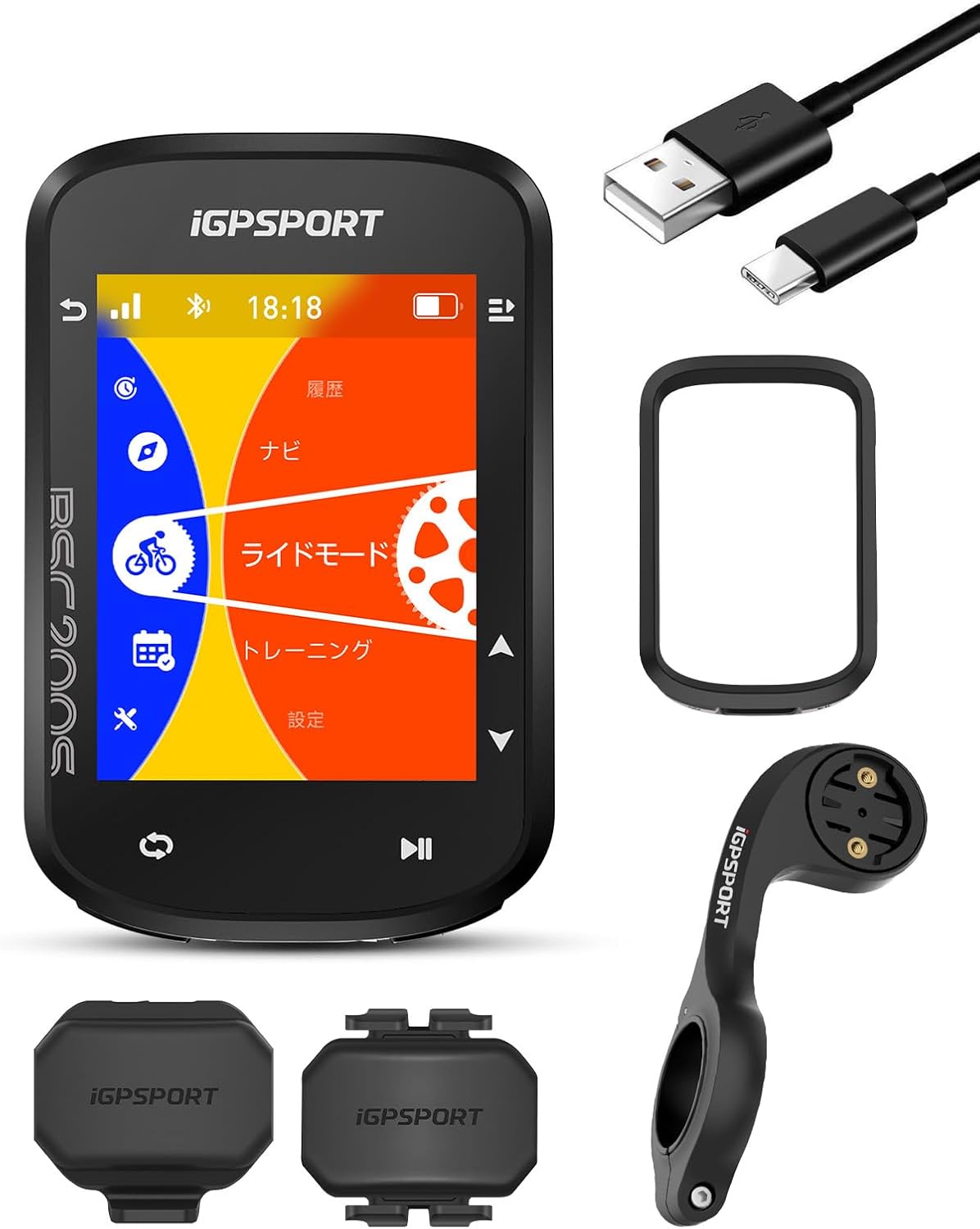
3. ఉత్పత్తి ముగిసిందిview
The iGPSPORT BSC200S is an advanced cycle computer designed to enhance your cycling experience with precise data tracking, navigation, and smart features.
3.1 ముఖ్య లక్షణాలు
- Full GNSS Support: Compatible with GPS, BEIDOU, GLONASS, GALILEO, and QZSS for enhanced positioning accuracy.
- 2.4-inch Transflective Color Display: Offers clear visibility in various lighting conditions and is energy efficient.
- Route Navigation: Easy route creation and transfer via the iGPSPORT app, with support for .gpx files and third-party platforms like Strava, TrainingPeaks, and Komoot. Includes turn-by-turn instructions and off-course warnings.
- Ride Continuation: Allows pausing and resuming rides without data loss, ideal for multi-day trips.
- స్మార్ట్ మోషన్ డిటెక్షన్: Automatically detects the start of a ride and prompts data recording.
- One-Click Navigation: Quickly navigate to pre-saved destinations via the app.
- కనెక్టివిటీ: Supports Bluetooth 5.0 and ANT+ for connecting to various sensors and smart devices.
- నీటి నిరోధకత: IPX7 rated for protection against water immersion.


4. సెటప్
4.1 పరికర సంస్థాపన
Follow these steps to install the cycle computer mount on your bicycle:
- Align the two fixed bases of the mount.
- Place the aligned base on your bicycle's handlebar.
- Secure the base using the two rubber bands.
- మౌంట్ యొక్క కోణాన్ని సరైనదిగా సర్దుబాటు చేయండి viewing.
- Attach the iGPSPORT BSC200S computer to the base by twisting it into place.
- Ensure the computer is securely attached.

4.2 Sensor Installation (CAD70 Cadence Sensor & SPD70 Speed Sensor)
The CAD70 cadence sensor and SPD70 speed sensor are designed for easy installation and compatibility with various devices.


Refer to the individual sensor manuals for specific installation instructions on your bicycle's crank arm (cadence) and wheel hub (speed).
5. ఆపరేటింగ్ సూచనలు
5.1 ప్రాథమిక ఆపరేషన్
The BSC200S features intuitive controls for easy navigation through its menus and functions.
5.2 నావిగేషన్ ఫీచర్లు
The BSC200S offers robust navigation capabilities:
- Route Creation and Transfer: Connect to the iGPSPORT app to easily create routes or import .gpx files. Routes from Strava, TrainingPeaks, and Komoot are also supported.
- Turn-by-Turn Guidance: Receive clear instructions, road names, and remaining distance during your ride.
- Off-Course Warning: The device will alert you if you deviate from your planned route.
- Customizable Route Colors: Personalize the appearance of your routes and tracks for better visibility.
- One-Click Navigation: Save frequently visited locations in the app and initiate navigation with a single tap.


5.3 Data Display and Recording
- Multiple Data Points: The large screen displays over 100 types of cycling data simultaneously, including speed, distance, time, cadence, heart rate, power, and more.
- స్మార్ట్ మోషన్ డిటెక్షన్: The device automatically detects when you start riding and prompts you to begin recording, ensuring no data is missed.
- Ride Continuation: You can pause and resume your ride recording at any time, even across multiple days, without losing data.
- History Display: Review your cycling history with upgraded display, showing date, time, and distance for each ride.


5.4 స్మార్ట్ ఫీచర్లు
- Intelligent Notifications: Receive call, message, and social media notifications directly on your device during a ride.
- Sunset/Sunrise Reminders: Plan your cycling trips effectively with automatic reminders based on daylight hours.


6 కనెక్టివిటీ
6.1 సెన్సార్ జత చేయడం
The BSC200S supports both Bluetooth 5.0 and ANT+ for connecting to a wide range of external sensors, including speed, cadence, heart rate monitors, and power meters.
6.2 iGPSPORT App Synchronization
The iGPSPORT official app allows you to:
- Analyze cycling data intelligently.
- Share cycling activities and route books with other users.
- Update sports rankings in real-time.
- Sync data with third-party platforms like Strava, TrainingPeaks, and Komoot.
- Integrate with Insta360 for riding data and video linkage.


6.3 Smart Device Integration
The BSC200S can integrate with various smart cycling devices:
- Smart Lights: Control and monitor battery life of iGPSPORT smart lights.
- Radar Bike Lights: Real-time monitoring of surrounding vehicles for enhanced safety.
- Smart Trainers: Connect to cycling platforms for advanced training modes and customized courses.


7. నిర్వహణ
- శుభ్రపరచడం: పరికరాన్ని మృదువైన, డితో తుడవండిamp వస్త్రం. కఠినమైన రసాయనాలు లేదా రాపిడి క్లీనర్లను నివారించండి.
- ఛార్జింగ్: Use the provided Type-C charging cable. Ensure the charging port is dry before connecting.
- నిల్వ: పరికరాన్ని ప్రత్యక్ష సూర్యకాంతి మరియు తీవ్రమైన ఉష్ణోగ్రతలు లేకుండా చల్లని, పొడి ప్రదేశంలో నిల్వ చేయండి.
- ఫర్మ్వేర్ నవీకరణలు: Regularly check for firmware updates via the iGPSPORT app or webఉత్తమ పనితీరును మరియు కొత్త ఫీచర్లకు ప్రాప్యతను నిర్ధారించడానికి సైట్.
8. ట్రబుల్షూటింగ్
If you encounter issues with your BSC200S, try the following:
- పరికరం ఆన్ చేయడం లేదు: పరికరం పూర్తిగా ఛార్జ్ అయ్యిందని నిర్ధారించుకోండి. కనీసం 30 నిమిషాలు దానిని ఛార్జర్కు కనెక్ట్ చేయండి.
- GPS సిగ్నల్ సమస్యలు: మీరు స్పష్టమైన వాతావరణం ఉన్న బహిరంగ ప్రదేశంలో ఉన్నారని నిర్ధారించుకోండి view of the sky. Allow the device a few minutes to acquire a signal.
- సెన్సార్ జత చేయడం లేదు: Check that the sensor's battery is not depleted. Ensure the sensor is within range and not paired with another device. Restart both the BSC200S and the sensor.
- Data synchronization problems: Ensure your phone has an active internet connection and the iGPSPORT app is up to date. Restart the app and the BSC200S.
- స్క్రీన్ స్పందించడం లేదు: Perform a soft reset by holding down the power button for 10-15 seconds.
For further assistance, please refer to the official iGPSPORT support resources.
9. స్పెసిఫికేషన్లు
9.1 iGPSPORT BSC200S Cycle Computer
- మోడల్: BSC200S
- మెటీరియల్: ప్లాస్టిక్
- కొలతలు: 8.2 x 5.3 x 1.45 సెం.మీ
- బరువు: 230 గ్రా
- స్క్రీన్ పరిమాణం: 2.4 అంగుళాలు
- నీటి నిరోధకత: IPX7
- కనెక్టివిటీ: బ్లూటూత్ 5.0, ANT+
- GNSS: GPS, BEIDOU, GLONASS, GALILEO, QZSS
9.2 CAD70 Cadence Sensor
- మోడల్: CAD70
- బరువు: 7.8గ్రా
- బ్యాటరీ రకం: CR2025
- బ్యాటరీ లైఫ్: 300 గంటలు
- కమ్యూనికేషన్: Bluetooth 5.0, ANT
- నీటి నిరోధకత: IPX7
9.3 SPD70 Speed Sensor
- మోడల్: SPD70
- బరువు: 7.8గ్రా
- బ్యాటరీ రకం: CR2025
- బ్యాటరీ లైఫ్: 300 గంటలు
- కమ్యూనికేషన్: Bluetooth 5.0, ANT
- నీటి నిరోధకత: IPX7
10. వారంటీ మరియు మద్దతు
For warranty information and customer support, please visit the official iGPSPORT webసైట్లో లేదా వారి కస్టమర్ సర్వీస్ను నేరుగా సంప్రదించండి. వారంటీ క్లెయిమ్ల కోసం కొనుగోలు రుజువుగా మీ కొనుగోలు రసీదును ఉంచండి.
iGPSPORT Official Webసైట్: www.igpsport.com


