పరిచయం
This manual provides detailed instructions for the setup, operation, and maintenance of your AINOTE Air 2 AI Note-Taking Tablet. Please read this manual thoroughly to ensure proper use and to maximize the device's capabilities.

Figure 1: AINOTE Air 2 AI Note-Taking Tablet with its accompanying stylus pen.
1. సెటప్
1.1 పెట్టెలో ఏముంది
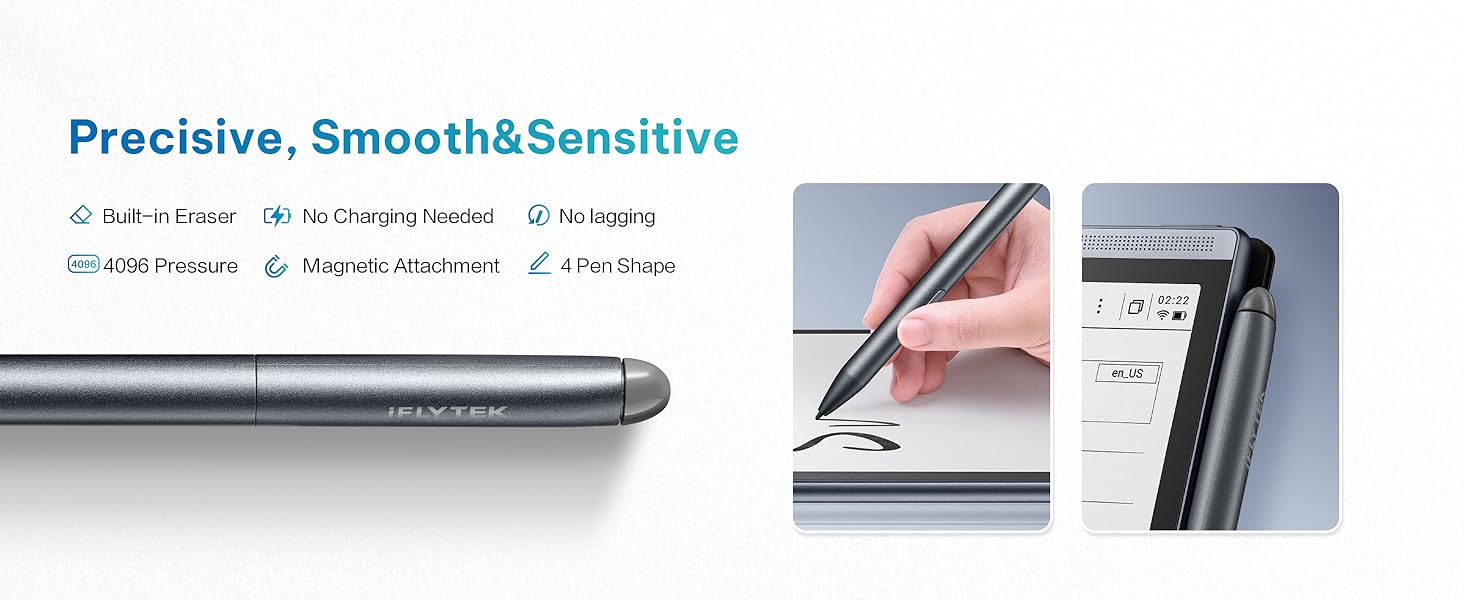
Figure 2: Contents of the AINOTE Air 2 package.
Your AINOTE Air 2 package should contain the following items:
- AINOTE Air 2 Note Taking Tablet (8.2-inch)
- స్టైలస్ పెన్
- ఛార్జింగ్ కేబుల్ (USB-C)
- వినియోగదారు మాన్యువల్ (ఈ పత్రం)
- ప్యాకేజీ బాక్స్
1.2 ప్రారంభ ఛార్జింగ్
Before first use, fully charge your AINOTE Air 2 tablet. Connect the provided USB-C charging cable to the tablet's charging port and plug the other end into a compatible USB power adapter (not included). The battery indicator on the screen will show charging progress. A full charge typically provides continuous performance for an extended period.
1.3 పవర్ చేయడం ఆన్/ఆఫ్
- పవర్ ఆన్ చేయడానికి: స్క్రీన్ వెలిగే వరకు పరికరం పక్కన ఉన్న పవర్ బటన్ను నొక్కి పట్టుకోండి.
- పవర్ ఆఫ్ చేయడానికి: Press and hold the power button until a power-off menu appears on the screen. Select 'Power Off' to shut down the device.
1.4 Stylus Pen Setup
The AINOTE Air 2 comes with a Wacom pen that requires no charging. It attaches magnetically to the side of the tablet for convenient storage and access. The pen features a built-in eraser and supports four different pen styles for varied writing experiences.

Figure 3: The Wacom stylus pen, designed for natural writing and magnetic attachment.
1.5 ప్రారంభ కాన్ఫిగరేషన్
Upon first power-on, follow the on-screen prompts to configure basic settings such as language, Wi-Fi connection, and account synchronization. The device supports secure cloud sync with OneDrive and integrates with Google Play for app access.
2. Operating the AINOTE Air 2
2.1 సాధారణ నావిగేషన్
The AINOTE Air 2 features an intuitive E-Ink touchscreen display. Navigate through menus and applications by tapping, swiping, and using the stylus for precise input. The interface is designed for ease of use, allowing quick access to notes and other functions.
2.2 Note-Taking Features
The AINOTE Air 2 excels in note-taking, offering a paper-like writing experience and advanced AI capabilities.
- Handwritten Notes to Text: Effortlessly convert handwritten notes to text in 83 languages. This feature allows for easy keyword searchability and secure cloud synchronization of your notes.
- Wacom Pen: Enjoy a seamless, natural writing experience. The pen includes a built-in eraser and supports four distinct pen styles. No charging is required for the stylus.
- AI-Powered Recording & Transcription: Record and transcribe in real-time across 15 languages (EN/ES/CN/FR/SA/VN/KR/RU/DE/JP/HK/TH/ID/MY/HU). The device features ChatGPT-powered instant playback and summaries. You can record up to 280 minutes per session, ideal for meetings and lectures.
- షెడ్యూల్ నిర్వహణ: Organize meetings, to-dos, and weekly reports in one centralized location, enhancing productivity.

Figure 4: The Schedule Assistant helps organize tasks and notes.
2.3 పఠన అనుభవం
The AINOTE Air 2 provides an immersive and eye-friendly reading experience.
- E-Ink Display: The 8.2-inch E-Ink screen features a dual-color reading light with 24 adjustable brightness levels, offering a strain-free viewing experience suitable for various lighting conditions.
- Audiobook Narration: Enjoy human-like audiobook narration in four languages without the need to download separate voice packages.
- Document Support: Import and annotate books across various formats, including PDF, EPUB, and TXT.

Figure 5: Reading on the AINOTE Air 2 offers a comfortable, paper-like experience.
2.4 AI Features and Connectivity
Leverage the advanced AI features to enhance your productivity and creativity.
- ChatGPT Compatibility: The device is powered by advanced AI features like ChatGPT compatibility, providing smart suggestions and instant information retrieval.
- AI Search & Highlight: Quickly find information within your notes and documents.
- AI-generated Summaries: Generate concise summaries of your recorded meetings or notes with a single tap.
- క్లౌడ్ సమకాలీకరణ: Features secure cloud sync with OneDrive and integration with Google Play, enabling access across multiple devices and safe storage of historical notes.

Figure 6: AI integration and app support on the AINOTE Air 2.
2.5 అధికారిక ఉత్పత్తి వీడియో
For a visual guide on the key features and benefits of the AINOTE Air 2, please watch the official product video below.
Video 1: Why Choose iFLYTEK AINOTE Air 2. This video provides an overview of the tablet's main functionalities and advantages.
3. నిర్వహణ
3.1 మీ పరికరాన్ని శుభ్రపరచడం
To maintain the longevity and appearance of your AINOTE Air 2, follow these cleaning guidelines:
- పరికరం యొక్క స్క్రీన్ మరియు బాడీని సున్నితంగా తుడవడానికి మృదువైన, మెత్తటి బట్టను ఉపయోగించండి.
- మొండి మచ్చల కోసం, కొద్దిగా dampకఠినమైన రసాయనాలు, రాపిడి క్లీనర్లు లేదా ఏరోసోల్ స్ప్రేలను ఉపయోగించకుండా ఉండండి.
- శుభ్రపరిచే ముందు పరికరం ఆఫ్ చేయబడిందని మరియు అన్ప్లగ్ చేయబడిందని నిర్ధారించుకోండి.
3.2 బ్యాటరీ సంరక్షణ
The AINOTE Air 2 is powered by a 2600mAh battery designed for continuous performance. To optimize battery life:
- పరికరాన్ని తీవ్రమైన ఉష్ణోగ్రతలకు బహిర్గతం చేయకుండా ఉండండి.
- పరికరాన్ని క్రమం తప్పకుండా ఛార్జ్ చేయండి, కానీ ఎక్కువసేపు పూర్తిగా డిశ్చార్జ్ చేయకుండా ఉండండి.
- పరికరాన్ని ఎక్కువసేపు నిల్వ చేస్తే, నిల్వ చేయడానికి ముందు దానిని 50% వరకు ఛార్జ్ చేయండి.
3.3 నిల్వ
The device comes with 32GB of internal storage and offers unlimited cloud backup for your notes. Regularly synchronize your notes to the cloud to ensure your work is safely stored and accessible across multiple devices.
3.4 సాఫ్ట్వేర్ నవీకరణలు
Periodically check for software updates to ensure your device has the latest features and performance improvements. Updates can typically be found in the device's settings menu under 'System Update' or similar. Ensure a stable Wi-Fi connection and sufficient battery charge before initiating an update.
4. ట్రబుల్షూటింగ్
This section addresses common issues you might encounter with your AINOTE Air 2.
4.1 సాధారణ సమస్యలు మరియు పరిష్కారాలు
- పరికరం ఆన్ చేయడం లేదు: పరికరం పూర్తిగా ఛార్జ్ అయ్యిందని నిర్ధారించుకోండి. బ్యాటరీ పూర్తిగా ఖాళీ అయిపోతే, అది పవర్ ఆన్ కావడానికి ముందు ఛార్జ్ కావడానికి కొన్ని నిమిషాలు పట్టవచ్చు.
- స్టైలస్ స్పందించడం లేదు: The Wacom pen does not require charging. Ensure the pen tip is clean and free from debris. If the issue persists, try restarting the tablet.
- Wi-Fi కనెక్టివిటీ సమస్యలు: Check your Wi-Fi router and ensure it is functioning correctly. Try forgetting the network on your tablet and reconnecting.
- Slow AI Features/Performance: Ensure your device has a stable internet connection for optimal AI performance. Close any unnecessary background applications.
- Handwritten Text Conversion Inaccuracy: Ensure your handwriting is clear and legible. The device supports 83 languages for conversion; verify the correct language setting is selected.
4.2 ఫ్యాక్టరీ రీసెట్
మీరు నిరంతర సమస్యలను ఎదుర్కొంటుంటే, ఫ్యాక్టరీ రీసెట్ వాటిని పరిష్కరించవచ్చు. హెచ్చరిక: A factory reset will erase all data on your device. Ensure you have backed up all important notes and files to the cloud before proceeding. Consult the device's settings menu for the factory reset option.
5. స్పెసిఫికేషన్లు
Below are the technical specifications for the AINOTE Air 2 AI Note-Taking Tablet:
| ఫీచర్ | స్పెసిఫికేషన్ |
|---|---|
| స్టాండింగ్ స్క్రీన్ డిస్ప్లే సైజు | 8.2 అంగుళాలు |
| స్క్రీన్ రిజల్యూషన్ | 1920 x 1440 pixels (293 PPI) |
| ప్రాసెసర్ | 1.8 GHz ARM |
| ఆపరేటింగ్ సిస్టమ్ | ఆండ్రాయిడ్ |
| వస్తువు బరువు | 8 ఔన్సులు |
| ఉత్పత్తి కొలతలు | 7 x 0.1 x 5 అంగుళాలు |
| రంగు | బూడిద రంగు |
| ఫ్లాష్ మెమరీ పరిమాణం | 32 GB |
| బ్యాటరీ | 2600mAh (1 AA battery included, likely referring to internal battery) |
| వైర్లెస్ రకం | 802.11ac |
| కనెక్టివిటీ టెక్నాలజీ | USB |
| ప్రత్యేక ఫీచర్ | పోర్టబుల్ |
6. వారంటీ మరియు మద్దతు
6.1 ఉత్పత్తి వారంటీ
The manufacturer provides warranty support for the AINOTE Air 2. For specific details regarding warranty coverage, duration, and terms, please refer to the warranty card included in your product packaging or visit the official iflytek webసైట్.
6.2 కస్టమర్ మద్దతు
For technical assistance, troubleshooting beyond this manual, or inquiries about your device, please contact iflytek customer support through their official channels. You may find contact information on the product packaging, the official iflytek webసైట్, లేదా మీ కొనుగోలు స్థానం ద్వారా.
6.3 ఆన్లైన్ వనరులు
Additional resources, including FAQs, updated manuals, and software downloads, may be available on the official iflytek support website. Regularly checking these resources can provide solutions to new issues or offer further guidance on using your device.


