1. ముఖ్యమైన భద్రతా సమాచారం
Please read this manual carefully before using the AIRROBO P25 Robot Vacuum Cleaner and retain it for future reference. Adhere to all safety warnings and instructions to prevent injury or damage.
- ఈ ఉపకరణాన్ని 8 సంవత్సరాలు మరియు అంతకంటే ఎక్కువ వయస్సు ఉన్న పిల్లలు మరియు తక్కువ శారీరక, ఇంద్రియ లేదా మానసిక సామర్థ్యాలు లేదా అనుభవం మరియు జ్ఞానం లేని వ్యక్తులు సురక్షితమైన మార్గంలో ఉపకరణాన్ని ఉపయోగించడం గురించి పర్యవేక్షణ లేదా సూచనలను అందించినట్లయితే మరియు ప్రమాదాలను అర్థం చేసుకుంటే వాటిని ఉపయోగించవచ్చు. .
- పిల్లలు ఉపకరణంతో ఆడకూడదు. పర్యవేక్షణ లేకుండా పిల్లలచే శుభ్రపరచడం మరియు వినియోగదారు నిర్వహణ చేయరాదు.
- Ensure the charging base is placed against a wall on a level surface and is connected to a power outlet.
- తడి వాతావరణంలో లేదా నీటి దగ్గర రోబోట్ వాక్యూమ్ను ఉపయోగించవద్దు.
- జుట్టు, వదులుగా ఉండే దుస్తులు, వేళ్లు మరియు శరీరంలోని అన్ని భాగాలను ఓపెనింగ్స్ మరియు కదిలే భాగాలకు దూరంగా ఉంచండి.
- సిగరెట్లు, అగ్గిపుల్లలు లేదా వేడి బూడిద వంటి కాలుతున్న లేదా ధూమపానం చేసే ఏదైనా తీసుకోవద్దు.
- డస్ట్ బిన్ మరియు/లేదా ఫిల్టర్లు లేకుండా ఉపయోగించవద్దు.
- Only use the charging adapter provided by the manufacturer.
2. ప్యాకేజీ విషయాలు
ప్యాకేజీని తెరిచినప్పుడు అన్ని వస్తువులు ఉన్నాయని మరియు మంచి స్థితిలో ఉన్నాయని ధృవీకరించండి:
- AIRROBO P25 రోబోట్ వాక్యూమ్
- ఛార్జింగ్ బేస్
- ఎసి పవర్ అడాప్టర్
- రిమోట్ కంట్రోల్
- 4 సైడ్ బ్రష్లు
- Hepa Filter (pre-installed)
- శుభ్రపరిచే సాధనం
- వినియోగదారు గైడ్
- సర్వీస్ కార్డ్
- ప్రధాన బ్రష్ (ముందే ఇన్స్టాల్ చేయబడింది)

Image: All components included in the AIRROBO P25 Robot Vacuum package.
3. ఉత్పత్తి ముగిసిందిview
3.1 భాగాలు
The AIRROBO P25 Robot Vacuum consists of the following main components:
- Main Unit (Robot Vacuum)
- Dustbin with HEPA Filter
- సైడ్ బ్రష్లు
- ప్రధాన బ్రష్
- కాంటాక్ట్లను ఛార్జ్ చేస్తోంది
- Infrared Sensors (Anti-collision, Anti-fall)
- పవర్ బటన్
- Home Button (Return to Charging Base)
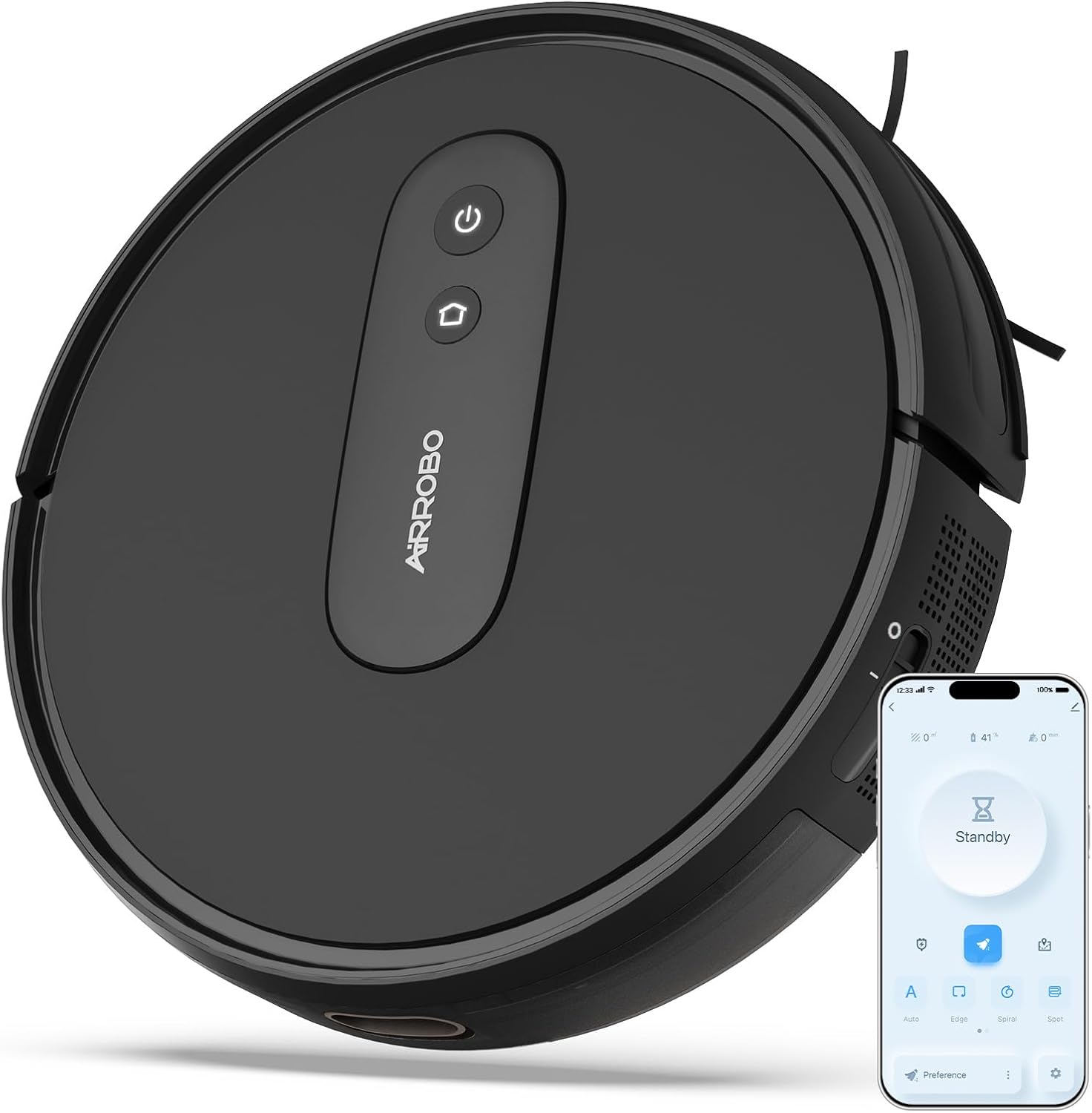
Image: The AIRROBO P25 Robot Vacuum with its primary controls visible.
3.2 ముఖ్య లక్షణాలు
The AIRROBO P25 is designed with advanced features for efficient cleaning:
- శక్తివంతమైన 2800Pa సక్షన్: Effectively cleans dust, dirt, and pet hair from various floor types, including low-pile carpets and hard floors.
- Slim 3-inch Design: Allows the vacuum to easily navigate under furniture like sofas, beds, and cabinets, reaching hidden dirt.
- Smart Gyroscope Navigation: Utilizes precision gyroscope navigation and infrared sensors to clean in systematic rows, avoiding obstacles and preventing falls.
- 600ML Large Dustbin: A generous dustbin capacity reduces the frequency of emptying, especially beneficial for pet owners.
- Smart APP Control & Voice Control: Manage cleaning schedules, modes, and monitor status via a dedicated smartphone application. Compatible with Amazon Alexa and Google Assistant for voice commands.
- స్వయంచాలక రీఛార్జ్: The robot automatically returns to its charging base when the battery is low or after completing a cleaning cycle.
- బహుళ క్లీనింగ్ మోడ్లు: Offers various cleaning modes including Auto Clean, Spot Clean, Edge Clean, and Spiral Clean to suit different cleaning needs.

చిత్రం: రోబోట్ వాక్యూమ్ షోక్asing its powerful 2800Pa suction capability.

Image: The slim design of the robot vacuum allows it to clean under low furniture.

Image: Illustration of the robot's efficient gyroscope navigation system.
4. సెటప్
4.1 రోబోట్ను ఛార్జ్ చేయడం
Before first use, fully charge the robot vacuum. Place the charging base against a wall in an open area, ensuring there are no obstacles within 1 meter (3 feet) to the sides and 2 meters (6 feet) in front. Connect the power adapter to the charging base and plug it into a wall outlet. Place the robot onto the charging base, ensuring the charging contacts align. The indicator light on the robot will show charging status.

Image: The robot vacuum automatically docking with its charging base.
4.2 AIRROBO యాప్కి కనెక్ట్ అవుతోంది
For enhanced control and scheduling, connect your AIRROBO P25 to the official AIRROBO app:
- Connect your smartphone to a 2.4GHz Wi-Fi network and ensure Bluetooth is enabled.
- Turn on the AIRROBO P25 robot vacuum.
- Download the 'AIRROBO' app from your smartphone's app store.
- Create an account and log in to the AIRROBO app.
- Click 'Add device' within the app and select the P25 robot vacuum from the list.
- కనెక్షన్ను పూర్తి చేయడానికి స్క్రీన్పై కనిపించే ప్రాంప్ట్లను అనుసరించండి.

Image: Step-by-step guide for connecting the robot vacuum to the AIRROBO mobile application.
5. రోబోట్ వాక్యూమ్ను నిర్వహించడం
5.1 క్లీనింగ్ మోడ్లు
The AIRROBO P25 offers several cleaning modes to address different cleaning needs:
- ఆటో క్లీన్: The robot cleans systematically in a zig-zag pattern, covering the entire floor area.
- స్పాట్ క్లీన్: The robot cleans a concentrated area in a spiral pattern, ideal for localized spills or dirt.
- ఎడ్జ్ క్లీన్: The robot cleans along walls and furniture edges to ensure thorough cleaning of corners and perimeters.
- Spiral Clean: Similar to Spot Clean, but can be initiated for a larger area.

చిత్రం: నాలుగు విభిన్న శుభ్రపరిచే విధానాల దృశ్యమాన ప్రాతినిధ్యం.

Image: Different cleaning paths the robot can follow based on selected mode.
5.2 షెడ్యూల్ క్లీనింగ్
Use the AIRROBO app to set up scheduled cleaning times. This allows the robot to automatically start cleaning at your preferred times, even when you are not home.
- Open the AIRROBO app.
- Navigate to the scheduling section.
- కావలసిన శుభ్రపరిచే సమయాలు మరియు రోజులను సెట్ చేయండి.
- షెడ్యూల్ను నిర్ధారించండి.

Image: Setting a timed cleaning task via the mobile app.
5.3 వాయిస్ నియంత్రణ
The AIRROBO P25 is compatible with Amazon Alexa and Google Assistant. Once connected to your smart home system, you can control the robot with voice commands.
- Ensure your robot is connected to the AIRROBO app and your smart home assistant (Alexa/Google Assistant) is linked to your AIRROBO account.
- Use commands such as "Alexa, turn on the P25" or "Hey Google, start cleaning with P25."

Image: Controlling the robot vacuum using smart app and voice commands.
6. నిర్వహణ
క్రమం తప్పకుండా నిర్వహణ సరైన పనితీరును నిర్ధారిస్తుంది మరియు మీ రోబోట్ వాక్యూమ్ యొక్క జీవితకాలాన్ని పొడిగిస్తుంది.
6.1 చెత్తబుట్టను ఖాళీ చేయడం
The 600ML dustbin should be emptied after each cleaning cycle or when full.
- రోబోట్ నుండి డస్ట్బిన్ను తీసివేయడానికి డస్ట్బిన్ విడుదల బటన్ను నొక్కండి.
- చెత్తబుట్ట మూత తెరిచి, దానిలోని వస్తువులను చెత్తబుట్టలో వేయండి.
- Close the dustbin cover and reinsert it into the robot until it clicks into place.

Image: The 600ML large dustbin, shown with collected debris.
6.2 ఫిల్టర్లు మరియు బ్రష్లను శుభ్రపరచడం
Clean the HEPA filter and brushes regularly to maintain suction power.
- HEPA ఫిల్టర్: Tap the filter gently to remove dust. Do not wash the HEPA filter with water. Replace every 3-6 months depending on usage.
- సైడ్ బ్రష్లు: పక్క బ్రష్ల నుండి చిక్కుబడ్డ వెంట్రుకలు లేదా చెత్తను తొలగించండి. బ్రష్లు అరిగిపోయినట్లయితే, వాటిని మార్చండి.
- ప్రధాన బ్రష్: Remove the main brush cover and lift out the brush. Use the cleaning tool to cut and remove tangled hair.
- ఛార్జింగ్ పరిచయాలు: Wipe the charging contacts on both the robot and the charging base with a dry cloth periodically to ensure good connection.
7. ట్రబుల్షూటింగ్
సాధారణ సమస్యలు మరియు వాటి పరిష్కారాల కోసం క్రింది పట్టికను చూడండి:
| సమస్య | సాధ్యమైన కారణం | పరిష్కారం |
|---|---|---|
| రోబోట్ ఆన్ చేయదు | బ్యాటరీ తక్కువగా ఉంది; పవర్ స్విచ్ ఆఫ్ చేయబడింది | ఛార్జింగ్ బేస్ మీద రోబోట్ ఉంచండి; పవర్ స్విచ్ ఆన్లో ఉందని నిర్ధారించుకోండి. |
| రోబోట్ ఛార్జ్ చేయదు | ఛార్జింగ్ కాంటాక్ట్లు మురికిగా ఉన్నాయి; ఛార్జింగ్ బేస్కు పవర్ లేదు. | Clean charging contacts; Check power connection to charging base. |
| చూషణ శక్తి తగ్గింది | చెత్తబుట్ట నిండింది; ఫిల్టర్ మూసుకుపోయింది; ప్రధాన బ్రష్ చిక్కుకుపోయింది | Empty dustbin; Clean/replace filter; Clean main brush. |
| రోబో తరచుగా ఇరుక్కుపోతుంది | నేలపై అడ్డంకులు; క్లిఫ్ సెన్సార్లు మురికిగా ఉన్నాయి | Clear cables/small objects; Clean cliff sensors. |
| Cannot connect to App | Incorrect Wi-Fi band (not 2.4GHz); Incorrect password; Bluetooth off | Ensure 2.4GHz Wi-Fi; Re-enter password; Turn on Bluetooth. |
8. స్పెసిఫికేషన్లు
Key technical specifications for the AIRROBO P25 Robot Vacuum Cleaner:
| ఫీచర్ | స్పెసిఫికేషన్ |
|---|---|
| బ్రాండ్ | ఎయిర్రోబో |
| మోడల్ పేరు | P25 |
| చూషణ శక్తి | 2800Pa (గరిష్ట మోడ్) |
| ఉత్పత్తి కొలతలు | 12"L x 12"W x 3"H (30సెం.మీ x 30సెం.మీ x 8సెం.మీ) |
| డస్ట్బిన్ కెపాసిటీ | 600 మి.లీ |
| బ్యాటరీ లైఫ్ | 120 నిమిషాల వరకు |
| ఫిల్టర్ రకం | HEPA |
| నియంత్రణ పద్ధతి | యాప్, రిమోట్ కంట్రోల్ |
| నావిగేషన్ రకం | గైరోస్కోప్ నావిగేషన్ |
| శబ్దం స్థాయి | 55dB (నిశ్శబ్ద మోడ్) |
| శక్తి మూలం | బ్యాటరీ ఆధారితమైనది |
| వస్తువు బరువు | 7.7 పౌండ్లు |

Image: Dimensions of the AIRROBO P25 Robot Vacuum.
9. వారంటీ మరియు మద్దతు
The AIRROBO P25 Robot Vacuum Cleaner comes with a worry-free 12 నెలల వారంటీ కొనుగోలు చేసిన తేదీ నుండి. ఈ వారంటీ సాధారణ ఉపయోగంలో తయారీ లోపాలు మరియు లోపాలను కవర్ చేస్తుంది.
For customer support, technical assistance, or warranty claims, please contact AIRROBO directly:
- కస్టమర్ సపోర్ట్ ఫోన్: +1 8599558668
- పని గంటలు: 9 AM to 5 PM, Monday to Friday (Eastern Time)
- You can also visit the official AIRROBO store on Amazon for more information and support resources: AIRROBO Amazon Store


