పరిచయం
This manual provides essential instructions for the safe and efficient use of your ZEBRONICS EnergiTank 10R1 10000 mAh Power Bank. Please read this manual thoroughly before operating the device and retain it for future reference.

Image: ZEBRONICS EnergiTank 10R1 10000 mAh Power Bank in black, held in a hand, showcasing its compact size and integrated cables.
ప్యాకేజీ విషయాలు
ప్యాకేజీలో అన్ని అంశాలు ఉన్నాయని నిర్ధారించుకోండి:
- ZEBRONICS EnergiTank 10R1 Power Bank - 1 unit
- Charging Cable (for power bank) - 1 unit
- QR కోడ్ గైడ్ - 1 యూనిట్

Image: The ZEBRONICS EnergiTank 10R1 power bank with its integrated Type-C and Lightning cables.
ఉత్పత్తి లక్షణాలు
- 10,000mAh కెపాసిటీ: Provides efficient power for multiple device charges.
- 22.5W రాపిడ్ ఛార్జింగ్: Supports fast charging for compatible smartphones and tablets.
- అంతర్నిర్మిత కేబుల్స్: Includes integrated Type-C and Lightning output cables for convenience.
- బహుళ అవుట్పుట్లు: Features a Type-C port (DC 5V/3A, 9V/2.2A, 10V/2.25A, 12V/1.67A), Type-C cable (DC 5V/3A, 9V/2.2A, 12V/1.67A), and Lightning cable (DC 5V/2A).
- టైప్-సి ఇన్పుట్: Recharges the power bank via a Type-C port (DC 5V/3A, 9V/2A, 12V/1.5A).
- LED శాతంtagఇ సూచిక: Displays real-time battery status.
- కాంపాక్ట్ డిజైన్: Features a sleek metallic finish and a convenient carry loop.
- భద్రతా రక్షణ: Incorporates overcharge, overload, and short-circuit protection.

Image: Highlighting the 10000 mAh capacity and 22.5W fast charging output.

Image: Close-up of the power bank showing the Type-C input and output port.
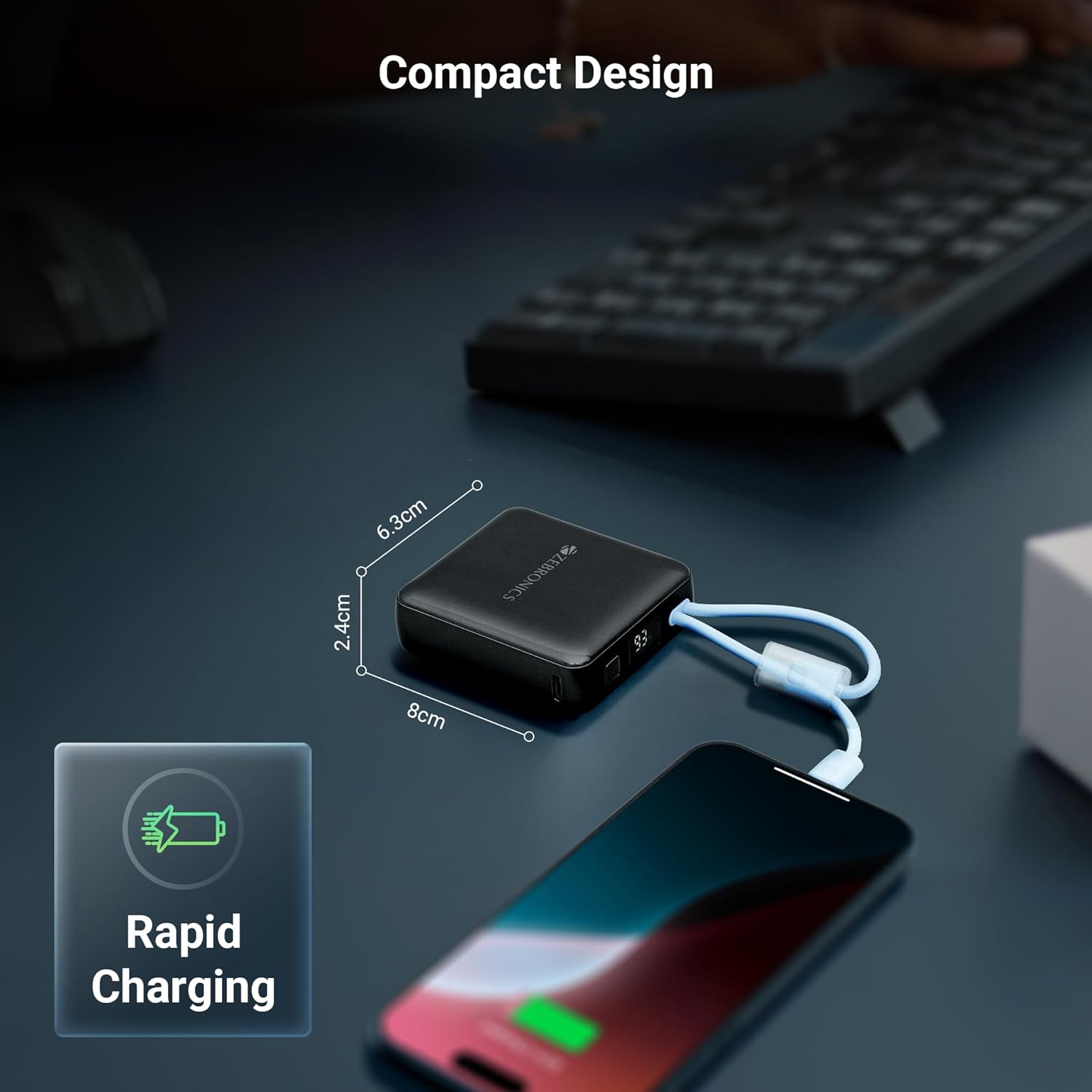
Image: Collage showing attached cables, LED display, and carry loop design.
ప్రారంభ సెటప్
- అన్ప్యాక్: Carefully remove the power bank and all accessories from the packaging.
- మొదటి ఉపయోగం: It is recommended to fully charge the power bank before its first use. Connect the power bank to a suitable USB power adapter (not included) using the provided Type-C charging cable.
- బ్యాటరీ స్థాయిని తనిఖీ చేయండి: The LED percentage indicator will show the current battery level during charging and discharge.
ఆపరేటింగ్ సూచనలు
మీ పరికరాలను ఛార్జ్ చేస్తోంది
- అంతర్నిర్మిత కేబుల్లను ఉపయోగించడం: Select the appropriate built-in cable (Type-C or Lightning) for your device. Connect the cable directly to your smartphone, tablet, or other compatible device.
- టైప్-సి పోర్ట్ ఉపయోగించి: For devices requiring a separate cable or if the built-in cables are in use, connect your device's charging cable to the Type-C output port on the power bank.
- ఛార్జింగ్ ప్రారంభించండి: పవర్ బ్యాంక్ మీ పరికరాన్ని స్వయంచాలకంగా ఛార్జ్ చేయడం ప్రారంభిస్తుంది. LED డిస్ప్లే మిగిలిన బ్యాటరీ శాతం చూపిస్తుంది.tage.
పవర్ బ్యాంక్ రీఛార్జ్
- Connect Input Cable: Use the provided Type-C charging cable to connect the power bank's Type-C input port to a USB wall adapter or a computer's USB port.
- మానిటర్ ఛార్జింగ్: The LED display will show the charging progress. When the display shows 100%, the power bank is fully charged.
- డిస్కనెక్ట్: పూర్తిగా ఛార్జ్ అయిన తర్వాత, పవర్ సోర్స్ నుండి పవర్ బ్యాంక్ను డిస్కనెక్ట్ చేయండి.

Image: The compact design of the power bank charging a smartphone, with dimensions indicated.
నిర్వహణ
సంరక్షణ మరియు నిల్వ
- Keep the power bank away from water, moisture, and liquids.
- పరికరాన్ని తీవ్రమైన ఉష్ణోగ్రతలకు (వేడి లేదా చలి) బహిర్గతం చేయకుండా ఉండండి.
- పవర్ బ్యాంక్ను విడదీయడానికి, మరమ్మతు చేయడానికి లేదా సవరించడానికి ప్రయత్నించవద్దు.
- మెత్తటి, పొడి గుడ్డతో పరికరాన్ని శుభ్రం చేయండి. కఠినమైన రసాయనాలు లేదా రాపిడి పదార్థాలను ఉపయోగించవద్దు.
- ఉపయోగంలో లేనప్పుడు పవర్ బ్యాంక్ను చల్లని, పొడి ప్రదేశంలో నిల్వ చేయండి.
- For optimal battery health, fully charge the power bank at least once every three months if stored for extended periods.
ట్రబుల్షూటింగ్
సాధారణ సమస్యలు మరియు పరిష్కారాలు
- Power bank not charging devices:
- Ensure the power bank has sufficient charge. Check the LED display.
- Verify that the charging cable (built-in or external) is securely connected to both the power bank and the device.
- Try a different charging cable or port on the power bank. - పవర్ బ్యాంక్ రీఛార్జ్ కావడం లేదు:
- Ensure the Type-C input cable is securely connected to the power bank and the power source.
- Try a different USB wall adapter or power source.
- Check if the charging cable itself is functional. - నెమ్మదిగా ఛార్జింగ్:
- Ensure your device supports fast charging and that the power bank is providing the appropriate output.
- Using a high-quality wall adapter for recharging the power bank can improve its charging speed.
- Environmental factors can affect charging speed.

Image: Illustrative image depicting the short circuit, overcharge, and overload protection features.
సాంకేతిక లక్షణాలు
| అంశం మోడల్ సంఖ్య | జెడ్ఇబి-పిబి 9 |
| బ్యాటరీ కెపాసిటీ | 10000 mAh |
| అవుట్పుట్ పవర్ | గరిష్టంగా 22.5W |
| టైప్-సి అవుట్పుట్ పోర్ట్ | DC 5V/3A, 9V/2.2A, 10V/2.25A, 12V/1.67A |
| అంతర్నిర్మిత టైప్-సి కేబుల్ అవుట్పుట్ | DC 5V/3A, 9V/2.2A, 12V/1.67A |
| అంతర్నిర్మిత లైట్నింగ్ కేబుల్ అవుట్పుట్ | DC 5V/2A |
| టైప్-సి ఇన్పుట్ పోర్ట్ | DC 5V/3A, 9V/2A, 12V/1.5A |
| కొలతలు (ప్యాకేజీ) | 17.6 x 8.9 x 4.4 సెం.మీ |
| వస్తువు బరువు | 180 గ్రా |
| రంగు | నలుపు |
| కనెక్టర్ రకం | USB టైప్ C |
| శక్తి మూలం | బ్యాటరీ |
ముఖ్యమైన భద్రతా జాగ్రత్తలు
- పవర్ బ్యాంక్ను పడవేయవద్దు, పంక్చర్ చేయవద్దు లేదా విడదీయవద్దు.
- పిల్లలకు దూరంగా ఉంచండి.
- Avoid placing the power bank near heat sources, direct sunlight, or in high humidity environments.
- Do not use the power bank if it has been damaged or submerged in water.
- స్థానిక నిబంధనల ప్రకారం పవర్ బ్యాంక్ను బాధ్యతాయుతంగా పారవేయండి.
వారంటీ మరియు మద్దతు
వారంటీ సమాచారం
Your ZEBRONICS EnergiTank 10R1 Power Bank comes with a standard manufacturer's warranty. Please refer to the warranty card included in your package or visit the official ZEBRONICS website for detailed warranty terms and conditions. An optional 1-year extended warranty may be available for purchase.
కస్టమర్ మద్దతు
For any product-related queries, technical assistance, or warranty claims, please contact ZEBRONICS customer support. Contact details can typically be found on the official ZEBRONICS webసైట్ లేదా ఉత్పత్తి ప్యాకేజింగ్లో.


