1. పరిచయం
This manual provides detailed instructions for the installation, operation, and maintenance of your Bisofice 80mm Thermal Receipt Printer, Model POS-8370. This high-speed direct thermal printer is designed for various business environments, offering reliable performance with an auto-cutter and versatile connectivity options.
2. ప్యాకేజీ విషయాలు
క్రింద జాబితా చేయబడిన అన్ని వస్తువులు మీ ప్యాకేజీలో చేర్చబడ్డాయని దయచేసి ధృవీకరించండి:
- 1 x Bisofice Thermal Receipt Printer (Model POS-8370)
- 1 x పవర్ కేబుల్
- 1 x USB కేబుల్
- 1 x Paper Roll (80*30mm)
- 1 x యూజర్ మాన్యువల్ (ఈ పత్రం)
3. ఉత్పత్తి ముగిసిందిview
The Bisofice POS-8370 is an efficient thermal receipt printer featuring a compact design and robust functionality. It utilizes direct thermal printing technology, eliminating the need for ink cartridges or ribbons, which reduces operational costs.

ముందు view of the Bisofice Thermal Receipt Printer, showing the paper output slot and control panel.
ముఖ్య లక్షణాలు:
- హై-స్పీడ్ ప్రింటింగ్: Up to 220mm/s for efficient transaction processing.
- ఆటో కట్టర్: Partial auto-cutter for clean and precise receipt separation.
- ద్వంద్వ కనెక్టివిటీ: USB and LAN interfaces for flexible integration with various systems.
- విస్తృత అనుకూలత: Supports Win2003/XP/7/8/10, Linux, and MAC OS. Compatible with ESC/POS print commands.
- Large Paper Bin: Accommodates thermal paper rolls up to 83mm in diameter, reducing frequent paper changes.
- Wall Hanging Design: Features two hanging holes on the bottom for convenient wall mounting, saving counter space.
- స్పష్టమైన ముద్రణ: 203DPI resolution ensures crisp and readable receipts.

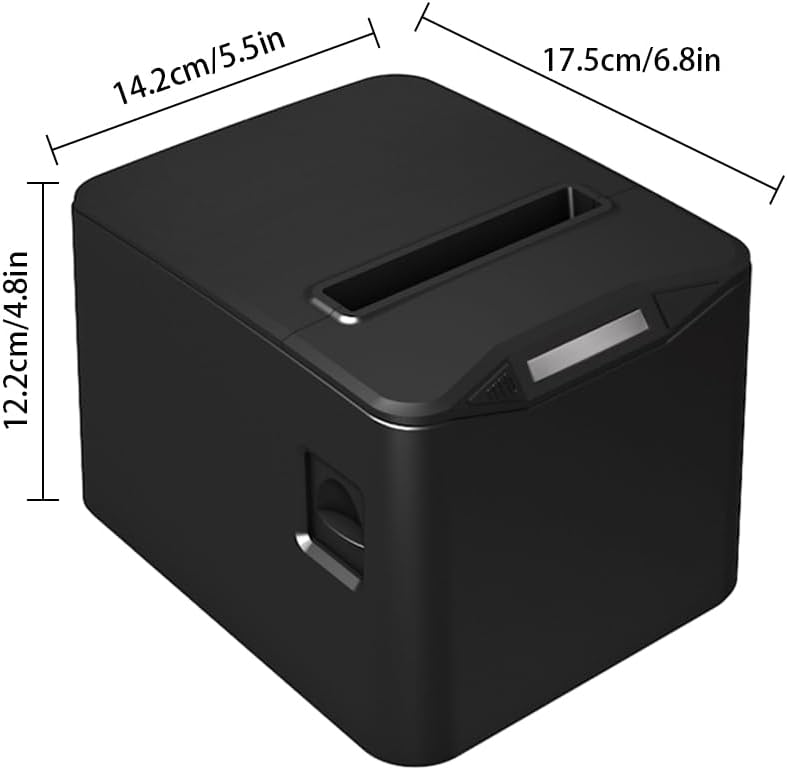
Diagram illustrating the dimensions of the printer: 17.5cm (6.8in) length, 14.2cm (5.5in) width, and 12.2cm (4.8in) height.

The printer operates without ribbons or ink, using only thermal paper rolls, shown alongside the device.

The printer features bottom holes for convenient wall mounting, demonstrated in a kitchen environment.

The printer's internal mechanism, showing its capacity for a large thermal paper roll with a maximum diameter of 83mm.
4. సెటప్
4.1 అన్ప్యాకింగ్
ప్రింటర్ మరియు అన్ని ఉపకరణాలను ప్యాకేజింగ్ నుండి జాగ్రత్తగా తీసివేయండి. భవిష్యత్తులో రవాణా లేదా నిల్వ కోసం ప్యాకేజింగ్ను అలాగే ఉంచండి.
4.2 కనెక్ట్ పవర్
- ప్రింటర్ పవర్ స్విచ్ ఆఫ్ స్థానంలో ఉందని నిర్ధారించుకోండి.
- Connect the power cable to the printer's power input port.
- పవర్ కేబుల్ యొక్క మరొక చివరను ప్రామాణిక ఎలక్ట్రికల్ అవుట్లెట్లోకి ప్లగ్ చేయండి.
4.3 థర్మల్ పేపర్ను లోడ్ చేస్తోంది
- Press the cover open button (if available) or gently lift the top cover of the printer.
- Insert the thermal paper roll into the paper bin, ensuring the printing side of the paper faces upwards and feeds out from the top.
- Pull a small length of paper out past the cutter.
- పై కవర్ సరిగ్గా తగిలే వరకు గట్టిగా మూసివేయండి.

The printer actively printing a receipt, demonstrating proper paper loading and output.
4.4 కంప్యూటర్కు కనెక్ట్ అవుతోంది
The printer supports both USB and LAN connections.
- USB కనెక్షన్: Connect one end of the provided USB cable to the printer's USB port and the other end to an available USB port on your computer.
- LAN కనెక్షన్: ప్రింటర్ యొక్క LAN పోర్ట్ నుండి మీ నెట్వర్క్ రౌటర్ లేదా స్విచ్కి ఈథర్నెట్ కేబుల్ను కనెక్ట్ చేయండి.
4.5 డ్రైవర్ ఇన్స్టాలేషన్
Before using the printer, you must install the appropriate driver on your computer. The driver supports Windows, Linux, and MAC OS.
అధికారిక నుండి తాజా డ్రైవర్ను డౌన్లోడ్ చేయండి webసైట్: http://www.cnfujun.com/d/33. ఇన్స్టాలేషన్ కోసం స్క్రీన్పై ఉన్న సూచనలను అనుసరించండి.
5. ఆపరేషన్
5.1 పవర్ చేయడం ఆన్/ఆఫ్
- To power on, flip the power switch to the 'ON' position. The indicator light will illuminate.
- పవర్ ఆఫ్ చేయడానికి, పవర్ స్విచ్ను 'ఆఫ్' స్థానానికి తిప్పండి.
5.2 ప్రింటింగ్
Once the printer is connected and drivers are installed, you can send print jobs from your application. The printer supports ESC/POS commands and can print various content types, including multi-language text, images, logos, 1D barcodes (UPC-A, UPC-E, JAN13, JAN8, CODE39, ITF, CODABAR, CODE93, CODE128), and 2D barcodes (QR CODE, PDF417).
ఒక మాజీample of a clearly printed receipt, highlighting the 203dpi resolution and 100KM print head life.
5.3 క్యాష్ డ్రాయర్ కనెక్షన్
The printer supports cash drawer driving. Connect your cash drawer to the dedicated port on the printer. The cash drawer will open automatically upon receiving the appropriate print command.
6. నిర్వహణ
6.1 ప్రింటర్ను శుభ్రపరచడం
క్రమం తప్పకుండా శుభ్రపరచడం ముద్రణ నాణ్యతను కాపాడుకోవడానికి మరియు ప్రింటర్ జీవితకాలం పొడిగించడానికి సహాయపడుతుంది.
- ప్రింటర్ శుభ్రం చేయడానికి ముందు దాని పవర్ ఆఫ్ చేయబడిందని మరియు అన్ప్లగ్ చేయబడిందని నిర్ధారించుకోండి.
- మెత్తని, మెత్తని బట్టను ఉపయోగించండి డిampened with isopropyl alcohol to gently wipe the thermal print head. Avoid touching the print head with bare hands.
- ఏదైనా కాగితపు దుమ్ము లేదా చెత్తను తొలగించడానికి కాగితపు మార్గం మరియు రోలర్లను శుభ్రం చేయండి.
- ప్రింటర్ యొక్క బాహ్య భాగాన్ని మృదువైన, పొడి వస్త్రంతో తుడవండి.
6.2 పేపర్ రోల్ భర్తీ
Replace the thermal paper roll when it runs out or when the red line appears, indicating low paper. Refer to section 4.3 for detailed instructions on loading thermal paper.
7. ట్రబుల్షూటింగ్
మీ ప్రింటర్తో మీకు సమస్యలు ఎదురైతే, ఈ క్రింది సాధారణ సమస్యలు మరియు పరిష్కారాలను చూడండి:
- ప్రింటర్ ఆన్ చేయడం లేదు: పవర్ కేబుల్ కనెక్షన్ను తనిఖీ చేయండి మరియు పవర్ అవుట్లెట్ పనిచేస్తుందని నిర్ధారించుకోండి.
- No printing: Verify that the printer is powered on, connected correctly (USB/LAN), and the driver is installed. Check for paper jams or if the paper roll is empty.
- పేలవమైన ముద్రణ నాణ్యత: Ensure you are using thermal paper. Clean the thermal print head as described in section 6.1.
- పేపర్ జామ్: Power off the printer, open the cover, carefully remove any jammed paper, and then close the cover and power on.
- Auto-cutter not working: Ensure no paper debris is obstructing the cutter. If the issue persists, contact support.
8. స్పెసిఫికేషన్లు
| ఫీచర్ | స్పెసిఫికేషన్ |
|---|---|
| మోడల్ | POS-8370 |
| ముద్రణ పద్ధతి | డైరెక్ట్ లైన్ థర్మల్ |
| ఇంటర్ఫేస్లు | USB + LAN |
| ప్రింట్ కమాండ్ | ESC / POS అనుకూలమైనది |
| ప్రింట్ స్పీడ్ | 220mm/s |
| రిజల్యూషన్ | 203DPI (8 dots/mm) |
| TPH Reliability (Print Head Life) | 100 కి.మీ |
| ఆటో కట్టర్ | పాక్షికం |
| కట్టర్ లైఫ్ | 1 మిలియన్ కోతలు |
| పేపర్ రకాలు | థర్మల్ రోల్ పేపర్ |
| పేపర్ వెడల్పు | 79.5 ± 0.5మి.మీ |
| పేపర్ రోల్ వ్యాసం | Max φ 83mm |
| ప్రింట్ వెడల్పు | 72మి.మీ |
| పేపర్ మందం | 0.06-0.08 మి.మీ |
| ఇన్పుట్ బఫర్ | 96K బైట్లు |
| NV ఫ్లాష్ | 256K బైట్లు |
| మద్దతు ఉన్న OS డ్రైవర్లు | Win2003 / WinXP / Win7 / WIN8 / WIN10; Linux; MAC; |
| పవర్ ఇన్పుట్ | AC 110V/220V, 50~60Hz |
| పవర్ అవుట్పుట్ | DC 24V/2.5A |
| ఉత్పత్తి పరిమాణం | 17.5 x 14.2 x 12.2 సెం.మీ (6.8 x 5.5 x 4.8 in) |
| ఉత్పత్తి బరువు | 0.84 కిలోలు (29.6 oz) |
| Supported 1D Codes | UPC-A / UPC-E / JAN13 (EAN13) / JAN8 (EAN8) / CODE39 / ITF / CODABAR / CODE93 / CODE128 |
| Supported 2D Codes | QR CODE, PDF417 |
9. వారంటీ మరియు మద్దతు
Bisofice products are manufactured to high-quality standards. For warranty information, technical support, or service inquiries, please refer to the contact information provided with your purchase or visit the official Bisofice website. Please have your product model (POS-8370) and purchase details ready when contacting support.


