పరిచయం
This manual provides essential instructions for the safe and efficient use of your ACwO Dwots 313 Wireless In-Ear Earbuds. Please read this manual thoroughly before using the product and retain it for future reference.
ప్యాకేజీ విషయాలు
ప్యాకేజీలో అన్ని అంశాలు ఉన్నాయని నిర్ధారించుకోండి:
- ACwO Dwots 313 Wireless Earbuds
- ఛార్జింగ్ కేసు
- USB ఛార్జింగ్ కేబుల్
- చెవిపోగులు (వివిధ పరిమాణాలు)
- వినియోగదారు మాన్యువల్ (ఈ పత్రం)
- వారంటీ కార్డ్
- నా కార్డ్ని స్కాన్ చేయండి

Image: The ACwO Dwots 313 Wireless Earbuds in their open charging case, showcasing the cool blue color variant.
ఉత్పత్తి ముగిసిందిview
The ACwO Dwots 313 earbuds feature a compact design with intuitive touch controls and advanced audio technology.

చిత్రం: ఒక దృశ్య రూపంview highlighting key features such as Dual Device Connectivity, Bluetooth V5.4, SBC & AAC Codec support, 13mm BassBoomX™ drivers, HyperBoost™ Charging, 50ms Low Latency, Intuitive Touch Control, and Instant Auto Connect.
భాగాలు
- ఇయర్బడ్స్: Left and Right, with integrated microphones and touch sensors.
- ఛార్జింగ్ కేసు: Stores and charges the earbuds, with an LED indicator for battery status.
- ఇర్టిప్స్: Designed for a secure and comfortable fit, available in multiple sizes.
టచ్ కంట్రోల్స్
The earbuds are equipped with touch-sensitive areas for controlling playback, calls, and other functions. Specific gestures will be detailed in the Operating section.
ఆడియో నాణ్యత
The ACwO Dwots 313 earbuds support AAC and SBC audio codecs, delivering detailed audio with seamless transmission. This ensures clear sound reproduction with low latency.

Image: A graphic illustrating sound waves, representing the lossless sound quality and authentic audio experience provided by the earbuds.
ఎర్గోనామిక్ డిజైన్
The earbuds feature a rubberized comfort seal and a lightweight design for a secure, pressure-free fit, engineered for effortless wear.
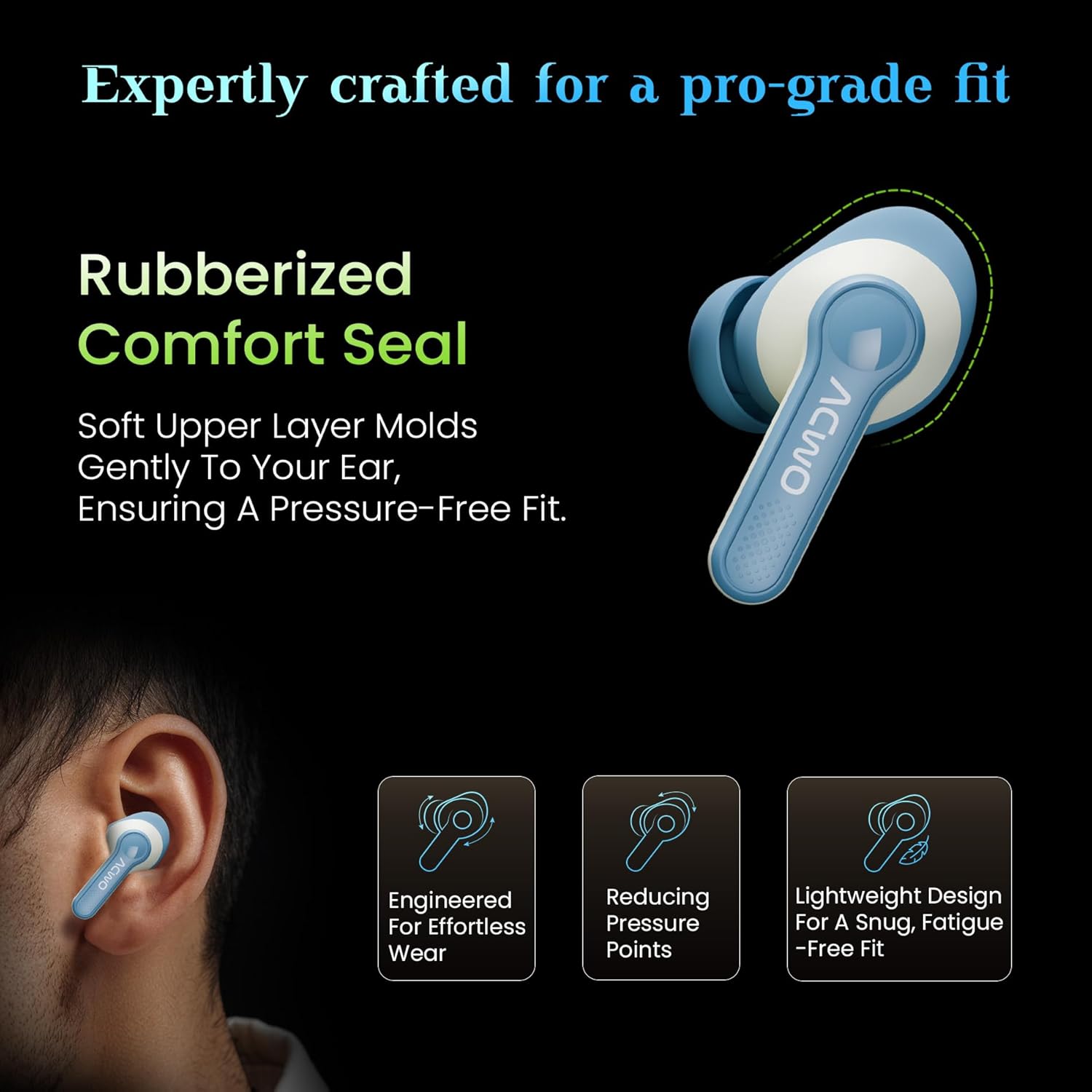
Image: An illustration showing the ACwO Dwots 313 earbud in an ear, highlighting the rubberized comfort seal and lightweight design for a snug, fatigue-free fit.
సెటప్
1. ఇయర్బడ్లు మరియు కేస్ను ఛార్జ్ చేయడం
మొదటిసారి ఉపయోగించే ముందు, ఇయర్బడ్లు మరియు ఛార్జింగ్ కేసును పూర్తిగా ఛార్జ్ చేయండి.
- ఇయర్బడ్లను ఛార్జింగ్ కేసులో ఉంచండి. అవి సరిగ్గా అమర్చబడ్డాయని నిర్ధారించుకోండి.
- USB ఛార్జింగ్ కేబుల్ను కేస్లోని ఛార్జింగ్ పోర్ట్కు మరియు పవర్ సోర్స్కి కనెక్ట్ చేయండి.
- The LED indicator on the case will show charging status. A full charge takes approximately 1 hour.
- The HyperBoost™ Charging feature allows for 120 minutes of playtime from just 10 minutes of charging.

Image: The ACwO Dwots 313 earbuds in their charging case, illustrating the 65-hour total playtime and the HyperBoost™ charging capability.
2. ప్రారంభ జత చేయడం
To pair the earbuds with your device for the first time:
- ఛార్జింగ్ కేస్ను తెరవండి. ఇయర్బడ్లు ఆటోమేటిక్గా జత చేసే మోడ్లోకి ప్రవేశిస్తాయి.
- మీ పరికరంలో (స్మార్ట్ఫోన్, టాబ్లెట్, ల్యాప్టాప్), బ్లూటూత్ను ప్రారంభించండి.
- కోసం వెతకండి available Bluetooth devices and select "ACwO Dwots 313" from the list.
- కనెక్ట్ అయిన తర్వాత, నిర్ధారణ ధ్వని ప్లే అవుతుంది మరియు ఇయర్బడ్లు ఉపయోగం కోసం సిద్ధంగా ఉంటాయి.
3. Dual Device Connectivity
The ACwO Dwots 313 supports simultaneous connection to two devices, allowing seamless switching between them.

Image: An illustration demonstrating the dual device connectivity feature, showing the earbuds wirelessly linked to both a smartphone and a laptop.
- పైన వివరించిన విధంగా ఇయర్బడ్లను మొదటి పరికరంతో జత చేయండి.
- Disconnect the earbuds from the first device (or put them back in the case and close/open to re-enter pairing mode if needed).
- రెండవ పరికరంతో ఇయర్బడ్లను జత చేయండి.
- The earbuds will now remember both devices and can switch between them automatically when both are in range and Bluetooth is enabled.
ఆపరేటింగ్ సూచనలు
ప్రాథమిక టచ్ నియంత్రణలు
| ఫంక్షన్ | చర్య |
|---|---|
| ప్లే/పాజ్ చేయండి | ఇయర్బడ్పై ఒక్కసారి నొక్కండి |
| తదుపరి ట్రాక్ | కుడి ఇయర్బడ్పై రెండుసార్లు నొక్కండి |
| మునుపటి ట్రాక్ | ఎడమ ఇయర్బడ్పై రెండుసార్లు నొక్కండి |
| సమాధానం/కాల్ ముగించు | ఇయర్బడ్పై ఒక్కసారి నొక్కండి |
| కాల్ని తిరస్కరించండి | ఇయర్బడ్లో దేనినైనా ఎక్కువసేపు నొక్కి ఉంచండి |
| వాయిస్ అసిస్టెంట్ని యాక్టివేట్ చేయండి | ఏ ఇయర్బడ్పైనా మూడుసార్లు నొక్కండి |
EQ మోడ్లు
The earbuds feature three preset EQ modes to optimize your listening experience:
- బాస్ మోడ్: Provides deep, powerful bass for music genres that benefit from enhanced low frequencies.
- Cinematic Mode: Offers an immersive, surround sound experience suitable for movies and videos.
- సాధారణ మోడ్: Delivers a balanced audio profile సాధారణ శ్రవణం కోసం.

Image: A visual representation of the two distinct audio modes: Bass Mode, depicted with a background of speaker cones, and Cinematic Mode, shown with a cinema hall background.
To switch between EQ modes, refer to the specific touch control gesture provided in the product's quick start guide or "Scan Me" card, as this functionality is often customized.
తక్కువ జాప్యం మోడ్
The 50ms low latency mode is designed for gaming and streaming, ensuring audio synchronization with on-screen action. This mode is typically activated automatically when a gaming application is detected or can be manually toggled via a specific touch control (refer to the quick start guide for details).
నిర్వహణ
క్లీనింగ్
- ఇయర్బడ్లు మరియు ఛార్జింగ్ కేసును మృదువైన, పొడి, మెత్తటి బట్టతో క్రమం తప్పకుండా శుభ్రం చేయండి.
- చెవి చివరలను తీసివేసి, తేలికపాటి సబ్బు మరియు నీటితో శుభ్రం చేసి, తిరిగి అతికించే ముందు పూర్తిగా ఆరబెట్టండి.
- రాపిడి క్లీనర్లు, ఆల్కహాల్ లేదా రసాయన ద్రావకాలను ఉపయోగించవద్దు.
- ఇయర్బడ్లు మరియు కేస్ రెండింటిలోనూ ఛార్జింగ్ కాంటాక్ట్లు శుభ్రంగా మరియు చెత్త లేకుండా ఉన్నాయని నిర్ధారించుకోండి.
నిల్వ
- ఉపయోగంలో లేనప్పుడు, ఇయర్బడ్లను రక్షించడానికి మరియు వాటిని ఛార్జ్లో ఉంచడానికి వాటి ఛార్జింగ్ కేసులో నిల్వ చేయండి.
- తీవ్రమైన ఉష్ణోగ్రతలు మరియు ప్రత్యక్ష సూర్యకాంతి నుండి దూరంగా చల్లని, పొడి ప్రదేశంలో నిల్వ చేయండి.
నీటి నిరోధకత (IPX5)
The earbuds are IPX5 water resistant, meaning they can withstand splashes and light rain. They are not designed for submersion in water. Ensure the earbuds are dry before placing them back into the charging case to prevent damage.
ట్రబుల్షూటింగ్
| సమస్య | పరిష్కారం |
|---|---|
| ఇయర్బడ్లు జత చేయడం లేదు | Ensure earbuds are charged. Place them back in the case, close, then open to re-enter pairing mode. Check your device's Bluetooth settings and try reconnecting. |
| ఒక ఇయర్బడ్ మాత్రమే పని చేస్తోంది | Place both earbuds back in the charging case, close the lid for 5 seconds, then open. This often re-syncs them. Check battery levels for both earbuds. |
| తక్కువ వాల్యూమ్ లేదా పేలవమైన ధ్వని నాణ్యత | Adjust volume on both your device and the earbuds. Ensure eartips are properly sealed in your ear. Clean any debris from the earbud speakers. |
| ఇయర్బడ్లు ఛార్జ్ కావడం లేదు | Ensure the charging cable is securely connected. Check the charging contacts on both earbuds and case for obstructions. Verify the power source is functional. |
| కాల్ నాణ్యత సమస్యలు | Ensure microphones are not obstructed. Move to an area with less background noise. Check device's call settings. |

Image: A diagram illustrating the placement of the four microphones on the ACwO Dwots 313 earbuds, designed for clear call quality with Environmental Noise Cancellation (ENC).
స్పెసిఫికేషన్లు
| ఫీచర్ | వివరాలు |
|---|---|
| మోడల్ పేరు | DwOTS 313 |
| కనెక్టివిటీ | వైర్లెస్ (బ్లూటూత్ 5.4) |
| బ్లూటూత్ రేంజ్ | 10 మీటర్లు |
| ఆట సమయం | 65 గంటల వరకు (ఛార్జింగ్ కేసుతో) |
| ఛార్జింగ్ సమయం | సుమారు 1 గంట (ఇయర్బడ్లు మరియు కేస్) |
| ఫాస్ట్ ఛార్జింగ్ | 10 Mins Charge = 120 Mins Playtime (HyperBoost™) |
| తక్కువ జాప్యం | 50మి.లు |
| మైక్రోఫోన్లు | Quad Mics with Environmental Noise Cancellation (ENC) |
| నీటి నిరోధకత | IPX5 (వాటర్ రెసిస్టెంట్) |
| ఆడియో డ్రైవర్ పరిమాణం | 13 Millimetres Dynamic Driver |
| ఫ్రీక్వెన్సీ రెస్పాన్స్ | 20000 Hz |
| నాయిస్ కంట్రోల్ | నిష్క్రియ శబ్దం రద్దు |
| నియంత్రణ పద్ధతి | టచ్ |
| బరువు | 43 గ్రాములు |
| కొలతలు | 4.5 x 6 x 2 సెం.మీ |
| మెటీరియల్ | ప్లాస్టిక్ |
వారంటీ మరియు మద్దతు
Your ACwO Dwots 313 Wireless Earbuds come with a warranty. Please refer to the included Warranty Card for detailed terms and conditions, including the warranty period and coverage.
For technical support, service, or further inquiries, please contact ACwO customer service. Contact information can typically be found on the Warranty Card or the official ACwO webసైట్.
Manufacturer: ACwO Lifestyle Pvt Ltd, Plot No. 58-60, 1st Floor, Apple Industrial Hub, Pelhar, Dist. Palghar, Maharashtra - 401208, India.


