1. పరిచయం
This manual provides detailed instructions for the safe and effective use of your TOTAL TMT57026 Laser Distance Meter. Please read this manual thoroughly before operating the device and keep it for future reference. This device is designed for accurate distance measurements up to 70 meters, suitable for various professional and DIY applications.
2. భద్రతా సూచనలు
- లేజర్ రేడియేషన్: This device emits Class 2 laser radiation. Do not stare into the laser beam or direct it at other people or animals.
- కంటి రక్షణ: లేజర్ పుంజానికి నేరుగా కంటికి గురికాకుండా ఉండండి.
- ఆపరేటింగ్ ఎన్విరాన్మెంట్: పేలుడు వాతావరణంలో లేదా మండే పదార్థాల దగ్గర పరికరాన్ని ఆపరేట్ చేయవద్దు.
- నీటి నిరోధకత: ఈ పరికరం నీటి నిరోధకత కాదు. నీటికి లేదా అధిక తేమకు గురికాకుండా ఉండండి.
- నిర్వహణ: Only qualified personnel should repair the device.
- బ్యాటరీలు: Use only specified AAA batteries. Do not mix old and new batteries or different types of batteries.
3. ఉత్పత్తి ముగిసిందిview
Familiarize yourself with the components of your TOTAL TMT57026 Laser Distance Meter.
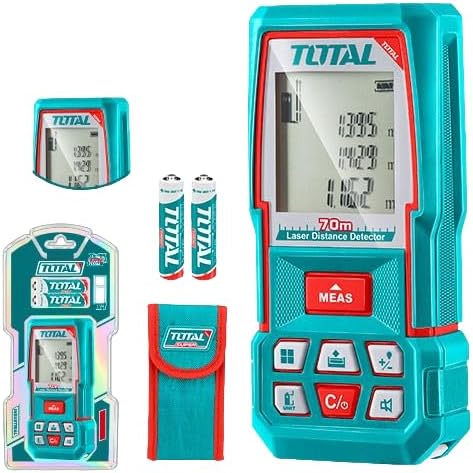
Figure 1: The TOTAL TMT57026 Laser Distance Meter, showing the device itself, two AAA batteries, a carrying pouch, and retail packaging. The device features a digital display and multiple function buttons.
ముఖ్య భాగాలు:
- లేజర్ ఉద్గారిణి/రిసీవర్: పరికరం పైభాగంలో ఉంది.
- డిస్ప్లే స్క్రీన్: Shows measurements, units, and mode indicators.
- MEAS బటన్: Initiates single or continuous measurement.
- UNIT బటన్: Changes measurement units (e.g., meters, feet, inches).
- C/O Button: Clears the last measurement or turns the device off.
- ఫంక్షన్ బటన్లు: For area, volume, addition, subtraction, and other calculations.
- బ్యాటరీ కంపార్ట్మెంట్: Located at the rear of the device.
4. సెటప్
4.1 బ్యాటరీ ఇన్స్టాలేషన్
- పరికరం వెనుక భాగంలో బ్యాటరీ కంపార్ట్మెంట్ కవర్ను గుర్తించండి.
- కవర్ను తెరవడానికి దాన్ని స్లైడ్ చేయండి లేదా అన్క్లిప్ చేయండి.
- Insert two (2) AAA 1.5V disposable batteries, ensuring correct polarity (+/-). The device includes two AAA batteries.
- బ్యాటరీ కంపార్ట్మెంట్ కవర్ను సురక్షితంగా మూసివేయండి.
4.2 పవర్ చేయడం ఆన్/ఆఫ్
- పవర్ ఆన్ చేయడానికి: నొక్కండి MEAS బటన్ను క్లుప్తంగా నొక్కితే డిస్ప్లే వెలుగుతుంది.
- పవర్ ఆఫ్ చేయడానికి: నొక్కండి మరియు పట్టుకోండి C/O button for approximately 3 seconds. The device will also automatically power off after a period of inactivity to conserve battery life.
5. ఆపరేటింగ్ సూచనలు
5.1 ప్రాథమిక దూర కొలత
- పరికరం పవర్ ఆన్ చేయబడిందని నిర్ధారించుకోండి.
- లక్ష్య ఉపరితలం వైపు లేజర్ పుంజంను సూచించండి.
- నొక్కండి MEAS button once. The laser will activate, and the measurement will appear on the display.
- The measurement will be held on the screen until a new measurement is taken or the device is turned off.
5.2 నిరంతర కొలత (ట్రాకింగ్)
- నొక్కండి మరియు పట్టుకోండి MEAS సుమారు 2 సెకన్ల పాటు బటన్.
- The device will enter continuous measurement mode, displaying real-time distance as you move the device.
- నొక్కండి MEAS button again to stop continuous measurement and hold the last value.
5.3 కొలత యూనిట్లను మార్చడం
- నొక్కండి యూనిట్ button repeatedly to cycle through available units: meters (m), feet (ft), and inches (in).
- The selected unit will be indicated on the display.
5.4 వైశాల్యం మరియు వాల్యూమ్ కొలత
The device supports calculation of area and volume. Refer to the icons on the function buttons for specific modes.
- Press the appropriate function button (e.g., the button with the square icon for area, or cube icon for volume).
- Follow the on-screen prompts to take the required measurements (e.g., length, width for area; length, width, height for volume).
- The calculated result will be displayed.
5.5 కూడిక మరియు తీసివేత
ఉపయోగించండి +/- button to add or subtract measurements.
- Take the first measurement.
- నొక్కండి +/- button to select addition or subtraction mode.
- Take the second measurement. The device will automatically perform the calculation and display the result.
6. నిర్వహణ
6.1 శుభ్రపరచడం
- పరికరాన్ని మృదువైన, డితో తుడవండిamp గుడ్డ. రాపిడి క్లీనర్లు లేదా ద్రావకాలు ఉపయోగించవద్దు.
- కెమెరా లెన్స్లను శుభ్రపరిచే మాదిరిగానే, లేజర్ లెన్స్ను మృదువైన, మెత్తటి బట్టతో జాగ్రత్తగా శుభ్రం చేయండి.
6.2 నిల్వ
- పరికరాన్ని పొడి, చల్లని ప్రదేశంలో, ప్రత్యక్ష సూర్యకాంతి మరియు తీవ్రమైన ఉష్ణోగ్రతలకు దూరంగా నిల్వ చేయండి.
- ఎక్కువ కాలం నిల్వ చేస్తే, లీకేజీని నివారించడానికి బ్యాటరీలను తీసివేయండి.
6.3 బ్యాటరీ భర్తీ
- డిస్ప్లేలోని బ్యాటరీ సూచిక తక్కువ శక్తిని చూపినప్పుడు, విభాగం 4.1 లోని సూచనలను అనుసరించి రెండు AAA బ్యాటరీలను భర్తీ చేయండి.
7. ట్రబుల్షూటింగ్
| సమస్య | సాధ్యమైన కారణం | పరిష్కారం |
|---|---|---|
| పరికరం పవర్ ఆన్ చేయదు. | బ్యాటరీలు డెడ్ లేదా తప్పుగా ఇన్స్టాల్ చేయబడ్డాయి. | బ్యాటరీ ధ్రువణతను తనిఖీ చేయండి లేదా కొత్త AAA బ్యాటరీలతో భర్తీ చేయండి. |
| సరికాని కొలతలు. | Laser lens is dirty; target surface is too reflective/non-reflective; device is unstable. | Clean the laser lens. Measure against a suitable, stable surface. Ensure device is held steady. |
| లేజర్ పుంజం కనిపించదు. | Bright ambient light; laser is off. | Operate in lower light conditions. Ensure device is powered on and MEAS button is pressed. |
| డిస్ప్లే ఎర్రర్ కోడ్ను చూపుతుంది. | కొలత పరిధి దాటిపోయింది; అంతర్గత లోపం. | Ensure target is within 0.05m to 70m range. Try restarting the device. If error persists, contact support. |
8. స్పెసిఫికేషన్లు
- మోడల్: TMT57026
- బ్రాండ్: మొత్తం
- కొలిచే పరిధి: 0.05 నుండి 70 మీటర్లు
- కొలత యూనిట్లు: మీటర్లు (మీ), అడుగులు (అడుగులు), అంగుళాలు (అంగుళాలు)
- లేజర్ క్లాస్: తరగతి 2
- బ్యాటరీలు: 2 x AAA, 1.5V (included)
- బ్యాటరీ రకం: డిస్పోజబుల్
- ఆటోమేటిక్ లేజర్ షట్-ఆఫ్: Yes (after inactivity)
- ఆటోమేటిక్ పరికర షట్-ఆఫ్: Yes (after inactivity)
- ఉత్పత్తి కొలతలు: సుమారు 17 x 5 x 0.1 సెం.మీ
- వస్తువు బరువు: Approximately 160 g (0.16 Kilograms)
- మెటీరియల్: ప్లాస్టిక్
- రంగు: మణి
- నీటి నిరోధక స్థాయి: వాటర్ రెసిస్టెంట్ కాదు
- తయారీదారు: మొత్తం
- మూలం దేశం: చైనా
9. వారంటీ మరియు మద్దతు
For warranty information and technical support, please contact TOTAL customer service. Keep your purchase receipt as proof of purchase.
For further assistance, please refer to the official TOTAL webసైట్ లేదా మీ స్థానిక పంపిణీదారుని సంప్రదించండి.


