1. పరిచయం
This manual provides comprehensive instructions for the safe and effective use of your SHARP SUGOMIMI Hearing Amplification Earbuds. Please read this manual thoroughly before using the product and retain it for future reference.
The SHARP SUGOMIMI is designed to enhance your listening experience by amplifying sounds, functioning both as a sound amplifier and as wireless earphones for music and calls. It features a rechargeable design and includes a fall prevention strap for added security.
2. ఉత్పత్తి ముగిసిందిview
2.1 భాగాలు
- SHARP SUGOMIMI Earbuds (Left and Right)
- ఛార్జింగ్ కేసు
- Fall Prevention Neck Strap
- చెవి చిట్కాలు (వివిధ పరిమాణాలు)
- USB ఛార్జింగ్ కేబుల్
2.2 ఉత్పత్తి లక్షణాలు
- వినికిడి Ampలిఫికేషన్: Enhances ambient sounds for clearer perception.
- వైర్లెస్ ఇయర్ఫోన్లు: Supports audio playback and hands-free calls.
- పునర్వినియోగపరచదగినది: Built-in rechargeable batteries for extended use.
- Fall Prevention Strap: Provides security against accidental drops.
- స్మార్ట్ఫోన్ యాప్ ఇంటిగ్రేషన్: For personalized sound adjustments and hearing checks.
- టచ్ సెన్సార్ నియంత్రణలు: Allows basic operation without a smartphone.
2.3 Visual Identification
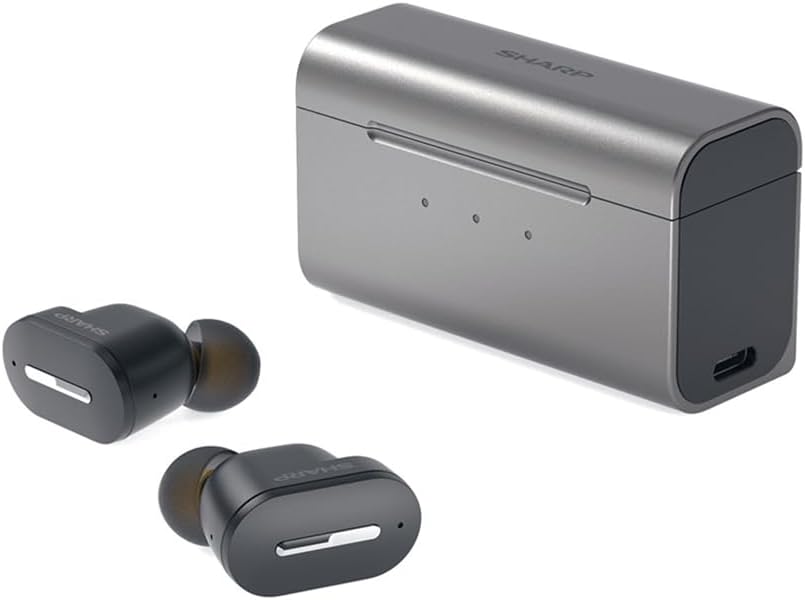
మూర్తి 2.3.1: The SHARP SUGOMIMI earbuds and their compact charging case.

మూర్తి 2.3.2: ఒక క్లోజప్ view of the SHARP SUGOMIMI earbuds, highlighting their design.

మూర్తి 2.3.3: The included neck strap designed to prevent the earbuds from falling.

మూర్తి 2.3.4: An infographic illustrating the functional differences between standard wireless earphones, sound amplifiers (like SUGOMIMI), and medical hearing aids.
3. సెటప్
3.1 పరికరాన్ని ఛార్జ్ చేస్తోంది
- ఛార్జింగ్ కేసులో రెండు ఇయర్బడ్లను ఉంచండి.
- USB ఛార్జింగ్ కేబుల్ను ఛార్జింగ్ కేస్ మరియు పవర్ సోర్స్కి కనెక్ట్ చేయండి.
- The indicator lights on the charging case will show the charging status. Ensure the device is fully charged before first use.
3.2 Initial Pairing and App Installation
- Download the dedicated SHARP SUGOMIMI application from your smartphone's app store.
- మీ స్మార్ట్ఫోన్లో బ్లూటూత్ని ప్రారంభించండి.
- Open the charging case. The earbuds will enter pairing mode.
- In the app, follow the on-screen instructions to connect the earbuds. It is crucial to ensure both the left (L) and right (R) earbuds are recognized and connected. If connection issues occur, try placing the earbuds back in the case, closing it, and then reopening to re-initiate pairing.
- Once connected, the app will guide you through a hearing check to create personalized tuning data. This optimizes the sound amplification for your specific hearing profile.

మూర్తి 3.2.1: The smartphone application allows for a personalized hearing check and automatic tuning data creation.
4. ఆపరేటింగ్ సూచనలు
4.1 Basic Controls (Without Smartphone)
The earbuds feature touch sensors for basic operations, allowing use even without a connected smartphone.
- పవర్ ఆన్/ఆఫ్: Place in/remove from charging case.
- స్విచ్ మోడ్లు: Press and hold the touch sensor for approximately 3 seconds to switch between wireless earphone mode and listening (sound ampలైఫికేషన్) మోడ్.
- వాల్యూమ్ సర్దుబాటు: Tap the touch sensor (specific gestures may vary, refer to app for detailed customization).

మూర్తి 4.1.1: The earbuds can be operated using their built-in touch sensors, eliminating the need for constant smartphone interaction.
4.2 Using as Wireless Earphones
In wireless earphone mode, the SUGOMIMI allows you to enjoy music, podcasts, and make/receive phone calls.
- సంగీతం ప్లేబ్యాక్: Connect to your smartphone via Bluetooth and play audio from your preferred applications.
- కాల్లు: హ్యాండ్స్-ఫ్రీ కమ్యూనికేషన్ కోసం ఇయర్బడ్లను ఉపయోగించండి.

మూర్తి 4.2.1: The SUGOMIMI earbuds can also function as standard wireless earphones for listening to music and making phone calls.
4.3 ధ్వని Amplification and Customization (Via App)
The smartphone app provides advanced controls for sound amplification and personalization.
- Volume and Equalizer Adjustment: Fine-tune the volume for each ear (L/R) and adjust the equalizer settings to match your preferences and environment. The app also includes a wind noise suppression feature.

మూర్తి 4.3.1: The app provides detailed controls for volume, equalizer settings, and wind noise suppression.
- దృశ్య ఎంపిక: Choose from 11 pre-set listening scenes optimized for various environments (e.g., standard, foreign language, concert, conversation in large groups, TV/video, speech, conversation in small groups, sea/waves, mountain/birdsong, cooking sounds). Additionally, you can create up to 4 custom scenes.

మూర్తి 4.3.2: A selection of 11 pre-configured listening scenes and options for 4 custom scene settings.
5. నిర్వహణ
5.1 శుభ్రపరచడం
- ఇయర్బడ్లు మరియు ఛార్జింగ్ కేసును మృదువైన, పొడి, మెత్తటి బట్టతో క్రమం తప్పకుండా శుభ్రం చేయండి.
- అవసరమైతే చెవుల చివరలను తీసివేసి తేలికపాటి సబ్బు మరియు నీటితో శుభ్రం చేయండి. తిరిగి అతికించే ముందు అవి పూర్తిగా పొడిగా ఉన్నాయని నిర్ధారించుకోండి.
- రాపిడి క్లీనర్లు, ద్రావకాలను ఉపయోగించవద్దు లేదా పరికరాన్ని నీటిలో ముంచవద్దు.
5.2 నిల్వ
- ఉపయోగంలో లేనప్పుడు, ఇయర్బడ్లను రక్షించడానికి మరియు వాటిని ఛార్జ్లో ఉంచడానికి వాటి ఛార్జింగ్ కేసులో నిల్వ చేయండి.
- పరికరాన్ని చల్లని, పొడి ప్రదేశంలో, ప్రత్యక్ష సూర్యకాంతి మరియు తీవ్రమైన ఉష్ణోగ్రతలకు దూరంగా నిల్వ చేయండి.
6. ట్రబుల్షూటింగ్
If you encounter issues with your SHARP SUGOMIMI earbuds, refer to the following common problems and solutions:
| సమస్య | సాధ్యమైన కారణం | పరిష్కారం |
|---|---|---|
| Earbuds do not connect to smartphone or app. | Bluetooth not enabled, earbuds not in pairing mode, app connection issue. | Ensure Bluetooth is on. Place earbuds in case, close, then reopen to re-enter pairing mode. Restart the app. Ensure both L and R earbuds are recognized in the app. |
| Sound quality is poor or inconsistent. | Incorrect ear tip size, ear tips dirty, improper fit, app settings. | Try different ear tip sizes for a secure fit. Clean ear tips. Adjust equalizer settings in the app. Ensure earbuds are properly seated in your ears. |
| ఇయర్బడ్లు సులభంగా బయటకు వస్తాయి. | Incorrect ear tip size, improper fit. | Experiment with different ear tip sizes to find the most secure and comfortable fit. Utilize the included fall prevention neck strap. |
| App is slow or unresponsive. | App software issue, smartphone performance. | Ensure your app is updated to the latest version. Close and reopen the app. Restart your smartphone. |
| శబ్దం లేదు amplification or music playback. | Low battery, incorrect mode, volume too low. | Charge the earbuds. Ensure the correct mode (listening or wireless earphone) is selected. Increase volume via app or touch controls. |
ఈ పరిష్కారాలను ప్రయత్నించిన తర్వాత కూడా సమస్య కొనసాగితే, దయచేసి కస్టమర్ మద్దతును సంప్రదించండి.
7. స్పెసిఫికేషన్లు
- బ్రాండ్: షార్ప్
- మోడల్: SUGOMIMI
- ASIN: B0DZGCC5R9
- బ్యాటరీ: Built-in rechargeable battery (included)
- ప్యాకేజీ కొలతలు: 17.9 x 9.4 x 3.7 సెం.మీ
- బరువు: 160 గ్రా (ప్యాకేజీ బరువు)
- మొదట అందుబాటులో ఉన్న తేదీ: 2025/07/16
8. వారంటీ సమాచారం
SHARP products are manufactured to high-quality standards. For specific warranty terms and conditions, please refer to the warranty card included with your product or visit the official SHARP webమీ ప్రాంతం కోసం సైట్. వారంటీ క్లెయిమ్ల కోసం మీ కొనుగోలు రుజువును ఉంచండి.
9. మద్దతు
For further assistance, technical support, or inquiries regarding your SHARP SUGOMIMI Hearing Amplification Earbuds, please contact SHARP customer service. Contact details can typically be found on the official SHARP webసైట్ లేదా ఉత్పత్తి ప్యాకేజింగ్లో.


