పరిచయం
The ATTACK SHARK X1 Superlight Wireless Gaming Mouse is engineered for high-performance gaming and versatile daily use. Featuring a PAW3395PRO gaming sensor, tri-mode connectivity (2.4G wireless, Bluetooth, and wired USB-C), and an innovative magnetic charging dock with RGB lighting, the X1 mouse provides precision, speed, and convenience. Its ultra-lightweight design and durable switches ensure comfort and longevity for extended use.
ప్యాకేజీ విషయాలు
- ATTACK SHARK X1 Superlight Wireless Gaming Mouse
- Magnetic RGB Charging Dock
- USB-C నుండి USB-A కేబుల్
- 2.4GHz Wireless Receiver (Nano Dongle)
- వినియోగదారు మాన్యువల్ (ఈ పత్రం)

Image: The ATTACK SHARK X1 mouse shown alongside its magnetic charging dock.
ఉత్పత్తి ముగిసిందిview
The X1 mouse features a lightweight ergonomic design with programmable buttons and a high-precision optical sensor. The accompanying magnetic charging dock provides convenient charging and also houses the 2.4GHz wireless receiver.
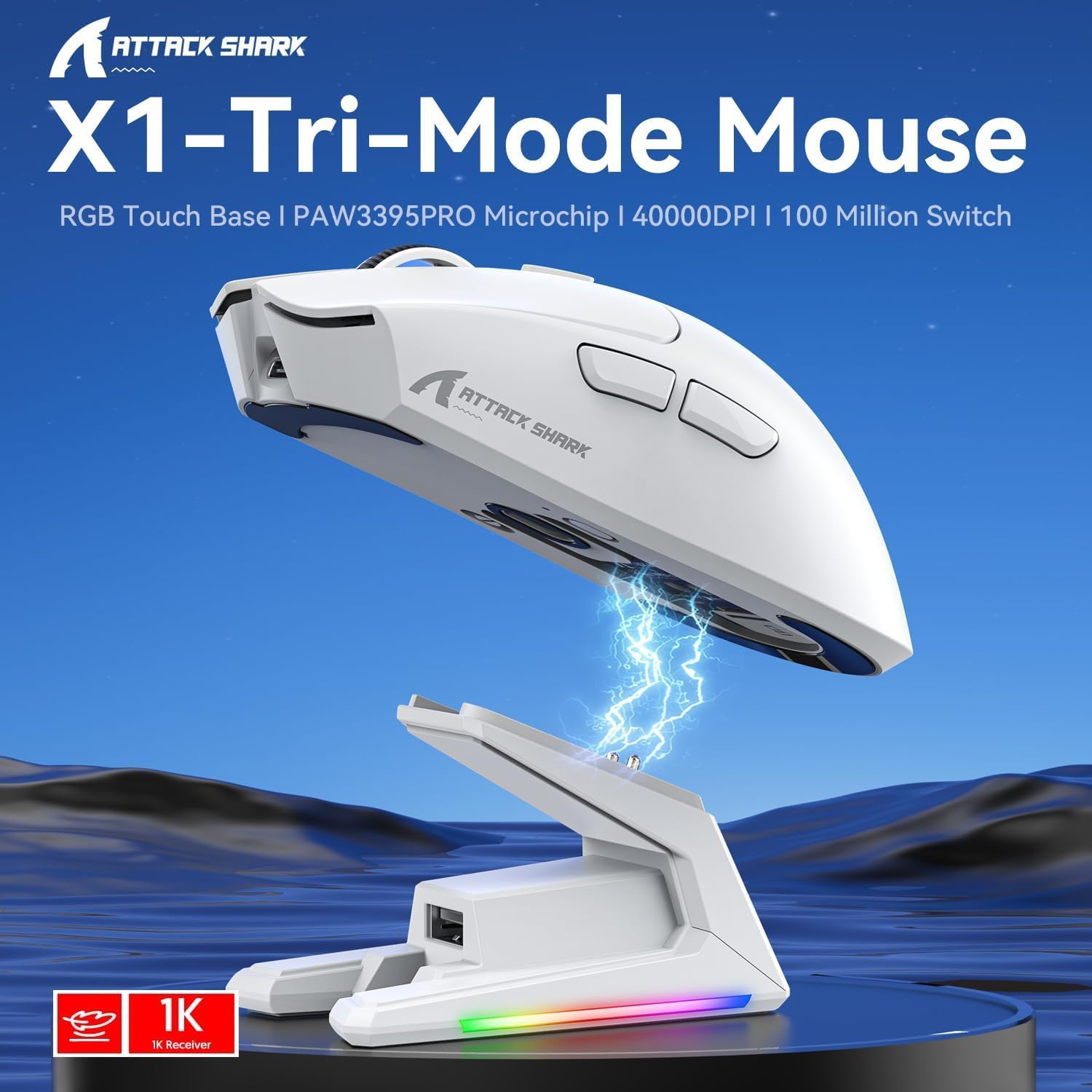
చిత్రం: పైగాview of the X1 Tri-Mode Mouse highlighting its key features.
మౌస్ భాగాలు:
- ఎడమ/కుడి క్లిక్ బటన్లు: Standard mouse buttons with durable OMRON switches.
- స్క్రోల్ వీల్: నిలువు స్క్రోలింగ్ మరియు మధ్య-క్లిక్ కార్యాచరణ కోసం.
- DPI బటన్: Located on top for quick sensitivity adjustments.
- సైడ్ బటన్లు: Two programmable buttons on the left side for forward/backward navigation or custom macros.
- USB-C పోర్ట్: వైర్డు కనెక్షన్ మరియు ఛార్జింగ్ కోసం.
- పవర్/మోడ్ స్విచ్: Located on the bottom, allows switching between OFF, 2.4G, and Bluetooth modes.
- PAW3395PRO Sensor: High-performance optical sensor for precise tracking.
Charging Dock Components:
- Magnetic Charging Pins: Align with the mouse for effortless charging.
- RGB Lighting Strip: అనుకూలీకరించదగిన లైటింగ్ ప్రభావాలు.
- Touch-Sensitive Panel: For controlling RGB lighting on the dock.
- USB-A పోర్ట్: For connecting the 2.4GHz wireless receiver.
- USB-C ఛార్జింగ్ పోర్ట్: For powering the dock.

చిత్రం: క్లోజప్ view of the charging dock's USB data interface for the 2.4G receiver and the Type-C charging interface.
సెటప్
1. వైర్డు కనెక్షన్:
- Connect the USB-C end of the provided cable to the mouse's USB-C port.
- మీ కంప్యూటర్లో అందుబాటులో ఉన్న USB పోర్ట్కి కేబుల్ యొక్క USB-A చివరను కనెక్ట్ చేయండి.
- Ensure the power/mode switch on the bottom of the mouse is set to the 'OFF' position. The mouse will function in wired mode and charge simultaneously.

Image: The X1 mouse connected to a laptop via its USB-C cable, demonstrating wired mode and charging capability.
2. 2.4GHz వైర్లెస్ కనెక్షన్:
- Plug the 2.4GHz wireless receiver into an available USB-A port on your computer or into the USB-A port on the charging dock.
- Set the power/mode switch on the bottom of the mouse to the '2.4G' position.
- మౌస్ స్వయంచాలకంగా రిసీవర్కి కనెక్ట్ అవ్వాలి.
3 బ్లూటూత్ కనెక్షన్:
- Set the power/mode switch on the bottom of the mouse to the 'BT' position.
- మౌస్ జత చేసే మోడ్లోకి ప్రవేశిస్తుంది (సూచిక కాంతి మెరుస్తుంది).
- మీ కంప్యూటర్ లేదా పరికరంలో, బ్లూటూత్ సెట్టింగ్లకు నావిగేట్ చేసి, కొత్త పరికరాల కోసం శోధించండి.
- Select 'ATTACK SHARK X1' (or similar name) from the list of available devices to pair. The mouse supports memory for up to 3 Bluetooth devices.
ఆపరేటింగ్ సూచనలు
DPI సర్దుబాటు:
The X1 mouse features a dedicated DPI button on its top surface. Press this button to cycle through the preset DPI levels. The mouse supports up to 40,000 DPI with 6 programmable sensitivity presets. The current DPI level may be indicated by an LED color change (refer to the Web Cloud Driver for specific indications).

చిత్రం: వివరణాత్మకం view of the PAW3395PRO gaming sensor, emphasizing its high precision.
Web Cloud Driver Software:
The ATTACK SHARK X1 utilizes an innovative web-based cloud driver for customization, eliminating the need for software installation. Access the driver through your web browser to configure advanced functions such as:
- DPI adjustment and custom profiles
- పోలింగ్ రేటు సెట్టింగ్లు
- Competitive mode activation
- Custom button assignments
- Macro recording and personalized key mapping
The open-source driver automatically identifies your computer system. Refer to the product packaging or official webనిర్దిష్ట కోసం సైట్ URL యాక్సెస్ చేయడానికి Web Cloud Driver.

Image: Screenshot of the X1 Web Cloud Driver interface, showing options for key settings, macros, and other functions.
RGB Lighting Customization (Dock):
The magnetic charging dock features an integrated touch-sensitive panel that allows you to customize its RGB lighting effects. Tap the panel to cycle through different lighting modes. Press and hold the panel to turn the RGB lighting on or off.
ఛార్జింగ్ మరియు బ్యాటరీ జీవితం
The X1 mouse can be charged via the included USB-C cable or by placing it on the magnetic charging dock. The dock provides effortless charging; simply align the mouse with the charging pins for instant power-up. A full charge typically takes approximately 2 hours and provides up to 65 hours of continuous working time.

Image: The X1 mouse magnetically docked for charging, showcasing the RGB lighting of the dock.

Image: An illustration depicting the optimized battery life of the X1 mouse, indicating efficient power usage.
నిర్వహణ
To ensure the longevity and optimal performance of your ATTACK SHARK X1 mouse and charging dock, follow these maintenance guidelines:
- శుభ్రపరచడం: Use a soft, dry cloth to wipe down the mouse and dock. For stubborn dirt, a slightly damp cloth can be used, but ensure no moisture enters the internal components or charging pins. Avoid harsh chemicals or abrasive materials.
- సెన్సార్ కేర్: Keep the optical sensor on the bottom of the mouse clean and free of dust or debris to maintain accurate tracking.
- నిల్వ: When not in use for extended periods, store the mouse and dock in a cool, dry place away from direct sunlight and extreme temperatures.
- ఛార్జింగ్ పిన్స్: Periodically inspect the charging pins on the dock and the corresponding contacts on the mouse for any residue or corrosion. Clean gently with a cotton swab if necessary.
ట్రబుల్షూటింగ్
If you encounter issues with your ATTACK SHARK X1 mouse, refer to the following common troubleshooting steps:
- మౌస్ స్పందించడం లేదు:
- మౌస్ ఛార్జ్ అయ్యిందని నిర్ధారించుకోండి.
- Check the power/mode switch on the bottom of the mouse is set to the correct connection mode (2.4G, BT, or OFF for wired).
- For 2.4G wireless, ensure the receiver is properly plugged into a USB port. Try a different USB port.
- బ్లూటూత్ కోసం, మీ పరికరంలో బ్లూటూత్ ప్రారంభించబడిందని మరియు మౌస్ జత చేయబడిందని నిర్ధారించుకోండి. మౌస్ను తిరిగి జత చేయడానికి ప్రయత్నించండి.
- Try connecting the mouse via the USB-C cable to see if it functions in wired mode.
- Inconsistent Tracking or Cursor Lag:
- మౌస్ అడుగున ఉన్న ఆప్టికల్ సెన్సార్ను శుభ్రం చేయండి.
- మీరు మౌస్ను తగిన ఉపరితలంపై (ఉదా. మౌస్ ప్యాడ్) ఉపయోగిస్తున్నారని నిర్ధారించుకోండి.
- Check for interference in 2.4G wireless mode (e.g., other wireless devices).
- Adjust DPI settings using the DPI button or Web Cloud Driver.
- ఛార్జింగ్ సమస్యలు:
- Ensure the USB-C cable is securely connected to the charging dock and a power source.
- Verify the mouse is correctly seated on the magnetic charging dock, ensuring the pins make proper contact.
- Try charging directly via the USB-C cable connected to the mouse.
- Web Cloud Driver Not Accessible:
- Ensure your computer has an active internet connection.
- ధృవీకరించండి URL కోసం Web Cloud Driver is entered correctly.
- వేరొక దానిని ప్రయత్నించండి web బ్రౌజర్.
స్పెసిఫికేషన్లు
| ఫీచర్ | వివరణ |
|---|---|
| మోడల్ | X1 |
| కనెక్టివిటీ | Tri-Mode: 2.4G Wireless, Bluetooth 5.2, Wired USB-C |
| సెన్సార్ | PixArt PAW3395PRO Optical Gaming Sensor |
| DPI పరిధి | Up to 40,000 DPI (6 programmable presets) |
| IPS | 650 ఐపిఎస్ |
| త్వరణం | 50G |
| స్విచ్లు | OMRON Mechanical Switches (100 Million Clicks lifespan) |
| బరువు | Approx. 53g (Ultra-light) |
| బ్యాటరీ లైఫ్ | 65 గంటల వరకు (నిరంతర వినియోగం) |
| ఛార్జింగ్ | Magnetic Charging Dock / USB-C Wired |
| పోలింగ్ రేటు | 1000Hz (1ms response) |
| కొలతలు (ప్యాకేజీ) | 7.09 x 4.53 x 2.17 అంగుళాలు |
| వస్తువు బరువు (ప్యాక్ చేయబడింది) | 7.7 ఔన్సులు |
వారంటీ మరియు మద్దతు
For warranty information and technical support, please refer to the official ATTACK SHARK webసైట్లో లేదా వారి కస్టమర్ సర్వీస్ను నేరుగా సంప్రదించండి. ఏవైనా వారంటీ క్లెయిమ్లకు కొనుగోలు రుజువుగా మీ కొనుగోలు రసీదును ఉంచండి.
మరింత సహాయం కోసం, సందర్శించండి అమెజాన్లో ఎటాక్ షార్క్ స్టోర్.


