1. పరిచయం
Thank you for choosing the Dexnor Solar Charger Power Bank. This device is designed to provide reliable power for your electronic devices in various environments, featuring a high-capacity battery, multiple charging options, and a durable build. This manual provides essential information for the safe and efficient use of your power bank.
పరికరాన్ని ఆపరేట్ చేసే ముందు దయచేసి ఈ మాన్యువల్ని పూర్తిగా చదవండి మరియు భవిష్యత్తు సూచన కోసం దాన్ని ఉంచండి.
2. ఉత్పత్తి ముగిసిందిview
ప్యాకేజీ విషయాలు:
- 1 x Dexnor Solar Power Bank
- 1 x ఛార్జింగ్ కేబుల్ (టైప్-సి)
- 1 x కారబైనర్
- 1 x Product User Manual
కాంపోనెంట్ ఐడెంటిఫికేషన్:

Detailed diagram highlighting the power switch, solar panel, wireless charging pad, metal hanging loop, battery indicator lights, Micro USB input, Type-C inputs/outputs, USB-A output, dust-proof cover, and LED flashlight.
ముఖ్య లక్షణాలు:
- అధిక సామర్థ్యం: 27,000mAh battery for extended power supply.
- ఫాస్ట్ ఛార్జింగ్: Equipped with 65W PD3.0 Type-C1, 20W PD3.0 Type-C2, and 18W QC3.0 USB-A ports.
- వైర్లెస్ ఛార్జింగ్: Magnetic wireless charging compatible with MagSafe, Qi, and other wireless charging standards (15W for Android, 7.5W for iOS).
- ఏకకాలంలో ఛార్జింగ్: ఒకేసారి నాలుగు పరికరాలను ఛార్జ్ చేయగల సామర్థ్యం.
- Dual Recharging Options: Recharge via solar panel or Type-C cable.
- ఇంటిగ్రేటెడ్ ఫ్లాష్లైట్: Multi-mode LED flashlight for emergency use.
- మన్నికైన డిజైన్: IP54-rated for resistance to splashes and dust, suitable for outdoor environments.
- పోర్టబిలిటీ: Includes a robust carabiner for easy attachment to gear.
3. సెటప్
పవర్ బ్యాంక్ యొక్క ప్రారంభ ఛార్జింగ్:
Before first use, it is recommended to fully charge the power bank using a wall adapter and the provided Type-C cable. Solar charging is supplementary and significantly slower than cable charging. A 45W adapter (not included) is recommended for optimal cable charging speed (approximately 3 hours for a full charge).
- Connect the provided Type-C charging cable to the Type-C1 port on the power bank.
- Connect the other end of the cable to a compatible USB wall adapter (e.g., 45W PD adapter).
- The battery indicator lights will illuminate, showing the charging progress. All lights will be solid when fully charged.

The power bank connected to a smartphone, demonstrating its 65W PD3.0 fast charging capability.
4. ఆపరేటింగ్ సూచనలు
4.1 పవర్ బ్యాంక్ను ఛార్జ్ చేయడం
USB-C కేబుల్ ద్వారా:
As described in the 'Initial Charging' section, connect the power bank to a wall adapter using a Type-C cable for the fastest recharge.
సోలార్ ప్యానెల్ ద్వారా:
The integrated solar panel allows for supplementary charging when outdoors. Place the power bank in direct sunlight with the solar panel facing upwards. The solar charging indicator light will illuminate when charging. Note that solar charging is significantly slower than cable charging (approximately 50 hours in direct sunlight for a full charge) and is intended for emergency or supplementary power, not as a primary charging method.

The solar panel on the power bank, designed for supplementary recharging under direct sunlight.
4.2 బాహ్య పరికరాలను ఛార్జ్ చేయడం
వైర్డు ఛార్జింగ్:
Connect your device to one of the available output ports (Type-C1, Type-C2, or USB-A) using a compatible charging cable. The power bank will automatically begin charging your device. The Type-C1 port supports 65W PD3.0, Type-C2 supports 20W PD3.0, and the USB-A port supports 18W QC3.0.

Illustration of the power bank charging multiple devices concurrently using its various output ports.
వైర్లెస్ ఛార్జింగ్:
The power bank features a magnetic wireless charging pad compatible with MagSafe, Qi, and other wireless charging standards. To activate wireless charging, ensure the power bank is switched on. Place your compatible device directly onto the wireless charging pad. The magnets will assist in proper alignment. It delivers 15W for Android devices and 7.5W for iOS devices.

The power bank demonstrating its magnetic wireless charging capability for compatible smartphones.
4.3 ఫ్లాష్లైట్ ఆపరేషన్
The power bank includes a built-in LED flashlight. To operate:
- Press and hold the power button for approximately 3 seconds to turn the flashlight ON.
- Press the power button briefly to cycle through brightness levels or modes (e.g., SOS mode).
- Press and hold the power button again for approximately 3 seconds to turn the flashlight OFF.
4.4 Carabiner Usage
The included carabiner can be attached to the designated loop on the power bank for convenient carrying. This allows you to secure the power bank to backpacks, belts, or other gear, making it ideal for outdoor activities.
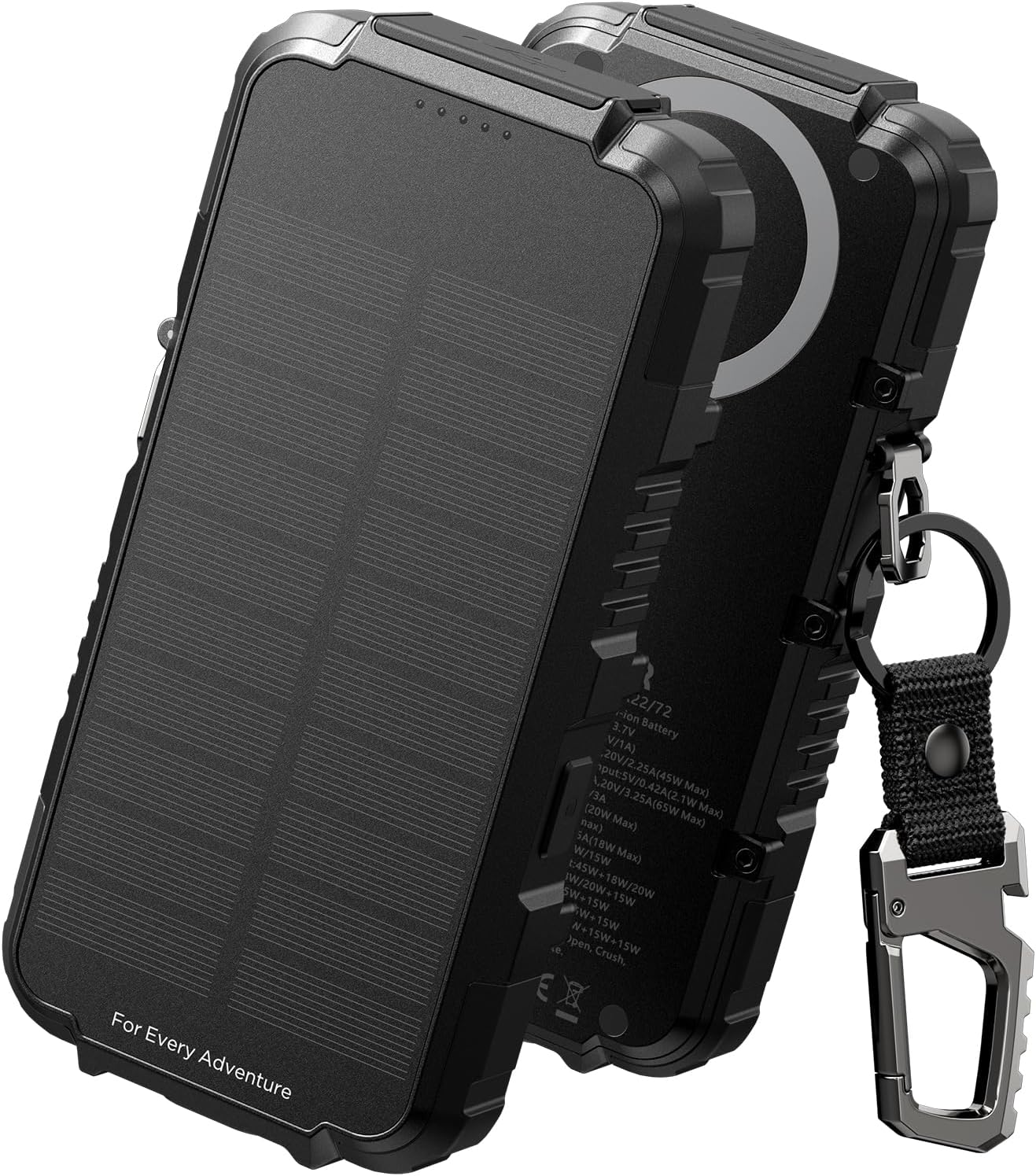
The Dexnor Solar Charger Power Bank, featuring a rugged design and an integrated carabiner for portability.
5. నిర్వహణ
శుభ్రపరచడం:
Wipe the power bank with a soft, dry cloth. Avoid using harsh chemicals or abrasive materials that could damage the surface or internal components. Ensure all ports are free of dust and debris.
నిల్వ:
Store the power bank in a cool, dry place away from direct sunlight and extreme temperatures. If storing for extended periods, charge the power bank to approximately 50-75% every three months to maintain battery health.
బ్యాటరీ సంరక్షణ:
To prolong the lifespan of the lithium polymer battery, avoid fully discharging the power bank regularly. The upgraded rechargeable battery is designed to deliver over 800 recharge cycles.
6. ట్రబుల్షూటింగ్
- పవర్ బ్యాంక్ ఛార్జింగ్ లేదు:
- Ensure the charging cable is securely connected to both the power bank's input port (Type-C1) and the power source.
- వాల్ అడాప్టర్ లేదా USB పోర్ట్ పనిచేస్తుందో లేదో ధృవీకరించండి.
- If using solar charging, ensure the solar panel is exposed to direct, strong sunlight. Solar charging is slow and may not register immediately if light is insufficient.
- పవర్ బ్యాంక్ నుండి పరికరం ఛార్జ్ కావడం లేదు:
- Ensure the power bank has sufficient charge. Check the battery indicator lights.
- మీ పరికరాన్ని పవర్ బ్యాంక్కు కనెక్ట్ చేసే ఛార్జింగ్ కేబుల్ పనిచేస్తుందని మరియు సరిగ్గా చొప్పించబడిందని ధృవీకరించండి.
- For wireless charging, ensure the power bank is switched on and your device is properly aligned on the wireless charging pad.
- Some devices may require a specific charging protocol; ensure compatibility.
- స్లో ఛార్జింగ్ స్పీడ్:
- Ensure you are using a fast-charging compatible cable and adapter for recharging the power bank.
- For charging external devices, use the appropriate fast-charging ports (PD3.0 or QC3.0) with compatible cables and devices.
- Solar charging is inherently slow; it is not designed for rapid recharging.
- ఫ్లాష్లైట్ పనిచేయడం లేదు:
- పవర్ బ్యాంక్ తగినంత ఛార్జ్ కలిగి ఉందని నిర్ధారించుకోండి.
- Press and hold the power button for approximately 3 seconds to activate the flashlight.
7. స్పెసిఫికేషన్లు
| ఫీచర్ | స్పెసిఫికేషన్ |
|---|---|
| మోడల్ సంఖ్య | DEX-DC001 ద్వారా మరిన్ని |
| బ్యాటరీ కెపాసిటీ | 27,000 mAh (లిథియం పాలిమర్) |
| ఉత్పత్తి కొలతలు | 7.68 x 3.86 x 1.97 అంగుళాలు |
| వస్తువు బరువు | 1.87 పౌండ్లు |
| Input (Type-C1) | 65W PD3.0 |
| Output (Type-C1) | 65W PD3.0 |
| Output (Type-C2) | 20W PD3.0 |
| అవుట్పుట్ (USB-A) | 18W QC3.0 |
| వైర్లెస్ అవుట్పుట్ | 15W (Android), 7.5W (iOS) |
| సోలార్ ఛార్జింగ్ | ఇంటిగ్రేటెడ్ సోలార్ ప్యానెల్ |
| ప్రత్యేక లక్షణాలు | Flashlight, Multiple Charging Ports, Outdoor Charging Station, Solar Charging, Wireless Charging |
| పర్యావరణ రేటింగ్ | IP54 (స్ప్లాష్ మరియు దుమ్ము నిరోధకం) |

The power bank shown in a wet environment, indicating its IP54 rating for resistance to splashes and dust. Note: Not fully waterproof; only resistant to gentle splashes and spills.

The Dexnor Power Bank in an outdoor setting, representing its large 27,000mAh capacity suitable for extended use.
8. వారంటీ మరియు మద్దతు
వారంటీ సమాచారం:
Dexnor products are manufactured to high-quality standards. This product is covered by a limited warranty against defects in materials and workmanship from the date of purchase. Please refer to the product packaging or the official Dexnor webనిర్దిష్ట వారంటీ నిబంధనలు మరియు షరతుల కోసం సైట్.
కస్టమర్ మద్దతు:
If you encounter any issues or have questions regarding your Dexnor Solar Charger Power Bank, please contact our customer support team. Contact details can typically be found on the official Dexnor webసైట్ లేదా మీ కొనుగోలు ప్లాట్ఫారమ్ ద్వారా.


