ALLPOWERS S300LUS పోర్టబుల్ పవర్ స్టేషన్ యూజర్ మాన్యువల్
మోడల్: AP-SS-005
Thank you for choosing ALLPOWERS. Please read this manual carefully before use and retain it for future reference.
1. భద్రతా సూచనలు
To ensure safe operation and prolong the lifespan of your ALLPOWERS S300LUS Portable Power Station, please observe the following safety guidelines:
- యూనిట్ను విడదీయడం, మరమ్మతు చేయడం లేదా సవరించడం చేయవద్దు. తప్పుగా తిరిగి అమర్చడం వల్ల అగ్ని ప్రమాదం లేదా గాయం సంభవించవచ్చు.
- Do not expose the unit to fire or extreme temperatures (above 60°C / 140°F).
- Do not use or store the unit in a bathroom or in areas exposed to water or high humidity.
- Do not use or store the unit near heat sources such as stoves or heaters.
- Avoid dropping, heavy impacts, or strong vibrations.
- పిల్లలు మరియు పెంపుడు జంతువులకు దూరంగా ఉంచండి.
- ఒరిజినల్ లేదా సర్టిఫైడ్ యాక్సెసరీలను మాత్రమే ఉపయోగించండి.
- If the unit emits unusual odors, generates heat, or shows any other abnormality, discontinue use immediately and contact customer support.
- స్థానిక నిబంధనల ప్రకారం ఉత్పత్తిని పారవేయండి. గృహ వ్యర్థాలతో పారవేయవద్దు.
2. ఉత్పత్తి ముగిసిందిview
The ALLPOWERS S300LUS is a compact and portable power station designed to provide reliable power for various devices. It features multiple output ports, wireless charging, and several recharging options.
ప్యాకేజీ విషయాలు:
- 1 x ALLPOWERS Portable Power Station (S300LUS)
- 1 x AC Adapter and Charging Cable
- 1 x వినియోగదారు మాన్యువల్
ముఖ్య లక్షణాలు:
- సామర్థ్యం: 288వాహ్ / 78000ఎంఏహెచ్
- AC అవుట్పుట్: 300W (Pure Sine Wave, Peak 600W)
- బహుళ అవుట్పుట్లు: AC, USB-A, USB-C, 12V Car Charger, Wireless Charging
- ఛార్జింగ్ ఎంపికలు: AC, Solar, Car Charger, AC + Solar, AC + Car Charger
- కాంపాక్ట్ డిజైన్: 8.1 x 6.5 x 4.3 inches, 8.8 pounds with built-in handle
- ఎమర్జెన్సీ లైట్: ఇంటిగ్రేటెడ్ LED లైట్
- స్మార్ట్ కంట్రోల్: Bluetooth app compatibility (iOS 9.0+, Android 4.3+)
- భద్రత: Built-in Battery Management System (BMS) for protection against overcurrent, overload, overheating, and short circuits.
కాంపోనెంట్ ఐడెంటిఫికేషన్:

చిత్రం: ముందు భాగం view of the ALLPOWERS S300LUS Portable Power Station, showing the display, AC outlet, USB ports, DC input, and handle.
- AC Output Port (US Standard)
- వైర్లెస్ ఛార్జింగ్ ప్యాడ్
- LCD డిస్ప్లే స్క్రీన్
- AC పవర్ బటన్
- DC/USB Power Button
- USB-A అవుట్పుట్ పోర్ట్లు (2x)
- USB-C అవుట్పుట్ పోర్ట్ (PD 100W)
- 12V Car Charger Output
- అత్యవసర LED లైట్
- హ్యాండిల్
3. సెటప్ మరియు ప్రారంభ ఉపయోగం
అన్ప్యాకింగ్:
Carefully remove the power station and all accessories from the packaging. Inspect for any damage. If any components are missing or damaged, contact customer support immediately.
ప్రారంభ ఛార్జింగ్:
Before first use, it is recommended to fully charge the ALLPOWERS S300LUS. This ensures optimal battery performance and calibration.
- Connect the provided AC adapter to the DC Input Port (9) on the power station.
- AC అడాప్టర్ను ప్రామాణిక వాల్ అవుట్లెట్లోకి ప్లగ్ చేయండి.
- The LCD display (3) will show the charging status. The battery icon will animate, and the percentagఇ పెరుగుతుంది.
- Charging is complete when the battery icon is full and the display shows 100%.
Initial AC charging typically takes approximately 1.5 hours (Max. 200W).
4. ఆపరేటింగ్ సూచనలు
పవర్ ఆన్/ఆఫ్:
- To turn on the unit, press and hold the AC Power Button (4) or DC/USB Power Button (5) for 3 seconds. The LCD display will illuminate.
- To turn off the unit, press and hold the respective power button (AC or DC/USB) for 3 seconds.
- If no output is detected, the unit will automatically shut down after a period of inactivity to conserve power.
AC అవుట్పుట్ను ఉపయోగించడం:
- Press the AC Power Button (4) to activate the AC output. The AC icon will appear on the LCD display.
- Plug your AC device into the AC Output Port (1).
- Ensure your device's power consumption does not exceed 300W (or 600W peak). Overloading will trigger protection and shut down the AC output.
- When finished, press the AC Power Button (4) again to turn off the AC output.
Using DC/USB Outputs:
- Press the DC/USB Power Button (5) to activate the DC and USB outputs. The DC and USB icons will appear on the LCD display.
- Connect your devices to the USB-A Ports (6), USB-C Port (7), or 12V Car Charger Output (8).
- The USB-C port supports Power Delivery (PD) up to 100W.
- When finished, press the DC/USB Power Button (5) again to turn off these outputs.
వైర్లెస్ ఛార్జింగ్:
- Press the DC/USB Power Button (5) to activate the wireless charging function.
- Place your Qi-compatible device on the Wireless Charging Pad (2).
- సరైన ఛార్జింగ్ కోసం పరికరం ప్యాడ్ మధ్యలో ఉందని నిర్ధారించుకోండి.
- When finished, press the DC/USB Power Button (5) again to turn off wireless charging.

Image: Visual representation of the six output options available on the power station, including AC, USB-C, USB-A, wireless charging, and car charger, with examples of devices being powered.
Emergency LED Light:
- To turn on the LED light, short press the LED Light button (usually integrated with the DC/USB button or a separate button, refer to unit for exact location).
- Press again to cycle through brightness levels or SOS mode (if available).
- Press and hold to turn off the LED light.
పవర్ స్టేషన్ రీఛార్జింగ్:
The S300LUS offers multiple ways to recharge:

Image: Infographic detailing the five different ways to recharge the power station: AC, Solar, Car Charger, AC+Solar, and AC+Car Charger, along with estimated charging times.
- AC Wall Outlet (Max. 200W): Connect the provided AC adapter to the DC Input Port (9) and a wall outlet. Approximately 1.5 hours.
- Solar Panel (Max. 100W MPPT): Connect a compatible solar panel (sold separately) to the DC Input Port (9). Ensure the solar panel is placed in direct sunlight. Approximately 3-4 hours (depending on sunlight intensity).
- Car Charger (Max. 100W): Connect a car charger adapter (not included, typically) to the DC Input Port (9) and your vehicle's 12V cigarette lighter socket. Approximately 3-4 hours.
- AC + Solar (Max. 300W): Combine AC wall charging and solar panel charging for faster recharge. Approximately 1 hour.
- AC + Car Charger (Max. 300W): Combine AC wall charging and car charger for faster recharge. Approximately 1 hour.
Note: Charging times are estimates and may vary based on environmental conditions and power source.
బ్లూటూత్ యాప్ నియంత్రణ:
The ALLPOWERS S300LUS can be controlled remotely via the ALLPOWERS app.
- Download the "ALLPOWERS" app from the App Store (iOS 9.0+) or Google Play Store (Android 4.3+).
- మీ స్మార్ట్ఫోన్లో బ్లూటూత్ ప్రారంభించబడిందని నిర్ధారించుకోండి.
- Open the app and follow the on-screen instructions to pair with your S300LUS power station.
- Once connected, you can monitor battery status, control outputs, and adjust settings within a 10-meter range.
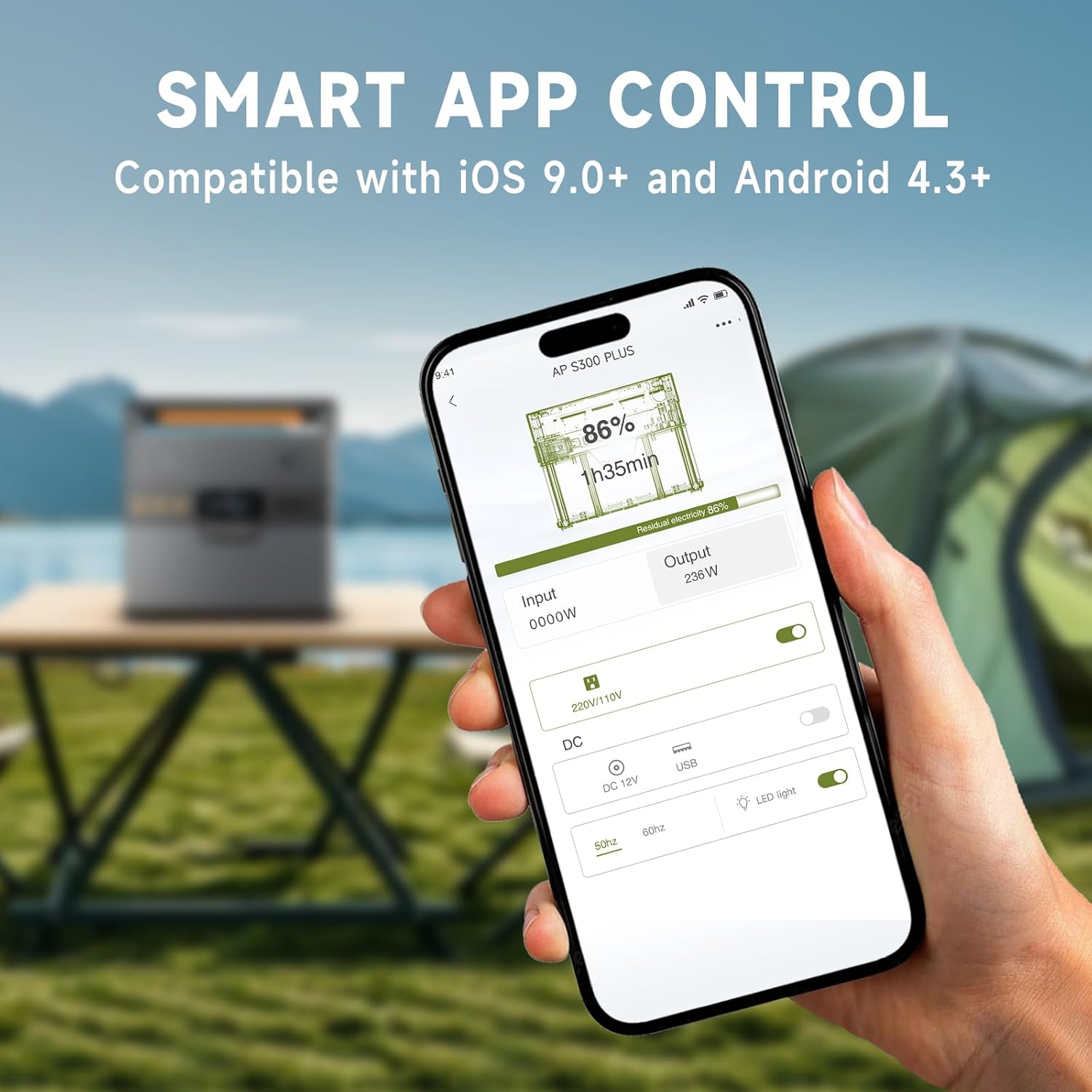
Image: A hand holding a smartphone showing the ALLPOWERS app interface, demonstrating remote control capabilities for the power station.
5. నిర్వహణ
నిల్వ:
- Store the power station in a cool, dry place, away from direct sunlight and corrosive materials.
- For long-term storage, charge the unit to 50-80% every 3-6 months to maintain battery health.
- Avoid storing in extreme temperatures (below -10°C / 14°F or above 45°C / 113°F).
శుభ్రపరచడం:
- మృదువైన, పొడి వస్త్రంతో బాహ్య భాగాన్ని తుడవండి.
- రాపిడి క్లీనర్లు లేదా ద్రావకాలు ఉపయోగించవద్దు.
- అన్ని పోర్టులు దుమ్ము మరియు శిధిలాలు లేకుండా ఉన్నాయని నిర్ధారించుకోండి.
6. ట్రబుల్షూటింగ్
| సమస్య | సాధ్యమైన కారణం | పరిష్కారం |
|---|---|---|
| యూనిట్ ఆన్ చేయబడలేదు. | బ్యాటరీ క్షీణించింది. | Charge the power station using the AC adapter. |
| AC అవుట్పుట్ పనిచేయడం లేదు. | AC output not activated; device exceeds 300W. | Press the AC Power Button. Reduce load or use a lower-power device. |
| USB/DC output not working. | DC/USB output not activated. | Press the DC/USB Power Button. |
| వైర్లెస్ ఛార్జింగ్ పనిచేయడం లేదు. | Device not Qi-compatible; device not centered; DC/USB output not activated. | Ensure device is Qi-compatible and correctly placed. Activate DC/USB output. |
| Slow charging via solar. | Insufficient sunlight; panel not correctly angled; panel not compatible. | Adjust panel angle for direct sunlight. Ensure panel is compatible and clean. |
| బ్లూటూత్ కనెక్షన్ సమస్యలు. | Bluetooth off on phone; app not updated; unit too far. | Ensure phone Bluetooth is on. Update app. Move phone closer to unit (within 10m). |
If the problem persists, please contact ALLPOWERS customer support.
7. స్పెసిఫికేషన్లు
| ఫీచర్ | వివరాలు |
|---|---|
| మోడల్ పేరు | AP-SS-005 |
| బ్యాటరీ కెపాసిటీ | 288వాహ్ / 78000ఎంఏహెచ్ |
| AC అవుట్పుట్ | 300W (Pure Sine Wave, Peak 600W) |
| USB-A అవుట్పుట్ | 2 x 18W |
| USB-C అవుట్పుట్ | 1 x 100W (QC3.0) |
| 12V Car Charger Output | 1 x 12V/10A |
| వైర్లెస్ ఛార్జింగ్ | 1 x 5V/1A |
| AC ఛార్జింగ్ ఇన్పుట్ | మాక్స్. 200W |
| సౌర ఛార్జింగ్ ఇన్పుట్ | Max. 100W (MPPT) |
| ఉత్పత్తి కొలతలు | 8.1"L x 6.5"W x 4.3"H (20.5సెం.మీ x 16.5సెం.మీ x 10.9సెం.మీ) |
| వస్తువు బరువు | 8.8 పౌండ్లు (4 కిలోలు) |
| బ్యాటరీ రకం | లిథియం పాలిమర్ |
8. వారంటీ మరియు మద్దతు
వారంటీ సమాచారం:
The ALLPOWERS S300LUS Portable Power Station comes with a 10-year ALLPOWERS warranty. This warranty covers manufacturing defects and workmanship under normal use. Please retain your proof of purchase for warranty claims.
దుర్వినియోగం, ప్రమాదాలు, అనధికార మార్పులు లేదా ప్రకృతి వైపరీత్యాల వల్ల కలిగే నష్టాన్ని వారంటీ కవర్ చేయదు.
కస్టమర్ మద్దతు:
For technical assistance, warranty claims, or any questions regarding your ALLPOWERS S300LUS, please contact ALLPOWERS customer support through their official webమీ కొనుగోలుతో అందించబడిన సైట్ లేదా సంప్రదింపు సమాచారం.
మీరు కూడా సందర్శించవచ్చు ALLPOWERS Store on Amazon మరిన్ని ఉత్పత్తి సమాచారం మరియు మద్దతు వనరుల కోసం.


