పరిచయం
Thank you for choosing the Bigme B251 Epaper Color Monitor. This 25.3-inch E-ink display is designed to provide a comfortable and eye-friendly viewing experience, mimicking the feel of color printing paper. It features advanced xRapid refresh technology, customizable front light, and versatile connectivity options to enhance your productivity and visual comfort.
This manual provides detailed instructions for setting up, operating, and maintaining your Bigme B251 monitor. Please read it thoroughly before using the device to ensure proper operation and to maximize its lifespan.

The Bigme B251 monitor is designed for eye comfort, making it suitable for extended use.
భద్రతా సమాచారం
To ensure safe and optimal operation of your Bigme B251 monitor, please observe the following safety precautions:
- Do not expose the monitor to water or excessive moisture.
- ప్రత్యక్ష సూర్యకాంతిలో లేదా వేడి మూలాల దగ్గర మానిటర్ను ఉంచడం మానుకోండి.
- మానిటర్తో పాటు సరఫరా చేయబడిన పవర్ అడాప్టర్ను మాత్రమే ఉపయోగించండి.
- మానిటర్ను మీరే విడదీయడానికి లేదా మరమ్మతు చేయడానికి ప్రయత్నించవద్దు. అన్ని సర్వీసింగ్లను అర్హత కలిగిన సిబ్బందికి సూచించండి.
- బలమైన అయస్కాంత క్షేత్రాల నుండి మానిటర్ను దూరంగా ఉంచండి.
- వేడెక్కడాన్ని నివారించడానికి మానిటర్ చుట్టూ సరైన వెంటిలేషన్ ఉండేలా చూసుకోండి.
- Handle the screen with care; it is made of glass and can break if dropped or impacted.
ప్యాకేజీ విషయాలు
దయచేసి ఈ క్రింది అంశాల కోసం పెట్టెను ఎంచుకోండి:
- Bigme B251 Epaper Color Monitor
- పవర్ అడాప్టర్
- HDMI కేబుల్
- USB-C కేబుల్
- వినియోగదారు మాన్యువల్ (ఈ పత్రం)
- Monitor Stand components (base and arm)
ఉత్పత్తి ముగిసిందిview
Familiarize yourself with the various components and features of your Bigme B251 monitor.
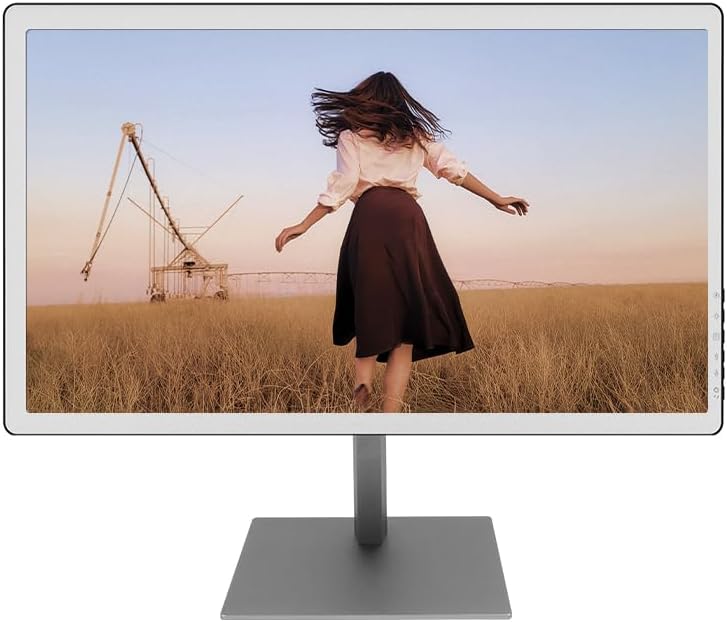
ముందు view of the Bigme B251 Epaper Color Monitor.

Key features of the Bigme B251 monitor.
పోర్ట్లు మరియు కనెక్షన్లు

వివరంగా view of the Bigme B251 monitor's input/output ports.
- DC 19V: పవర్ ఇన్పుట్ పోర్ట్.
- USB_B: Upstream USB port for connecting to your computer.
- USB_A (x3): Downstream USB ports for connecting peripherals like keyboards, mice, or USB drives.
- DP (డిస్ప్లేపోర్ట్): డిజిటల్ వీడియో ఇన్పుట్.
- మినీ HDMI: డిజిటల్ వీడియో ఇన్పుట్.
- HDMI: డిజిటల్ వీడియో ఇన్పుట్.
- టైప్-సి: Multi-function port supporting video input, data transfer, and power delivery.
సెటప్
1. స్టాండ్ అసెంబ్లింగ్
- ప్యాకేజింగ్ నుండి అన్ని భాగాలను జాగ్రత్తగా తొలగించండి.
- అందించిన స్క్రూలను ఉపయోగించి స్టాండ్ ఆర్మ్కు స్టాండ్ బేస్ను అటాచ్ చేయండి.
- మానిటర్ వెనుక భాగంలో ఉన్న మౌంటు రంధ్రాలతో అసెంబుల్ చేయబడిన స్టాండ్ను సమలేఖనం చేయండి.
- Secure the stand to the monitor using the designated screws. Ensure it is firmly attached.
2. మీ కంప్యూటర్కు కనెక్ట్ అవుతోంది
The Bigme B251 supports multiple video input options:
- HDMI కనెక్షన్: Connect one end of the HDMI cable to the HDMI port on your monitor and the other end to the HDMI output port on your computer.
- డిస్ప్లేపోర్ట్ (DP) కనెక్షన్: Connect one end of the DisplayPort cable to the DP port on your monitor and the other end to the DP output port on your computer.
- టైప్-సి కనెక్షన్: If your computer supports video output via USB-C (DisplayPort Alternate Mode), connect a USB-C to USB-C cable between the monitor's Type-C port and your computer's USB-C port. This connection may also provide power and data.
3. పవర్ కనెక్షన్
- Connect the power adapter to the DC 19V input port on the monitor.
- పవర్ అడాప్టర్ను వాల్ అవుట్లెట్లోకి ప్లగ్ చేయండి.
4. ప్రారంభ పవర్ ఆన్
Press the power button located on the monitor (refer to Product Overview for location). The monitor will power on and display the Bigme logo before showing your computer's desktop.
ఆపరేటింగ్ సూచనలు
పవర్ ఆన్/ఆఫ్
- పవర్ ఆన్ చేయడానికి: పవర్ బటన్ను నొక్కండి.
- పవర్ ఆఫ్ చేయడానికి: Press and hold the power button for a few seconds until the screen turns off.
Refresh Modes (xRapid Technology)
The Bigme B251 features xRapid refresh technology and multiple display modes to optimize performance for different content types. E-ink displays require specific modes for best results.

Adjusting refresh modes and display settings.
- Web మోడ్: Ideal for general web browsing and dynamic content.
- టెక్స్ట్ మోడ్: Optimized for reading text documents, providing sharp and clear characters.
- చిత్ర మోడ్: కోసం ఉత్తమమైనది viewing static images and graphics, balancing clarity and refresh.
- వీడియో మోడ్: Designed for video playback, minimizing ghosting and improving motion fluidity.
Switch between these modes via the monitor's on-screen display (OSD) menu or dedicated buttons (if available) to achieve the best display effect for your current activity.
డిస్ప్లే సెట్టింగ్లను సర్దుబాటు చేస్తోంది
The monitor allows you to fine-tune various display parameters for optimal viewing సౌకర్యం.

Adjusting warm and cold front light settings.
- Front Light Adjustment: Customize the brightness and color temperature (warm/cold) of the integrated front light to suit different lighting conditions and personal preferences. This can be done through the OSD menu.
- Dark Enhancement: Adjust this setting to control the intensity of dark tones on the screen.
- Light Filtration: Use this setting to filter light, which can further reduce eye strain.
వాయిస్ కంట్రోల్ సిస్టమ్
The B251 monitor features an intelligent voice control system for hands-free operation. Common voice commands include:
- "Power On"
- "Power Off"
- "Volume Up"
- "Volume Down"
- "Brighter"
- "Dimmer"
Ensure the microphone is not obstructed for optimal voice recognition.
బహుముఖ మౌంటు ఎంపికలు
The Bigme B251 supports various mounting configurations to provide a comfortable viewభంగిమ.

The Bigme B251 offers flexible mounting and adjustment options.
- ఎత్తు సర్దుబాటు: Adjust the monitor's height for ergonomic viewing.
- స్వివెల్: Rotate the monitor horizontally on its stand.
- వంపు: స్క్రీన్ యొక్క నిలువు కోణాన్ని సర్దుబాటు చేయండి.
- 90° Rotation (Pivot): Rotate the screen to portrait mode, ideal for reading long documents or coding.
- వాల్ మౌంట్: Compatible with VESA standard mounts (check specifications for size) for wall or mechanical arm installation.
నిర్వహణ
మానిటర్ శుభ్రపరచడం
- శుభ్రపరిచే ముందు ఎల్లప్పుడూ మానిటర్ను పవర్ ఆఫ్ చేసి, పవర్ అవుట్లెట్ నుండి అన్ప్లగ్ చేయండి.
- కొద్దిగా మెత్తని, మెత్తని బట్టను ఉపయోగించండి dampనీరు లేదా రాపిడి లేని స్క్రీన్ క్లీనర్తో శుభ్రం చేయండి.
- క్లీనర్ను నేరుగా స్క్రీన్పై పిచికారీ చేయవద్దు.
- కఠినమైన రసాయనాలు, రాపిడి ప్యాడ్లు లేదా ద్రావకాలను ఉపయోగించడం మానుకోండి.
- దుమ్ము మరియు మరకలను తొలగించడానికి స్క్రీన్ను సున్నితంగా తుడవండి.
- మానిటర్ శుభ్రం చేయండి casinగ్రా. మృదువైన, పొడి వస్త్రంతో.
నిల్వ
If storing the monitor for an extended period, ensure it is powered off, unplugged, and stored in a cool, dry place away from direct sunlight and extreme temperatures. It is recommended to use the original packaging for protection.
ట్రబుల్షూటింగ్
| సమస్య | సాధ్యమైన కారణం | పరిష్కారం |
|---|---|---|
| తెరపై చిత్రం లేదు |
|
|
| Image is blurry or ghosting |
|
|
| Voice control not responding |
|
|
| Monitor not recognized by computer |
|
|
స్పెసిఫికేషన్లు
| ఫీచర్ | వివరాలు |
|---|---|
| బ్రాండ్ | బిగ్మే |
| మోడల్ | యుఎస్-బి251 |
| స్క్రీన్ పరిమాణం | 25.3 అంగుళాలు |
| ప్రదర్శన సాంకేతికత | Color E-ink (Epaper) |
| రిజల్యూషన్ | 3200 x 1800 (3K) |
| కారక నిష్పత్తి | 16:9 |
| Refresh Technology | xRapid Refresh |
| ఫ్రంట్ లైట్ | Adjustable Warm/Cold Light |
| కనెక్టివిటీ | HDMI, DP, Type-C, USB-A (x3), USB-B |
| ఉత్పత్తి కొలతలు | 1.23 x 14.17 x 23.54 అంగుళాలు |
| వాయిస్ కంట్రోల్ | అవును |
| మౌంటు ఐచ్ఛికాలు | Height Adjustable, Swivel, Tilt, 90° Rotation, Wall Mount (VESA compatible) |
వారంటీ మరియు మద్దతు
Bigme products are manufactured to high quality standards. For specific warranty terms and conditions, please refer to the warranty card included with your product or visit the official Bigme webసైట్.
If you encounter any issues or have questions regarding your Bigme B251 monitor, please contact Bigme customer support. You can typically find contact information on the Bigme webసైట్ లేదా ఉత్పత్తి ప్యాకేజింగ్లో.
For the latest drivers, firmware updates, and additional support resources, please visit the official Bigme support page.


