పరిచయం
This manual provides essential information for setting up, operating, maintaining, and troubleshooting your Auusda 15.6-inch T152A Laptop. Please read this guide thoroughly to ensure optimal performance and longevity of your device.
The Auusda T152A is a versatile 15.6-inch laptop designed for productivity and multimedia. It features a 4-Core N95 processor, 32GB DDR4 RAM, and a 1TB PCIe SSD, with upgradeability up to 8TB. The laptop comes preinstalled with Windows 11 Pro and includes a Full HD (1920x1080) IPS display, a backlit keyboard, and a fingerprint reader for enhanced security.
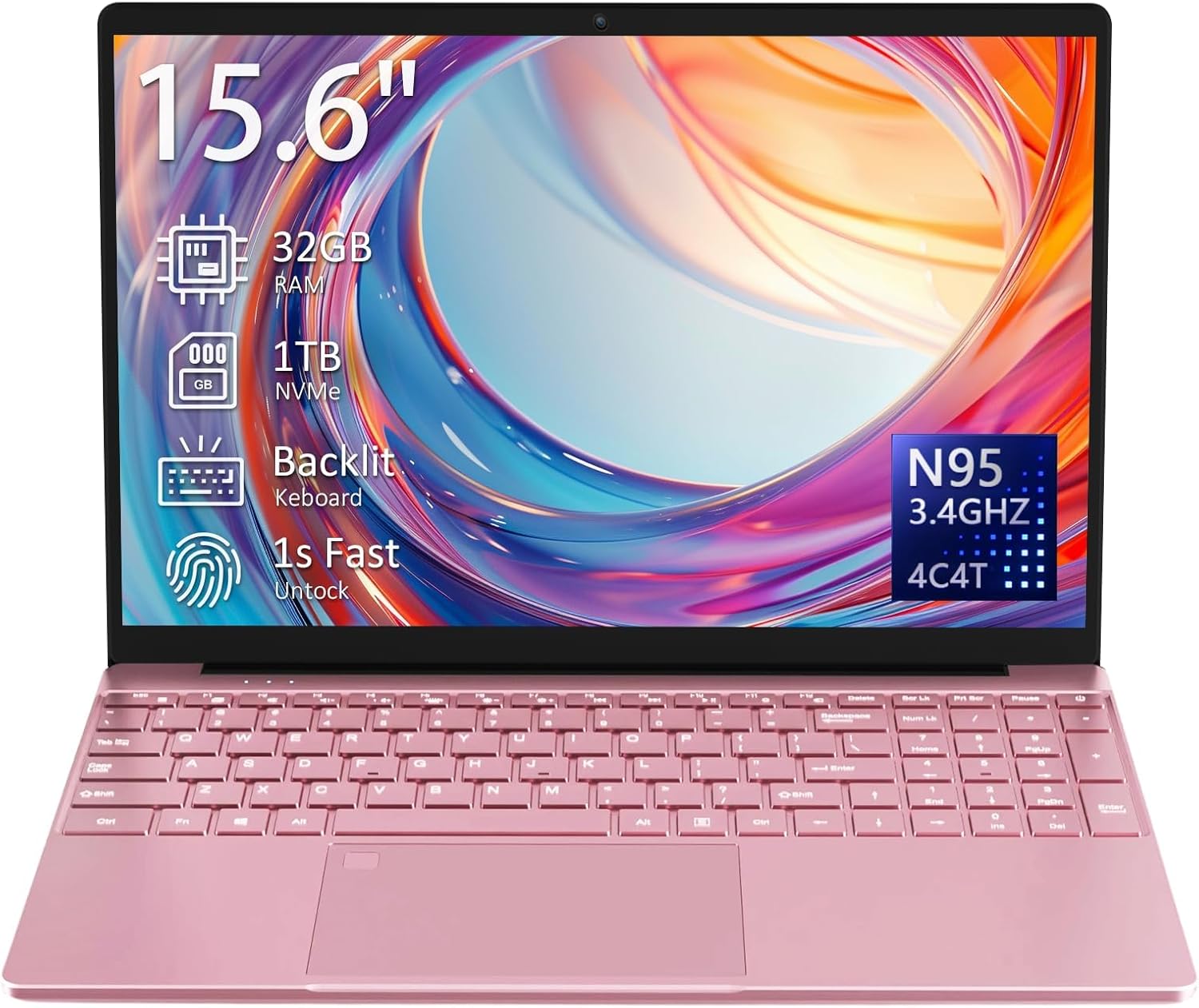
Image: The Auusda 15.6-inch T152A Laptop, showcasing its sleek design and key features like 32GB RAM, 1TB NVMe SSD, backlit keyboard, 1-second fingerprint unlock, and N95 processor.
సెటప్
- అన్బాక్సింగ్ మరియు ప్రారంభ తనిఖీ: Carefully remove the laptop and all accessories from the packaging. Verify that all components listed in the 'Included' section are present and undamaged.
- Charging the Laptop: Connect the globally compatible 100-240V charger to the DC3.5mm round power port (located on the left side) and plug it into a power outlet. Allow the laptop to charge fully before first use.
- పవర్ ఆన్: Open the laptop lid. Press the power button, typically located on the top right of the keyboard or side. The laptop will boot up and guide you through the initial Windows 11 Pro setup process.
- విండోస్ 11 ప్రో సెటప్: Follow the on-screen instructions to configure your language, region, network connection, and user account. This process includes setting up your fingerprint for secure login.
- Wi-Fiకి కనెక్ట్ చేస్తోంది: During the Windows setup, you will be prompted to connect to a Wi-Fi network. Select your network and enter the password. The laptop supports dual-band 5GHz Wi-Fi (802.11ac/g/n).
- పరిధీయ కనెక్షన్: Connect any external devices such as a mouse, external keyboard, or monitor using the available ports.
Video: This video demonstrates the Auusda laptop's general appearance and functionality, including its display and keyboard, providing a visual overview of the device in use.
ఆపరేటింగ్
కీబోర్డ్ మరియు టచ్ప్యాడ్
The laptop features a full-size keyboard with a numeric keypad. The backlit keyboard allows for comfortable typing in low-light conditions. To activate or adjust the backlight, press the 'Fn' key and then press the 'F5' key 1-3 times.
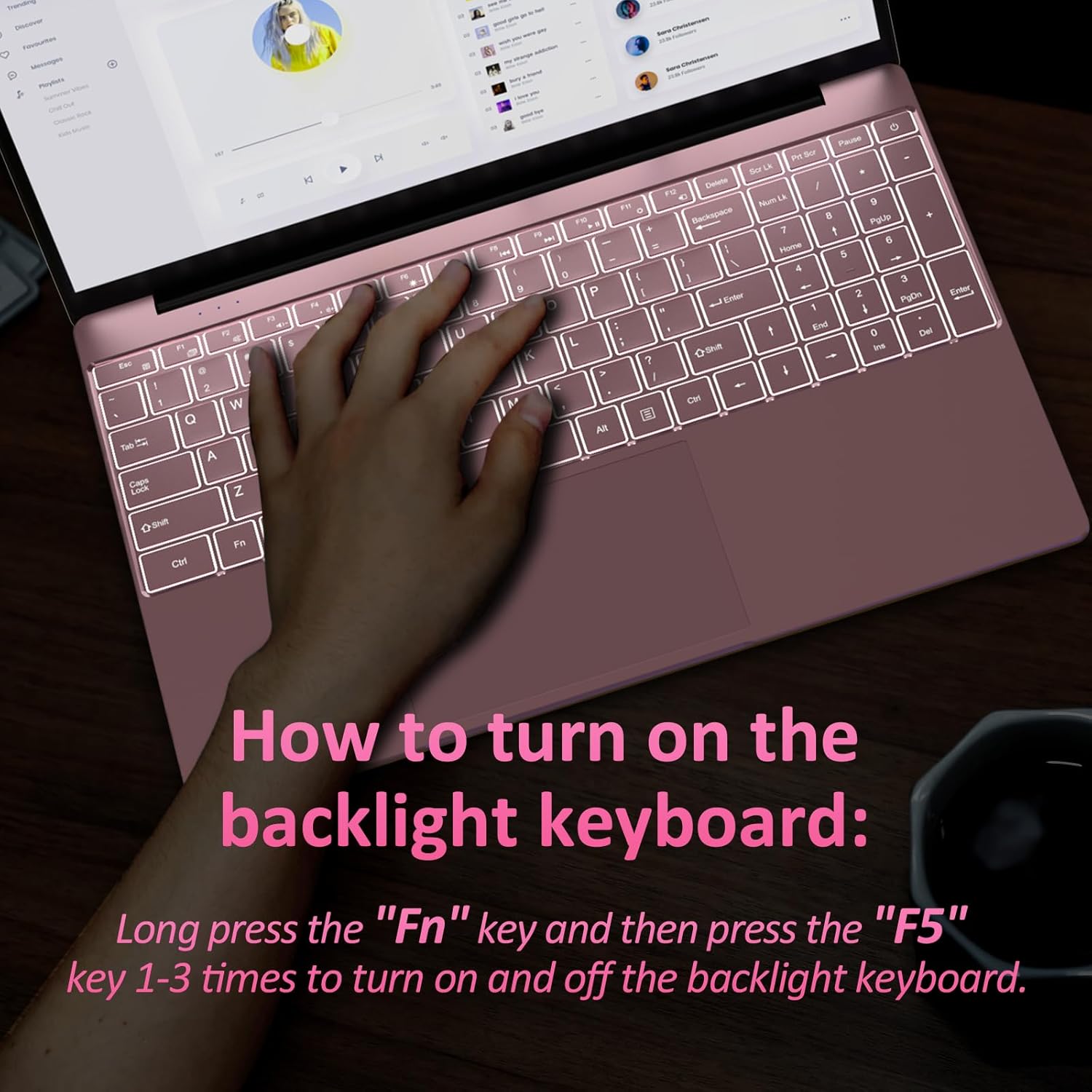
Image: A close-up of the laptop's backlit keyboard, illustrating the 'Fn' and 'F5' key combination to control the backlight.
The glass-like touchpad provides precise cursor control. It also integrates a fingerprint reader for secure, one-touch login, eliminating the need for passwords.

Image: This image highlights the backlit keyboard for improved visibility and the integrated fingerprint recognition for enhanced security and quick unlocking.
కనెక్టివిటీ మరియు పోర్టులు
The laptop offers various ports for connecting external devices:
- 2x USB 3.0 ports for fast data transfer.
- 1x MicroSD slot (supports up to 2TB).
- Mini (or standard) HDMI output for 4K video, supporting up to three 4K@60Hz external displays.
- 3.5mm audio jack (with microphone, right side).
- DC3.5mm round power port (12V 3A, left side).
Wireless connectivity includes dual-band 5GHz Wi-Fi (802.11ac/g/n) and Bluetooth 5.0 for reliable device pairing.

Image: An illustration detailing the various ports available on the Auusda T152A laptop, including USB 3.0, MicroSD slot, HDMI, headphone jack, and charging port, emphasizing its multi-function connection capabilities.
ప్రదర్శించు
The 15.6-inch Full HD (1920x1080) IPS screen features a 0.2-inch narrow bezel and a 180° hinge, allowing for flexible viewing angles. It is powered by UHD Graphics (16EU at up to 1.20GHz) for vibrant visuals.

Image: The laptop's 15.6-inch Full HD IPS display with a narrow bezel and a 180-degree hinge, demonstrating its flexibility and wide viewing కోణాలు.
Video: This video demonstrates the laptop's performance during a racing game, highlighting its display quality and processing capabilities for light gaming.
నిర్వహణ
- శుభ్రపరచడం: స్క్రీన్ మరియు బాహ్య భాగాన్ని శుభ్రం చేయడానికి మృదువైన, మెత్తటి బట్టను ఉపయోగించండి. మొండి మరకల కోసం, dampకొద్ది మొత్తంలో నీరు లేదా స్క్రీన్-సేఫ్ క్లీనర్తో వస్త్రాన్ని తుడవండి. కఠినమైన రసాయనాలను నివారించండి.
- బ్యాటరీ సంరక్షణ: The laptop is equipped with an 8000mAh, 61.6Wh battery. To prolong battery life, avoid fully discharging the battery frequently. Store the laptop in a cool, dry place when not in use for extended periods.
- శీతలీకరణ: The laptop has a built-in cooling fan and air vents to dissipate heat. Ensure the air vents are not obstructed to maintain proper airflow and prevent overheating.
- సాఫ్ట్వేర్ అప్డేట్లు: Regularly install Windows updates to ensure system stability, security, and performance.

చిత్రం: వివరణాత్మక view of the laptop's air vent, crucial for maintaining optimal operating temperature and preventing overheating.
ట్రబుల్షూటింగ్
- ల్యాప్టాప్ ఆన్ కావడం లేదు: Ensure the charger is securely connected and the laptop has sufficient battery charge. If the issue persists, try a different power outlet.
- నెమ్మదిగా పనితీరు: Close unnecessary applications running in the background. Check for available Windows updates and install them. Ensure adequate free space on the 1TB SSD.
- Wi-Fi కనెక్టివిటీ సమస్యలు: Verify that Wi-Fi is enabled and you are connected to the correct network. Restart your router and the laptop.
- Backlit Keyboard Not Working: Press 'Fn' + 'F5' multiple times to cycle through backlight settings. Ensure the keyboard is clean and free of debris.
- Fingerprint Reader Issues: Ensure your finger is clean and dry. Re-register your fingerprint in Windows settings if problems persist.
- External Display Not Detected: Check the HDMI cable connection. Ensure the external display is powered on and set to the correct input source. Update graphics drivers if necessary.
స్పెసిఫికేషన్లు
| ఫీచర్ | స్పెసిఫికేషన్ |
|---|---|
| మోడల్ పేరు | T152A |
| స్క్రీన్ పరిమాణం | 15.6 అంగుళాలు |
| స్క్రీన్ రిజల్యూషన్ | 1920 x 1080 Pixels (Full HD IPS) |
| ప్రాసెసర్ | 1.7 GHz Intel Mobile CPU (N95, 4C/4T, 1.7-3.4GHz) |
| RAM | 32 GB DDR4 SDRAM (3200 MHz) |
| హార్డ్ డ్రైవ్ | 1 TB SSD (PCIe x 2, upgradable to 8TB) |
| గ్రాఫిక్స్ కోప్రాసెసర్ | UHD Graphics (16EU at up to 1.20GHz) |
| ఆపరేటింగ్ సిస్టమ్ | Windows 11 ప్రో |
| వైర్లెస్ రకం | Dual-band 5GHz Wi-Fi (802.11ac/g/n), Bluetooth 5.0 |
| ఓడరేవులు | 2x USB 3.0, 1x MicroSD slot, 1x Mini HDMI, 1x 3.5mm Audio Jack, 1x DC3.5mm Power Port |
| ప్రత్యేక లక్షణాలు | బ్యాక్లిట్ కీబోర్డ్, ఫింగర్ప్రింట్ రీడర్ |
| బ్యాటరీ | 8000mAh, 61.6Wh |
| వస్తువు బరువు | 5.3 pounds (approx. 3.7 lbs as per feature bullets) |
| ఉత్పత్తి కొలతలు | 14 x 10 x 0.7 అంగుళాలు |
| రంగు | పింక్ |
వారంటీ మరియు మద్దతు
Your Auusda T152A Laptop comes with a 730-రోజుల వారంటీ for worry-free ownership. Additionally, we offer 100 రోజుల ఉచిత రిటర్న్లు.
For any questions, technical assistance, or support needs, please contact our 24/7 కస్టమర్ సేవ. Refer to the contact information provided in your product packaging or on the official Auusda webసైట్.


