పరిచయం
The WOLFBOX G930 Mirror Camera and X5 New 3 Channel Dash Cam system offers comprehensive vehicle recording capabilities. The G930 model functions as a smart 4K mirror dash cam, providing clear front and rear views. The X5 dash camera is a 4K 3-channel system, capturing front, rear, and interior footage. This manual provides detailed instructions for setup, operation, and maintenance of your WOLFBOX dash cam system.

Image: The WOLFBOX G930 Mirror Camera and X5 Dash Cam system, showing both units.
సెటప్
Before operating your WOLFBOX dash cam system, ensure proper installation and initial setup. This includes mounting the cameras, connecting power, and inserting the memory card.
భాగాలు ముగిశాయిview

Image: Components of the WOLFBOX G930 Mirror Camera, including the main unit, GPS module, and a 64GB SD card.
మెమరీ కార్డ్ ఇన్స్టాలేషన్
The system comes with a 64GB memory card to get started. Insert the memory card into the designated slot on the dash cam unit. Ensure it is inserted correctly until it clicks into place.
పవర్ కనెక్షన్
Connect the power cable to the dash cam and to your vehicle's power outlet. For 24/7 parking mode functionality, a separate hardware kit is required and must be purchased independently to ensure continuous power supply.
ఆపరేటింగ్ సూచనలు
The WOLFBOX dash cam system is designed for intuitive operation, offering various features to enhance your driving safety and recording experience.
G930 Mirror Camera Operation
- ప్రదర్శన నియంత్రణ: The G930 features a responsive 10-inch touch screen. You can slide the screen up and down to adjust the viewing angle. Swipe left and right to switch between front, rear, or split-screen viewలు అప్రయత్నంగా.
- రిజల్యూషన్: The G930 records front footage in 4K resolution and rear footage in 1080P, ensuring sharp and detailed video capture.
- 5.8GHz వైఫై కనెక్టివిటీ: Utilize the upgraded 5.8GHz WiFi system for seamless and stable connections. Connect to the G930 dash cam mirror via the WOLFBOX app to quickly download and share videos. This high-speed WiFi ensures smooth access to your video files.
- WDR టెక్నాలజీ: The Wide Dynamic Range (WDR) technology ensures clear details are captured in various lighting conditions, from very dark to very bright environments, by balancing exposure.

Image: The WOLFBOX G930 Mirror Camera highlighting its 4K UHD capability and features like 5.8GHz Wi-Fi, WDR, G-Sensor, GPS, and 10-inch touch screen.

Image: The WOLFBOX G930 Mirror Camera demonstrating its 5.8GHz Wi-Fi capability for faster data transfers compared to 2.4GHz.

Image: A visual representation of WDR technology in the WOLFBOX G930, showing how it balances exposure in overly dark or overly light conditions.
X5 Dash Cam Operation
- 3-ఛానల్ రికార్డింగ్: The WOLFBOX X5 dash camera system includes a 4K front camera, a 2.5K rear camera, and a 1080P interior camera, providing comprehensive coverage.
- STARVIS 2 IMX678 Image Sensor: Equipped with the cutting-edge STARVIS 2 IMX678 image sensor, the X5 offers exceptional image quality and color reproduction, especially in low-light conditions.
- Upgraded 2.5K Rear Camera: The enhanced 2.5K rear camera captures fine details, contributing to safer driving. It utilizes advanced digital signal transmission for superior image quality and data transfer compared to traditional analog systems.
- మెరుగైన రాత్రి దృష్టి: Thanks to the STARVIS 2 IMX678 image sensor and advanced 3D Noise Reduction (3D DNR), the X5 dash cam ensures clear and detailed visuals even in low-light conditions, reducing image noise by 20%.

చిత్రం: WOLFBOX X5 డాష్ కామ్, షోక్asing its STARVIS 2 sensor, 4K HDR recording, GPS, and 128GB storage capacity.
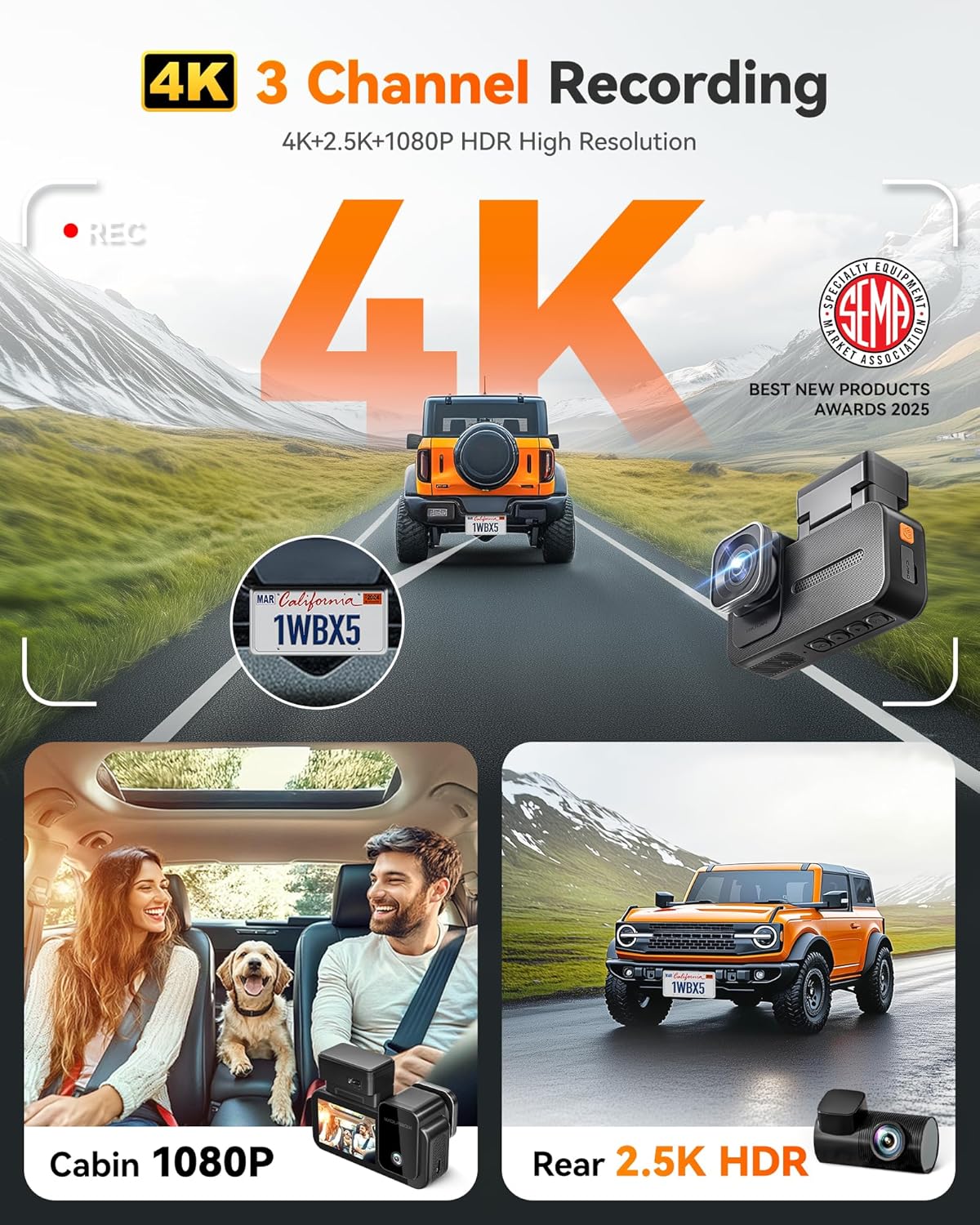
చిత్రం: ఒక ఓవర్view of the WOLFBOX X5 Dash Cam's 4K 3-Channel Recording, detailing front 4K, cabin 1080P, and rear 2.5K HDR capabilities.

Image: A comparison illustrating the upgraded 2.5K rear camera and the benefits of digital signal transmission over analog in the WOLFBOX X5 Dash Cam.

Image: A visual explanation of the WOLFBOX X5 Dash Cam's enhanced 3D Noise Reduction Night Vision, highlighting the Sony Starvis IMX678 sensor, HDR & WDR, 3D DNR, and f/1.7 aperture.
Common Operating Features (G930 & X5)
- స్మార్ట్ వాయిస్ నియంత్రణ: Both models support hands-free control with 12 voice commands (e.g., "take picture", "turn on/off Wi-Fi", "lock the video", "show front/rear camera"). This allows for easy control without taking your hands off the steering wheel.
- GPS ట్రాకింగ్: The GPS tracking feature displays speed and direction in real-time and allows for route review later, adding a layer of information to your recordings.
- లూప్ రికార్డింగ్ & G-సెన్సార్: The loop recording function ensures continuous recording by overwriting the oldest files when the memory card is full. The G-sensor automatically detects sudden shakes or collisions and locks the current video segment to prevent it from being overwritten, providing peace of mind during unexpected incidents.
నిర్వహణ
Regular maintenance ensures the longevity and optimal performance of your WOLFBOX dash cam system.
- లెన్స్ క్లీనింగ్: Periodically clean the camera lenses with a soft, lint-free cloth to ensure clear video quality. Avoid abrasive materials that could scratch the lens.
- మెమరీ కార్డ్ నిర్వహణ: Format the memory card regularly (e.g., once a month) through the dash cam's settings to prevent data corruption and ensure smooth recording. Back up important videos before formatting.
- ఫర్మ్వేర్ నవీకరణలు: అధికారిక WOLFBOX ని తనిఖీ చేయండి website or app for any available firmware updates. Keeping your device updated can improve performance and add new features.
- కేబుల్ తనిఖీ: Routinely inspect all cables for any signs of wear or damage. Replace any damaged cables immediately to prevent power issues or disconnections.
ట్రబుల్షూటింగ్
If you encounter issues with your WOLFBOX dash cam system, refer to the following common troubleshooting steps:
- కెమెరా ఆన్ చేయడం లేదు:
- Ensure the power cable is securely connected to both the dash cam and the vehicle's power source.
- వాహనం యొక్క పవర్ అవుట్లెట్ కార్యాచరణ కోసం తనిఖీ చేయండి.
- If using a hardwire kit, verify all connections are correct and the vehicle's fuse is intact.
- పేలవమైన వీడియో నాణ్యత:
- Clean the camera lenses to remove any dirt or smudges.
- లెన్స్ల నుండి రక్షిత పొర తొలగించబడిందని నిర్ధారించుకోండి.
- Check the video resolution settings in the dash cam menu.
- Verify that the WDR and Night Vision functions are enabled if operating in challenging lighting conditions.
- Wi-Fi కనెక్షన్ సమస్యలు:
- Ensure your mobile device is within range of the dash cam's Wi-Fi signal.
- డాష్ క్యామ్ మరియు మీ మొబైల్ పరికరం రెండింటినీ రీస్టార్ట్ చేయండి.
- Reinstall the WOLFBOX app if issues persist.
- మెమరీ కార్డ్ లోపాలు:
- Format the memory card through the dash cam's settings.
- Try a different, high-quality memory card (Class 10 or higher recommended).
- Ensure the memory card is not full; enable loop recording.
- G-సెన్సర్ సున్నితత్వం:
- Adjust the G-sensor sensitivity setting in the menu. If it's too high, it may trigger recordings unnecessarily.
For further assistance, please contact WOLFBOX customer support.
స్పెసిఫికేషన్లు
| ఫీచర్ | వివరాలు |
|---|---|
| బ్రాండ్ | WOLFBOX |
| మోడల్ | G930 & X5 |
| ASIN | B0F5W43P8W |
| ప్రదర్శన ఫీచర్లు | వైర్లెస్ |
| తయారీదారు | WOLFBOX |
| మొదటి తేదీ అందుబాటులో ఉంది | జనవరి 19, 2025 |
| G930 Front Camera Resolution | 4K |
| G930 Rear Camera Resolution | 1080P |
| X5 Front Camera Resolution | 4K |
| X5 Rear Camera Resolution | 2.5K |
| X5 Interior Camera Resolution | 1080P |
| Wi-Fi ఫ్రీక్వెన్సీ | 5.8GHz |
| Image Sensor (X5) | స్టార్విస్ 2 IMX678 |
| మెమరీ కార్డ్ చేర్చబడింది | 64GB (G930), 128GB (X5) |
వారంటీ మరియు మద్దతు
WOLFBOX products are designed for reliability and performance. For any inquiries or assistance, please refer to the following information:
- రిటర్న్ పాలసీ: The product is eligible for a refund or replacement within 30 days of purchase. Please refer to the retailer's specific return policy for full details.
- తయారీదారు మద్దతు: For technical support, troubleshooting, or warranty claims beyond the return period, please contact WOLFBOX directly. Visit the official WOLFBOX webసంప్రదింపు సమాచారం మరియు మద్దతు వనరుల కోసం సైట్.
- ఆన్లైన్ వనరులు: Additional support, FAQs, and firmware updates may be available on the WOLFBOX brand store or product support pages.


