1. పరిచయం
The ANBERNIC RG34XXSP is a portable retro handheld game console designed for an immersive gaming experience. Featuring a unique flip design with magnetic closure, a 3.4-inch IPS screen, and a powerful H700 quad-core processor, this console supports a wide array of classic game formats. It offers multiple connectivity options including Wi-Fi, Bluetooth, and HDMI output, making it versatile for both on-the-go and home entertainment.
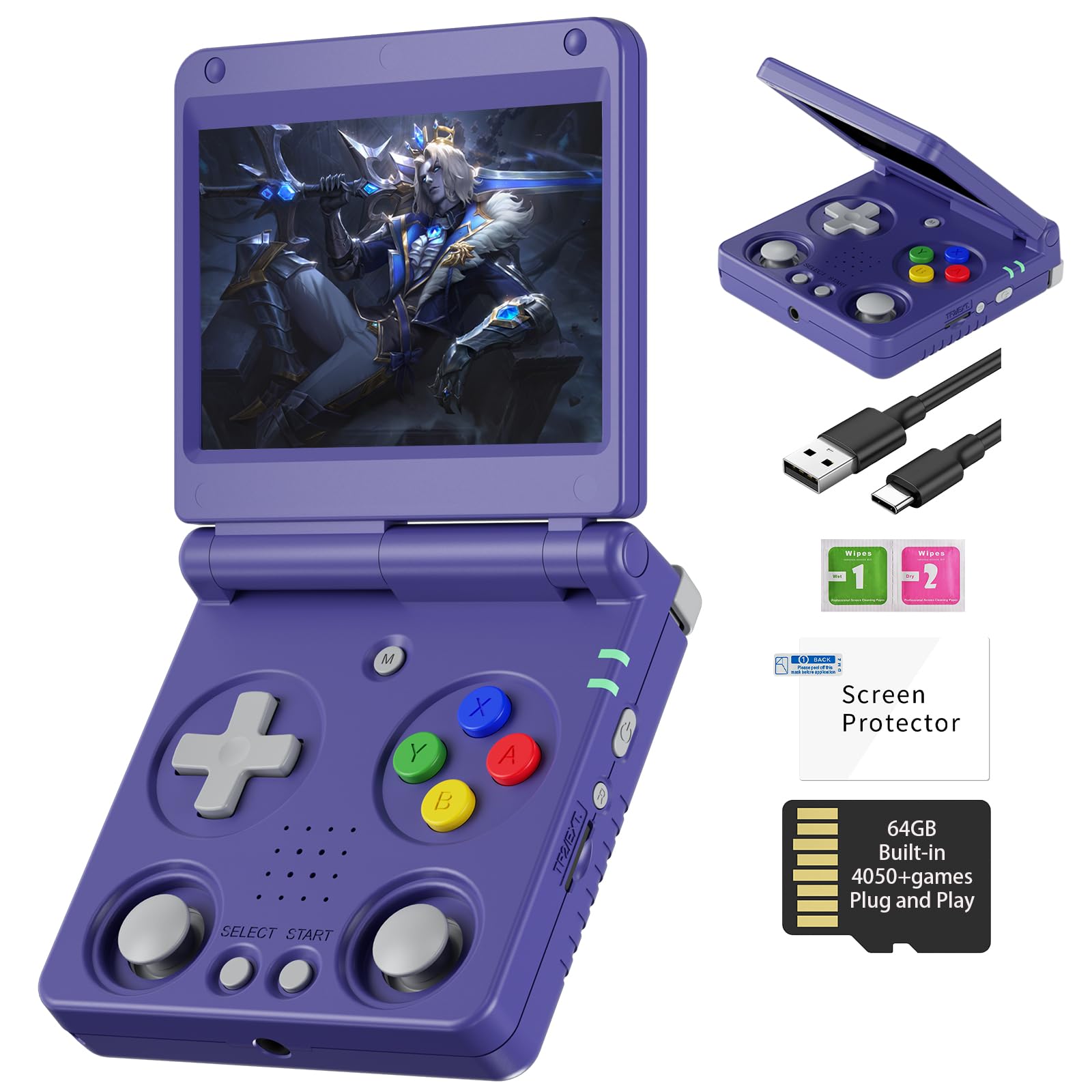
Image: The ANBERNIC RG34XXSP console, showcasing దాని కాంపాక్ట్, మడతపెట్టగల డిజైన్.
2 కీ ఫీచర్లు
- Flip Portable Design: Features a magnetic closure and high-quality alloy hinges, allowing the screen to hover at various angles (190 and 155 degrees) and supporting sleep mode when closed.
- శక్తివంతమైన పనితీరు: Equipped with an H700 quad-core ARM Cortex-A53 CPU (1.5GHz) and dual-core G31 MP2 GPU for smooth gaming.
- వైబ్రెంట్ డిస్ప్లే: 3.4-అంగుళాల IPS పూర్తి-viewing angle screen with OCA full-fit technology and 720*480 resolution for clear and saturated visuals.
- Extensive Game Compatibility: Supports over 30 game formats, including PSP, PS1, DC, NDS, ARCADE, GBC, GB, SFC, FC, MAME, MD, GG, PCE, NGPC, SMS, WSC. Compatible with third-party software like RixeIHK for game downloads.
- Ample నిల్వ: Comes with a 64GB TF card and supports dual card slots for expansion up to 512GB.
- సుదీర్ఘ బ్యాటరీ జీవితం: Integrated 3300mAh Li-Polymer battery provides 7-8 hours of gameplay, with fast charging via USB Type-C.
- బహుళ కనెక్టివిటీ: Supports 2.4G wireless and wired controller connections, Bluetooth controller connection, HDMI output to TV, vibration motor, online multiplayer via Wi-Fi, and streaming.
- Responsive Controls: Features imported Japanese metal dome buttons for high sensitivity and precise feedback, along with sunken dual joysticks to prevent accidental touches.

Image: The console's alloy axle and multi-angle hover feature, demonstrating its adjustable screen positions.
3. సెటప్ గైడ్
3.1. ప్యాకేజీ విషయాలు
ప్రారంభించడానికి ముందు, అన్ని అంశాలు ప్యాకేజీలో ఉన్నాయని నిర్ధారించుకోండి:
- ANBERNIC RG34XXSP Handheld Console
- USB ఛార్జింగ్ కేబుల్
- స్క్రీన్ ప్రొటెక్టర్
- వినియోగదారు మాన్యువల్ (ఈ పత్రం)
- 64GB TF కార్డ్ (ముందే ఇన్స్టాల్ చేయబడింది లేదా వేరుగా ఉంటుంది)

Image: A visual representation of the items included in the RG34XXSP product package.
3.2. ప్రారంభ ఛార్జ్
For optimal performance, fully charge the console before first use.
- Connect the provided USB charging cable to the console's USB Type-C port.
- కేబుల్ యొక్క మరొక చివరను అనుకూలమైన USB పవర్ అడాప్టర్ (చేర్చబడలేదు) లేదా కంప్యూటర్ యొక్క USB పోర్ట్కు కనెక్ట్ చేయండి.
- The charging indicator light will illuminate. Charging is complete when the light changes color or turns off (refer to the console's indicator light behavior).
Note: The console supports fast charging. A full charge typically takes 2-3 hours.
3.3. TF కార్డును చొప్పించడం
The console comes with a 64GB TF card pre-loaded with games and the operating system. If you are using an additional TF card for game expansion:
- Locate the TF card slots on the side of the console. There are two slots: TF1/INT (internal/system) and TF2/EXT (external/expansion).
- Gently insert the system TF card into the TF1/INT slot until it clicks into place.
- For additional storage, insert a second TF card (up to 512GB) into the TF2/EXT slot.
- Ensure the console is powered off before inserting or removing TF cards to prevent data corruption.

Image: Close-up of the console's side, highlighting the TF card slots and power button.
3.4. పవర్ ఆన్/ఆఫ్
- To power on: Press and hold the Power button until the screen illuminates.
- To power off: Press and hold the Power button, then select the "Power Off" option on the screen. Alternatively, a short press may bring up a power menu.
- The console supports a sleep mode when the lid is closed, thanks to its built-in Hall switch chip.
4. ఆపరేటింగ్ సూచనలు
4.1. ప్రాథమిక నియంత్రణలు
Familiarize yourself with the console's buttons and joysticks:
- డి-ప్యాడ్: Directional control for menu navigation and gameplay.
- A/B/X/Y బటన్లు: Action buttons for gameplay.
- ఎంచుకోండి/ప్రారంభించు బటన్లు: For in-game functions and menu selections.
- Analog Joysticks: Dual sunken joysticks for precise control in compatible games.
- భుజం బటన్లు (L1, L2, R1, R2): Located on the top edge of the console for additional in-game actions.
- మెనూ బటన్: Accesses the system menu or in-game options.
- వాల్యూమ్ బటన్లు (+/-): Adjusts audio output.
- రీసెట్ బటన్: Small button for system reset (use only if necessary).

Image: Detail of the console's sunken dual joysticks, designed for comfortable and precise control.
Image: Detail of the console's action buttons and D-pad, featuring imported Japanese metal dome technology for responsive input.
4.2. సిస్టమ్ను నావిగేట్ చేయడం
The RG34XXSP runs on a Linux-based system. Use the D-Pad and A/B/X/Y buttons to navigate through menus, select games, and adjust settings.
- From the main menu, you can browse installed games, access system settings, or explore multimedia applications.
- The system supports various languages including Chinese, English, Japanese, Korean, Russian, French, German, Spanish, and Portuguese.
4.3. ఆటలు ఆడటం
To start a game:
- Navigate to the game selection menu.
- Select your desired game from the list.
- Press the 'A' button (or equivalent action button) to launch the game.
Note: The console supports various game formats. If a game does not launch, ensure it is compatible with the installed emulators.

Image: A visual list of the extensive game formats and emulators supported by the console.
4.4. Advanced Gaming Functions
The console offers several in-game shortcuts for enhanced control:
| కలయిక కీ | ఫంక్షన్ |
|---|---|
| మెనూ | Access In-Game Menu |
| Menu + R2 | ఫాస్ట్ ఫార్వర్డ్ |
| Menu + L2 | స్లో మోషన్ |
| Menu + R1 | రాష్ట్రాన్ని కాపాడండి |
| Menu + L1 | లోడ్ స్థితి |
| Menu + Y | డిస్ప్లే ఫ్రేమ్ రేట్ |
| Menu + B | స్క్రీన్షాట్ |
| Menu + X | పాజ్ చేయండి |
| Menu + START | ఆట నుండి నిష్క్రమించు |
| Menu + VOL+ | ప్రకాశాన్ని సర్దుబాటు చేయండి |
| Menu + Left/Right Direction | సేవ్ స్టేట్ స్లాట్ని ఎంచుకోండి |

Image: A diagram illustrating the console's buttons and their combination functions for advanced gameplay.
4.5. కనెక్టివిటీ ఎంపికలు
The RG34XXSP offers various ways to connect with other devices:
- Wi-Fi (2.4G/5G 802.11a/b/g/n/ac): For online multiplayer and system updates.
- బ్లూటూత్ (4.2): Connect wireless controllers or other Bluetooth accessories.
- HDMI అవుట్పుట్: Connect the console to a TV or monitor for a larger screen experience.
- బాహ్య కంట్రోలర్లు: Supports 2.4G wireless and wired controllers for multi-player gaming.

Image: The RG34XXSP console connected to a television, demonstrating its screen casting capability for home video gaming.

Image: Two users engaging in Wi-Fi multiplayer battle games on their RG34XXSP consoles.

Image: A person holding and playing the RG34XXSP in its standard handheld mode.

Image: A user streaming AAA games to the RG34XXSP handheld, showcasing its streaming capabilities.
5. నిర్వహణ
5.1. Cleaning the Console
- Use a soft, dry, lint-free cloth to clean the console's exterior.
- For the screen, use a screen-specific cleaning solution and a microfiber cloth. Avoid harsh chemicals.
- Do not allow liquids to enter the console's openings.
5.2. బ్యాటరీ సంరక్షణ
- Avoid exposing the console to extreme temperatures (hot or cold), as this can affect battery life and performance.
- If storing the console for an extended period, charge it to approximately 50% before storage.
- ఛార్జింగ్ కోసం అందించిన USB టైప్-C కేబుల్ను మాత్రమే ఉపయోగించండి.
5.3. సాఫ్ట్వేర్ నవీకరణలు
Periodically check for system software updates to ensure optimal performance and compatibility. Refer to the official ANBERNIC website or community forums for update instructions.
6. ట్రబుల్షూటింగ్
| సమస్య | సాధ్యమైన కారణం | పరిష్కారం |
|---|---|---|
| కన్సోల్ ఆన్ అవ్వదు. | బ్యాటరీ తక్కువగా ఉంది; సిస్టమ్ క్రాష్ అయింది. | Charge the console for at least 30 minutes. If still unresponsive, press the Reset button with a thin object. |
| ఆటలు లోడ్ కావు లేదా క్రాష్ కావు. | Incompatible game format; Corrupted game file; SD card issue. | Ensure the game format is supported. Re-download the game file. Check if the TF card is properly inserted or try a different TF card. |
| స్క్రీన్ స్పందించడం లేదు లేదా స్తంభించిపోయింది. | సిస్టమ్ క్రాష్. | Press the Reset button with a thin object to restart the console. |
| శబ్దం లేదు. | Volume too low; Muted; Headphone issue. | Increase volume using the +/- buttons. Check system sound settings. If using headphones, ensure they are properly connected and functional. |
| Wi-Fi/Bluetooth not connecting. | Incorrect settings; Interference. | Verify Wi-Fi/Bluetooth settings. Ensure the console is within range of the network/device. Restart the console and try again. |
7. స్పెసిఫికేషన్లు
| ఫీచర్ | వివరాలు |
|---|---|
| మోడల్ | ఆర్జీ 34XXSP |
| రంగులు అందుబాటులో ఉన్నాయి | Yellow, Gray, Black, Purple |
| స్క్రీన్ | 3.4-అంగుళాల IPS పూర్తి viewing angle, OCA full lamination, 720*480 resolution |
| CPU | H700 quad-core ARM Cortex-A53, 1.5GHz frequency |
| GPU | Dual-core G31 MP2 |
| RAM | LPDDR4 2GB |
| నిల్వ | 64GB TF/MicroSD (expandable up to 512GB via dual card slots) |
| వ్యవస్థ | Linux 64-బిట్ |
| Wi-Fi | 2.4G/5G 802.11a/b/g/n/ac |
| బ్లూటూత్ | బ్లూటూత్ 4.2 |
| బ్యాటరీ | 3300mAh Li-Polymer, lasting 7-8 hours |
| ఛార్జింగ్ | 5V/1.5A, supports C2C charger |
| స్పీకర్ | అధిక విశ్వసనీయత కలిగిన స్పీకర్ |
| Hall Magnetic Switch | Built-in strong magnets for magnetic closure and sleep mode when lid is closed. |
| ఇతర విధులు | Supports 2.4G wireless/wired controller, Bluetooth controller, HDMI to TV, vibration motor, online multiplayer via Wi-Fi, streaming. |
| Supported Game Formats | PSP, PS1, DC, NDS, ARCADE, GBA, GBC, GB, SFC, FC, MAME, MD, GG, PCE, NGPC, SMS, WSC, and more. |
| ఉత్పత్తి కొలతలు | 3.45 x 2.49 x 0.71 అంగుళాలు |
| వస్తువు బరువు | 9.9 ఔన్సులు (0.28 కిలోగ్రాములు) |

చిత్రం: ఒక సమగ్రమైన ఓవర్view of the RG34XXSP's technical specifications and features.
8. వారంటీ సమాచారం
ANBERNIC products are typically covered by a manufacturer's warranty against defects in materials and workmanship. The specific terms and duration of the warranty may vary by region and retailer. Please retain your proof of purchase for warranty claims.
For detailed warranty information, please refer to the warranty card included with your product or visit the official ANBERNIC webసైట్.
9. కస్టమర్ మద్దతు
If you encounter any issues or have questions regarding your ANBERNIC RG34XXSP console, please contact customer support through the following channels:
- ఆన్లైన్ మద్దతు: Visit the official ANBERNIC webతరచుగా అడిగే ప్రశ్నలు, ట్రబుల్షూటింగ్ గైడ్లు మరియు సంప్రదింపు ఫారమ్ల కోసం సైట్.
- ఇమెయిల్ మద్దతు: మీ ఉత్పత్తి ప్యాకేజింగ్ లేదా అధికారిక webకస్టమర్ సర్వీస్ ఇమెయిల్ చిరునామా కోసం సైట్.
- కమ్యూనిటీ ఫోరమ్లు: Engage with other users and find solutions on dedicated ANBERNIC or retro gaming forums.
When contacting support, please provide your product model (RG34XXSP), purchase date, and a detailed description of the issue.
10. ఉత్పత్తి వీడియోలు
10.1. Handheld Gaming Console Overview
వీడియో: ఒక అధికారిview demonstrating the ANBERNIC RG34XXSP handheld gaming console in use, showcasing దాని లక్షణాలు మరియు గేమ్ప్లే.


