పరిచయం
ఈ మాన్యువల్ బ్లాక్ కోసం వివరణాత్మక సూచనలను అందిస్తుందిview WAVE 8 smartphone. It covers essential information regarding device setup, operation, maintenance, and troubleshooting to ensure optimal performance and user experience. Please read this manual thoroughly before using your device.
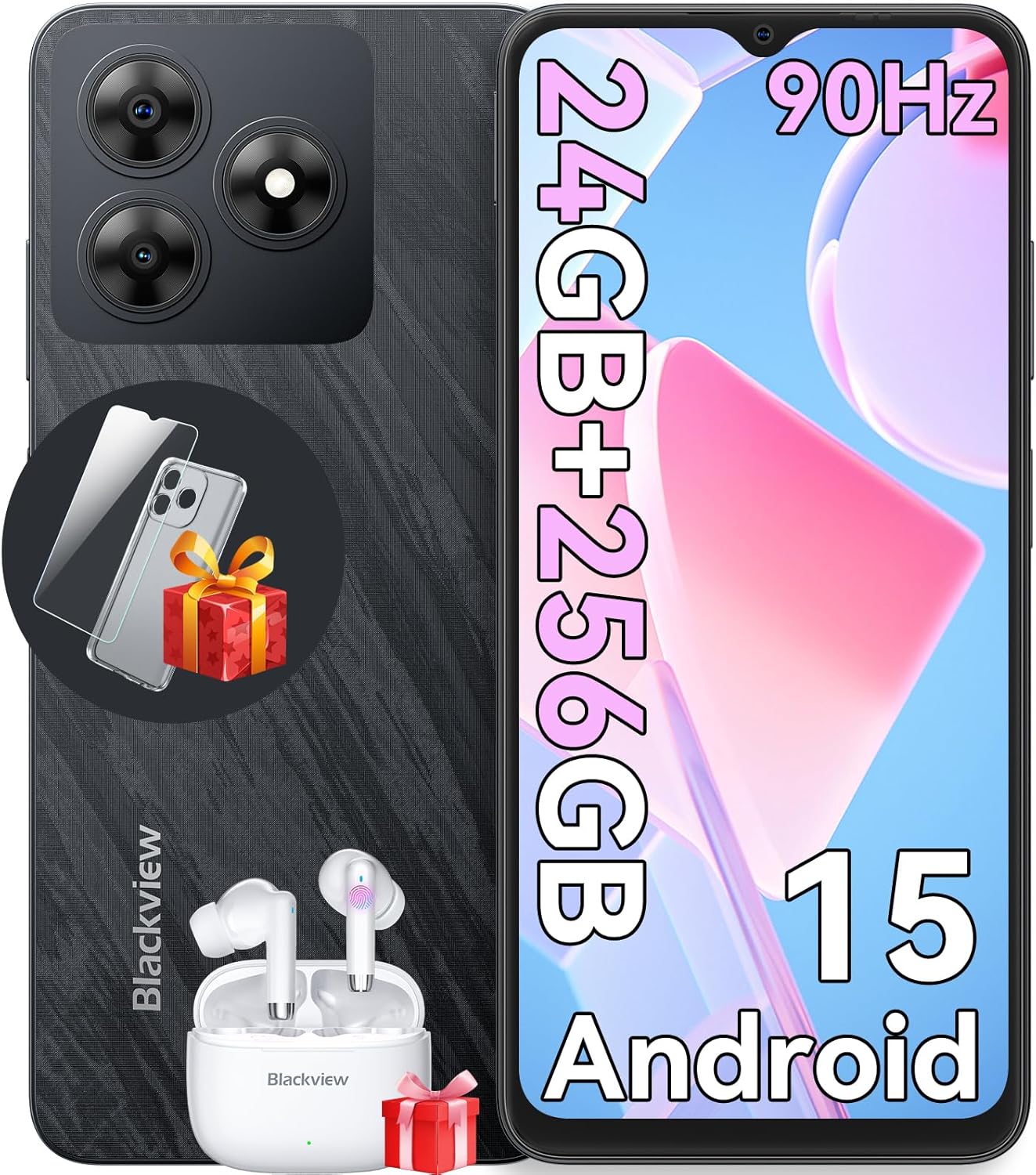
Image: The Blackview WAVE 8 smartphone, showcasing its sleek design, camera module, and included accessories like earbuds and a screen protector.
పెట్టెలో ఏముంది
Upon unboxing your Blackview WAVE 8, please verify that all the following items are included:
- నలుపుview WAVE 8 Cell Phone
- 10W ఛార్జర్
- PC Protective Case
- Tempered Film (Screen Protector)
- వినియోగదారు మాన్యువల్ (ఈ పత్రం)
- టైప్-సి కేబుల్
- SIM Tray Ejector (SIM Card is not included)

Image: A visual representation of all items included in the Blackview WAVE 8 retail packaging, such as the phone, charger, cables, case, and manual.
సెటప్
SIM Card and Storage Installation
ది బ్లాక్view WAVE 8 supports dual SIM cards and a TF (microSD) card for expanded storage. Use the provided SIM tray ejector tool to open the SIM tray.
- Locate the SIM tray slot on the side of your device.
- ట్రే పక్కన ఉన్న చిన్న రంధ్రంలోకి సిమ్ ట్రే ఎజెక్టర్ సాధనాన్ని చొప్పించి, ట్రే బయటకు వచ్చే వరకు సున్నితంగా నొక్కండి.
- Carefully place your Nano-SIM cards and/or TF card into the designated slots on the tray. Ensure the gold contacts are facing down and the cards are correctly oriented.
- Gently push the tray back into the slot until it is flush with the device body.

Image: An infographic highlighting key features of the Blackview WAVE 8, including a visual representation of its dual SIM and TF card slots.
Initial Power On and Basic Configuration
To power on your device for the first time, press and hold the Power button located on the side until the Blackview logo appears. Follow the on-screen prompts to complete the initial setup:
- భాష ఎంపిక: మీకు ఇష్టమైన భాషను ఎంచుకోండి.
- Wi-Fi కనెక్షన్: Connect to a Wi-Fi network to download updates and set up your Google account.
- Google ఖాతా: మీ Google ఖాతాతో సైన్ ఇన్ చేయండి లేదా కొత్తదాన్ని సృష్టించండి. Google Play Store మరియు ఇతర Google సేవలను యాక్సెస్ చేయడానికి ఇది చాలా అవసరం.
- భద్రతా సెటప్: Configure your preferred screen lock method (PIN, pattern, password, fingerprint, or face unlock).
- డేటా బదిలీ: Optionally transfer data from an old device.
Operating Your Blackview వేవ్ 8
ప్రదర్శన ఫీచర్లు
ది బ్లాక్view WAVE 8 features a 6.56-inch HD+ IPS display with a 90Hz refresh rate, providing smooth visuals and vibrant colors. It also includes eye comfort modes to reduce strain during prolonged use.
- 90Hz రిఫ్రెష్ రేట్: Provides a smoother scrolling and gaming experience compared to standard 60Hz displays.
- Eye Comfort Modes: Access these modes in Display Settings to reduce blue light emission and adjust screen color for comfortable viewing, especially in low light. Options include Reading Mode, Night Light, and Dark Mode.

Image: A graphic detailing the 6.56-inch HD+ IPS display, its 90Hz refresh rate, 720x1612 resolution, 81% screen-to-body ratio, and 450 nits brightness.

Image: A visual explanation of the Blackview WAVE 8's eye comfort modes, including Reading Mode, Night Light, and Dark Mode, designed to reduce eye fatigue.
పనితీరు మరియు నిల్వ
Powered by an Octa-Core chipset, the WAVE 8 offers smooth performance for daily tasks and multitasking. It comes with 8GB of physical RAM, expandable to 24GB with virtual RAM, and 256GB of internal storage, which can be further expanded up to 2TB using a TF card.

Image: A diagram illustrating the Octa-core processor, 24GB RAM (8GB physical + 16GB virtual), and 256GB ROM with support for up to 2TB TF card expansion.
కెమెరా సిస్టమ్
Capture your moments with the Blackview WAVE 8's 13MP ISOCELL 4H7 rear camera and 8MP front camera. The camera app offers various modes to enhance your photography.
- ఆటోమేటిక్ మోడ్: Point and shoot for quick, high-quality photos.
- HDR: Improves dynamic range for balanced exposure in challenging lighting conditions.
- బ్యూటీ మోడ్: Enhances facial features for flattering selfies.
- పోర్ట్రెయిట్ మోడ్: Creates a depth-of-field effect, blurring the background to highlight the subject.
- రాత్రి మోడ్: Optimizes settings for clearer, brighter photos in low-light environments.
- పనోరమా మోడ్: Capture wide scenic views by stitching multiple photos together.
- వీడియో రికార్డింగ్: Supports 1080P video recording.

చిత్రం: ఒక ఓవర్view నల్లజాతికి చెందినview WAVE 8's camera capabilities, featuring its 8MP front and 13MP rear cameras, and showcasing different photography modes like HDR, Beauty, Portrait, Night, and Panorama.

Image: A side-by-side comparison demonstrating the effect of HDR mode on the Blackview WAVE 8 camera, showing improved detail and color in both bright and dark areas.

చిత్రం: ఉదాamples of photos taken using the Beauty Mode on the Blackview WAVE 8, illustrating how it enhances subjects for more appealing portraits.

Image: Photos demonstrating the Portrait Mode feature of the Blackview WAVE 8 camera, showing subjects in sharp focus against a blurred background.

చిత్రం: ఒక మాజీample of a panoramic shot taken with the Blackview WAVE 8, showcasing its ability to capture wide, expansive scenes.

Image: A comparison showing the effectiveness of Night Mode on the Blackview WAVE 8 camera, with a brighter and more detailed image in low-light conditions.
బ్యాటరీ నిర్వహణ
ది బ్లాక్view WAVE 8 is equipped with a 5000mAh long-lasting battery, providing extended usage times. It supports 10W charging.
- ఛార్జింగ్: Use the provided 10W charger and Type-C cable for optimal charging speed.
- బ్యాటరీ ఆప్టిమైజేషన్: To extend battery life, reduce screen brightness, close unused apps, and enable battery saver mode when needed.

Image: An illustration of the Blackview WAVE 8's 5000mAh battery, with estimated usage times for web browsing, gaming, video playback, music, calls, and standby.
DokeOS 4.0 Based on Android 15
Experience an enhanced user interface with DokeOS 4.0, built on the latest Android 15 operating system. This system offers improved personalization, convenience, fluency, and privacy features.
- EasyShare App: A self-developed network-free solution for faster data transfer.
- ప్రత్యక్ష శీర్షిక: Provides real-time captions for media playing on your device.
- Screen Attention: Keeps the screen on while you are looking at it.
- అనుకూలీకరించదగిన టైమర్: Set timers for various activities.
- గేమ్ మోడ్: Optimizes performance and minimizes interruptions during gaming.
- Focus Mode App: Offers preset focus modes to help you concentrate.
- Atomized Memory 2.0: Improves RAM management for smoother operation.
- Smart Pre-Loading: Boosts app launch speed.
- F2FS (Flash Friendly File వ్యవస్థ): మెరుగుపరుస్తుంది file సిస్టమ్ పనితీరు.
- Set Privacy Boundaries: Granular control over app permissions and data access.

Image: A comprehensive graphic detailing the various features of DokeOS 4.0, including personalization, convenience, fluency, and privacy enhancements.
Connectivity and Security
ది బ్లాక్view WAVE 8 offers robust connectivity options and security features.
- నెట్వర్క్ అనుకూలత: Supports Dual SIM 4G connectivity with various GSM carriers (T-Mobile, Speedtalk, Mint Mobile, BTC, MetroPCS, H2O, Movistar, Telcel, Tigo, Claro, Ultra Mobile, Tello, Bell Wireless, Rogers Wireless, Chatr, Telus, Fido, Fizz). Note: Does not work with CDMA carriers such as AT&T, Cricket Wireless, Verizon, Straight Talk, or U.S. Cellular.
- GPS: Integrated GPS, AGPS, Glonass, Galileo, and Beidou for accurate navigation.
- ఆడియో: Features a Smart-K Speaker and a 3.5mm earphone jack.
- భద్రత: Includes a 2-in-1 Power Button & Fingerprint Sensor for quick and secure unlocking, along with Face Unlock.

Image: A map indicating supported network operators and a list of 2G, 3G, and 4G frequency bands compatible with the Blackview WAVE 8.

Image: A visual representation of the Blackview WAVE 8's 2-in-1 power button and fingerprint sensor, its multi-system GPS capabilities, and the inclusion of a Smart-K speaker and 3.5mm earphone jack.
నిర్వహణ
మీ పరికరాన్ని శుభ్రపరచడం
To maintain the appearance and functionality of your Blackview WAVE 8, regularly clean it with a soft, lint-free cloth. Avoid using harsh chemicals or abrasive materials that could damage the screen or body.
సాఫ్ట్వేర్ నవీకరణలు
Keep your device's software updated to ensure you have the latest features, security patches, and performance improvements. You can check for updates in the device's Settings menu under 'System' or 'Software Update'.
నిల్వ ఆప్టిమైజేషన్
Regularly manage your device's storage to prevent performance issues. Delete unnecessary files, uninstall unused applications, and move large media files to the expandable TF card if applicable.
ట్రబుల్షూటింగ్
If you encounter issues with your Blackview WAVE 8, try the following basic troubleshooting steps:
- పరికరం స్పందించడం లేదు: రీస్టార్ట్ చేయమని బలవంతం చేయడానికి పవర్ బటన్ను దాదాపు 10-15 సెకన్ల పాటు నొక్కి పట్టుకోండి.
- కనెక్టివిటీ సమస్యలు (Wi-Fi/బ్లూటూత్/సెల్యులార్): Try toggling the respective connection off and on. Restart your device. For cellular issues, ensure your SIM card is properly inserted and your plan is active.
- యాప్లు క్రాష్ అవుతున్నాయి/స్తంభింపజేస్తున్నాయి: సెట్టింగ్లు > యాప్లలో యాప్ కాష్ మరియు డేటాను క్లియర్ చేయండి. సమస్య కొనసాగితే, యాప్ను అన్ఇన్స్టాల్ చేసి, మళ్లీ ఇన్స్టాల్ చేయండి.
- నెమ్మదిగా పనితీరు: Close background apps, clear cache, and ensure sufficient storage space. Consider a factory reset as a last resort (back up your data first).
- బ్యాటరీ త్వరగా ఆరిపోతుంది: Check battery usage in Settings to identify power-hungry apps. Reduce screen brightness, disable unnecessary features (GPS, Bluetooth, Wi-Fi when not in use), and enable battery saver mode.
For persistent issues, refer to the official Blackview support resources or contact customer service.
స్పెసిఫికేషన్లు
| ఫీచర్ | స్పెసిఫికేషన్ |
|---|---|
| మోడల్ పేరు | Wave8-256GB |
| ఆపరేటింగ్ సిస్టమ్ | Android 15 (DokeOS 4.0) |
| ప్రదర్శన పరిమాణం | 6.56 అంగుళాలు |
| రిజల్యూషన్ | 720 x 1612 HD+ |
| రిఫ్రెష్ రేట్ | 90 Hz |
| RAM మెమరీ | 8 GB (24 GB వర్చువల్ RAM వరకు విస్తరించుకోవచ్చు) |
| నిల్వ సామర్థ్యం | 256 GB (TF కార్డ్ ద్వారా 2 TB వరకు విస్తరించుకోవచ్చు) |
| వెనుక కెమెరా | 13 ఎంపీ |
| ఫ్రంట్ కెమెరా | 8 ఎంపీ |
| బ్యాటరీ కెపాసిటీ | 5000 mAh |
| ఛార్జింగ్ | 10W |
| కనెక్టివిటీ | 4G LTE, Wi-Fi, Bluetooth, USB Type-C, 3.5mm Audio Jack |
| నావిగేషన్ | GPS, AGPS, Glonass, Galileo, Beidou |
| భద్రతా లక్షణాలు | Fingerprint ID (side-mounted), Face ID |
| కొలతలు | 7 x 3.5 x 2 అంగుళాలు |
| వస్తువు బరువు | 15.5 ఔన్సులు |
వారంటీ మరియు మద్దతు
నలుపుview stands by the quality of the WAVE 8 smartphone with a 2 సంవత్సరాల వారంటీ. Should you require assistance, Blackview offers dedicated and responsive customer service.
- 2-Year Repair Support: Your device is covered for two years from the date of purchase against manufacturing defects.
- 24/7 Online Service Support: Access assistance and troubleshooting resources online at any time.
For warranty claims or technical support, please visit the official Blackview website or contact their customer service team using the contact information provided with your purchase.

Image: A graphic illustrating Blackview's commitment to customer support, highlighting 24/7 online service and 2-year repair support.


