1. ఉత్పత్తి ముగిసిందిview
The Twotrees TS2-20Max is a high-power 20000mW laser engraver and cutter designed for a wide range of materials and large-scale projects. It features a generous working area of 450x900mm, high precision, and fast engraving speeds, making it suitable for intricate designs and efficient production.
ముఖ్య లక్షణాలు ఉన్నాయి:
- High-Power Laser: 20000mW output for engraving and cutting various materials.
- పెద్ద చెక్కే ప్రాంతం: 450x900mm (17.7"x35.4") for large projects or batch processing.
- Precision and Speed: 0.1mm positioning accuracy and up to 6000mm/min engraving speed.
- దృఢమైన నిర్మాణం: Durable metal sheet and aluminum profile స్థిరత్వం కోసం.
- Wide Software Compatibility: Supports LaserGRBL and LightBurn, compatible with Windows and MacOS.
- యూజర్ ఫ్రెండ్లీ: Intuitive interface, USB and TF card support, emergency stop switch.
2. భద్రతా సమాచారం
Operating a laser engraver requires strict adherence to safety protocols to prevent injury. This device uses a high-power laser which can cause severe eye damage, skin burns, and fire if not handled correctly.
- కంటి రక్షణ: Always wear the provided safety goggles when the laser is in operation. Never look directly at the laser beam or its reflection.
- అత్యసవర నిలుపుదల: Familiarize yourself with the emergency stop switch location and function. Use it immediately in case of any malfunction or unexpected behavior.
- వెంటిలేషన్: Ensure adequate ventilation in the work area to dissipate fumes and smoke produced during engraving and cutting.
- అగ్ని భద్రత: అగ్నిమాపక యంత్రాన్ని సమీపంలో ఉంచండి. యంత్రాన్ని పనిచేసేటప్పుడు, ముఖ్యంగా మండే పదార్థాలను కత్తిరించేటప్పుడు దానిని గమనించకుండా ఉంచవద్దు.
- మెటీరియల్ అనుకూలత: Only engrave or cut materials specified as safe for laser processing. Avoid highly reflective materials or PVC, which can produce toxic fumes.
- పిల్లలు మరియు పెంపుడు జంతువులు: పిల్లలు మరియు పెంపుడు జంతువులను ఆపరేటింగ్ ప్రాంతం నుండి దూరంగా ఉంచండి.

Image: Red acrylic shield designed to block blue laser light for eye protection.
3. సెటప్ మరియు అసెంబ్లీ
The Twotrees TS2-20Max requires assembly before first use. Follow the steps below carefully. For a visual guide, please refer to the official assembly video provided.
Video: Detailed unboxing and assembly guide for the Twotrees TS2-20Max laser engraver. This video demonstrates each step of putting the machine together, from unpacking components to final connections.
3.1 అన్బాక్సింగ్ మరియు కాంపోనెంట్ గుర్తింపు
Carefully unpack all components from the box. Verify that all parts listed in the packing list are present and undamaged. Lay out the frame components, laser module, cables, and accessories on a clean, flat surface.

Image: All components of the Twotrees TS2-20Max laser engraver laid out on a table, including the frame, laser module, and accessories.
3.2 ఫ్రేమ్ అసెంబ్లీ
- Connect the main frame sections using the provided screws and hex keys. Ensure all connections are secure.
- Attach the Y-axis rails to the main frame.
- Install the X-axis gantry onto the Y-axis rails.
- Tighten all tensioner screws for the belts to ensure proper movement without slippage. Refer to the video for specific tensioning instructions.
3.3 లేజర్ మాడ్యూల్ ఇన్స్టాలేషన్
- Mount the laser module onto the X-axis gantry using the designated screws.
- Connect the laser module cable to the control board.

చిత్రం: క్లోజప్ view of the 20W laser module, highlighting its compact design and powerful cutting capability.
3.4 వైరింగ్ మరియు కనెక్షన్లు
- Connect the stepper motor cables to the control board, ensuring correct axis (X and Y) connections.
- Connect the end-stop switches to their respective ports on the control board.
- Route all cables neatly using cable ties or the provided cable management solutions to prevent interference with moving parts.
- Connect the power supply to the control unit and then to a suitable power outlet.
4. ఆపరేషన్
This section outlines the general steps for operating your Twotrees TS2-20Max laser engraver.
4.1 Software Installation and Setup
The engraver is compatible with popular laser control software such as LaserGRBL (for Windows) and LightBurn (for Windows, MacOS, and Linux). Install the software on your computer and configure it according to the software's specific instructions and the machine's specifications.
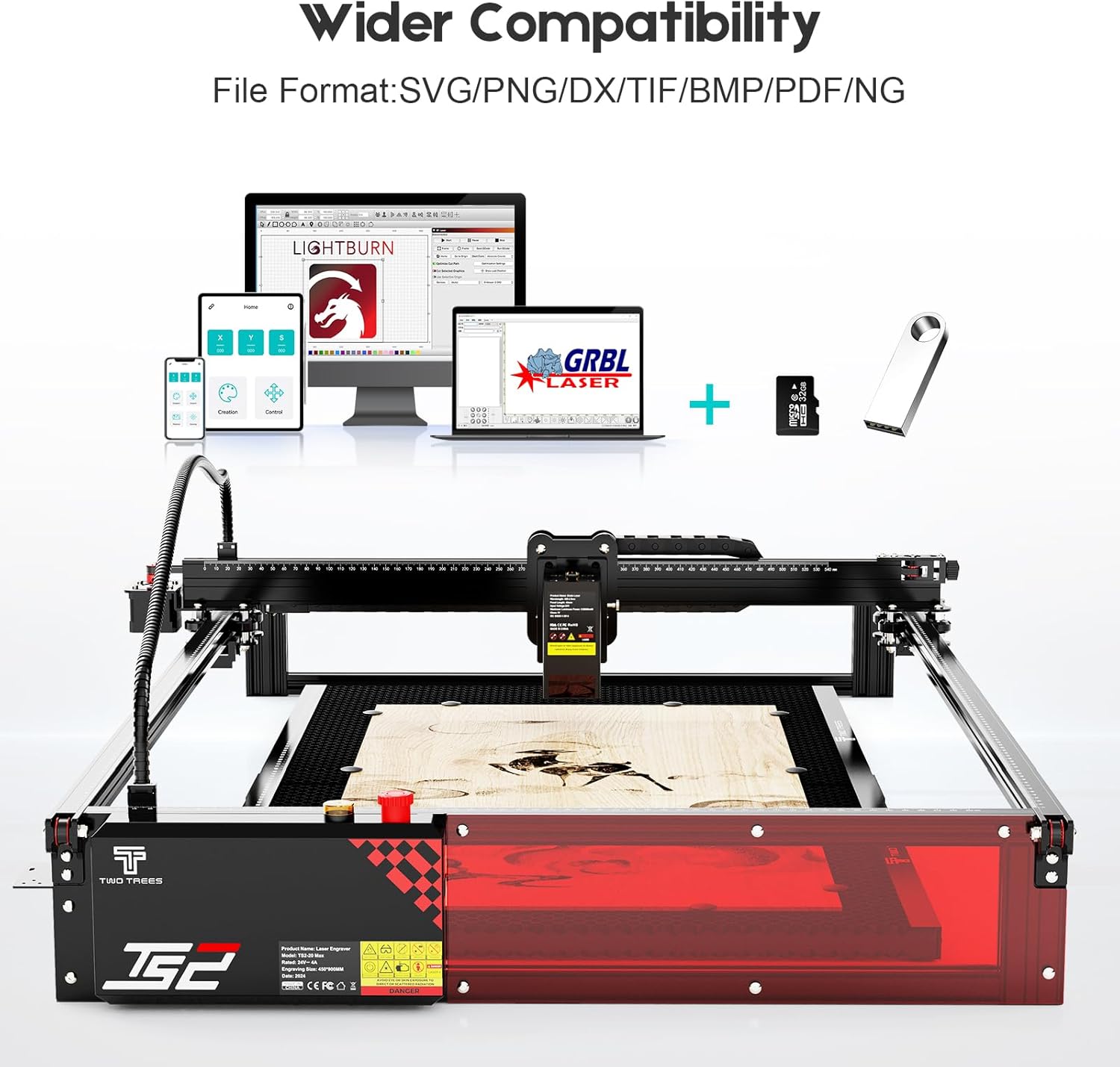
Image: Illustration showing the laser engraver's compatibility with various software like LightBurn and LaserGRBL, and support for TF cards.
4.2 మెటీరియల్ తయారీ
Place the material to be engraved or cut securely on the work surface. Ensure it is flat and properly aligned within the engraving area. The large 450x900mm area allows for diverse project sizes.

Image: Visual comparison demonstrating the larger engraving area of the TS2-20Max (450x900mm) compared to standard engravers (410x410mm).
4.3 లేజర్ను కేంద్రీకరించడం
Achieving optimal focus is crucial for precise engraving and cutting. Use the sliding block focus mechanism to adjust the laser module height until the laser spot is at its smallest point on the material surface. Consult your software's instructions for specific focusing procedures.

Image: Close-up of the laser module's sliding block focus mechanism, illustrating quick and precise positioning.
4.4 Starting an Engraving/Cutting Job
- మీ డిజైన్ను లోడ్ చేయండి file (.nc, .gcode, BMP, JPG, PNG, etc.) into the laser control software.
- Set the appropriate laser power, speed, and passes based on your material and desired outcome.
- Perform a frame test to ensure the design fits within your material and the engraving area.
- With safety goggles on and ventilation active, initiate the engraving or cutting process.

Image: Comparison illustrating the high engraving speed of the TS2-20Max (6000mm/min) versus other models (3000mm/min).

చిత్రం: ఒక కోల్లెజ్ షోasing various materials and objects that can be engraved or cut by the laser engraver, including wood, phone cases, tumblers, and acrylic.
5. నిర్వహణ
క్రమం తప్పకుండా నిర్వహణ మీ లేజర్ చెక్కే వ్యక్తి యొక్క దీర్ఘాయువు మరియు సరైన పనితీరును నిర్ధారిస్తుంది.
- శుభ్రపరచడం: Regularly clean the work area, rails, and laser lens to remove dust, debris, and residue. Use a soft, lint-free cloth and appropriate cleaning solutions for the lens.
- బెల్ట్ టెన్షన్: Periodically check the tension of the timing belts. Adjust them if they are too loose or too tight to prevent engraving dislocations or motor strain.
- సరళత: Apply a small amount of lubricant to the moving parts and linear rails as recommended by the manufacturer to ensure smooth operation.
- ఫర్మ్వేర్ నవీకరణలు: తయారీదారుని తనిఖీ చేయండి website for any available firmware updates to improve performance or add new features.
6. ట్రబుల్షూటింగ్
This section provides general guidance for common issues. For more detailed troubleshooting, refer to the official Twotrees support resources.
- లేజర్ కాల్చడం లేదు: Check power connections, laser module cable, and software settings (power, enable). Ensure the emergency stop button is not engaged.
- పేలవమైన చెక్కడం నాణ్యత: Verify laser focus, material settings (power/speed), and ensure the material is clean and flat. Check belt tension for skipped steps.
- యంత్రం కదలడం లేదు: Check all motor connections, power supply, and software connection. Ensure no physical obstructions are blocking movement.
- సాఫ్ట్వేర్ కనెక్షన్ సమస్యలు: Verify USB cable connection, correct COM port selection in software, and driver installation.
7. స్పెసిఫికేషన్లు
| ఫీచర్ | వివరాలు |
|---|---|
| మోడల్ నం. | TS2-20Max 20000mW |
| తయారీదారు | Twotrees |
| వస్తువు బరువు | 15 పౌండ్లు |
| ఉత్పత్తి కొలతలు | 28.9 x 48.9 x 7.48 అంగుళాలు |
| రంగు | ఎరుపు మరియు నలుపు |
| మెటీరియల్ | Sheet metal, aluminum extrusions, acrylic |
| అంశం ప్యాకేజీ పరిమాణం | 1 |
| చెక్కే ప్రాంతం | 450x900మిమీ (17.7"x35.4") |
| పొజిషనింగ్ ఖచ్చితత్వం | 0.1మి.మీ |
| గరిష్ట చెక్కడం వేగం | 6000మిమీ/నిమి |
| సాఫ్ట్వేర్ అనుకూలత | లేజర్జిఆర్బిఎల్, లైట్బర్న్ |
| మద్దతు ఇచ్చారు File ఫార్మాట్లు | .nc, .gcode, BMP, JPG, PNG |
| ఆపరేటింగ్ సిస్టమ్స్ | Windows, MacOS |
8. వారంటీ మరియు మద్దతు
The Twotrees TS2-20Max Laser Engraver & Cutter comes with a 1 సంవత్సరం వారంటీ. For warranty claims, technical support, or further assistance, please contact the Twotrees-US Official Store directly or visit their official webసైట్. కొనుగోలు రుజువుగా మీ కొనుగోలు రసీదుని ఉంచండి.
అదనపు వనరులు మరియు ఉత్పత్తి సమాచారం కోసం, మీరు సందర్శించవచ్చు Twotrees Store on Amazon.


