పరిచయం
This manual provides detailed instructions for the ZAGG Mophie Essentials USB-A to USB-C Cable. This 2-meter black cable is designed for reliable charging and data transfer between devices equipped with USB-A and USB-C ports. Please read this manual carefully to ensure proper use and maintenance of your cable.
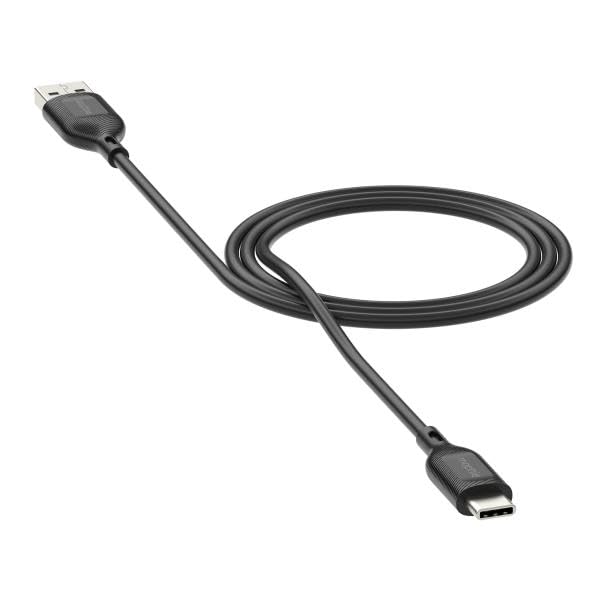
Image: The ZAGG Mophie Essentials USB-A to USB-C Cable, black, 2 meters in length, with a USB-A connector on one end and a USB-C connector on the other.
సెటప్
The ZAGG Mophie Essentials USB-A to USB-C Cable is designed for plug-and-play functionality. No software installation is required.
- పోర్టులను గుర్తించండి: Locate the USB-A port on your power adapter, computer, or other host device, and the USB-C port on your smartphone, tablet, laptop, or other compatible device.
- USB-A ని కనెక్ట్ చేయండి: Insert the USB-A (male) end of the cable into the USB-A port of your power source or host device. Ensure it is fully seated.
- USB-C ని కనెక్ట్ చేయండి: Insert the USB-C (male) end of the cable into the USB-C port of your target device. The USB-C connector is reversible, so it can be inserted in either orientation.
- కనెక్షన్ని ధృవీకరించండి: Once connected, your device should begin charging or establish a data connection, depending on the function of the host device.
ఆపరేటింగ్ సూచనలు
This cable facilitates two primary functions: charging and data transfer.
- ఛార్జింగ్ కోసం:
- USB-A ఎండ్ను అనుకూలమైన USB వాల్ ఛార్జర్, కార్ ఛార్జర్ లేదా పవర్ బ్యాంక్కి కనెక్ట్ చేయండి.
- Connect the USB-C end to your device (e.g., smartphone, tablet).
- Ensure the power source is active. Your device's charging indicator should activate.
- For Data Transfer:
- Connect the USB-A end to a USB-A port on a computer (PC or Mac).
- USB-C ఎండ్ను మీ పరికరానికి కనెక్ట్ చేయండి.
- Your computer should recognize the connected device. Follow on-screen prompts on your computer and device to allow data access and transfer files.
నిర్వహణ
Proper care will extend the life of your ZAGG Mophie Essentials cable.
- శుభ్రపరచడం: Use a soft, dry, lint-free cloth to gently wipe the cable and connectors. Do not use harsh chemicals, cleaning solvents, or strong detergents.
- నిల్వ: Store the cable in a cool, dry place away from direct sunlight and extreme temperatures. Avoid tightly coiling or bending the cable at sharp angles, especially near the connectors, as this can damage internal wires.
- నిర్వహణ: Always grasp the connector housing when plugging or unplugging the cable. Do not pull on the cable itself, as this can strain the connection points and lead to damage.
- ద్రవాలను నివారించండి: Keep the cable away from water and other liquids. If the cable gets wet, disconnect it immediately and allow it to dry completely before reuse.
ట్రబుల్షూటింగ్
If you encounter issues with your ZAGG Mophie Essentials cable, try the following solutions:
| సమస్య | సాధ్యమైన పరిష్కారం |
|---|---|
| పరికరం ఛార్జ్ అవ్వడం లేదు. |
|
| డేటా బదిలీ పనిచేయడం లేదు. |
|
| కేబుల్ దెబ్బతిన్నట్లు కనిపిస్తోంది. |
|
స్పెసిఫికేషన్లు
| ఫీచర్ | వివరాలు |
|---|---|
| బ్రాండ్ | ZAGG |
| మోడల్ సంఖ్య | 409913775 |
| కనెక్టర్ రకం | USB-A (Male) to USB-C (Male) |
| కేబుల్ రకం | USB కేబుల్ |
| పొడవు | 2 మీటర్లు |
| రంగు | నలుపు |
| అనుకూల పరికరాలు | Devices with USB-C ports (e.g., smartphones, tablets, laptops) and USB-A host ports (e.g., chargers, computers) |
| ప్యాకేజీ కొలతలు | 5.91 x 5.91 x 3.94 అంగుళాలు |
| వస్తువు బరువు | 3.53 ఔన్సులు |
| తయారీదారు | ZAGG |
| మొదటి తేదీ అందుబాటులో ఉంది | ఏప్రిల్ 30, 2025 |
వారంటీ మరియు మద్దతు
ZAGG stands behind the quality of its products.
- వారంటీ: This ZAGG Mophie Essentials cable comes with a మూడు సంవత్సరాల వారంటీ against manufacturing defects. Please retain your proof of purchase for warranty claims.
- కస్టమర్ మద్దతు: For further assistance, troubleshooting not covered in this manual, or warranty inquiries, please visit the official ZAGG webసైట్ లేదా వారి కస్టమర్ మద్దతును నేరుగా సంప్రదించండి.
మీరు అధికారికంగా మరిన్ని వివరాలు మరియు మద్దతును పొందవచ్చు ZAGG Store on Amazon.


