పరిచయం
Thank you for choosing the Monster S290 Portable Bluetooth Speaker. This manual provides essential information for setting up, operating, and maintaining your speaker to ensure optimal performance and longevity. Please read these instructions carefully before using the product.
Image: The Monster S290 speaker, designed for portability, shown being carried by a person outdoors.
ప్యాకేజీ విషయాలు
క్రింద జాబితా చేయబడిన అన్ని వస్తువులు మీ ప్యాకేజీలో చేర్చబడ్డాయని ధృవీకరించండి:
- Monster S290 Speaker x1
- AUX-IN Cable x1
- USB-C ఛార్జింగ్ కేబుల్ x1
- త్వరిత ప్రారంభ గైడ్ x1
- వారంటీ కార్డ్ x1
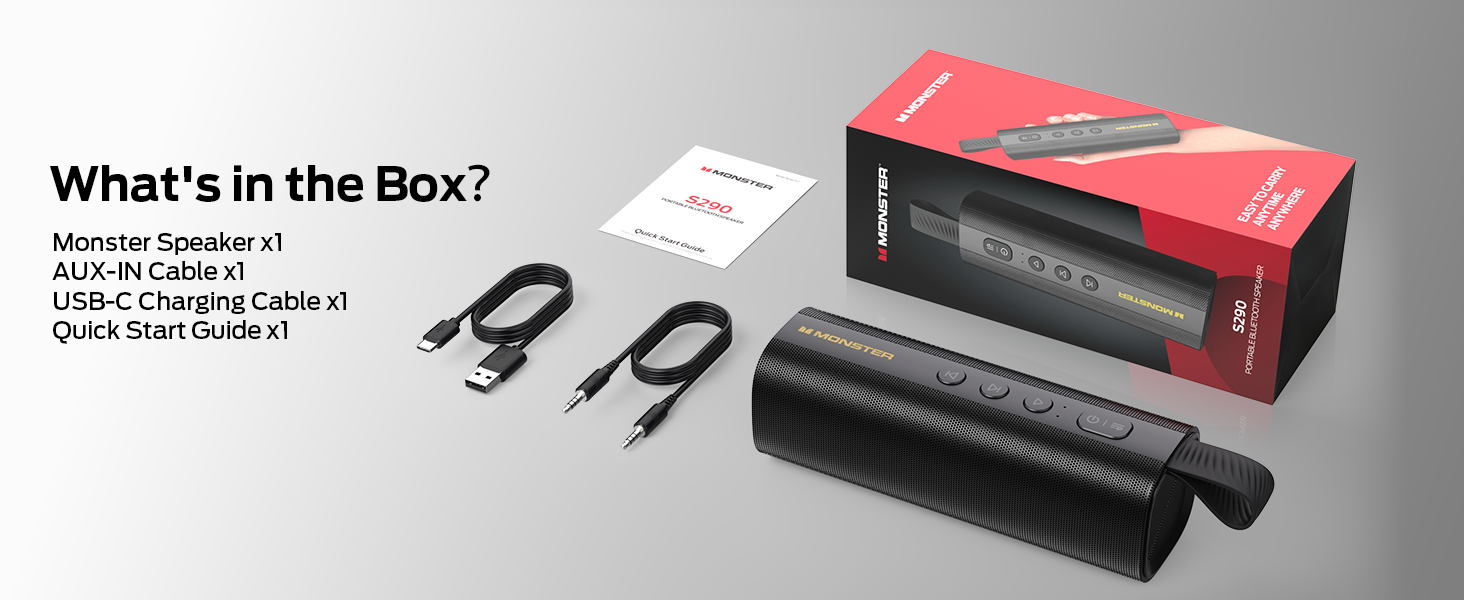
Image: A visual representation of the Monster S290 speaker and its included accessories: AUX-IN cable, USB-C charging cable, quick start guide, and warranty card.
ఉత్పత్తి ముగిసిందిview
స్పీకర్ లేఅవుట్
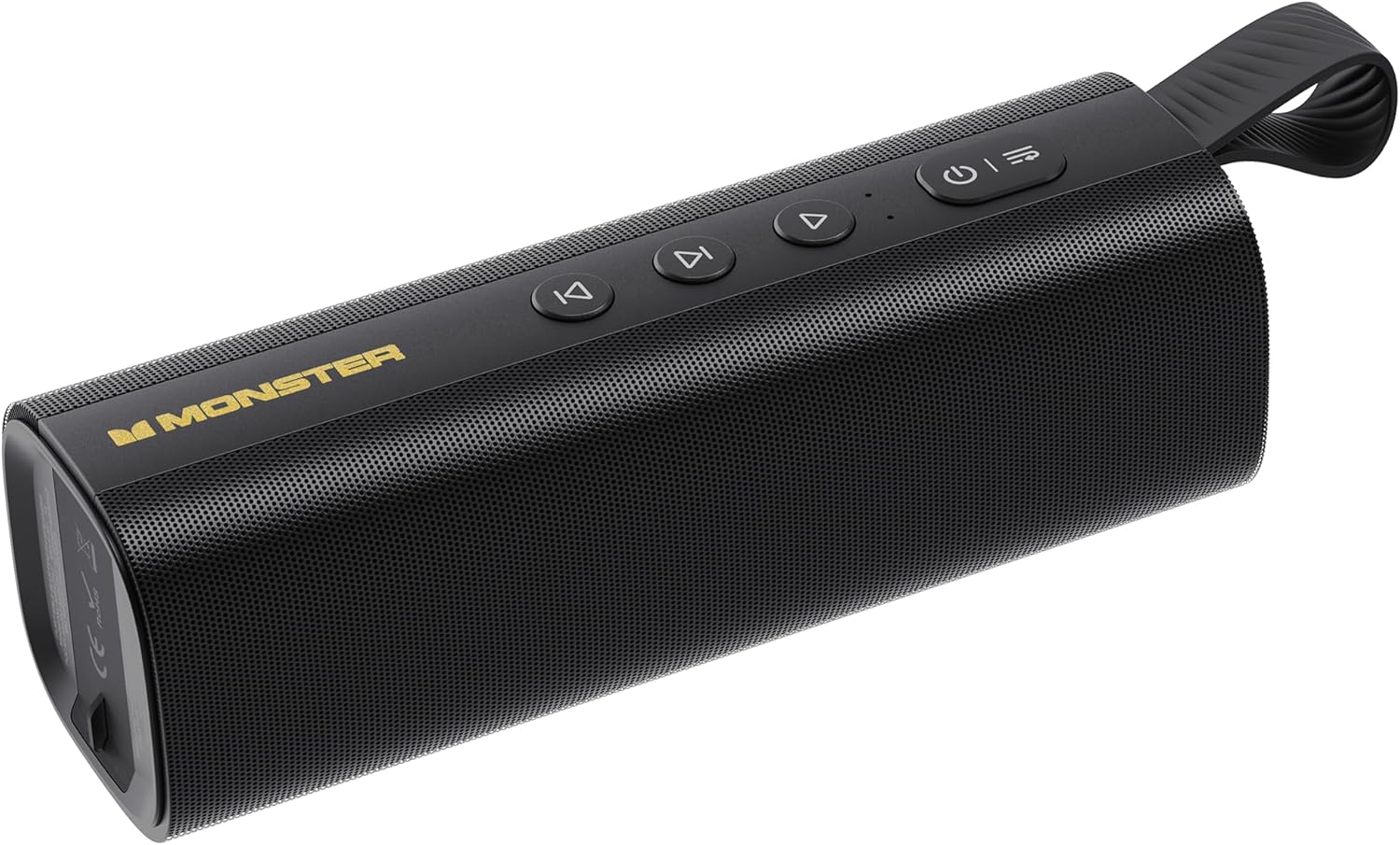
Image: The Monster S290 Portable Bluetooth Speaker, showcasing its cylindrical design, control buttons on top, and integrated carrying strap.
నియంత్రణ బటన్లు
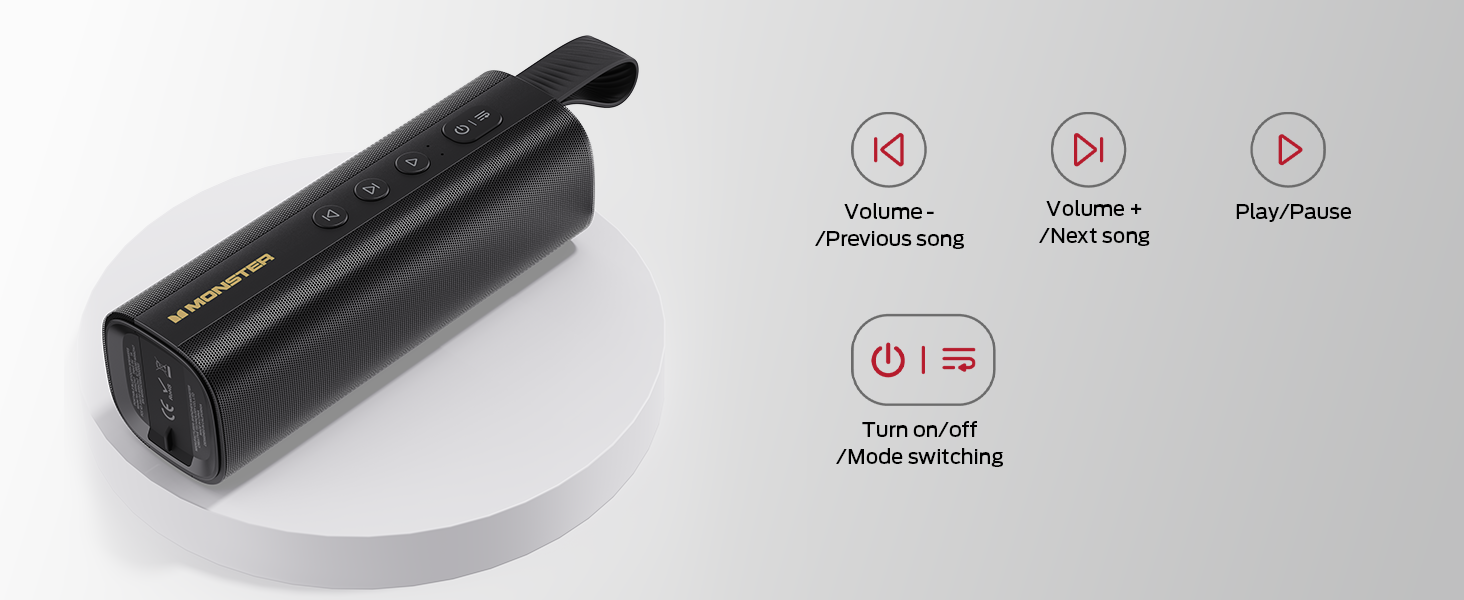
Image: A diagram detailing the functions of the speaker's buttons: Power On/Off/Mode Switching, Volume Down/Previous Song, Volume Up/Next Song, and Play/Pause.
- పవర్ బటన్ (⏻ ⏻ తెలుగు): Press and hold to power on/off. Short press to switch between input modes (Bluetooth, AUX, TF Card, USB).
- Volume Down / Previous Song (⏮ ⏮ తెలుగు): Short press for previous song. Press and hold to decrease volume.
- Play / Pause (⏯ ⏯ काला काला ⏯ काला काला के स): Short press to play or pause audio.
- Volume Up / Next Song (⏭ ⏭ తెలుగు): Short press for next song. Press and hold to increase volume.
ఇన్పుట్ పోర్ట్లు

చిత్రం: వివరణాత్మక view of the speaker's connectivity panel, showing the TF card slot, USB port, USB-C charging port, and AUX-IN port, protected by a rubber flap.
- TF కార్డ్ స్లాట్: For playing audio directly from a MicroSD/TF card.
- USB పోర్ట్: For playing audio directly from a USB flash drive.
- USB-C (DC 5V): Charging port for the speaker.
- AUX-IN: 3.5mm audio input for wired connection to devices.
సెటప్
స్పీకర్పై ఆరోపణలు చేస్తున్నారు
- అందించిన USB-C ఛార్జింగ్ కేబుల్ను స్పీకర్లోని USB-C పోర్ట్కు కనెక్ట్ చేయండి.
- కేబుల్ యొక్క మరొక చివరను USB పవర్ అడాప్టర్ (చేర్చబడలేదు) లేదా కంప్యూటర్ యొక్క USB పోర్ట్కు కనెక్ట్ చేయండి.
- ఛార్జింగ్ ఇండికేటర్ లైట్ ఛార్జింగ్ సమయంలో వెలుగుతుంది మరియు పూర్తిగా ఛార్జ్ అయిన తర్వాత ఆపివేయబడుతుంది.
- పూర్తిగా ఛార్జ్ చేస్తే దాదాపు 15 గంటల ప్లేటైమ్ లభిస్తుంది.

Image: The Monster S290 speaker held in a hand, visually representing its extended battery life of up to 15 hours on a single charge.
పవర్ ఆన్/ఆఫ్
- పవర్ ఆన్ చేయడానికి: పవర్ బటన్ను నొక్కి పట్టుకోండి (⏻ ⏻ తెలుగు) for approximately 2-3 seconds until you hear an audible prompt and the indicator light turns on.
- పవర్ ఆఫ్ చేయడానికి: పవర్ బటన్ను నొక్కి పట్టుకోండి (⏻ ⏻ తెలుగు) for approximately 2-3 seconds until you hear an audible prompt and the indicator light turns off.
ఆపరేటింగ్ సూచనలు
బ్లూటూత్ జత చేయడం (సింగిల్ స్పీకర్)
- Ensure the speaker is powered on and in Bluetooth pairing mode (indicated by a flashing blue LED). If not, short press the Power button (⏻ ⏻ తెలుగు) to cycle through modes until Bluetooth mode is active.
- మీ మొబైల్ పరికరంలో (స్మార్ట్ఫోన్, టాబ్లెట్, మొదలైనవి), బ్లూటూత్ను ప్రారంభించండి.
- కోసం వెతకండి available Bluetooth devices. You should see "Monster S290" in the list.
- Select "Monster S290" to connect. Once connected, the indicator light will turn solid blue, and you will hear a confirmation sound.
- పవర్ ఆన్ చేసినప్పుడు స్పీకర్ స్వయంచాలకంగా చివరిగా జత చేసిన పరికరానికి తిరిగి కనెక్ట్ అవ్వడానికి ప్రయత్నిస్తుంది.

చిత్రం: ఒక ఎక్స్-రే view of the Monster S290 speaker, emphasizing the integrated Bluetooth 6.0 chip for stable and efficient wireless connectivity.
TWS (ట్రూ వైర్లెస్ స్టీరియో) పెయిరింగ్
TWS pairing allows you to connect two Monster S290 speakers together for a stereo sound experience.
- Ensure both Monster S290 speakers are powered on and not connected to any Bluetooth device.
- On one of the speakers (this will be the primary speaker), press and hold the Play/Pause button (⏯ ⏯ काला काला ⏯ काला काला के स) for 2-3 seconds. You will hear a prompt indicating TWS pairing mode.
- The two speakers will automatically search for and connect to each other. Once connected, you will hear a confirmation sound, and the primary speaker's indicator light will flash, while the secondary speaker's light will be solid.
- ఇప్పుడు, "బ్లూటూత్ జత చేయడం" విభాగంలో వివరించిన విధంగా బ్లూటూత్ ద్వారా మీ మొబైల్ పరికరాన్ని ప్రాథమిక స్పీకర్కు కనెక్ట్ చేయండి.
- ఆడియో ఇప్పుడు రెండు స్పీకర్ల ద్వారా స్టీరియోలో ప్లే అవుతుంది.

Image: Two Monster S290 speakers demonstrating TWS connectivity, allowing them to play audio in stereo from a single Bluetooth source.
AUX-IN మోడ్
- Connect one end of the 3.5mm AUX-IN cable to the AUX-IN port on the speaker.
- కేబుల్ యొక్క మరొక చివరను మీ పరికరం యొక్క ఆడియో అవుట్పుట్ జాక్కి కనెక్ట్ చేయండి.
- పవర్ బటన్ను షార్ట్ ప్రెస్ చేయండి (⏻ ⏻ తెలుగు) to switch to AUX mode. The speaker will announce "AUX mode".
- మీ కనెక్ట్ చేయబడిన పరికరం నుండి ప్లేబ్యాక్ మరియు వాల్యూమ్ను నియంత్రించండి.
TF కార్డ్ ప్లేబ్యాక్ మోడ్
- ఆడియోతో TF (మైక్రో SD) కార్డ్ని చొప్పించండి fileTF కార్డ్ స్లాట్లోకి లు.
- పవర్ బటన్ను షార్ట్ ప్రెస్ చేయండి (⏻ ⏻ తెలుగు) to switch to TF Card mode. The speaker will announce "TF card mode" and begin playing audio.
- Use the speaker's control buttons for playback (Play/Pause, Next/Previous Song, Volume Up/Down).
USB ప్లేబ్యాక్ మోడ్
- ఆడియోతో USB ఫ్లాష్ డ్రైవ్ను చొప్పించండి fileUSB పోర్ట్లోకి s.
- పవర్ బటన్ను షార్ట్ ప్రెస్ చేయండి (⏻ ⏻ తెలుగు) to switch to USB mode. The speaker will announce "USB mode" and begin playing audio.
- Use the speaker's control buttons for playback (Play/Pause, Next/Previous Song, Volume Up/Down).
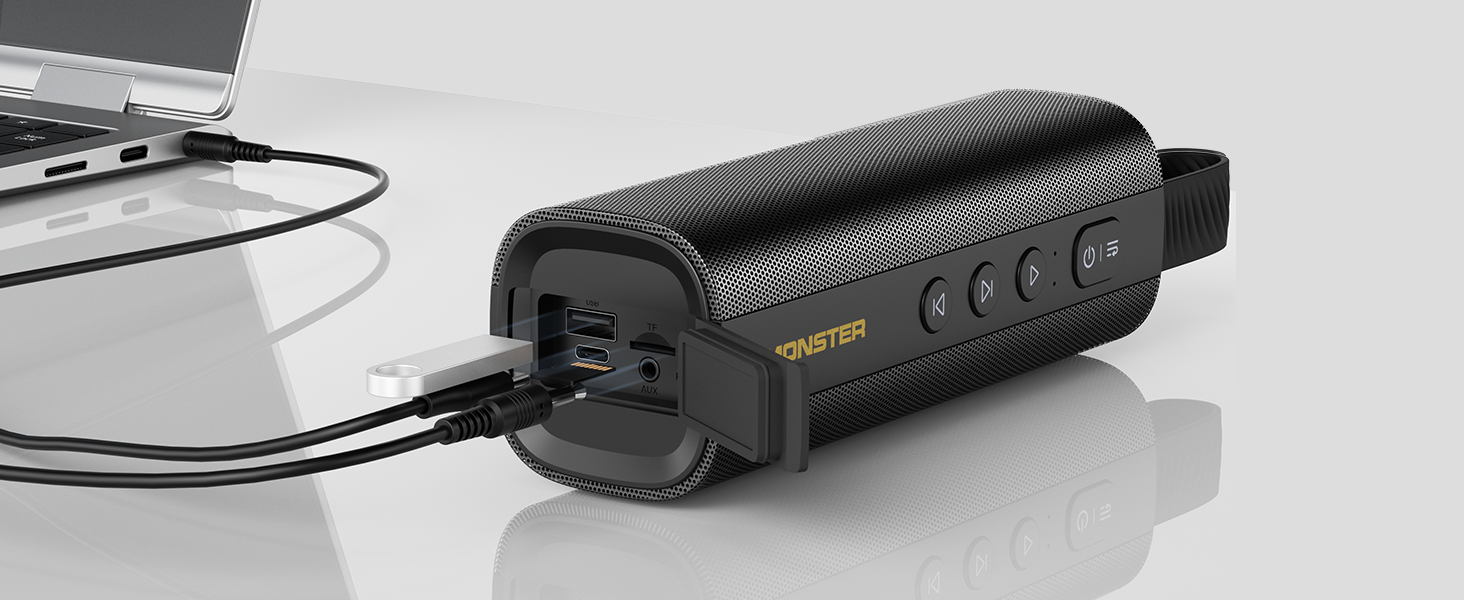
Image: The Monster S290 speaker connected to a laptop, illustrating its versatility with AUX, USB, and TF card input options.
నిర్వహణ
నీటి నిరోధకత (IPX6)
The Monster S290 speaker features an IPX6 waterproof rating, meaning it is protected against high-pressure water jets from any direction. This makes it suitable for outdoor use and resistant to splashes, rain, and sweat.
- Ensure the rubber flap covering the charging and input ports is securely closed to maintain water resistance.
- స్పీకర్ను నీటిలో ముంచవద్దు.
- After exposure to water, wipe the speaker dry with a soft cloth before charging or opening the port cover.

Image: The Monster S290 speaker positioned near a pool, illustrating its IPX6 waterproof capability, making it suitable for use in wet environments.
శుభ్రపరచడం మరియు నిల్వ చేయడం
- స్పీకర్ను మృదువైన, డి-ప్యాక్తో శుభ్రం చేయండి.amp గుడ్డ. రాపిడి క్లీనర్లు లేదా ద్రావకాలు ఉపయోగించవద్దు.
- స్పీకర్ను ప్రత్యక్ష సూర్యకాంతి మరియు తీవ్రమైన ఉష్ణోగ్రతలకు దూరంగా చల్లని, పొడి ప్రదేశంలో నిల్వ చేయండి.
- ఎక్కువ కాలం నిల్వ చేస్తే, బ్యాటరీ ఆరోగ్యాన్ని కాపాడుకోవడానికి కాలానుగుణంగా ఛార్జ్ చేయండి.
ట్రబుల్షూటింగ్
| సమస్య | సాధ్యమైన కారణం | పరిష్కారం |
|---|---|---|
| స్పీకర్ పవర్ ఆన్ చేయదు. | తక్కువ బ్యాటరీ. | అందించిన USB-C కేబుల్ని ఉపయోగించి స్పీకర్ను ఛార్జ్ చేయండి. |
| శబ్దం లేదు. | Volume too low on speaker or connected device. Incorrect input mode. | Increase volume on both speaker and device. Ensure correct input mode is selected (Bluetooth, AUX, TF, USB). |
| బ్లూటూత్ ద్వారా జత చేయడం సాధ్యం కాదు. | Speaker not in pairing mode. Device Bluetooth is off. Speaker already connected to another device. | Ensure speaker is in Bluetooth pairing mode (flashing blue LED). Turn on Bluetooth on your device. Disconnect from other devices or restart the speaker. |
| TWS జత చేయడం విఫలమైంది. | Speakers are too far apart. One speaker is already paired to a device. | Ensure speakers are within 10 meters of each other. Disconnect both speakers from any Bluetooth devices before initiating TWS pairing. |
| తక్కువ ధ్వని నాణ్యత. | Low battery. Device too far from speaker (Bluetooth). Interference. | Charge the speaker. Move device closer to the speaker. Avoid obstacles between device and speaker. |
స్పెసిఫికేషన్లు
- మోడల్ పేరు: S290 (Item Model Number: S38)
- బ్రాండ్: Monster
- బ్లూటూత్ వెర్షన్: 6.0
- ఆడియో అవుట్పుట్: 30W
- ఆట సమయం: Up to 15 hours (varies by volume and content)
- జలనిరోధిత రేటింగ్: IPX6
- ఇన్పుట్ ఇంటర్ఫేస్లు: Bluetooth, AUX-IN, TF Card, USB
- ఛార్జింగ్ పోర్ట్: USB-C (DC 5V)
- బ్యాటరీ: 1 బ్యాటరీ (చేర్చబడింది)
- ఉత్పత్తి కొలతలు: 2.36 x 7.24 x 2.68 అంగుళాలు
- వస్తువు బరువు: 1.08 పౌండ్లు
- మెటీరియల్: ప్లాస్టిక్
- రంగు: నలుపు
వారంటీ మరియు మద్దతు
The Monster S290 Portable Bluetooth Speaker comes with a warranty. Please refer to the included "Warranty Card" for detailed terms and conditions. For further assistance or technical support, please consult the "Quick Start Guide" or visit the official Monster support webసైట్.
వారంటీ క్లెయిమ్ల కోసం కొనుగోలు రుజువుగా మీ కొనుగోలు రసీదును ఉంచండి.


