1. ఉత్పత్తి ముగిసిందిview
The llano Laptop Cooler Bundle provides an effective cooling solution for laptops ranging from 15 to 21 inches, paired with a large tempered glass mousepad designed for precision. The cooler features a powerful 5.5-inch (14CM) turbo external fan and includes advanced dust protection. The glass mousepad offers an ultra-smooth, durable surface.
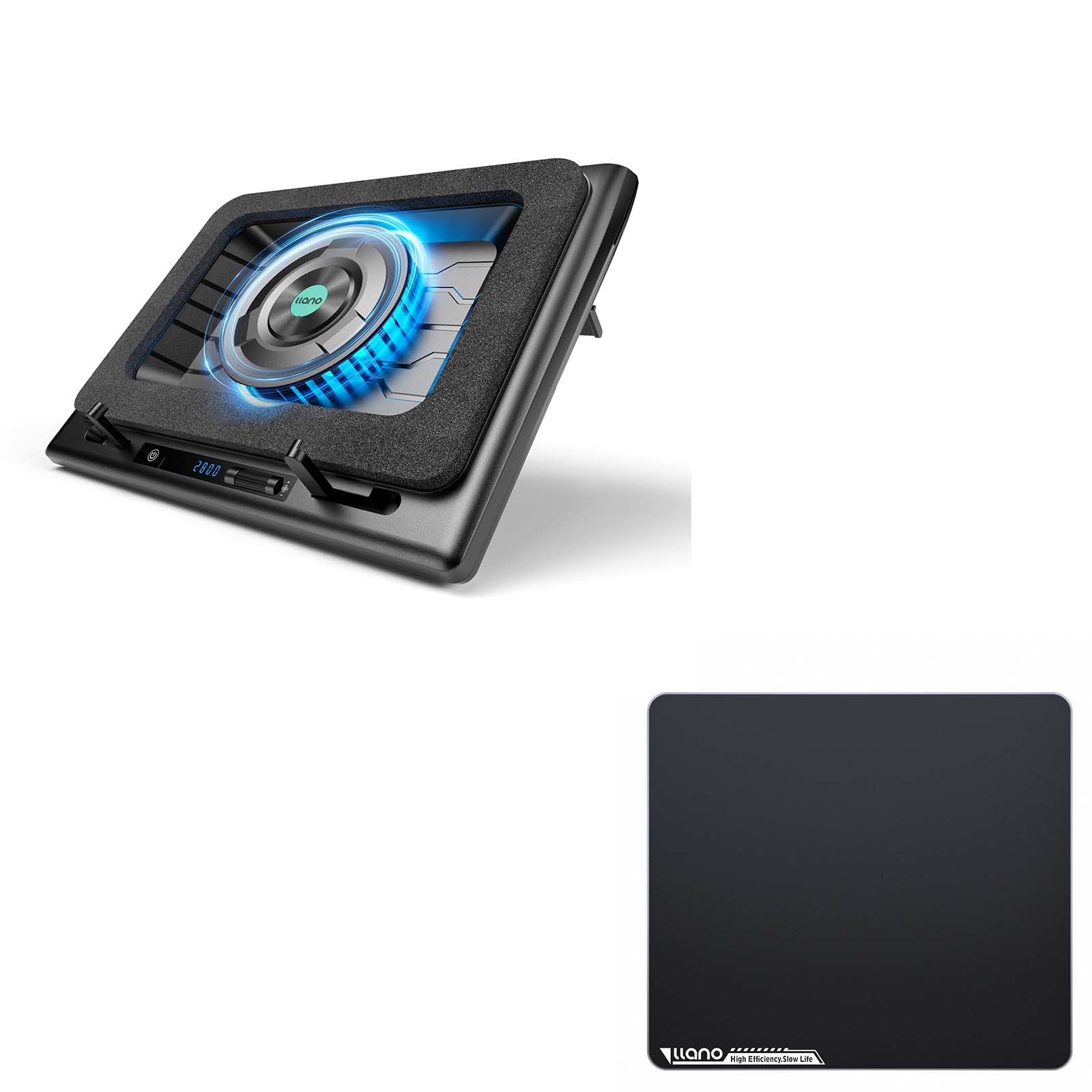
Figure 1: llano Laptop Cooler Bundle. The image displays the black laptop cooler with a central fan and a large glass mousepad.
2. సెటప్ సూచనలు
2.1 Laptop Cooler Assembly
- భాగాలను అన్ప్యాక్ చేయండి: Carefully remove the laptop cooler, power adapter, USB-C to USB-A cable, and extra dust filter from the packaging.
- Position the Foam Seal: The cooler comes with a memory foam rectangle designed to create a seal between the laptop and the fan. Place this foam seal around the central fan area on the cooler.
- పవర్ కనెక్ట్ చేయండి: Insert the included power adapter into the DC 12V port on the side of the cooler. Plug the adapter into a power outlet.
- Connect to Laptop (Optional USB Hub Functionality): Use the provided USB-C to USB-A cable to connect the cooler's USB-C 'IN' port to a USB-A port on your laptop. This enables the cooler's integrated USB hub (OUT1, OUT2, OUT3) for connecting additional peripherals.
- Adjust Laptop Support Arms: Pull up the two small arms located at the front edge of the cooler base. These arms, equipped with rubber pads, will hold your laptop securely in place.
- Place Laptop: Carefully place your laptop onto the cooler, ensuring it rests securely against the support arms and the foam seal.
- ఎత్తు సర్దుబాటు చేయండి (ఐచ్ఛికం): On the underside of the cooler, locate the two adjustable feet. Flip them up to increase the height and improve airflow if desired.
2.2 Glass Mousepad Setup
- Unpack Mousepad: Remove the tempered glass mousepad from its packaging.
- Position on Desk: Place the mousepad on a clean, flat surface. The anti-slip rubber base will keep it stable during use.

Figure 2: Illustration of the llano Laptop Cooler setup with a laptop placed on top, highlighting the foam seal and adjustable arms.
3. ఆపరేటింగ్ సూచనలు
3.1 పవర్ ఆన్/ఆఫ్
To power on the laptop cooler, press and hold the touch-sensitive power button located on the front control panel for a few seconds. The LED display will illuminate, showing the current fan speed. To power off, press and hold the power button again.
3.2 ఫ్యాన్ వేగాన్ని సర్దుబాటు చేయడం
The cooler features a 5.5-inch turbo fan with an operating speed range of 300 to 2800 RPM. Use the roller dial on the control panel to adjust the fan speed. Each notch up or down on the dial changes the speed by 100 RPM. The LED display will show the current RPM.

Figure 3: Close-up of the control panel showing the power button, LED display, and roller dial for fan speed adjustment.
3.3 RGB లైటింగ్ నియంత్రణ
The cooler features RGB lighting. Use the dedicated lighting control buttons on the control panel to cycle through different lighting modes and colors. Refer to the quick start guide for specific button functions related to lighting.
4. నిర్వహణ
4.1 డస్ట్ ఫిల్టర్ శుభ్రపరచడం
The laptop cooler is equipped with a removable dust filter to prevent dust intrusion into your laptop. To clean the filter:
- Turn off and unplug the laptop cooler.
- Carefully release the clips holding the fan filter cover on the underside of the cooler.
- డస్ట్ ఫిల్టర్ తొలగించండి.
- Clean the filter by gently tapping it to dislodge dust or by using a soft brush/compressed air.
- Reinsert the clean filter and secure the cover with the clips.
An extra dust filter is included in the package for convenience.
4.2 సాధారణ శుభ్రపరచడం
Wipe the exterior surfaces of the laptop cooler and glass mousepad with a soft, damp వస్త్రం. ముగింపుకు హాని కలిగించే కఠినమైన రసాయనాలు లేదా రాపిడి పదార్థాలను ఉపయోగించడం మానుకోండి.

Figure 4: The glass mousepad is shown being easily wiped clean with a cloth, demonstrating its low-maintenance surface.
5. స్పెసిఫికేషన్లు
- ల్యాప్టాప్ అనుకూలత: 15-21 అంగుళాలు
- ఫ్యాన్ పరిమాణం: 5.5 inches (14CM) turbo fan
- ఫ్యాన్ వేగం: 300-2800 RPM (adjustable)
- శీతలీకరణ పనితీరు: Up to 44°C (111°F) temperature drop (CPU+GPU) in 90 seconds
- కనెక్టివిటీ: 3x USB-A output ports, 1x USB-C input port, DC 12V power input
- Mousepad Material: Premium Tempered Glass with AG Micro-Etched surface
- Mousepad Features: Anti-slip rubber base, smooth rounded edges, skin-friendly, stain-resistant, scratch-resistant
- దుమ్ము రక్షణ: Removable dust filter (extra filter included)
6. ట్రబుల్షూటింగ్
6.1 Fan Not Turning On
- Ensure the power adapter is securely connected to the cooler and a working power outlet.
- Verify the power button is pressed and held until the LED display illuminates.
- Check the power outlet with another device to confirm it is functional.
6.2 తగినంత శీతలీకరణ లేకపోవడం
- Increase the fan speed using the roller dial on the control panel.
- Ensure the foam seal is properly positioned around your laptop to direct airflow effectively.
- Check and clean the dust filter on the underside of the cooler. A clogged filter can restrict airflow.
- Ensure your laptop's intake vents are not obstructed.
6.3 USB Ports Not Working
- Ensure the USB-C to USB-A cable is securely connected from the cooler's 'IN' port to your laptop's USB-A port.
- Verify the laptop cooler is powered on.
7. వారంటీ & సపోర్ట్
For warranty information and customer support, please refer to the contact details provided in the product packaging or visit the official llano webవారంటీ క్లెయిమ్ల కోసం కొనుగోలు రుజువుగా మీ కొనుగోలు రసీదును ఉంచండి.


