Kuizil Smart Watch User Manual
మోడల్: T70
పరిచయం
Thank you for choosing the Kuizil Smart Watch. This device is designed to enhance your daily life by combining advanced fitness tracking, health monitoring, and smart communication features. With its 1.91-inch HD color screen and robust IP68 waterproof rating, it is suitable for various activities and lifestyles. This manual provides detailed instructions to help you set up, operate, and maintain your new smartwatch.
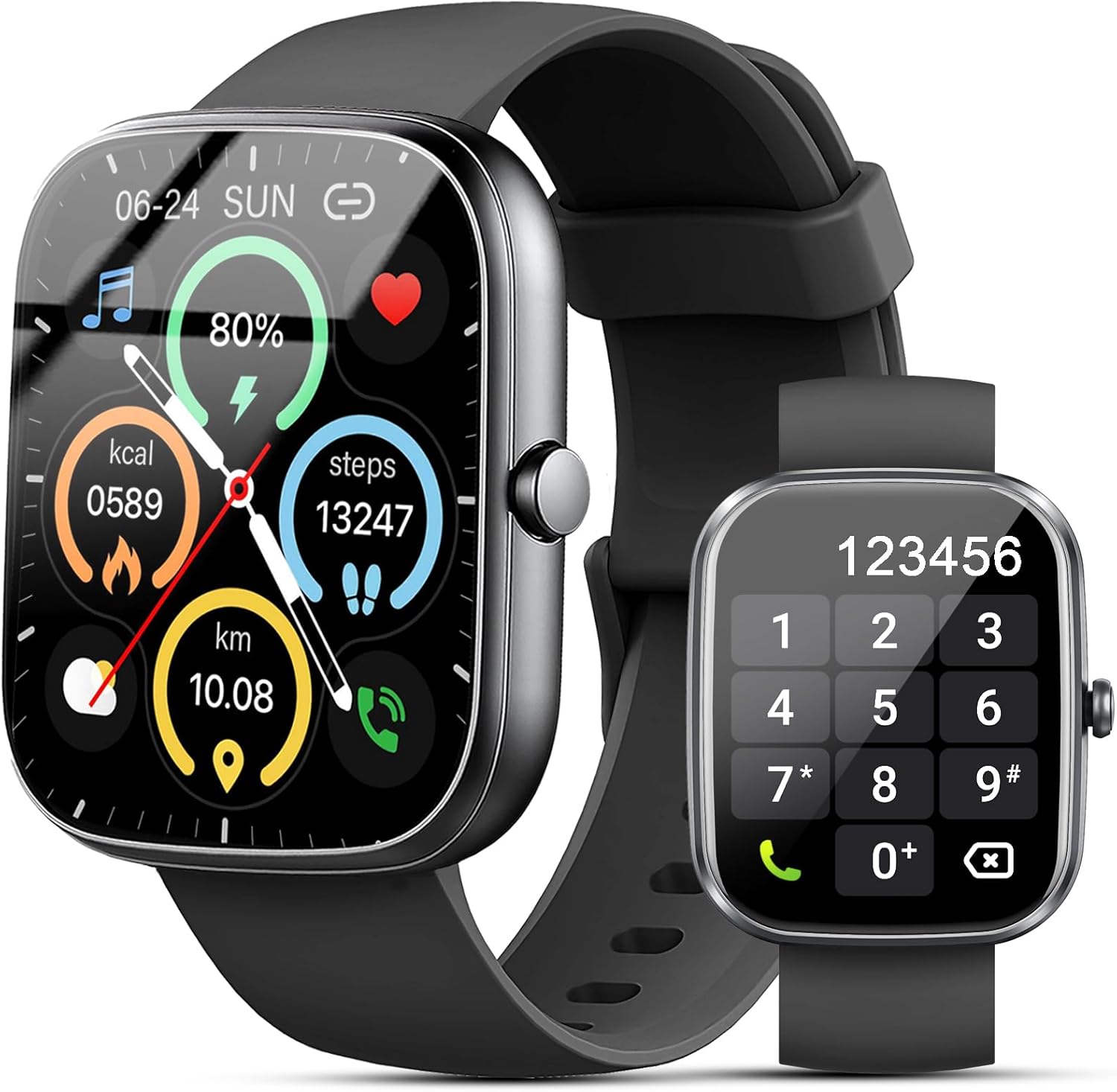
Figure 1: Kuizil Smart Watch with fitness data and call interface.
పెట్టెలో ఏముంది
దయచేసి మీ ప్యాకేజీలో అన్ని అంశాలు ఉన్నాయని ధృవీకరించండి:
- స్మార్ట్ వాచ్ (1 యూనిట్)
- Watch Band (1 unit)
- మాగ్నెటిక్ ఛార్జింగ్ కేబుల్ (1 యూనిట్)
- వినియోగదారు మాన్యువల్ (1 యూనిట్)

Figure 2: Package contents of the Kuizil Smart Watch.
సెటప్ గైడ్
1. స్మార్ట్ వాచ్ ఛార్జింగ్
Before first use, fully charge your smartwatch. Connect the magnetic charging cable to the charging points on the back of the watch and plug the USB end into a standard USB power adapter (not included). A full charge typically takes 2 hours.
- Ensure the charging pins are clean and properly aligned with the watch's charging contacts.
- వాచ్ డిస్ప్లే ఛార్జింగ్ స్థితిని సూచిస్తుంది.
2. యాప్ డౌన్లోడ్ మరియు జత చేయడం
To unlock the full functionality of your Kuizil Smart Watch, you need to download and connect it to the companion app, "Gloryfit".
- అనువర్తనాన్ని డౌన్లోడ్ చేయండి: కోసం వెతకండి "Gloryfit" in the Apple App Store (for iOS devices) or Google Play Store (for Android devices) and install it.
- బ్లూటూత్ని ప్రారంభించండి: On your smartphone, go to Settings and ensure Bluetooth is turned on.
- Open Gloryfit App: Launch the "Gloryfit" app and follow the on-screen instructions to create an account or log in.
- పరికరాన్ని జోడించండి: Within the app, navigate to the "Device" or "Add Device" section. The app will search for nearby smartwatches. Select "T70" from the list of found devices to initiate pairing.
- జత చేయడాన్ని నిర్ధారించండి: A pairing request may appear on both your phone and the watch. Confirm the pairing on both devices.

చిత్రం 3: బ్లూటూత్ కాల్ మరియు నోటిఫికేషన్ లక్షణాలు.
3. బ్లూటూత్ కాల్ ఫంక్షన్ సెటప్
For the call answering/making function, an additional Bluetooth connection is required:
- After successfully pairing the watch with the "Gloryfit" app, go to your smartphone's Bluetooth settings.
- Look for a device named "T70-Audio" or similar in the list of available devices.
- Tap on "T70-Audio" to connect. Once connected, you will be able to make and receive calls directly from your smartwatch.
ఆపరేటింగ్ సూచనలు
నావిగేషన్
The Kuizil Smart Watch features a full touch screen and a side button for navigation:
- పైకి/క్రిందికి స్వైప్ చేయండి: మెనూలు మరియు నోటిఫికేషన్ల ద్వారా స్క్రోల్ చేయండి.
- ఎడమ/కుడి స్వైప్ చేయండి: Access quick functions or different data screens (e.g., heart rate, weather, activity summary).
- నొక్కండి: ఒక అంశాన్ని ఎంచుకోండి లేదా చర్యను నిర్ధారించండి.
- సైడ్ బటన్: హోమ్ స్క్రీన్కి తిరిగి రావడానికి లేదా పరికరాన్ని మేల్కొలపడానికి నొక్కండి. పవర్ ఎంపికల కోసం ఎక్కువసేపు నొక్కి ఉంచండి.

Figure 4: The 1.91" HD color screen.
Bluetooth Call and Message Notifications
Once connected via Bluetooth, your smartwatch can handle calls and display messages:
- కాల్స్ చేయడం/జవాబు ఇవ్వడం: Use the built-in HD speaker and microphone to answer incoming calls or dial numbers directly from the watch. You can also view call history and store contacts.
- సందేశ నోటిఫికేషన్లు: Receive vibrating alerts for social media messages (Facebook, WhatsApp, Instagram, Twitter, etc.) and SMS. You can read message previews directly on the watch screen.
ఆరోగ్య పర్యవేక్షణ
The smartwatch is equipped with advanced sensors for comprehensive health tracking:
- హృదయ స్పందన పర్యవేక్షణ: Continuously monitors your heart rate in real-time.
- రక్త ఆక్సిజన్ (SpO2) పర్యవేక్షణ: మీ రక్త ఆక్సిజన్ సంతృప్త స్థాయిలను కొలుస్తుంది.
- స్లీప్ మానిటరింగ్: Automatically tracks your sleep patterns (deep sleep, light sleep, wakeful sleep) and provides detailed analysis in the "Gloryfit" app to help improve sleep habits.

Figure 5: Health monitoring features including heart rate, SpO2, and sleep tracking.
స్పోర్ట్ మోడ్లు మరియు యాక్టివిటీ ట్రాకింగ్
The watch supports over 100 sport modes to accurately record your exercise data:
- కార్యాచరణ ట్రాకింగ్: Records daily steps, calories burned, distance, and active minutes.
- స్పోర్ట్ మోడ్లు: Select from various activities like running, cycling, walking, basketball, yoga, football, and more. The watch will track relevant metrics for each mode.

Figure 6: Over 100 sport modes supported by the smartwatch.
Other Practical Functions
Your Kuizil Smart Watch includes a variety of useful features:
- టైమర్ & స్టాప్వాచ్: For precise timing.
- అలారం గడియారం: బహుళ అలారాలను సెట్ చేయండి.
- మీ ఫోన్ను కనుగొనండి: మీ జత చేసిన స్మార్ట్ఫోన్ను గుర్తించండి.
- సెడెంటరీ రిమైండర్: నిష్క్రియాత్మక కాలాల తర్వాత మిమ్మల్ని తరలించమని అడుగుతుంది.
- సంగీత నియంత్రణ: మీ స్మార్ట్ఫోన్లో మ్యూజిక్ ప్లేబ్యాక్ని నియంత్రించండి.
- వాతావరణ సూచన: నిజ-సమయ వాతావరణ నవీకరణలను పొందండి.
- ఫోటో నియంత్రణ: మీ ఫోన్ కెమెరాను రిమోట్గా ట్రిగ్గర్ చేయండి.
- స్త్రీ సైకిల్ ట్రాకింగ్: Monitor menstrual cycles.
- అంతరాయం కలిగించవద్దు మోడ్: నోటిఫికేషన్లను నిశ్శబ్దం చేయండి.
- ప్రకాశం సర్దుబాటు: స్క్రీన్ ప్రకాశాన్ని అనుకూలీకరించండి.

చిత్రం 7: పైగాview of additional practical functions.
నిర్వహణ
మీ స్మార్ట్ వాచ్ను శుభ్రపరచడం
To ensure optimal performance and hygiene, regularly clean your smartwatch:
- స్క్రీన్ మరియు వాచ్ బాడీని మృదువైన, మెత్తటి బట్టతో తుడవండి.
- మొండి మచ్చల కోసం, కొద్దిగా dampen గుడ్డను నీటితో తడిపివేయండి. కఠినమైన రసాయనాలు లేదా రాపిడి పదార్థాలను ఉపయోగించకుండా ఉండండి.
- సమర్థవంతమైన ఛార్జింగ్ను నిర్ధారించడానికి ఛార్జింగ్ కాంటాక్ట్లను కాలానుగుణంగా శుభ్రం చేయండి.
నీటి నిరోధకత (IP68)
The Kuizil Smart Watch has an IP68 waterproof rating, meaning it is resistant to dust and can withstand immersion in water up to 1.5 meters for 30 minutes. This makes it suitable for daily activities like hand washing, face washing, and sweating during exercise.
ముఖ్యమైన గమనిక:
- Do not use the watch in hot water, saunas, or steam rooms, as steam can penetrate the seals and cause damage.
- Avoid using the watch in seawater, as salt can corrode the device.
- The water resistance is not permanent and may decrease over time with normal wear and tear.
బ్యాటరీ సంరక్షణ
బ్యాటరీ జీవితకాలం మరియు దీర్ఘాయువును పెంచడానికి:
- మొదటిసారి ఉపయోగించే ముందు వాచ్ను పూర్తిగా ఛార్జ్ చేయండి.
- బ్యాటరీని తరచుగా పూర్తిగా ఖాళీ చేయడాన్ని నివారించండి.
- ఎక్కువసేపు ఉపయోగంలో లేనప్పుడు గడియారాన్ని చల్లని, పొడి ప్రదేశంలో నిల్వ చేయండి.

Figure 8: Battery capacity and typical usage times.
ట్రబుల్షూటింగ్
If you encounter issues with your Kuizil Smart Watch, please refer to the following common solutions:
- గడియారం ఆన్ కావడం లేదు: వాచ్ పూర్తిగా ఛార్జ్ అయ్యిందని నిర్ధారించుకోండి. దానిని ఛార్జింగ్ కేబుల్ మరియు పవర్ సోర్స్కి కనీసం 30 నిమిషాలు కనెక్ట్ చేయండి.
- ఫోన్తో జత చేయడం సాధ్యం కాదు:
- మీ ఫోన్లో బ్లూటూత్ ప్రారంభించబడిందని మరియు వాచ్ పరిధిలో ఉందని నిర్ధారించుకోండి.
- మీ ఫోన్ మరియు వాచ్ రెండింటినీ రీస్టార్ట్ చేయండి.
- Make sure you are using the "Gloryfit" app and not trying to pair directly through your phone's Bluetooth settings for the main connection.
- For call function, ensure "T70-Audio" is connected in your phone's Bluetooth settings.
- సరికాని ఆరోగ్య డేటా:
- మీ మణికట్టు మీద వాచ్ చక్కగా ధరించేలా చూసుకోండి, మణికట్టు ఎముక కంటే ఒక వేలు వెడల్పు పైన ఉంచండి.
- Keep the sensor area on the back of the watch clean.
- కొలతలు తీసుకునేటప్పుడు అధిక కదలికలను నివారించండి.
- నోటిఫికేషన్లు అందలేదు:
- మీ ఫోన్లో యాప్ నోటిఫికేషన్ అనుమతులను తనిఖీ చేయండి.
- Ensure the watch is connected to the "Gloryfit" app.
- Verify that "Do Not Disturb" mode is not active on the watch.
- తక్కువ బ్యాటరీ జీవితం:
- స్క్రీన్ ప్రకాశాన్ని తగ్గించండి.
- నిరంతర హృదయ స్పందన రేటు పర్యవేక్షణ లేదా శక్తి-ఇంటెన్సివ్ ఫీచర్ల తరచుగా వాడకాన్ని పరిమితం చేయండి.
- ప్రతిసారీ వాచ్ పూర్తిగా ఛార్జ్ అయ్యిందని నిర్ధారించుకోండి.
For further assistance, please refer to the "Help" or "FAQ" section within the "Gloryfit" app or contact Kuizil customer support.
స్పెసిఫికేషన్లు
| ఫీచర్ | వివరాలు |
|---|---|
| మోడల్ సంఖ్య | T70 |
| స్క్రీన్ పరిమాణం | 1.91 Inches HD Color Screen |
| డిస్ప్లే రిజల్యూషన్ | 320*380 పిక్సెల్లు |
| కనెక్టివిటీ | బ్లూటూత్ |
| జలనిరోధిత రేటింగ్ | IP68 |
| బ్యాటరీ లైఫ్ (సాధారణ వినియోగం) | 5-7 రోజులు |
| బ్యాటరీ లైఫ్ (స్టాండ్బై) | సుమారుగా. 30 రోజుల |
| ఛార్జింగ్ సమయం | సుమారు 2 గంటలు |
| అనుకూల OS | iOS 9.0 మరియు అంతకంటే ఎక్కువ, Android 6.0 మరియు అంతకంటే ఎక్కువ |
| ఆరోగ్య పర్యవేక్షణ | హృదయ స్పందన రేటు, SpO2, నిద్ర ట్రాకింగ్ |
| క్రీడా మోడ్లు | 100+ |
| వస్తువు బరువు | 3.2 ఔన్సులు |
| ప్యాకేజీ కొలతలు | 6.81 x 3.74 x 0.75 అంగుళాలు |
వారంటీ మరియు మద్దతు
Your Kuizil Smart Watch is covered by a standard manufacturer's warranty. For specific warranty terms and conditions, please refer to the documentation included with your purchase or contact Kuizil customer support.
If you require technical assistance, have questions about your device, or need to report an issue, please contact Kuizil customer support through the contact information provided on the official Kuizil website or within the "Gloryfit" app.
For the latest updates, FAQs, and additional resources, please visit the official Kuizil brand store on Amazon: Kuizil Store.


