1. పరిచయం మరియు ఓవర్view
This user manual provides essential information for the safe and efficient operation of your Candy 21-Pint Portable Dehumidifier. Please read this manual thoroughly before using the appliance and retain it for future reference. This dehumidifier is designed to remove excess moisture from indoor air, helping to prevent mold, mildew, and other humidity-related issues in spaces up to 1,000 square feet.

మూర్తి 1.1: ముందు view of the Candy 21-Pint Portable Dehumidifier.
2. భద్రతా సమాచారం
అగ్ని ప్రమాదాలు, విద్యుత్ షాక్ మరియు గాయాల ప్రమాదాన్ని తగ్గించడానికి విద్యుత్ ఉపకరణాలను ఉపయోగిస్తున్నప్పుడు ఎల్లప్పుడూ ప్రాథమిక భద్రతా జాగ్రత్తలను అనుసరించండి.
- విద్యుత్ సరఫరా వాల్యూమ్తో సరిపోలుతుందని నిర్ధారించుకోండిtage డీహ్యూమిడిఫైయర్ యొక్క రేటింగ్ లేబుల్పై పేర్కొనబడింది.
- దెబ్బతిన్న త్రాడు లేదా ప్లగ్తో డీహ్యూమిడిఫైయర్ను ఆపరేట్ చేయవద్దు.
- Keep the appliance away from water and other liquids. Do not immerse the unit in water.
- గాలి ఇన్లెట్లు లేదా అవుట్లెట్లను నిరోధించవద్దు. యూనిట్ చుట్టూ కనీసం 8 అంగుళాల (20 సెం.మీ.) క్లియరెన్స్ నిర్వహించండి.
- ఏదైనా నిర్వహణ లేదా శుభ్రపరిచే ముందు డీహ్యూమిడిఫైయర్ను అన్ప్లగ్ చేయండి.
- ఈ ఉపకరణం ఇండోర్ రెసిడెన్షియల్ ఉపయోగం కోసం మాత్రమే.
- పిల్లలను డీహ్యూమిడిఫైయర్తో ఆపరేట్ చేయడానికి లేదా ఆడుకోవడానికి అనుమతించవద్దు.
- If the unit emits unusual sounds, smells, or smoke, unplug it immediately and contact customer support.
3. ఉత్పత్తి లక్షణాలు
Your Candy Dehumidifier is equipped with several features designed for optimal performance and user convenience:
- Efficient Moisture Removal: Capable of removing up to 21 pints (12 liters) of moisture per day, suitable for areas up to 1,000 sq.ft.
- సర్దుబాటు చేయగల తేమ పరిధి: Set desired humidity levels between 30% and 90% Relative Humidity (RH).
- ద్వంద్వ డ్రైనేజీ ఎంపికలు:
- మాన్యువల్ డ్రైనేజ్: Utilizes a 0.66-gallon (2.5-liter) water tank with an auto-shutoff feature to prevent overflow.
- నిరంతర పారుదల: Includes a 3.33 ft (1 meter) drain hose for continuous water removal, ideal for long-term operation.
- బహుళ ఆపరేటింగ్ మోడ్లు:
- నిరంతర మోడ్: Runs constantly for maximum dehumidification.
- ఆటో మోడ్: Automatically adjusts operation to maintain comfortable humidity based on ambient temperature.
- User-Defined Mode: Allows setting a specific target humidity level. The unit will pause when the target is reached and restart if humidity rises.
- రెండు ఫ్యాన్ స్పీడ్లు: Choose between LOW and HIGH fan speeds for customized performance and noise levels.
- స్మార్ట్ కంట్రోల్: Control the dehumidifier remotely via a dedicated smartphone app, compatible with Google Home and Alexa for voice control.
- యూజర్ ఫ్రెండ్లీ డిజైన్: Features ergonomically designed lift-up handles, 360° smooth wheels for easy mobility, a touch control panel with LED display, a 1-24 hour timer, and a detachable, washable filter for easy maintenance.
- ఆటో డీఫ్రాస్ట్: Automatically defrosts the coils in low-temperature environments to ensure efficient operation.

Figure 3.1: Dehumidification capacity and coverage area.
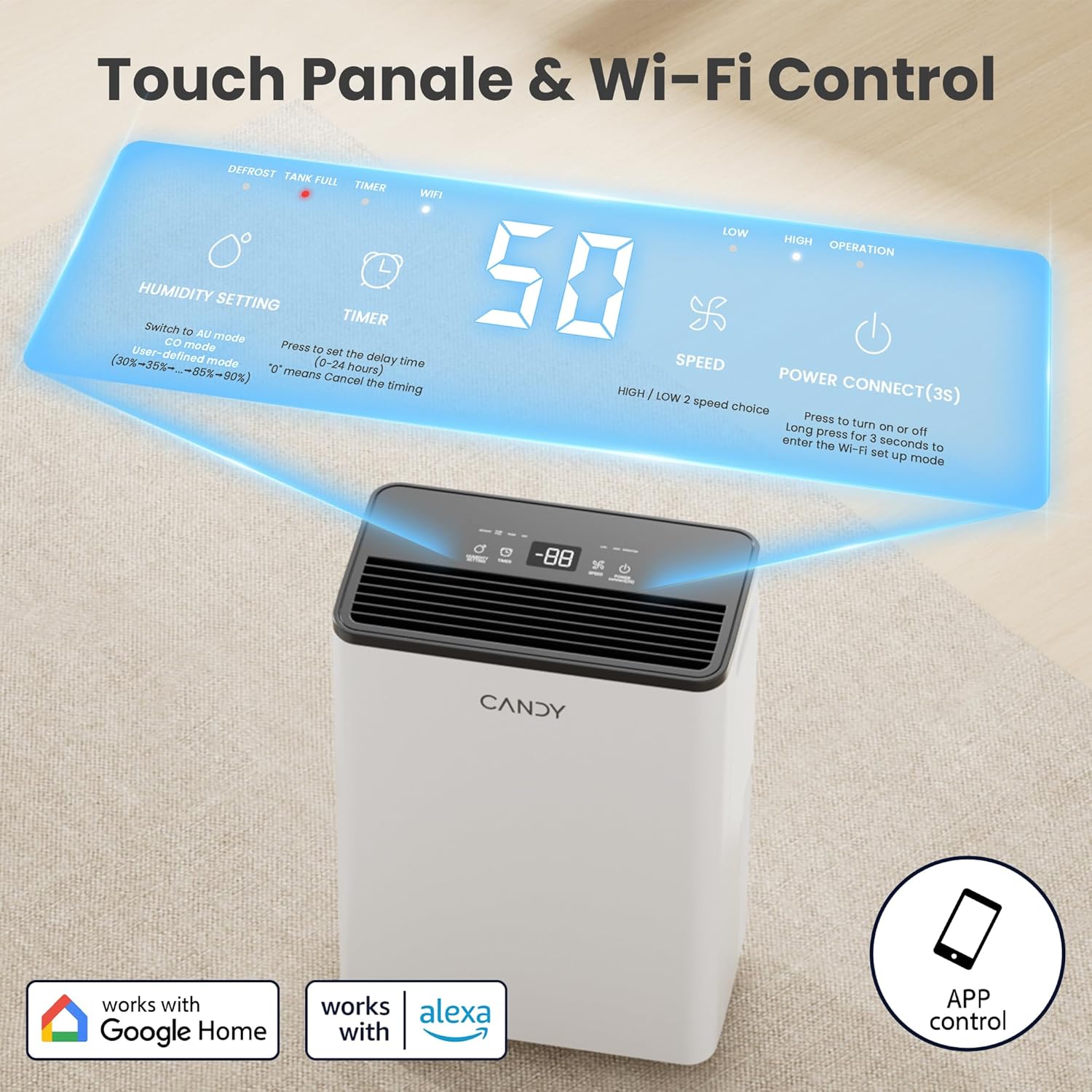
Figure 3.2: Touch control panel and Wi-Fi connectivity.

చిత్రం 3.3: మాన్యువల్ మరియు నిరంతర పారుదల పద్ధతుల ఉదాహరణ.
4. సెటప్ మరియు ఇన్స్టాలేషన్
4.1 అన్ప్యాకింగ్
దాని ప్యాకేజింగ్ నుండి డీహ్యూమిడిఫైయర్ను జాగ్రత్తగా తొలగించండి. ఏదైనా షిప్పింగ్ నష్టం కోసం యూనిట్ను తనిఖీ చేయండి. భవిష్యత్తులో నిల్వ లేదా రవాణా కోసం ప్యాకేజింగ్ మెటీరియల్లను ఉంచుకోండి.
4.2 ప్లేస్మెంట్
Place the dehumidifier on a flat, stable surface in the area where moisture removal is desired. Ensure there is at least 8 inches (20 cm) of clear space around all sides of the unit for proper airflow.
4.3 పవర్ కనెక్షన్
పవర్ కార్డ్ను గ్రౌండెడ్ ఎలక్ట్రికల్ అవుట్లెట్లోకి ప్లగ్ చేయండి. అవుట్లెట్ వాల్యూమ్ను నిర్ధారించుకోండిtage యూనిట్ అవసరాలకు అనుగుణంగా ఉంటుంది.
4.4 Drainage Setup (Choose One)
4.4.1 మాన్యువల్ డ్రైనేజీ (నీటి ట్యాంక్)
The unit comes with a built-in 0.66-gallon (2.5-liter) water tank. When the tank is full, the dehumidifier will automatically shut off and an indicator light will illuminate. Empty the tank by pulling it out, discarding the water, and reinserting it firmly until it clicks into place.

Figure 4.1: Steps for emptying the water tank.
4.4.2 నిరంతర డ్రైనేజీ (డ్రెయిన్ హోస్)
For continuous operation without needing to empty the tank, attach the included drain hose to the continuous drainage outlet on the back of the unit. Ensure the hose is sloped downwards to allow gravity drainage into a floor drain, large bucket, or sink. Do not allow the hose to be kinked or elevated, as this will prevent proper drainage.
5. ఆపరేటింగ్ సూచనలు
5.1 కంట్రోల్ ప్యానెల్ ఓవర్view
The dehumidifier features a touch control panel with an LED display. Refer to Figure 5.1 for button functions.

చిత్రం 5.1: డిజిటల్ కంట్రోల్ ప్యానెల్.
- పవర్ బటన్: Press to turn the unit ON/OFF. Press and hold for 3 seconds to enter Wi-Fi setup mode.
- తేమ సెట్టింగ్ బటన్: Press to cycle through humidity settings (30%-90% RH) or select operating modes (Continuous, Auto, User-Defined).
- టైమర్ బటన్: Press to set the auto ON/OFF timer (1-24 hours). '0' means no timer is set.
- స్పీడ్ బటన్: Press to switch between LOW and HIGH fan speeds.
- ప్రదర్శన: ప్రస్తుత తేమ, లక్ష్య తేమ లేదా టైమర్ సెట్టింగ్లను చూపుతుంది.
- సూచిక లైట్లు: DEFROST, TANK FULL, TIMER, WIFI, LOW (speed), HIGH (speed), OPERATION.
5.2 ఆపరేటింగ్ మోడ్లను సెట్ చేయడం
నొక్కండి తేమ సెట్టింగ్ కింది మోడ్ల ద్వారా సైకిల్ చేయడానికి బటన్:
- Continuous Mode (CO): The dehumidifier will operate continuously at HIGH fan speed, regardless of the indoor humidity. This mode is ideal for rapid dehumidification.

Figure 5.2: Continuous Mode operation.
- Auto Mode (AU): The dehumidifier will automatically adjust its operation to maintain the most comfortable humidity level based on the current indoor temperature. This setting cannot be manually adjusted.

Figure 5.3: Auto Mode operation.
- User-Defined Mode (30-90% RH): In this mode, you can set your desired humidity level. The unit will maintain the indoor humidity within a range of +3% to -2% of your set target. When the target humidity is reached, the unit will stop, and the operation light will flash. It will restart automatically when the humidity rises above the target.

Figure 5.4: User-Defined Mode operation.
5.3 Setting Fan Speed
నొక్కండి వేగం button to toggle between LOW and HIGH fan speeds. High speed provides faster dehumidification, while low speed offers quieter operation.

చిత్రం 5.5: ఫ్యాన్ స్పీడ్ సెట్టింగ్లు.
5.4 టైమర్ని సెట్ చేయడం
నొక్కండి టైమర్ button to set the desired operating duration (1-24 hours). The unit will automatically turn ON or OFF after the set time. If '0' is displayed, the timer function is inactive.

Figure 5.6: Timer and Auto Defrost features.
5.5 స్మార్ట్ కంట్రోల్ (వై-ఫై & వాయిస్)
Your dehumidifier can be controlled remotely via a smartphone app and voice assistants.
5.5.1 యాప్ కనెక్షన్
- Download the dedicated smartphone app (e.g., "Smart Life" or similar, as indicated by product packaging/instructions) from your app store.
- మీ ఫోన్ 2.4 GHz Wi-Fi నెట్వర్క్కి కనెక్ట్ చేయబడిందని నిర్ధారించుకోండి.
- Press and hold the Power button on the dehumidifier for 3 seconds until the Wi-Fi indicator light flashes, indicating pairing mode.
- Follow the in-app instructions to add and connect your dehumidifier.

Figure 5.7: Smart control via Wi-Fi app.
5.5.2 Voice Control (Google Home/Alexa)
Once connected to the app, you can link your dehumidifier to Google Home or Amazon Alexa for voice commands. Follow the instructions within the app or your smart home assistant's application to enable this feature. Example commands include: "Alexa, set the bedroom humidity to 50."

Figure 5.8: Voice control integration.
6. నిర్వహణ
క్రమం తప్పకుండా నిర్వహణ చేయడం వల్ల మీ డీహ్యూమిడిఫైయర్ యొక్క ఉత్తమ పనితీరు లభిస్తుంది మరియు జీవితకాలం పెరుగుతుంది. ఏదైనా నిర్వహణ చేసే ముందు ఎల్లప్పుడూ యూనిట్ను అన్ప్లగ్ చేయండి.
6.1 ఎయిర్ ఫిల్టర్ను శుభ్రపరచడం
గాలి నాణ్యత మరియు వినియోగం ఆధారంగా ప్రతి రెండు వారాలకు ఒకసారి లేదా అంతకంటే ఎక్కువసార్లు ఎయిర్ ఫిల్టర్ను శుభ్రం చేయాలి. మురికిగా ఉన్న ఫిల్టర్ సామర్థ్యాన్ని తగ్గిస్తుంది మరియు యూనిట్ మరింత కష్టపడి పనిచేయడానికి కారణమవుతుంది.
- నీటి ట్యాంక్ తొలగించండి.
- Gently pull down to remove the air filter from its slot.
- Clean the filter with cool water. Do not use gasoline, alcohol, or hot water. A vacuum cleaner can also be used to remove dust.
- Allow the filter to air-dry completely before reinserting it. Do not operate the unit without the filter.

Figure 6.1: Steps for cleaning the air filter.
6.2 వాటర్ ట్యాంక్ శుభ్రపరచడం
Periodically clean the water tank to prevent mold and mildew growth. Use mild soap and warm water, then rinse thoroughly. Ensure the tank is completely dry before reinserting.
6.3 బాహ్య క్లీనింగ్
డీహ్యూమిడిఫైయర్ యొక్క బాహ్య భాగాన్ని మృదువైన, డితో తుడవండిamp cloth. Do not use harsh chemicals or abrasive cleaners, as they may damage the surface.
7. ట్రబుల్షూటింగ్
కస్టమర్ సపోర్ట్ను సంప్రదించే ముందు, సాధారణ సమస్యల కోసం దయచేసి కింది ట్రబుల్షూటింగ్ గైడ్ను చూడండి:
| సమస్య | సాధ్యమైన కారణం | పరిష్కారం |
|---|---|---|
| డీహ్యూమిడిఫైయర్ ఆన్ చేయదు. | కరెంటు లేదు; పవర్ కార్డ్ ప్లగ్ చేయబడలేదు; వాటర్ ట్యాంక్ నిండిపోయింది లేదా సరిగ్గా కూర్చోలేదు. | Check power outlet; Ensure power cord is securely plugged in; Empty and reinsert water tank correctly. |
| యూనిట్ నడుస్తోంది కానీ నీటిని సేకరించడం లేదు. | Humidity setting too high; Room temperature too low; Air filter clogged; Air inlets/outlets blocked. | Lower the target humidity; Ensure room temperature is above 41°F (5°C); Clean the air filter; Clear any obstructions around the unit. |
| యూనిట్ ధ్వనించే ఉంది. | Unit not on a level surface; Air filter clogged; Fan speed set to HIGH. | Place unit on a flat, stable surface; Clean the air filter; Switch to LOW fan speed. |
| యూనిట్ నుండి నీరు లీక్ అవుతుంది. | Water tank not properly seated; Continuous drain hose is kinked or elevated. | Reinsert water tank firmly; Ensure drain hose is straight and sloped downwards. |
| Wi-Fi కనెక్షన్ సమస్యలు. | Incorrect Wi-Fi password; Not connected to 2.4 GHz network; Router too far. | Verify Wi-Fi password; Connect phone to 2.4 GHz network; Move unit closer to router or use a Wi-Fi extender. |
8. స్పెసిఫికేషన్లు
| ఫీచర్ | వివరాలు |
|---|---|
| బ్రాండ్ | మిఠాయి |
| మోడల్ పేరు | CAS-CF12(W)-US |
| డీహ్యూమిడిఫికేషన్ సామర్థ్యం | 21 Pints / 12 Liters per Day (at 86°F, 80% RH) |
| కవరేజ్ ఏరియా | 1000 చదరపు అడుగుల వరకు |
| ట్యాంక్ వాల్యూమ్ | 0.66 గ్యాలన్లు (2.5 లీటర్లు) |
| తేమ సెట్టింగ్ పరిధి | 30% - 90% ఆర్హెచ్ |
| స్పీడ్ల సంఖ్య | 2 (తక్కువ, ఎక్కువ) |
| వాట్tage | 130 వాట్స్ |
| ఉత్పత్తి కొలతలు (D x W x H) | 6.69"డి x 11.42"వా x 16.34"హ |
| వస్తువు బరువు | 18.7 పౌండ్లు |
| ప్రత్యేక లక్షణాలు | Automatic Defrost, Automatic Shutoff, Continuous/Auto Mode, Digital Display, Smart APP WIFI Control, Ergonomic Handle, Washable Filter, Removable Tank, 360° Smooth Wheels. |
9. వారంటీ మరియు మద్దతు
For warranty information, technical support, or service inquiries, please refer to the warranty card included with your product or visit the official Candy website. Please have your model number (CAS-CF12(W)-US) and purchase date ready when contacting support.
You can also visit the Candy Store on Amazon for more information: Candy Store


