1. పరిచయం
This manual provides essential information for the safe and effective operation of your GEPRC Vapor-D6 O4 Pro FPV Drone. Please read this manual thoroughly before operating the drone to ensure proper setup, flight, and maintenance. This drone is designed for advanced users and offers enhanced image clarity, stability, and agility for FPV racing and cinematic aerial footage.
2. భద్రతా సమాచారం
- విమాన ప్రయాణానికి ముందు తనిఖీ: Always inspect the drone for any damage, loose parts, or obstructions before each flight. Ensure propellers are securely attached and free from cracks.
- బ్యాటరీ భద్రత: Use only recommended 6S LiPo 1500mAh – 2000mAh batteries. Do not overcharge or over-discharge batteries. Store batteries in a safe, fireproof location.
- విమాన పర్యావరణం: Fly in open areas, away from people, animals, buildings, and power lines. Avoid flying in strong winds or adverse weather conditions.
- దృష్టి రేఖను: Maintain visual line of sight with your drone at all times, even when using FPV goggles.
- Propeller Hazard: Keep hands and face clear of propellers when motors are armed. Propellers can cause serious injury.
- స్థానిక నిబంధనలు: Adhere to all local aviation laws and regulations regarding drone operation.
- నైపుణ్య స్థాయి: This drone is intended for advanced users. Beginners should seek guidance from experienced pilots.
3. ప్యాకేజీ విషయాలు
మీ ప్యాకేజీలో అన్ని అంశాలు ఉన్నాయని ధృవీకరించండి:
- 1 x GEPRC Vapor-D6 O4 Pro FPV Drone
- 2 x HQprop 6X3.5X3 Propellers
- 2 x Battery Anti-Slip Pads
- 1 x Spare Screw Pack (includes: 6 x M3*10mm round head screws, 6 x M3*8mm round head screws, 2 x M3*6mm flat head screws, 1 x M5*28mm thin head screw, 1 x M5 flange nut, 4 x M3 rivet nuts)
- 1 x Vapor Side Panel
- 2 x M20*250mm Battery Straps
- 1 x L- ఆకారపు స్క్రూడ్రైవర్ 1.5mm
- 1 x L- ఆకారపు స్క్రూడ్రైవర్ 2.0mm
- 1 x GoPro Mount
4. ఉత్పత్తి ముగిసిందిview
The GEPRC Vapor-D6 O4 Pro is a high-performance FPV racing quadcopter designed for seamless integration with the O4 Air Unit Pro VTX. It features a robust carbon fiber frame, anti-vibration design, and powerful motors for dynamic flight.
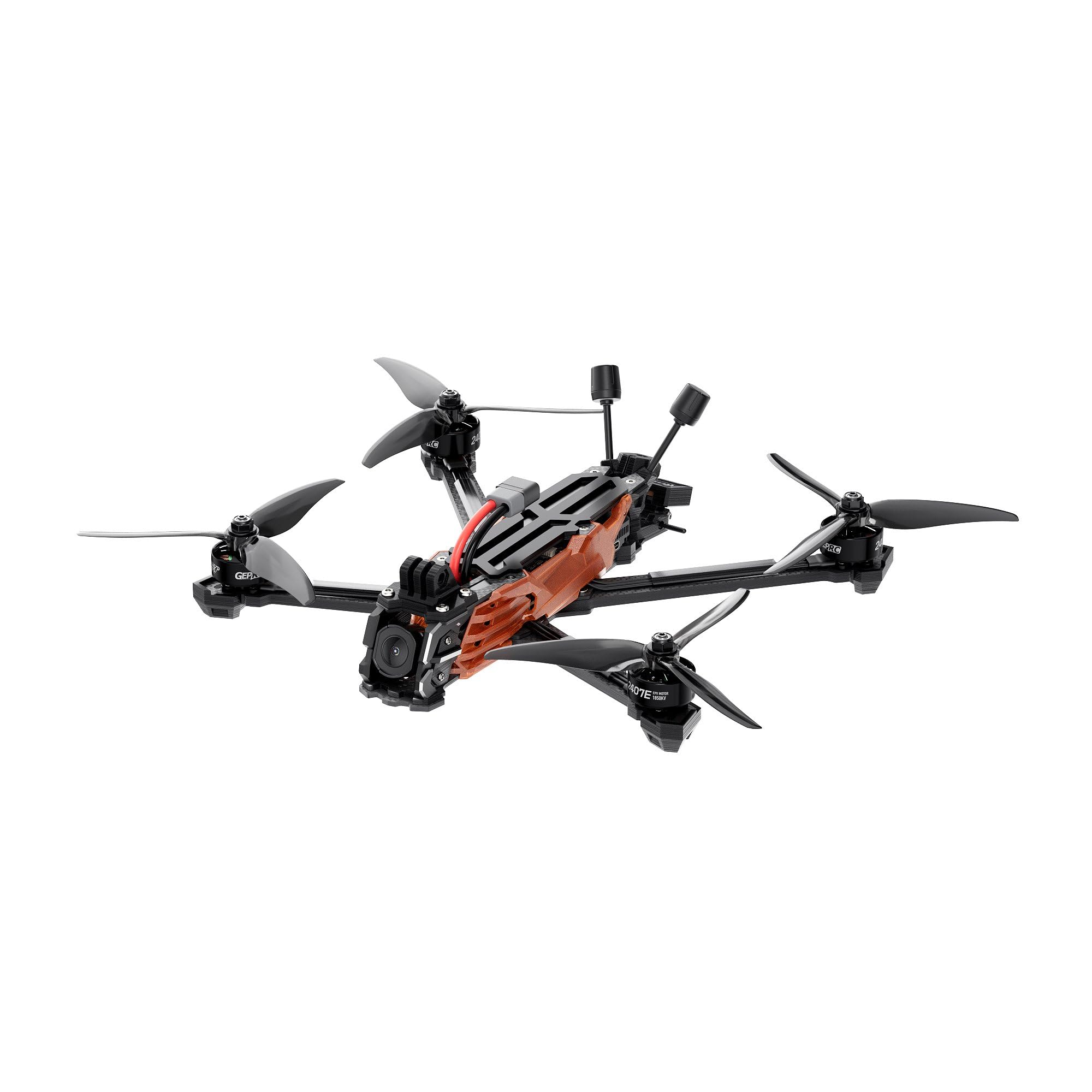
చిత్రం 1: పై నుండి క్రిందికి view of the GEPRC Vapor-D6 O4 Pro FPV Drone, showcasing its carbon fiber frame and propeller layout.

చిత్రం 2: కోణీయ view of the GEPRC Vapor-D6 O4 Pro FPV Drone, highlighting its integrated O4 Air Unit Pro and robust design.
ముఖ్య లక్షణాలు:
- O4 Air Unit Pro Integration: Designed for seamless integration with the O4 Air Unit Pro VTX, delivering enhanced image clarity and light sensitivity for immersive FPV racing and cinematic aerial shots.
- యాంటీ వైబ్రేషన్ డిజైన్: Features a precision-engineered aluminum lens housing and shock-absorbing silicone mounts to minimize vibrations, ensuring crisp, stable footage.
- High-Performance Motors: Equipped with SPEEDX2 E-series motors (2407E 1750KV) for smooth, responsive thrust and agility.
- Durable Carbon Fiber Frame: Built with reinforced 5mm carbon fiber arms and a robust layered plate design for exceptional durability and impact resistance.
- Stable Flight Performance: Factory-tuned PID controls ensure stable flight. Optional GPS module (GEP-M10) enables accurate positioning.
5. సెటప్
5.1 ప్రొపెల్లర్ ఇన్స్టాలేషన్
- Ensure the drone is powered off and the battery is disconnected.
- Identify the correct rotation direction for each propeller (CW and CCW).
- Align the propeller with the motor shaft and press down firmly.
- Secure the propeller with the provided propeller nuts, ensuring they are tightened but not overtightened.
5.2 బ్యాటరీ కనెక్షన్
- Place a battery anti-slip pad on the top plate of the drone.
- Secure the recommended 6S LiPo battery (1500mAh – 2000mAh) to the drone using the M20*250mm battery straps. Ensure the battery is centered and tightly secured.
- Connect the XT60 battery connector to the drone's power port.
5.3 Receiver Binding (ELRS 2.4G / TBS Nano RX)
Refer to your specific receiver's manual for detailed binding instructions. Generally, the process involves:
- Power on your remote controller and set it to binding mode.
- Power on the drone. The receiver's LED should indicate it's ready for binding (e.g., flashing rapidly).
- Initiate the binding process on your remote controller.
- Once bound, the receiver's LED should turn solid, indicating a successful connection.
5.4 FPV System Setup (O4 Air Unit Pro)
Ensure your FPV goggles are compatible with the O4 Air Unit Pro Transmission Module. Power on your goggles and the drone. The video feed should automatically connect. Adjust channel and frequency settings if necessary via your goggles' menu.
6. ఆపరేటింగ్ సూచనలు
6.1 Arming/Disarming Motors
To arm the motors, move both sticks on your remote controller to the bottom-right corner (or as configured in Betaflight). The motors will spin up slowly. To disarm, move both sticks to the bottom-left corner.
6.2 ప్రాథమిక విమాన నియంత్రణలు
- థొరెటల్: ఎత్తును నియంత్రిస్తుంది (ఎడమ కర్ర పైకి/క్రిందికి).
- యా: Rotates the drone left or right (left stick left/right).
- పిచ్: డ్రోన్ను ముందుకు లేదా వెనుకకు వంచుతుంది (కుడి కర్ర పైకి/క్రిందికి).
- రోల్: డ్రోన్ను ఎడమ లేదా కుడికి వంచుతుంది (కుడివైపు కర్ర ఎడమ/కుడి).
6.3 అధునాతన విమాన మోడ్లు
The Vapor-D6 O4 Pro supports various flight modes configurable in Betaflight. Common modes include:
- యాంగిల్ మోడ్: Self-leveling mode, suitable for stable cruising.
- Acro Mode: Manual mode, offering full control for freestyle and racing.
- GPS Rescue (with optional GPS): If equipped with the GEP-M10 GPS module, this mode can assist in returning the drone to a predefined home point in case of signal loss or emergency.
7. నిర్వహణ
- ప్రొపెల్లర్ తనిఖీ: Regularly check propellers for any damage, bends, or cracks. Replace damaged propellers immediately.
- ఫ్రేమ్ తనిఖీ: Inspect the carbon fiber frame and arms for any signs of stress, cracks, or damage after hard landings or crashes.
- మోటార్ క్లీనింగ్: మోటార్లను ధూళి, దుమ్ము మరియు చెత్త లేకుండా ఉంచండి. వాటిని శుభ్రం చేయడానికి కంప్రెస్డ్ ఎయిర్ లేదా మృదువైన బ్రష్ను ఉపయోగించండి.
- స్క్రూ బిగుతు: Periodically check all screws for tightness, especially those securing motors and frame components.
- ఫర్మ్వేర్ నవీకరణలు: Keep your flight controller (GEP-F722-HD v2) and O4 Air Unit Pro firmware updated to the latest versions for optimal performance and bug fixes.
8. ట్రబుల్షూటింగ్
| సమస్య | సాధ్యమైన కారణం | పరిష్కారం |
|---|---|---|
| డ్రోన్ పవర్ ఆన్ అవ్వదు | Disconnected battery; faulty battery; damaged power cable | Ensure battery is fully charged and connected. Check XT60 connector for damage. |
| No video feed in FPV goggles | VTX/camera not powered; incorrect channel/frequency; damaged O4 Air Unit Pro | Verify O4 Air Unit Pro is powered. Check channel/frequency settings. Inspect cables. |
| Drone does not arm | Throttle not at lowest position; safety switch engaged; receiver not bound | Ensure throttle is at zero. Disengage any safety switches. Re-bind receiver. |
| Unstable flight/drifting | Damaged propellers; incorrect PID tuning; motor issues | Inspect and replace damaged propellers. Check Betaflight PID settings. Inspect motors for damage. |
| Loss of control/signal | Out of range; interference; receiver issue | Fly within range. Avoid areas with high interference. Check receiver connection. |
9. స్పెసిఫికేషన్లు
| భాగం | స్పెసిఫికేషన్ |
|---|---|
| మోడల్ | Vapor-D6 O4 Pro |
| ఫ్రేమ్ | GEP-Vapor-D6 O4 Pro frame |
| వీల్ బేస్ | 274.60 మి.మీ |
| Top Plate Thickness | 2.0 మి.మీ |
| Middle Plate Thickness | 2.0 మి.మీ |
| Bottom Plate Thickness | 2.5 మి.మీ |
| Arm Thickness | 5.0 మి.మీ |
| ఫ్లైట్ కంట్రోలర్ (FC) | GEP-F722-HD v2 |
| MCU | STM32F722 |
| గైరో | ICM42688-P(SPI) |
| బేరోమీటర్ | అవును |
| OSD | Betaflight OSD w/AT7456E |
| ESC | TAKER H60_BLS 60A 4IN1 ESC |
| VTX | O4 Air Unit Pro Transmission Module |
| కెమెరా | O4 Air Unit Pro Transmission Module |
| యాంటెన్నా | O4 Air Unit Pro Antenna |
| కనెక్టర్ | XT60 |
| ఐచ్ఛిక GPS | GEP-M10 GPS |
| 6-inch Motor | GEPRC SPEEDX2 2407E 1750KV |
| 6-inch Propeller | HQprop 6X3.5X3 |
| Weight (PNP Version) | 465 g± 5g |
| రిసీవర్ | PNP/GEPRC ELRS24/TBS Nano RX |
| సిఫార్సు చేయబడిన బ్యాటరీ | 6S LiPo 1500mAh – 2000mAh |
| విమాన సమయం | 14-19 నిమి |
| వీడియో క్యాప్చర్ రిజల్యూషన్ | 4K |
| మెటీరియల్ | కార్బన్ ఫైబర్ |
| ఉత్పత్తి కొలతలు | 10.75"లీ x 11"వా x 3.15"హ |
10. వారంటీ మరియు మద్దతు
GEPRC products are manufactured to high standards. For warranty claims or technical assistance, please contact GEPRC customer support. Our support team is available to assist with setup and troubleshooting.
For immediate assistance, refer to the official GEPRC website or contact their customer service channels. Keep your proof of purchase for any warranty-related inquiries.


