1. పరిచయం
This manual provides essential information for the safe and efficient installation, operation, and maintenance of the VEICHI AC10 series frequency converters. Please read this manual thoroughly before using the product to ensure proper handling and to prevent damage or injury.
The VEICHI AC10 series frequency converters are designed for general-purpose applications, offering reliable motor control and energy efficiency. This manual covers models such as AC10-T/S2-R75G-B-220V, AC10-T/S2-1R5G-B-220V, AC10-T/S2-2R2G-B-220V, AC10-T3-R75G-B-380V, and AC10-T3-1R5G-B-380V.
2. భద్రతా జాగ్రత్తలు
Always observe the following safety precautions to prevent electric shock, fire, or personal injury. Failure to comply may result in severe consequences.
- అర్హత కలిగిన సిబ్బంది: Installation, wiring, operation, and maintenance must be performed by qualified electrical personnel only.
- పవర్ డిస్కనెక్ట్: Always disconnect all power sources before performing any wiring or maintenance. Wait at least 5 minutes after power off for the capacitor discharge indicator to extinguish.
- గ్రౌండింగ్: Ensure the frequency converter is properly grounded according to local electrical codes.
- పర్యావరణ పరిస్థితులు: Do not operate the converter in environments exceeding specified temperature, humidity, or dust levels.
- రక్షణ కవర్లు: Do not remove protective covers or touch internal components while power is applied.
3. ఉత్పత్తి ముగిసిందిview
The VEICHI AC10 series frequency converter features a compact design with an integrated control panel for easy operation and monitoring.
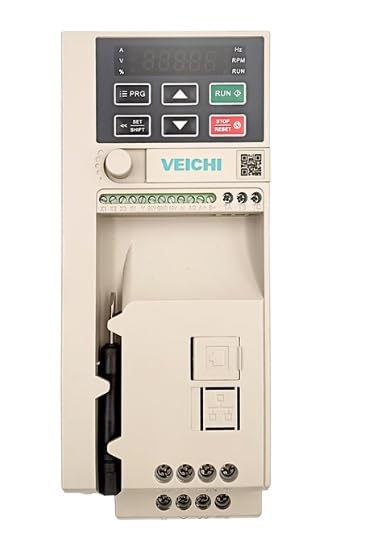
మూర్తి 3.1: ముందు view of the VEICHI AC10 Frequency Converter. This image displays the main unit, highlighting the digital display for parameters, control buttons for programming and operation, and the various terminal blocks for power and control wiring. A screwdriver is visible in the side compartment.
3.1. Control Panel Layout
The control panel consists of a digital display and several function buttons:
- ప్రదర్శన: Shows operational parameters, fault codes, and programming values.
- PRG (ప్రోగ్రామ్): Enters/exits parameter setting mode.
- పైకి/క్రిందికి బాణాలు: Navigate through parameters, adjust values.
- రన్: మోటారును ప్రారంభిస్తుంది.
- ఆపు/రీసెట్: Stops the motor, resets fault conditions.
- SET/SHIFT: Confirms parameter settings, shifts cursor during input.
4. సెటప్ మరియు ఇన్స్టాలేషన్
4.1 మౌంటు
Mount the frequency converter vertically on a flat, non-flammable surface. Ensure adequate ventilation space around the unit (at least 10 cm above and below, 5 cm on sides) for heat dissipation.
4.2. వైరింగ్
Refer to the wiring diagram provided with your specific model for detailed connections. General wiring guidelines:
- Power Input (R, S, T or L1, L2): Connect to the main power supply. Ensure correct voltage (220V or 380V depending on model).
- మోటార్ అవుట్పుట్ (U, V, W): మోటార్ టెర్మినల్స్ కు కనెక్ట్ చేయండి.
- గ్రౌండ్ (PE): Connect to a reliable ground point.
- నియంత్రణ టెర్మినల్స్: For external control signals (e.g., start/stop, speed reference, fault output).
Warning: Incorrect wiring can lead to severe damage to the unit or personal injury. Consult a qualified electrician if unsure.
5. ఆపరేటింగ్ సూచనలు
5.1. ప్రారంభ పవర్-అప్
- After completing all wiring, apply power to the frequency converter.
- The display will light up, typically showing "0.00" or a default frequency.
5.2. Basic Operation (Keypad Control)
- ఫ్రీక్వెన్సీని సెట్ చేయండి: నొక్కండి PRG button to enter parameter mode. Navigate to the frequency setting parameter (e.g., F0.01) using the పైకి/క్రిందికి బాణాలు. నొక్కండి SET/SHIFT to edit, adjust value, then SET/SHIFT again to confirm. Press PRG నిష్క్రమించడానికి.
- మోటారును ప్రారంభించండి: నొక్కండి రన్ button. The motor will accelerate to the set frequency.
- మోటార్ ఆపు: నొక్కండి నిలిపివేయండి/రీసెట్ చేయండి button. The motor will decelerate and stop.
5.3. పారామీటర్ సెట్టింగులు
The AC10 series has a comprehensive set of parameters for various functions. Refer to the detailed parameter list in the full product manual for advanced configurations (e.g., acceleration/deceleration times, motor parameters, control modes).
Example పారామితులు:
- F0.00: Run command source (keypad, terminal, communication)
- F0.01: Frequency setting source (keypad, analog input, communication)
- F0.03: గరిష్ట అవుట్పుట్ ఫ్రీక్వెన్సీ
- F0.04: త్వరణం సమయం
- F0.05: క్షీణత సమయం
6. నిర్వహణ
Regular maintenance ensures the longevity and reliable operation of your frequency converter.
- శుభ్రపరచడం: Periodically clean the cooling fins and fan to prevent dust accumulation, which can hinder heat dissipation. Use compressed air or a soft brush. Ensure power is off before cleaning.
- టెర్మినల్ తనిఖీ: Annually check all wiring terminals for tightness. Loose connections can cause overheating or intermittent operation.
- పర్యావరణ తనిఖీ: Verify that the operating environment remains within specified temperature and humidity ranges.
- Fan Replacement: Cooling fans have a limited lifespan. Consider replacing them every 3-5 years, depending on operating conditions, to maintain optimal cooling.
7. ట్రబుల్షూటింగ్
This section provides common issues and their potential solutions. For complex problems, contact technical support.
| Problem/Fault Code | సాధ్యమైన కారణం | పరిష్కారం |
|---|---|---|
| No Display/Power | No input power; Blown fuse; Internal fault. | Check power supply; Check fuses; Contact support. |
| Overcurrent (OC) Fault | Motor overload; Short circuit in motor wiring; Rapid acceleration/deceleration. | Check motor load; Inspect motor wiring; Increase acceleration/deceleration time. |
| ఓవర్వోల్tage (OV) Fault | ఇన్పుట్ వాల్యూమ్tage too high; Rapid deceleration with high inertia load. | ఇన్పుట్ వాల్యూమ్ని తనిఖీ చేయండిtage; వేగ తగ్గింపు సమయాన్ని పెంచండి; బ్రేకింగ్ రెసిస్టర్ను పరిగణించండి. |
| అండర్ వోల్tage (UV) Fault | ఇన్పుట్ వాల్యూమ్tage too low; Power supply dip. | ఇన్పుట్ వాల్యూమ్ని తనిఖీ చేయండిtage; Ensure stable power supply. |
| Overheat (OH) Fault | Ambient temperature too high; Fan failure; Blocked ventilation. | Improve ventilation; Clean cooling fins; Check fan operation. |
To reset a fault, press the నిలిపివేయండి/రీసెట్ చేయండి button after resolving the cause.
8. స్పెసిఫికేషన్లు
The following specifications are typical for the VEICHI AC10 series. Specific values may vary slightly by model.
| పరామితి | విలువ/పరిధి |
|---|---|
| ఇన్పుట్ వాల్యూమ్tage | Single-phase 220V (AC10-T/S2 models) or Three-phase 380V (AC10-T3 models) |
| అవుట్పుట్ ఫ్రీక్వెన్సీ పరిధి | 0.00 హెర్ట్జ్ - 400.00 హెర్ట్జ్ |
| నియంత్రణ మోడ్ | V/F control, Sensorless vector control |
| ఓవర్లోడ్ కెపాసిటీ | 150% of rated current for 60 seconds |
| రక్షణ లక్షణాలు | ఓవర్ కరెంట్, ఓవర్వాల్tagఇ, అండర్వాల్tage, Overheat, Overload, Short circuit |
| ఆపరేటింగ్ ఉష్ణోగ్రత | -10°C నుండి 40°C (14°F నుండి 104°F) |
| తేమ | Less than 90% RH (non-condensing) |
| కొలతలు (సుమారుగా) | Varies by power rating (e.g., 2 x 2 x 2 inches for smaller models) |
| బరువు (సుమారుగా) | Varies by power rating (e.g., 4.41 Pounds for smaller models) |
Note: For precise specifications of your specific model, refer to the product label or the comprehensive technical datasheet.
9. వారంటీ మరియు మద్దతు
9.1. వారంటీ సమాచారం
This product is typically covered by a manufacturer's warranty against defects in materials and workmanship for a period specified at the time of purchase. Please retain your proof of purchase for warranty claims. The warranty does not cover damage caused by improper installation, misuse, unauthorized modification, or operation outside of specified environmental conditions.
For specific warranty terms and conditions, please refer to the documentation provided with your purchase or contact the seller.
9.2. సాంకేతిక మద్దతు
If you encounter issues that cannot be resolved using the troubleshooting guide, or require further technical assistance, please contact your supplier or the manufacturer's authorized service center.
మద్దతును సంప్రదించేటప్పుడు, దయచేసి ఈ క్రింది సమాచారాన్ని అందించడానికి సిద్ధంగా ఉండండి:
- Product Model Number (e.g., AC10-T/S2-1R5G-B-220V)
- Serial Number (if applicable)
- కొనుగోలు తేదీ
- Detailed description of the problem, including any fault codes displayed.


