1. పరిచయం
This manual provides detailed instructions for the installation, operation, and maintenance of the LiftMaster SRDRST O2-SRDRST Multi-Technology Smart Reader. This device is designed for secure access control in both indoor and outdoor environments, supporting various credential types including 125 KHz proximity cards, 13.56 MHz cards, and Bluetooth Low Energy (BLE) mobile credentials.
2. భద్రతా సమాచారం
Please read and understand all safety instructions before installing or operating the SRDRST Smart Reader. Failure to follow these instructions may result in product damage, property damage, or personal injury.
- విద్యుత్ భద్రత: Ensure power is disconnected before performing any wiring or installation procedures. All wiring should be performed by a qualified technician in accordance with local electrical codes.
- పర్యావరణ పరిస్థితులు: While designed for indoor/outdoor use, avoid exposing the reader to extreme temperatures, direct water spray, or corrosive substances beyond its specified operating conditions.
- మౌంటు: Mount the reader securely to a stable surface to prevent accidental dislodgement.
- అధీకృత వినియోగం: This device is intended for access control applications only. Do not use it for purposes other than its intended design.
3. ప్యాకేజీ విషయాలు
ఇన్స్టాలేషన్ ప్రారంభించే ముందు అన్ని భాగాలు ప్యాకేజీలో ఉన్నాయని నిర్ధారించుకోండి:
- SRDRST Smart Reader (Model O2-SRDRST)
- మౌంటింగ్ హార్డ్వేర్ (స్క్రూలు, యాంకర్లు)
- ఇన్స్టాలేషన్ గైడ్ (ఈ పత్రం)
4. సెటప్ మరియు ఇన్స్టాలేషన్
The SRDRST Smart Reader offers flexible installation options, including surface mount or single gang box mounting.
4.1 రీడర్ను మౌంట్ చేయడం
- స్థానాన్ని ఎంచుకోండి: Choose a suitable indoor or outdoor location for the reader, ensuring it is within reach of necessary wiring and at an appropriate height for user access.
- ఉపరితలాన్ని సిద్ధం చేయండి: For surface mounting, ensure the surface is clean and flat. For single gang box mounting, ensure the box is securely installed.
- డ్రిల్ రంధ్రాలు: Use the reader's mounting plate (if applicable) or the reader itself as a template to mark and drill pilot holes for the mounting screws.
- Secure Reader: Attach the reader securely to the wall or single gang box using the provided mounting hardware. Do not overtighten screws.
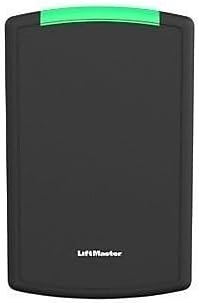
మూర్తి 1: ముందు view of the SRDRST O2-SRDRST Smart Reader. This image shows the sleek, black rectangular reader with a green indicator light at the top and the LiftMaster logo at the bottom.
4.2 వైరింగ్ కనెక్షన్లు
WARNING: Disconnect all power before making any wiring connections.
The SRDRST reader typically connects to an access control panel using standard Wiegand or OSDP protocols. Refer to your access control panel's documentation for specific wiring requirements.
- శక్తి: Connect the reader to a regulated DC power supply (voltage range typically 9-16V DC). Observe correct polarity.
- డేటా: Connect the data lines (e.g., Data 0, Data 1 for Wiegand, or RS485 A, B for OSDP) from the reader to the corresponding inputs on the access control panel.
- గ్రౌండ్: Ensure a proper ground connection.

చిత్రం 2: కోణీయ view of the SRDRST O2-SRDRST Smart Reader. This image provides a side perspective of the reader, highlighting its depth and the green indicator light.
4.3 Power Up and Testing
- After all wiring is complete and verified, restore power to the access control system.
- Observe the reader's LED indicator. It should typically illuminate or flash to indicate power and readiness.
- Present a known valid credential (card or mobile device) to the reader to confirm proper operation and communication with the access control panel.
5. ఆపరేటింగ్ సూచనలు
The SRDRST Smart Reader supports multiple credential technologies for flexible access.
5.1 Using 125 KHz and 13.56 MHz Cards/Fobs
- Ensure your card or fob is enrolled in the access control system.
- Present the card or fob directly to the face of the SRDRST reader.
- The reader will emit an audible beep and/or change its LED indicator color (e.g., green for access granted, red for access denied) to indicate the access status.
5.2 Using BLE Mobile Credentials
- Ensure your mobile device has the compatible access control application installed and your mobile credential is provisioned.
- మీ మొబైల్ పరికరంలో బ్లూటూత్ని ప్రారంభించండి.
- Depending on the application settings, you may need to open the app, tap your phone to the reader, or simply approach the reader with your phone in your pocket (hands-free mode).
- The reader will communicate with your mobile device via Bluetooth and indicate access status through its LED and/or an audible signal.
6. నిర్వహణ
The SRDRST Smart Reader is designed for minimal maintenance. Follow these guidelines to ensure optimal performance:
- శుభ్రపరచడం: Clean the reader's surface periodically with a soft, damp cloth. Do not use abrasive cleaners, solvents, or harsh chemicals, as these can damage the housing.
- తనిఖీ: Periodically inspect the reader for any signs of physical damage or loose connections.
- ఫర్మ్వేర్ నవీకరణలు: Consult your access control system administrator or LiftMaster support for information on available firmware updates for enhanced features or security.
7. ట్రబుల్షూటింగ్
If you encounter issues with your SRDRST Smart Reader, refer to the following common problems and solutions:
| సమస్య | సాధ్యమైన కారణం | పరిష్కారం |
|---|---|---|
| Reader is not powering on (no LED activity). | No power supply; incorrect wiring; faulty power supply. | విద్యుత్ కనెక్షన్లు మరియు వాల్యూమ్ను తనిఖీ చేయండిtage. Ensure power supply is active. Verify wiring polarity. |
| Reader does not respond to cards/fobs. | Credential not enrolled; incorrect credential type; reader malfunction; communication issue with panel. | Verify credential enrollment in the access control system. Ensure the credential type is supported by the reader. Check wiring to the access control panel. |
| BLE mobile access not working. | Bluetooth off on mobile device; app not running; credential not provisioned; signal interference. | Ensure Bluetooth is enabled. Open the access app. Verify mobile credential provisioning. Reduce interference. |
| Reader grants access but door does not unlock. | Issue with door strike/lock; wiring to door strike; access control panel output. | This indicates the reader is functioning. Troubleshoot the door lock mechanism or the access control panel's output to the lock. |
8. స్పెసిఫికేషన్లు
- మోడల్: O2-SRDRST
- తయారీదారు: లిఫ్ట్ మాస్టర్
- మద్దతు ఉన్న సాంకేతికతలు:
- 125 KHz Proximity Cards/Fobs (e.g., 26 Bit HID, 30 Bit, 36 Bit Li'Master, 37 Bit formats)
- 13.56 MHz Cards/Fobs (e.g., 32 Bit Mi Fare, 56 Bit Li'Master)
- Bluetooth Low Energy (BLE) Mobile Credentials
- ఇన్స్టాలేషన్ ఎంపికలు: Surface Mount, Single Gang
- చేర్చబడిన భాగాలు: SRDRST స్మార్ట్ రీడర్
- పర్యావరణం: ఇండోర్/అవుట్డోర్
9. వారంటీ మరియు మద్దతు
Specific warranty details for the SRDRST O2-SRDRST Smart Reader are not provided in this document. For warranty information, technical support, or service, please refer to the official LiftMaster website or contact your authorized LiftMaster dealer.
నవీకరణలు మరియు మద్దతు పొందడానికి మీ ఉత్పత్తిని నమోదు చేసుకోవాలని సిఫార్సు చేయబడింది.


