1. పరిచయం
This manual provides essential information for the setup, operation, and maintenance of your Thunderobot Zero 18 Pro 5080 Gaming Laptop. Please read this manual thoroughly before using the device to ensure proper functionality and to maximize your user experience. Keep this manual for future reference.
2 కీ ఫీచర్లు
2.1. Performance Hardware
The Thunderobot Zero 18 Pro is equipped with high-performance components designed for demanding applications and gaming.
- ప్రాసెసర్: Intel Core Ultra 9 275HX (24 Cores, 24 Threads, up to 5.40GHz)
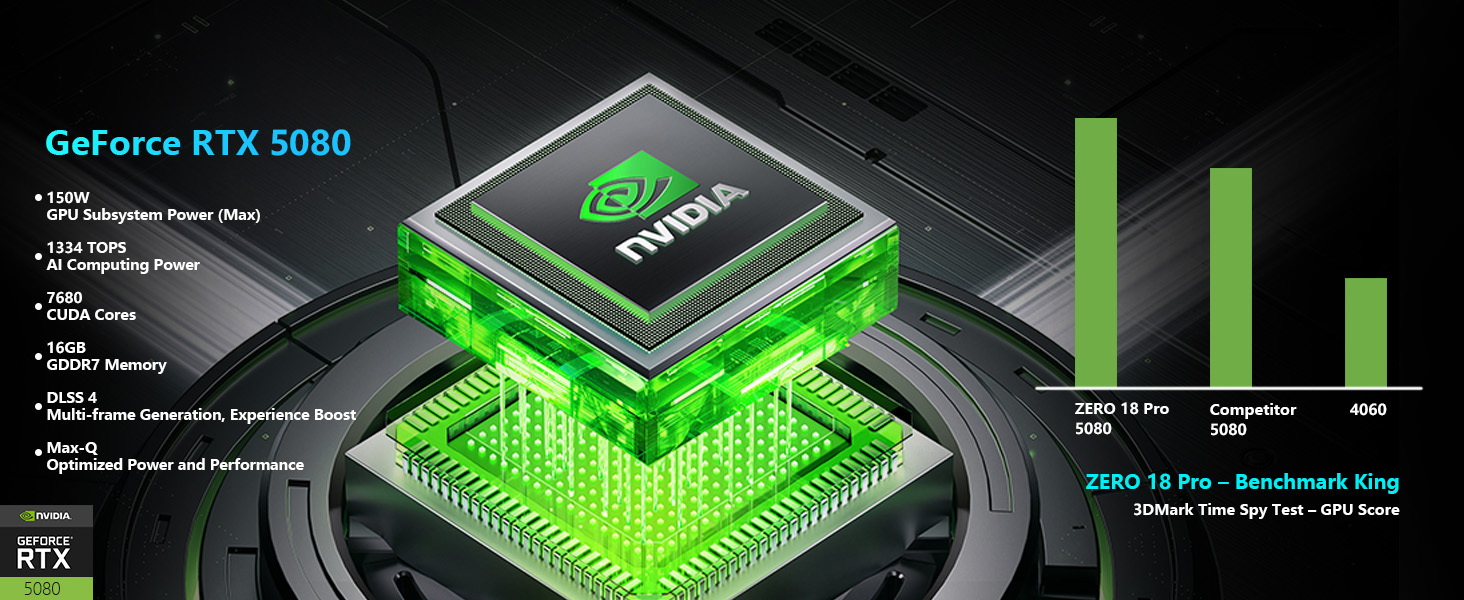
- గ్రాఫిక్స్: NVIDIA GeForce RTX 5080
- మెమరీ: 32GB DDR5 ర్యామ్
- నిల్వ: 1TB PCIe M.2 SSD
చిత్రం: వివరణాత్మకం view of the Intel Core Ultra 9 275HX processor and NVIDIA GeForce RTX 5080 graphics card, highlighting their specifications and capabilities.
2.2. డిస్ప్లే టెక్నాలజీ
The laptop features an advanced display for clear and fluid visuals.
- పరిమాణం: 18-inch QHD+ (2560x1600)
- రిఫ్రెష్ రేట్: 240Hz
- సాంకేతికత: Bionic Hummingbird Eye-Care Display with Anti-Glare and Anti-Reflection properties.
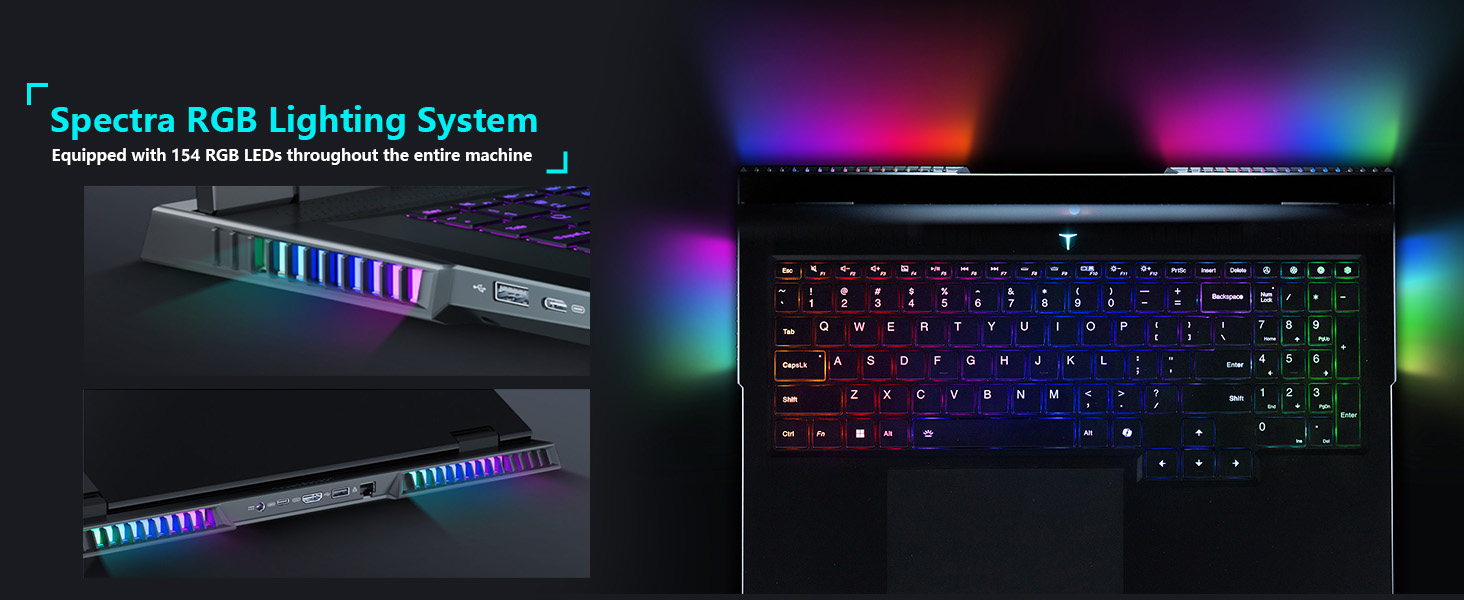
Image: The 18-inch Bionic Hummingbird Eye-Care Display showcasing its QHD+ resolution, 240Hz refresh rate, and anti-glare features.
వీడియో: ముగిసిందిview of the THUNDEROBOT Series Display features, including refresh rate and resolution.
2.3. శీతలీకరణ వ్యవస్థ
The laptop incorporates an advanced cooling system to maintain optimal performance during intensive use.
- అభిమానులు: 3 Night Owl fans with high air volume.
- హీట్ పైప్స్: 7 high-efficiency heat pipes.
- రెక్కలు: 338 pieces of 0.075mm ultra-thin copper fins.
- Power Release: Up to 270W total power release.
చిత్రం: ఒక అంతర్గత view illustrating the laptop's heat dissipation architecture, including fans and heat pipes.
2.4. Keyboard and Lighting
The laptop features a customizable keyboard and integrated lighting.
- కీబోర్డ్: Per-Key RGB Backlit Keyboard with numeric keypad.
- లైటింగ్ సిస్టమ్: "Spectra" RGB Lighting System with 154 RGB light beads.
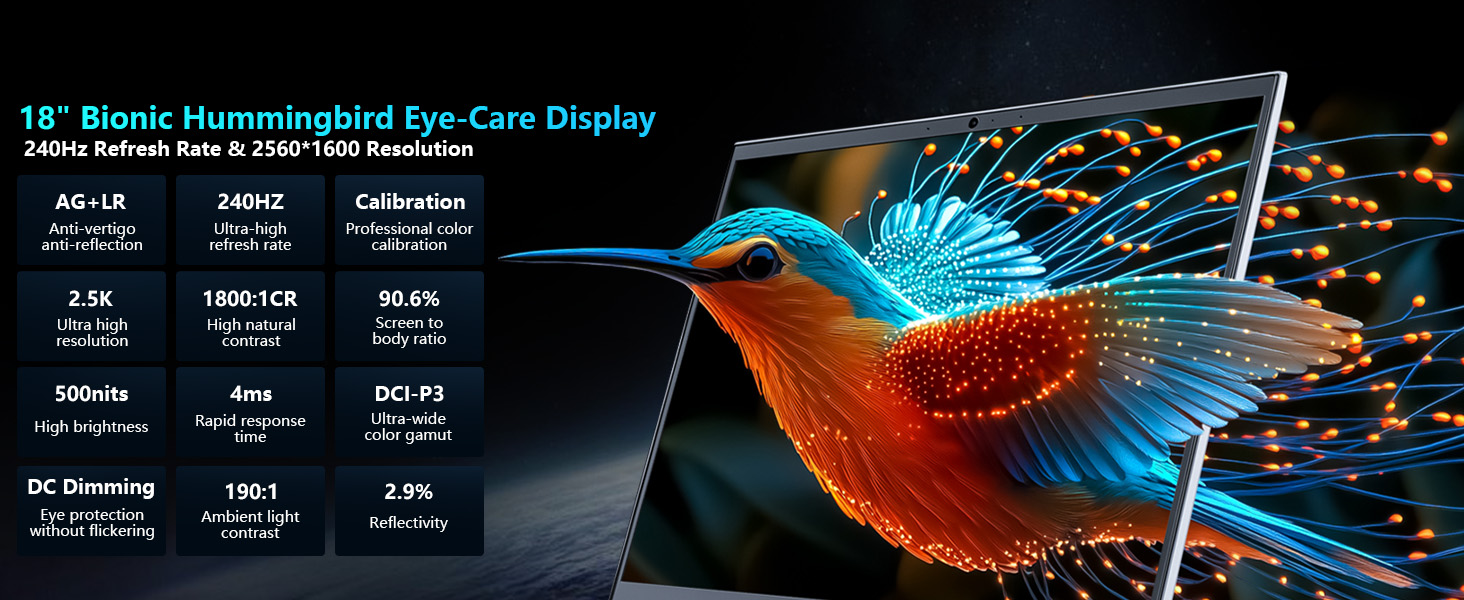
Image: Close-up of the laptop keyboard, highlighting the Per-Key RGB backlighting and dedicated mode switching keys.
Video: Demonstration of the Thunderobot RGB lighting features and customization options.
2.5 కనెక్టివిటీ
The Zero 18 Pro offers a range of ports for external devices and network connectivity.
- USB పోర్ట్లు: 3 x Superspeed USB Type-A, 2 x Superspeed USB Type-C (Thunderbolt 5 compatible).
- వీడియో అవుట్పుట్: 1 x HDMI 2.1.
- నెట్వర్క్: 1 x RJ-45 (Ethernet), Wi-Fi 6E.
- ఆడియో: 1 x Audio Port.
- వైర్లెస్: బ్లూటూత్.
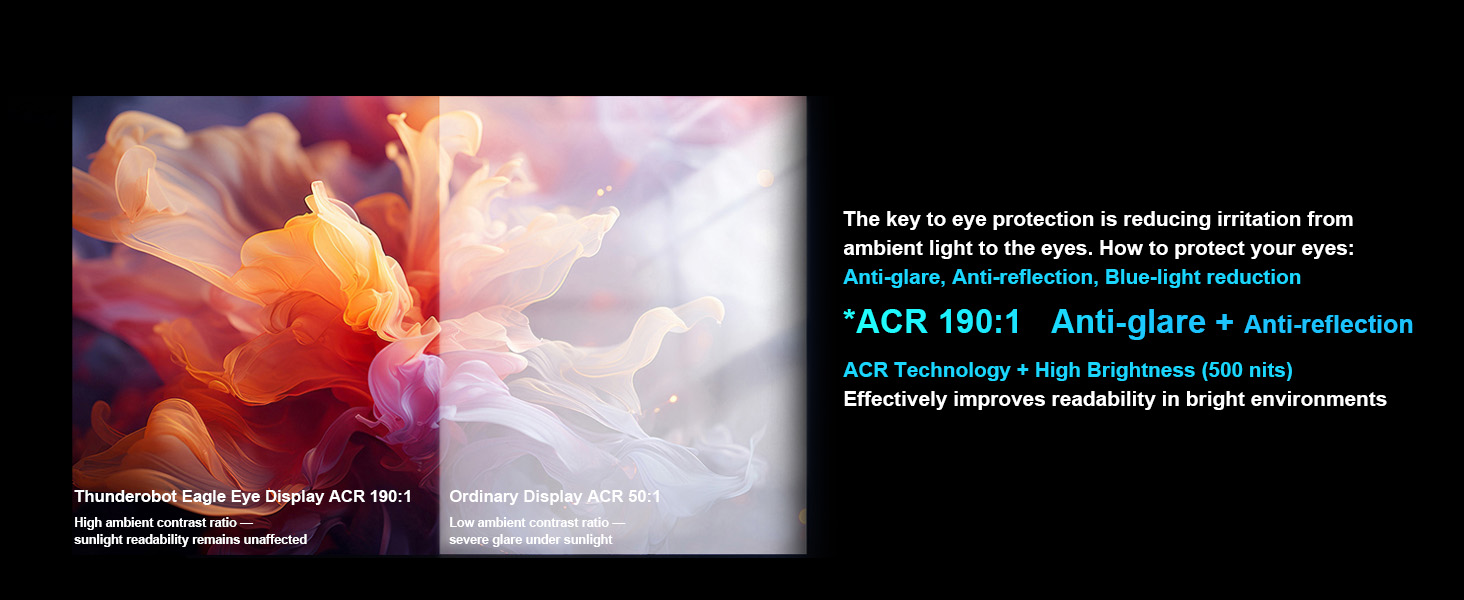
Image: Diagram illustrating the location and types of ports available on the Thunderobot Zero 18 Pro laptop.
3. సెటప్ గైడ్
3.1. అన్బాక్సింగ్ మరియు ప్రారంభ తనిఖీ
- ప్యాకేజింగ్ నుండి ల్యాప్టాప్ మరియు అన్ని ఉపకరణాలను జాగ్రత్తగా తీసివేయండి.
- 'పెట్టెలో ఏముంది' విభాగంలో జాబితా చేయబడిన అన్ని భాగాలు ఉన్నాయని ధృవీకరించండి.
- ఏదైనా భౌతిక నష్టం కోసం ల్యాప్టాప్ను తనిఖీ చేయండి. నష్టం కనుగొనబడితే, వెంటనే కస్టమర్ మద్దతును సంప్రదించండి.
3.2. కనెక్ట్ పవర్
- Connect the AC adapter to the power port on the laptop.
- పవర్ కార్డ్ను గ్రౌన్దేడ్ ఎలక్ట్రికల్ అవుట్లెట్లోకి ప్లగ్ చేయండి.
- ప్రారంభ ఉపయోగం ముందు బ్యాటరీని పూర్తిగా ఛార్జ్ చేయాలని సిఫార్సు చేయబడింది.
3.3. మొదటి బూట్ మరియు ఆపరేటింగ్ సిస్టమ్ సెటప్
- ల్యాప్టాప్ మూత తెరిచి పవర్ బటన్ నొక్కండి.
- Follow the on-screen instructions to complete the Windows 11 Home setup process. This includes selecting your region, language, and setting up user accounts.
- Connect to a Wi-Fi network when prompted to ensure the operating system can download necessary updates.
4. ఆపరేటింగ్ సూచనలు
4.1. పవర్ ఆన్/ఆఫ్
- పవర్ ఆన్: కీబోర్డ్ డెక్పై ఉన్న పవర్ బటన్ను నొక్కండి.
- పవర్ ఆఫ్: విండోస్లో స్టార్ట్ బటన్ను క్లిక్ చేసి, ఆపై పవర్ > షట్ డౌన్ ఎంచుకోండి.
- స్లీప్ మోడ్: ల్యాప్టాప్ మూతను మూసివేయండి లేదా స్టార్ట్ బటన్ను క్లిక్ చేయండి, ఆపై పవర్ > స్లీప్ ఎంచుకోండి.
4.2. కీబోర్డ్ విధులు
The keyboard features Per-Key RGB backlighting and dedicated function keys.
- ఫంక్షన్ కీలు (Fn): పట్టుకోండి Fn key and press the corresponding F-key (F1-F12) for special functions like volume control, brightness adjustment, or toggling Wi-Fi.
- RGB అనుకూలీకరణ: Use the pre-installed control software to customize the Per-Key RGB lighting effects and colors.
- Performance Mode Switching: Dedicated keys (Fn+Space) allow quick switching between performance profiles (e.g., Quiet, Balance, Turbo).
4.3. AI Intelligent Control Center
The AI Intelligent Control Center software provides comprehensive control over your laptop's performance, lighting, and system settings.
- పనితీరు ట్యూనింగ్: Adjust CPU/GPU power limits and fan speeds.
- తెలివైన కాంతి సర్దుబాటు: Customize RGB lighting zones (keyboard, strip, logo) with various effects.
- సమగ్ర సర్దుబాటు: Access system monitoring, power plans, and other advanced settings.
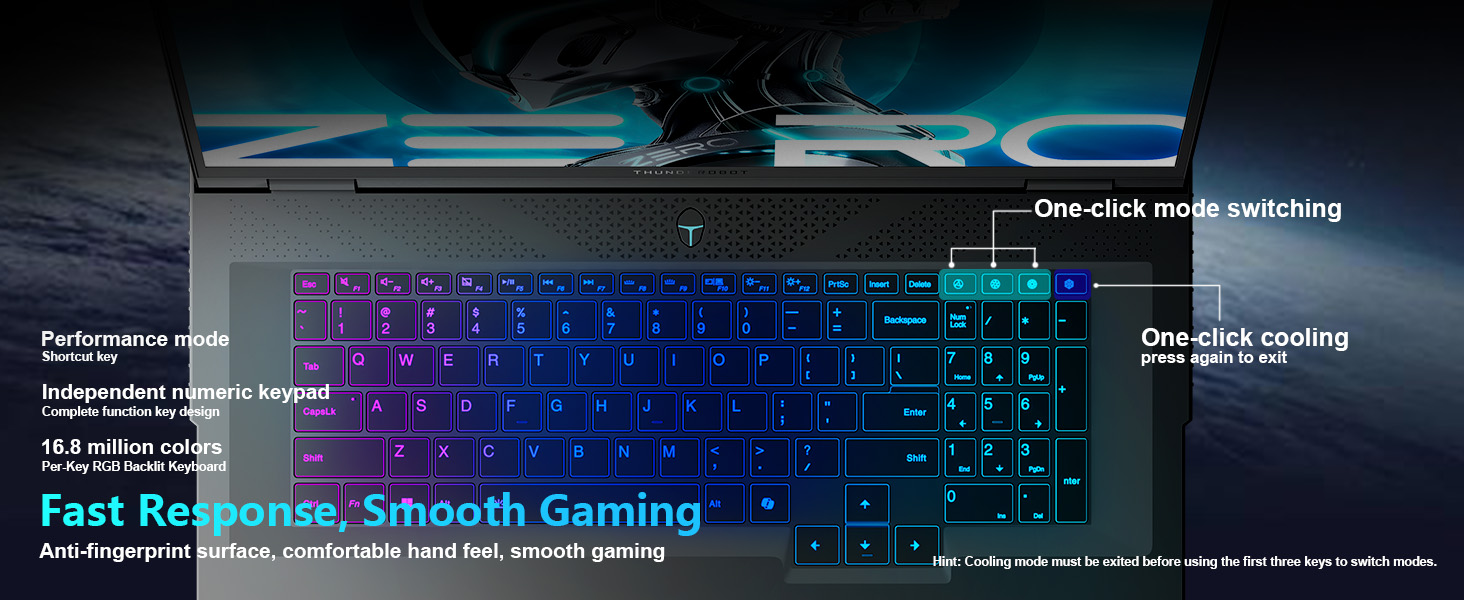
Image: Screenshot of the AI Intelligent Control Center, showing options for system, lighting, and settings adjustments.
వీడియో: వివరణాత్మక సమాచారంview of the THUNDEROBOT Zero 18 Pro, showcasing its design, features, and the AI Intelligent Control Center.
5. నిర్వహణ
5.1. శుభ్రపరచడం
- స్క్రీన్: మెత్తని, మెత్తని బట్టను తేలికగా ఉపయోగించండి డిampనీరు లేదా స్క్రీన్ క్లీనర్తో కలిపి ఉంచండి. కఠినమైన రసాయనాలను నివారించండి.
- కీబోర్డ్ మరియు చాసిస్: Use a soft cloth to wipe surfaces. A can of compressed air can remove dust from between keys and vents.
- వెంట్స్: Regularly check and clean the cooling vents to prevent dust buildup, which can hinder airflow and lead to overheating.
5.2. సాఫ్ట్వేర్ నవీకరణలు
- సిస్టమ్ స్థిరత్వం మరియు భద్రతను నిర్ధారించడానికి విండోస్ నవీకరణలను క్రమం తప్పకుండా తనిఖీ చేసి, ఇన్స్టాల్ చేయండి.
- Update graphics drivers (NVIDIA GeForce) and other device drivers through the manufacturer's website or dedicated software.
- Keep the AI Intelligent Control Center software updated for new features and performance optimizations.
5.3. బ్యాటరీ సంరక్షణ
- బ్యాటరీని తరచుగా పూర్తిగా డిశ్చార్జ్ చేయడాన్ని నివారించండి.
- If storing the laptop for an extended period, charge the battery to about 50-60% and store it in a cool, dry place.
- Use only the original AC adapter provided with the laptop.
6. ట్రబుల్షూటింగ్
6.1. ల్యాప్టాప్ పవర్ ఆన్ అవ్వడం లేదు
- AC అడాప్టర్ ల్యాప్టాప్ మరియు పనిచేసే పవర్ అవుట్లెట్ రెండింటికీ సురక్షితంగా కనెక్ట్ చేయబడిందని నిర్ధారించుకోండి.
- మరొక పరికరాన్ని ప్లగ్ చేయడం ద్వారా పవర్ అవుట్లెట్ పనిచేస్తుందో లేదో తనిఖీ చేయండి.
- బ్యాటరీ పూర్తిగా ఖాళీ అయిపోతే, పవర్ ఆన్ చేయడానికి ప్రయత్నించే ముందు కనీసం 30 నిమిషాలు ఛార్జ్ అవ్వనివ్వండి.
6.2. Display Issues (No Image, Flickering)
- ల్యాప్టాప్ ఆన్లో ఉందని మరియు స్లీప్ మోడ్లో లేదని నిర్ధారించుకోండి.
- ఫంక్షన్ కీలను (Fn + F-కీలు) ఉపయోగించి స్క్రీన్ ప్రకాశాన్ని సర్దుబాటు చేయండి.
- If an external monitor is connected, try disconnecting it or switching display modes (Fn + F-key, usually F7 or F8).
- గ్రాఫిక్స్ డ్రైవర్లను నవీకరించండి.
6.3. వేడెక్కడం
- శీతలీకరణ వెంట్లు అడ్డంకులు లేకుండా చూసుకోండి.
- కంప్రెస్డ్ ఎయిర్ ఉపయోగించి వెంట్లలోని దుమ్మును శుభ్రం చేయండి.
- Use the AI Intelligent Control Center to set the cooling mode to a higher fan speed (e.g., Turbo mode).
- Ensure the laptop is used on a hard, flat surface to allow proper airflow.
6.4. Wi-Fi కనెక్టివిటీ సమస్యలు
- Wi-Fi ప్రారంభించబడిందని నిర్ధారించుకోండి (ఫంక్షన్ కీలు లేదా విండోస్ సెట్టింగ్లను తనిఖీ చేయండి).
- మీ రౌటర్ మరియు మోడెమ్ను పునఃప్రారంభించండి.
- Update your Wi-Fi adapter drivers.
- సమస్యను పరిష్కరించడానికి వేరే Wi-Fi నెట్వర్క్కు కనెక్ట్ చేయడానికి ప్రయత్నించండి.
7. స్పెసిఫికేషన్లు
| ఫీచర్ | వివరాలు |
|---|---|
| బ్రాండ్ | థండర్బోట్ |
| మోడల్ పేరు | జీరో 18 ప్రో |
| స్క్రీన్ పరిమాణం | 18 అంగుళాలు |
| స్క్రీన్ రిజల్యూషన్ | 2560 x 1600 పిక్సెల్స్ (QHD+) |
| ప్రాసెసర్ | ఇంటెల్ కోర్ అల్ట్రా 9 275HX (5.4 GHz వరకు) |
| RAM | 32 GB DDR5 |
| మెమరీ వేగం | 4800 MHz |
| హార్డ్ డ్రైవ్ | 1 TB SSD (PCIe x 4) |
| గ్రాఫిక్స్ కోప్రాసెసర్ | GeForce RTX 5080 (Dedicated) |
| ఆపరేటింగ్ సిస్టమ్ | Windows 11 హోమ్ |
| వైర్లెస్ రకం | 802.11ax (Wi-Fi 6E) |
| USB 3.0 పోర్ట్లు | 3 |
| వస్తువు బరువు | 15 పౌండ్లు |
| ఉత్పత్తి కొలతలు | 16.04 x 11.78 x 1.41 అంగుళాలు |
| రంగు | నలుపు |
| శక్తి మూలం | AC & బ్యాటరీ |
| ప్రత్యేక ఫీచర్ | సంఖ్యా కీప్యాడ్ |
8. వారంటీ మరియు మద్దతు
Every Thunderobot laptop includes a 12-month warranty. This warranty offers expert support, thorough diagnostics, and genuine parts if a repair is needed. Additionally, a 90-day warranty is provided on all warranty replacement parts, ensuring hassle-free repairs. Your satisfaction is our commitment.
Image: Graphic detailing Thunderobot's warranty and service policy, including 12-month laptop warranty and 90-day replacement parts warranty.
8.1 మద్దతును సంప్రదిస్తోంది
For technical assistance, warranty claims, or service inquiries, please refer to the contact information provided in your product packaging or visit the official Thunderobot support webసైట్.


