పరిచయం
Thank you for choosing the GNCC 1080P Indoor Security Camera. This manual provides detailed instructions for setting up, operating, and maintaining your camera to ensure optimal performance and security for your home. This camera offers high-definition video, advanced detection features, and two-way audio communication.
పెట్టెలో ఏముంది
దయచేసి మీ ప్యాకేజీలోని విషయాలను తనిఖీ చేయండి. ఏవైనా వస్తువులు తప్పిపోయినా లేదా దెబ్బతిన్నా, కస్టమర్ మద్దతును సంప్రదించండి.
- ఇండోర్ కెమెరా
- పవర్ అడాప్టర్
- ఇన్స్ట్రక్షన్ మాన్యువల్
- మౌంటు స్క్రూ
- 2మీ పవర్ కార్డ్
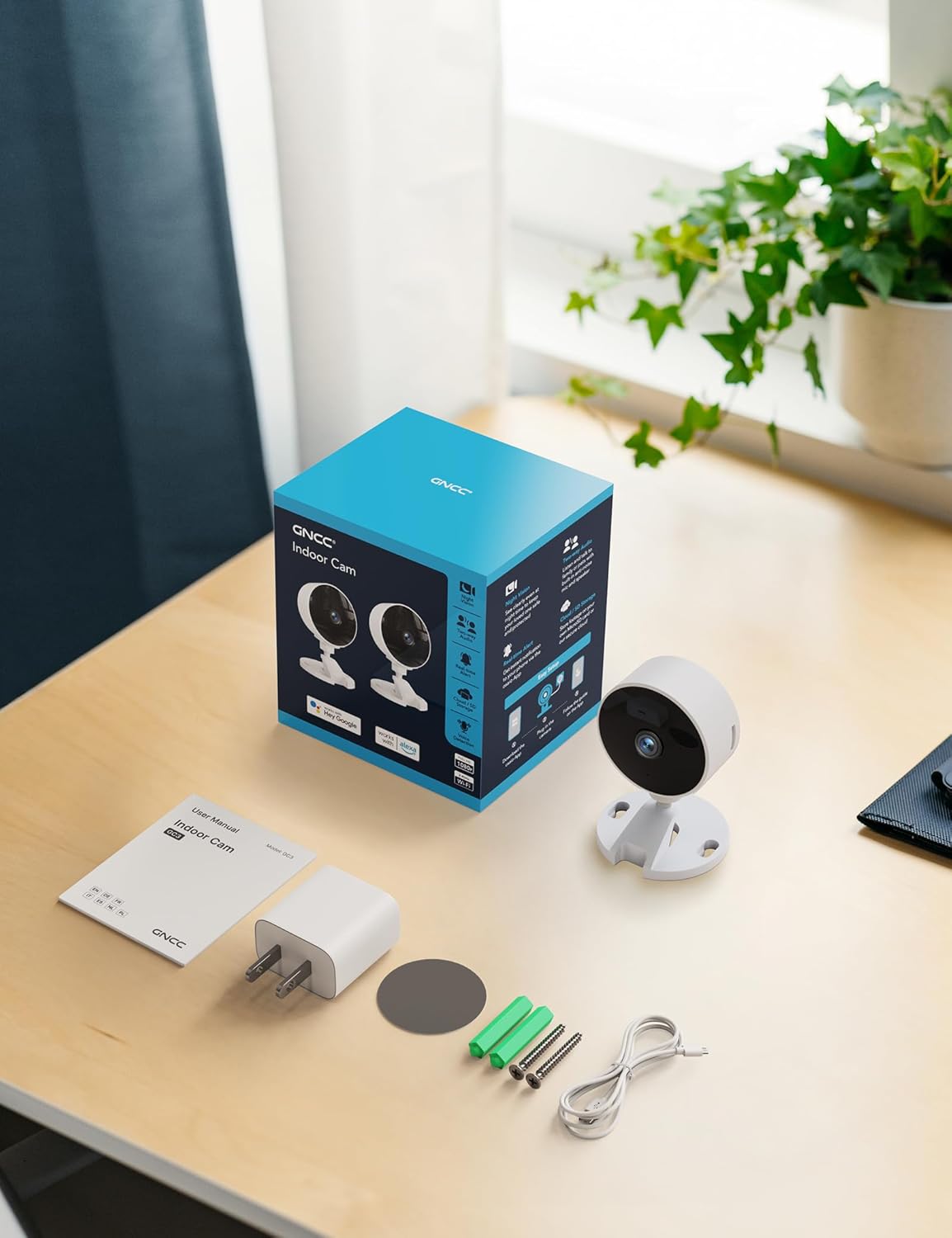
Image: All components included in the GNCC Indoor Camera package, neatly laid out on a wooden surface.
ఉత్పత్తి లక్షణాలు
The GNCC Indoor Security Camera is equipped with several features designed to enhance your home security and monitoring experience:
- 1080P పూర్తి HD రిజల్యూషన్: Provides clear and detailed video monitoring.
- 15m Night Vision: Built-in infrared LEDs enable clear vision up to 15 meters in low-light conditions.
- Smarter AI Detection: Advanced AI (subscription required) for identifying people, pets, vehicles, and packages, reducing false alerts.
- సౌకర్యవంతమైన నిల్వ ఎంపికలు: Supports local recording with a 128GB Micro SD card (not included) and offers a 14-day free cloud storage trial.
- సులభమైన సెటప్: Can be installed quickly using 3M tape or included screws for wall mounting.
- గోప్యతా మోడ్: One-tap privacy mode to disable the lens and LED for enhanced privacy.
- రెండు-మార్గం ఆడియో: రియల్ టైమ్ కమ్యూనికేషన్ కోసం అంతర్నిర్మిత మైక్రోఫోన్ మరియు స్పీకర్.
- స్మార్ట్ ఇంటిగ్రేషన్: Compatible with Alexa and Google Home for voice control.
- కుటుంబ భాగస్వామ్యం: Allows sharing access with up to 3 users.

Image: Visual representation of the camera's core functionalities, including HD resolution, night vision, and two-way audio.
సెటప్
1. పవర్ చేయడం
- Connect the provided power adapter to the camera's power input port.
- పవర్ అడాప్టర్ను ప్రామాణిక ఎలక్ట్రికల్ అవుట్లెట్లోకి ప్లగ్ చేయండి.
- కెమెరా ఆన్ అవుతుంది మరియు సూచిక లైట్ దాని స్థితిని చూపుతుంది.
2. యాప్ ఇన్స్టాలేషన్ మరియు ఖాతా సృష్టి
- Download the official GNCC app from your smartphone's app store (iOS App Store or Google Play Store).
- కొత్త ఖాతాను సృష్టించడానికి లేదా మీకు ఇప్పటికే ఒకటి ఉంటే లాగిన్ అవ్వడానికి యాప్ను తెరిచి, స్క్రీన్పై ఉన్న సూచనలను అనుసరించండి.
3. యాప్కి కెమెరాను జోడించడం
- In the GNCC app, tap the "+" icon to add a new device.
- Select "Security Camera" or the specific model if prompted.
- కెమెరాను మీ 2.4GHz Wi-Fi నెట్వర్క్కి కనెక్ట్ చేయడానికి యాప్ సూచనలను అనుసరించండి. Note: This camera is not compatible with 5GHz Wi-Fi networks.
- You may be required to scan a QR code displayed on your phone with the camera lens or enter a code manually.
- Once connected, name your camera and assign it to a specific room or location.

Image: The GNCC camera alongside a smartphone showing the camera's live feed and app interface, demonstrating connectivity.
4 మౌంటు ఐచ్ఛికాలు
కెమెరా సౌకర్యవంతమైన మౌంటు ఎంపికలను అందిస్తుంది:
- టాబ్లెట్ ప్లేస్మెంట్: Simply place the camera on a flat surface like a shelf, table, or desk.
- వాల్ మౌంటు: Use the included 3M adhesive tape for a drill-free installation, or use the provided screws for a more permanent fixture. Ensure the mounting surface is clean and dry before applying adhesive.
ఆపరేటింగ్ సూచనలు
ప్రత్యక్షం View మరియు రిమోట్ పర్యవేక్షణ
Once connected, you can access the live video feed from your camera anytime, anywhere, through the GNCC app.

Image: A smartphone screen showing the live feed from the GNCC camera, illustrating remote monitoring capabilities.
రెండు-మార్గం ఆడియో
The camera features a built-in microphone and speaker, allowing for two-way communication. Tap the microphone icon in the app to speak, and release to listen. This is ideal for communicating with family members or pets.

Image: A visual representation of the two-way audio feature, showing a child and a pet, with text bubbles indicating conversation.
నైట్ విజన్
The camera automatically switches to night vision mode in low-light conditions, providing clear black and white images up to 15 meters. This ensures continuous monitoring even in complete darkness.

Image: A baby sleeping in a crib, demonstrating the camera's clear night vision capabilities in a dark environment.
మోషన్ మరియు సౌండ్ డిటెక్షన్
The camera can detect motion and sound, sending instant alerts to your smartphone. With an optional AI subscription, the camera can differentiate between people, pets, vehicles, and packages, reducing false alarms. You can customize motion detection zones within the app.

Image: Children and a dog triggering motion and sound detection, with example alert notifications shown.
నిల్వ ఎంపికలు
Your GNCC camera supports two primary storage methods for recorded footage:
- మైక్రో SD కార్డ్: Insert a Micro SD card (up to 128GB, not included) into the camera's slot for continuous local recording.
- క్లౌడ్ నిల్వ: A 14-day free trial of cloud storage is included. Cloud storage provides secure, off-site backup of your recordings, accessible from anywhere.

Image: The camera with visual cues for both SD card and cloud storage, highlighting flexible recording options.
గోప్యతా మోడ్
To ensure privacy, the GNCC camera features a one-tap privacy mode within the app. Activating this mode will fully disable the camera lens and LED indicator, preventing any recording or live viewing.
నిర్వహణ
- శుభ్రపరచడం: కెమెరా లెన్స్ మరియు బాడీని శుభ్రం చేయడానికి మృదువైన, పొడి వస్త్రాన్ని ఉపయోగించండి. ద్రవ క్లీనర్లు లేదా రాపిడి పదార్థాలను ఉపయోగించడం మానుకోండి.
- ఫర్మ్వేర్ నవీకరణలు: Regularly check the GNCC app for firmware updates. Keeping your camera's firmware up-to-date ensures optimal performance, security, and access to new features.
- ప్లేస్మెంట్: కెమెరాను ప్రత్యక్ష సూర్యకాంతి, వేడి వనరులు మరియు అధిక తేమ నుండి దూరంగా స్థిరమైన ప్రదేశంలో ఉంచారని నిర్ధారించుకోండి.
ట్రబుల్షూటింగ్
| సమస్య | సాధ్యమైన కారణం / పరిష్కారం |
|---|---|
| కెమెరా Wi-Fiకి కనెక్ట్ చేయడం లేదు |
|
| వీడియో ఫీడ్ / ఆఫ్లైన్ స్థితి లేదు |
|
| పేలవమైన వీడియో నాణ్యత |
|
| మోషన్/సౌండ్ అలర్ట్లు అందలేదు |
|
| రెండు-మార్గం ఆడియో పని చేయడం లేదు |
|
స్పెసిఫికేషన్లు
| ఫీచర్ | వివరాలు |
|---|---|
| మోడల్ పేరు | GC3B-1P |
| ఇండోర్/అవుట్డోర్ వినియోగం | ఇండోర్ |
| వీడియో క్యాప్చర్ రిజల్యూషన్ | 1080p పూర్తి HD |
| నైట్ విజన్ రేంజ్ | 15 మీటర్లు |
| కనెక్టివిటీ టెక్నాలజీ | వైర్లెస్ (Wi-Fi) |
| Wi-Fi ఫ్రీక్వెన్సీ | 2.4GHz (5GHzకి అనుకూలంగా లేదు) |
| శక్తి మూలం | కార్డెడ్ ఎలక్ట్రిక్ |
| కంట్రోలర్ రకం | అమెజాన్ అలెక్సా, గూగుల్ హోమ్ |
| మౌంటు రకం | టేబుల్టాప్ మౌంట్, వాల్ మౌంట్ |
| నిల్వ ఎంపికలు | Micro SD Card (up to 128GB, not included), Cloud Storage |
| రెండు-మార్గం ఆడియో | అవును |
| AI డిటెక్షన్ | Motion, Sound (AI features require subscription) |
| ఉత్పత్తి కొలతలు | 2.56 x 2.76 x 3.54 అంగుళాలు |
| వస్తువు బరువు | 2.24 ఔన్సులు |
| రంగు | తెలుపు |
| చేర్చబడిన భాగాలు | Indoor camera, Power Adapter, Instruction Manual, Mounting Screw, 2m power cord |
వారంటీ మరియు మద్దతు
GNCC products are designed for reliability and performance. For specific warranty details, please refer to the warranty card included with your product or visit the official GNCC webసైట్.
If you encounter any issues or have questions regarding your GNCC 1080P Indoor Security Camera, please contact GNCC Customer Support through the following channels:
- Official GNCC Webసైట్: Look for the "Support" or "Contact Us" section.
- ఇమెయిల్ మద్దతు: Refer to the contact information provided in the GNCC app or on the product packaging.
- యాప్లో మద్దతు: Some issues can be resolved directly through the help section within the GNCC application.
Please have your product model (GC3B-1P) and purchase information ready when contacting support.


