1. పరిచయం
The darkFlash DG240 is an all-in-one liquid CPU cooler designed to provide efficient and reliable thermal management for your computer's central processing unit. This manual provides essential information regarding the installation, operation, maintenance, and troubleshooting of your DG240 AIO cooler. Please read this manual thoroughly before installation to ensure proper setup and optimal performance.
2 కీ ఫీచర్లు
- Efficient & Durable High-Speed Pump: Features a 3-phase 6-pole motor for smooth and efficient operation, reaching up to 3000 RPM and handling up to 315W TDP. Equipped with a ceramic bearing for enhanced durability and resistance to heat and wear.
- అత్యుత్తమ శీతలీకరణ పనితీరు: Delivers an airflow of up to 81.5 CFM with a low noise level of just 33dBA. PWM control allows for dynamic fan speed adjustment based on system load, ensuring optimal cooling when needed and quiet operation otherwise.
- Optimized Heat Dissipation: Incorporates a high-density cooling radiator and a high polymer rubber hose protective water pipe, designed for low resistance and high cooling efficiency. The 400mm long pipe offers flexibility for various PC case layouts.

Figure 2.1: Radiator design for efficient heat dissipation. This diagram illustrates the high-density cooling radiator and the dual-material (IIR+EPDM) protective water pipe, optimized for efficient heat transfer and pressure resistance.
- Dynamic ARGB Lighting: Supports 5V 3-pin ARGB sync via the motherboard, providing unified and vibrant lighting effects on both the fan and pump head with a soft 1600W color glow. Compatible with major motherboard ARGB Sync technologies including ASUS Aura Sync, Gigabyte RGB Fusion, and MSI Mystic Light Sync.
- విస్తృత అనుకూలత: Supports a wide range of CPU cooling sockets, including Intel LGA 1200/115X/1700/1851 and AMD AM4/AM5. Includes all necessary mounting plates and fasteners for dual CPU platforms.
3. ప్యాకేజీ విషయాలు
సంస్థాపనతో కొనసాగే ముందు అన్ని భాగాలు ప్యాకేజీలో ఉన్నాయని నిర్ధారించుకోండి.
- darkFlash DG240 All-in-one Liquid CPU Cooler (240mm AIO)
- Mounting hardware for Intel LGA 1200/115X/1700/1851 sockets
- AMD AM4/AM5 సాకెట్ల కోసం మౌంటు హార్డ్వేర్
- Thermal paste (pre-applied or in a small tube)
- వినియోగదారు మాన్యువల్ (ఈ పత్రం)
4. స్పెసిఫికేషన్లు
| గుణం | విలువ |
|---|---|
| మోడల్ సంఖ్య | DG240 |
| శీతలీకరణ పద్ధతి | నీటి శీతలీకరణ |
| రేడియేటర్ మెటీరియల్ | అల్యూమినియం |
| కోల్డ్ ప్లేట్ మెటీరియల్ | రాగి, మైక్రో స్కివ్డ్ రెక్కలు |
| Pump Motor Type | 3-phase 6-pole |
| పంప్ వేగం | 3000 RPM వరకు |
| టిడిపి మద్దతు | 315W వరకు |
| ఫ్యాన్ వేగం (గరిష్టంగా) | 1800 RPM |
| గాలి ప్రవాహ సామర్థ్యం (గరిష్టంగా) | 81.5 CFM |
| శబ్దం స్థాయి (గరిష్టం) | 33 డిబి |
| పైపు పొడవు | 400మి.మీ |
| పవర్ కనెక్టర్ రకం | 5-పిన్ |
| వాల్యూమ్tage | 12 వోల్ట్లు |
| వాట్tage | 1.8 వాట్స్ |
| అనుకూల పరికరాలు | డెస్క్టాప్ |
| ప్యాకేజీ కొలతలు | 12.64 x 8.07 x 5.67 అంగుళాలు |
| బరువు | 3.68 పౌండ్లు |
5. అనుకూలత
The darkFlash DG240 AIO cooler is compatible with the following CPU sockets:
- ఇంటెల్: LGA 1200, LGA 115X (1150, 1151, 1155, 1156), LGA 1700, LGA 1851
- AMD: AM4, AM5

This image displays the two primary mounting brackets provided with the darkFlash DG240 cooler, one for Intel CPUs and one for AMD CPUs, illustrating the broad compatibility of the product.
6. సెటప్ మరియు ఇన్స్టాలేషన్
Proper installation is crucial for optimal cooling performance. Always refer to your motherboard and PC case manuals for specific guidance on component placement and cable routing. The following steps provide a general overview:
- Prepare the CPU and Motherboard: Ensure your CPU is correctly seated in its socket. Clean the CPU surface thoroughly if old thermal paste is present.
- బ్యాక్ప్లేట్ను ఇన్స్టాల్ చేయండి: Attach the appropriate backplate for your CPU socket (Intel or AMD) to the rear of the motherboard.
- Mount the Radiator: Secure the radiator and fans to an available mounting location in your PC case (e.g., top, front, or rear). Ensure fans are oriented for optimal airflow (intake or exhaust).
- థర్మల్ పేస్ట్ వర్తించు: If not pre-applied, apply a small amount of thermal paste to the center of your CPU's integrated heat spreader (IHS).
- Install the Pump/Cold Plate: Carefully place the pump/cold plate assembly onto the CPU, aligning it with the mounting posts. Secure it using the provided screws, tightening them in a diagonal pattern to ensure even pressure.
- కేబుల్స్ కనెక్ట్ చేయండి:
- Connect the pump's power cable to the designated AIO_PUMP or CPU_FAN header on your motherboard.
- Connect the fan PWM cables to the CPU_FAN or SYS_FAN headers. The DG240 supports daisy chain connection for fans.
- Connect the 5V 3-pin ARGB cable from the pump and fans to the motherboard's 5V ARGB header for lighting synchronization.
- కేబుల్ నిర్వహణ: Route cables neatly to ensure proper airflow and a clean build.

ఈ చిత్రం పూర్తి స్థాయిని అందిస్తుంది view of the darkFlash DG240 liquid CPU cooler, showcasing its radiator, two ARGB fans, and the illuminated pump head, illustrating the complete unit before installation.

This image shows the darkFlash DG240 AIO cooler installed inside a computer case, highlighting its ARGB lighting synchronized with other system components, demonstrating its aesthetic integration.
7. ఆపరేటింగ్ సూచనలు
7.1. Fan and Pump Control (PWM)
The DG240's fans and pump utilize Pulse Width Modulation (PWM) technology, allowing your motherboard to dynamically adjust their speeds based on CPU temperature and system load. This ensures efficient cooling when needed and quieter operation during lighter tasks.
- Access your motherboard's BIOS/UEFI settings to configure fan curves and pump speeds.
- Most motherboards offer automatic fan control profiles (e.g., Standard, Silent, Performance) that can be selected.
- For advanced users, custom fan curves can be set to fine-tune the balance between cooling performance and noise levels.
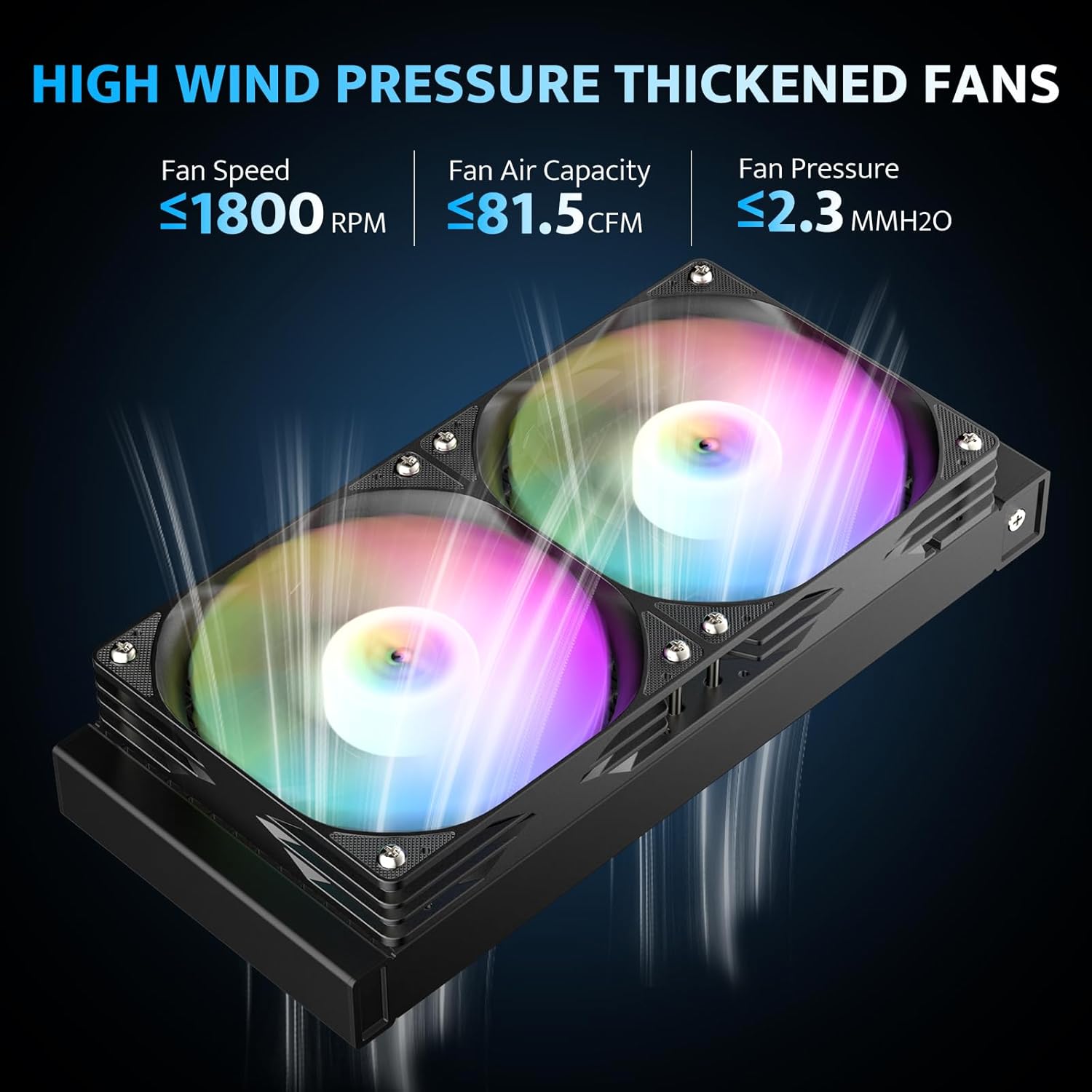
This image highlights the performance characteristics of the DG240's fans, including fan speed (≤1800 RPM), air capacity (≤81.5 CFM), and fan pressure (≤2.3 MMH2O), demonstrating their high wind pressure capabilities.

ఈ చిత్రం ఒక విస్ఫోటనాన్ని అందిస్తుంది view of the DG240's 3-phase 6-pole motor water pump, detailing its internal structure, ceramic bearing, and copper cold plate, emphasizing its high-performance design.
7.2. ARGB లైటింగ్ నియంత్రణ
The DG240 features Addressable RGB (ARGB) lighting on both the fans and the pump head, which can be synchronized with your motherboard's ARGB software.
- Ensure the 5V 3-pin ARGB cable is connected to the correct header on your motherboard.
- Install the corresponding ARGB control software for your motherboard brand (e.g., ASUS Aura Sync, MSI Mystic Light Sync, Gigabyte RGB Fusion, ASRock Polychrome RGB).
- Use the software to customize lighting effects, colors, and synchronization with other ARGB components in your system.
8. నిర్వహణ
క్రమం తప్పకుండా నిర్వహణ మీ AIO కూలర్ యొక్క దీర్ఘాయువు మరియు సరైన పనితీరును నిర్ధారించడంలో సహాయపడుతుంది.
- దుమ్ము శుభ్రపరచడం: రేడియేటర్ రెక్కలు మరియు ఫ్యాన్ బ్లేడ్ల నుండి దుమ్మును కంప్రెస్డ్ ఎయిర్ లేదా మృదువైన బ్రష్ని ఉపయోగించి కాలానుగుణంగా శుభ్రం చేయండి. పేరుకుపోయిన దుమ్ము గాలి ప్రవాహానికి ఆటంకం కలిగిస్తుంది మరియు శీతలీకరణ సామర్థ్యాన్ని తగ్గిస్తుంది.
- ఫ్యాన్ తనిఖీ: ఫ్యాన్ బ్లేడ్లు ఏవైనా అడ్డంకులు లేదా దుస్తులు ధరించే సంకేతాలు ఉన్నాయా అని తనిఖీ చేయండి. ఫ్యాన్లు స్వేచ్ఛగా మరియు నిశ్శబ్దంగా తిరుగుతున్నాయని నిర్ధారించుకోండి.
- గొట్టం మరియు కనెక్షన్ తనిఖీ: Inspect the rubber hoses and connections for any signs of leaks, kinks, or damage. While the system is sealed, visual checks are recommended.
- Thermal Paste (Long-Term): The thermal paste applied between the CPU and cold plate typically lasts for several years. If you notice a significant increase in CPU temperatures over time, reapplying fresh thermal paste might be necessary. This requires carefully removing the pump, cleaning both surfaces, and applying new paste.
9. ట్రబుల్షూటింగ్
If you encounter issues with your darkFlash DG240 AIO cooler, refer to the following common problems and solutions:
| సమస్య | సాధ్యమైన కారణం | పరిష్కారం |
|---|---|---|
| అధిక CPU ఉష్ణోగ్రతలు |
|
|
| ఫ్యాన్లు తిరగడం లేదు / ARGB లైటింగ్ లేదు |
|
|
| కూలర్ నుండి అసాధారణ శబ్దం |
|
|
10. వారంటీ మరియు మద్దతు
darkFlash provides a 3 సంవత్సరాల హామీ for the DG240 All-in-one Liquid CPU Cooler. This warranty covers defects in materials and workmanship under normal use. For warranty claims or technical support, please contact darkFlash customer service through their official webఉత్పత్తిని కొనుగోలు చేసిన సైట్ లేదా రిటైలర్.
వారంటీ ధ్రువీకరణ కోసం దయచేసి మీ కొనుగోలు రుజువును ఉంచుకోండి.


