పరిచయం
Welcome to the user manual for your new GOBOULT W60 True Wireless Earbuds. These earbuds are designed to provide a superior audio experience with features like extended playtime, environmental noise cancellation, and ultra-low latency. This manual will guide you through the setup, operation, and maintenance of your device to ensure optimal performance.

Image: GOBOULT W60 True Wireless Earbuds in their green charging case, showcasing ఉత్పత్తి రూపకల్పన.
పెట్టెలో ఏముంది
Your GOBOULT W60 package includes the following items:
- GOBOULT W60 True Wireless Earbuds
- వైర్లెస్ ఛార్జింగ్ కేస్
- అదనపు జత ఇయర్టిప్లు (అనుకూలీకరించిన ఫిట్ కోసం)
- టైప్-సి ఫాస్ట్ ఛార్జింగ్ కేబుల్
- వినియోగదారు మాన్యువల్ (ఈ పత్రం)
- వారంటీ కార్డ్
ఉత్పత్తి లక్షణాలు
The GOBOULT W60 earbuds are equipped with advanced features for an enhanced audio experience:
- 60 గంటల ఆట సమయం: Enjoy extended listening sessions with the combined battery life of the earbuds and charging case.
- Quad Mic ENC: Environmental Noise Cancellation with four microphones ensures crystal-clear calls by filtering out ambient noise.
- బ్లూటూత్ 5.4: Provides faster pairing, stable connectivity, and energy-efficient performance.
- 50ms అల్ట్రా-తక్కువ జాప్యం: Ideal for gaming and video streaming, ensuring audio and video synchronization.
- Voice Assistant Enabled: Supports Google Assistant and Siri for hands-free control.
- టైప్-సి ఫాస్ట్ ఛార్జింగ్: Quick charging capability to get you back to your music faster.
- Compact & Pocket-Friendly Design: Lightweight and easy to carry for daily use and travel.
- IPX5 నీటి నిరోధకం: Sweatproof and splashproof design for durability during workouts or light rain.
- 10mm డైనమిక్ డ్రైవర్లు: Deliver punchy bass and immersive sound.

చిత్రం: ఒక ఓవర్view of key features of the GOBOULT W60 earbuds, highlighting 60 hours playtime, ZEN Quad Mic ENC, Lightning Fast Charging, Pocket Friendly design, Made in India, Bluetooth 5.4, and 50ms Ultra Low Latency.

Image: Demonstrates the IPX5 water resistance, indicating sweatproof and splashproof capabilities, and the voice assistant integration with examples for Google Assistant and Siri.
స్పెసిఫికేషన్లు
| ఫీచర్ | వివరాలు |
|---|---|
| మోడల్ పేరు | W60 (ఎయిర్బాస్) |
| కనెక్టివిటీ టెక్నాలజీ | బ్లూటూత్ 5.4, వైర్లెస్ |
| బ్లూటూత్ రేంజ్ | 10 మీటర్లు |
| ఆడియో డ్రైవర్ పరిమాణం | 10 మిల్లీమీటర్లు |
| ఆడియో లాటెన్సీ | 45 Milliseconds (Ultra-low latency mode: 50ms) |
| నాయిస్ కంట్రోల్ | Passive Noise Cancellation, Quad Mic ENC |
| Playtime (Total) | 60 గంటల వరకు (ఛార్జింగ్ కేసుతో) |
| ఛార్జింగ్ సమయం (కేస్) | 10 Minutes for significant playtime |
| హెడ్ఫోన్స్ జాక్ | టైప్-సి ఫాస్ట్ ఛార్జింగ్ జాక్ |
| నీటి నిరోధక స్థాయి | IPX5 (Water Resistant, Sweatproof, Splashproof) |
| నియంత్రణ రకం | Touch Controls, Google Assistant, Siri |
| వస్తువు బరువు | 52 గ్రాములు |
| ఉత్పత్తి కొలతలు | 6 x 2.7 x 5.3 సెం.మీ |
| బ్యాటరీ రకం | లిథియం పాలిమర్ (చేర్చబడింది) |
| మూలం దేశం | భారతదేశం |
సెటప్
1. ఇయర్బడ్లు మరియు కేస్ను ఛార్జ్ చేయడం
మొదటిసారి ఉపయోగించే ముందు, ఇయర్బడ్లు మరియు ఛార్జింగ్ కేస్ రెండూ పూర్తిగా ఛార్జ్ అయ్యాయని నిర్ధారించుకోండి.
- అందించిన టైప్-సి ఛార్జింగ్ కేబుల్ను కేస్లోని ఛార్జింగ్ పోర్ట్కు కనెక్ట్ చేయండి.
- కేబుల్ యొక్క మరొక చివరను USB పవర్ అడాప్టర్ (చేర్చబడలేదు) లేదా కంప్యూటర్ యొక్క USB పోర్ట్కు కనెక్ట్ చేయండి.
- కేస్లోని LED సూచిక ఛార్జింగ్ స్థితిని చూపుతుంది. పూర్తిగా ఛార్జ్ అయిన తర్వాత, సూచిక మారుతుంది లేదా ఆపివేయబడుతుంది.
- ఇయర్బడ్లను ఛార్జింగ్ కేసులో ఉంచండి. అవి ఆటోమేటిక్గా ఛార్జింగ్ అవడం ప్రారంభిస్తాయి.
Note: A 10-minute charge can provide several hours of playtime.
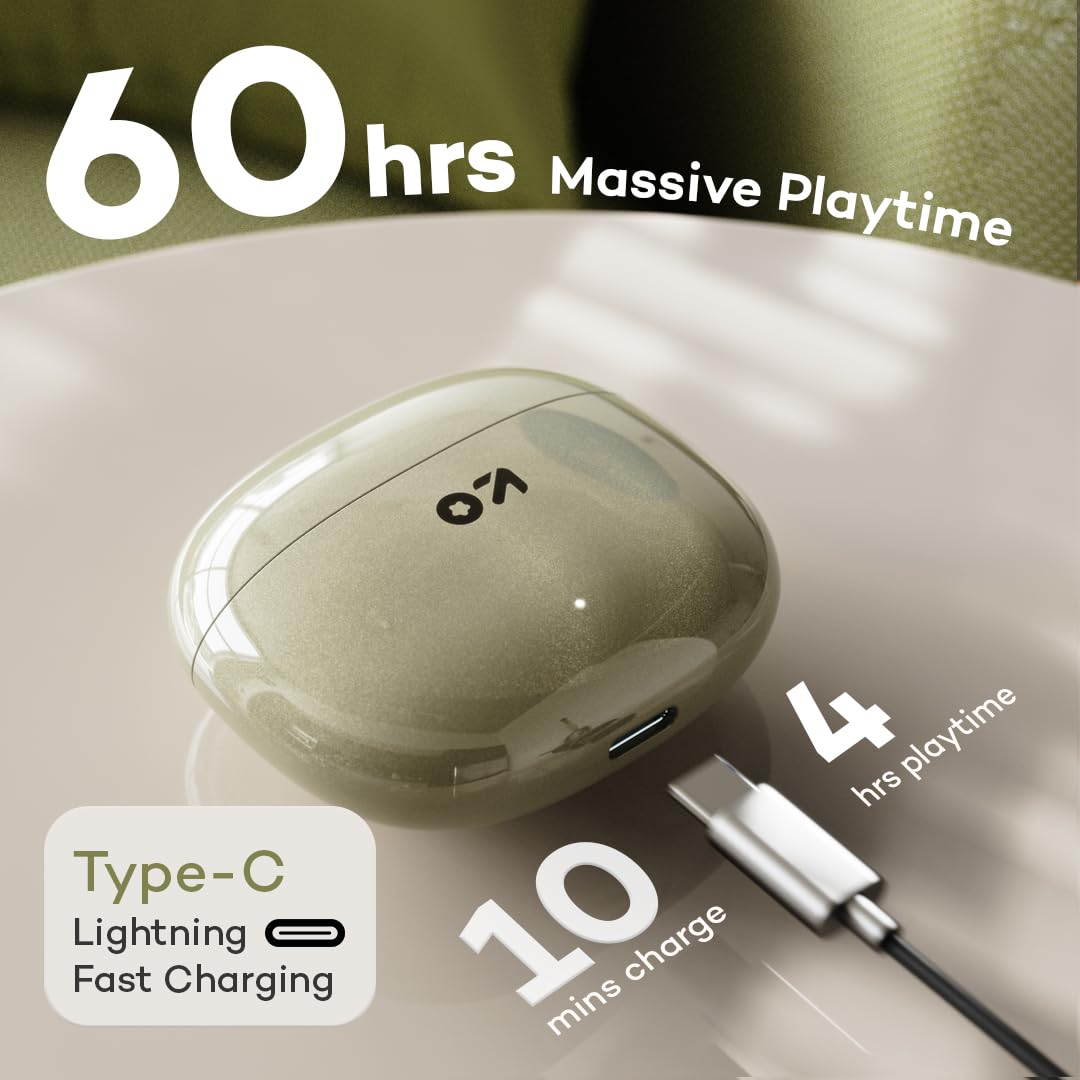
Image: Illustrates the Type-C fast charging port on the case and highlights the 60 hours of massive playtime, with a note that 10 minutes of charge provides 4 hours of playtime.
2. మీ పరికరంతో జత చేయడం
- Open the charging case. The earbuds will automatically enter pairing mode (indicated by flashing LED lights on the earbuds).
- మీ స్మార్ట్ఫోన్ లేదా బ్లూటూత్-ప్రారంభించబడిన పరికరంలో, బ్లూటూత్ సెట్టింగ్లకు వెళ్లండి.
- కోసం వెతకండి అందుబాటులో ఉన్న పరికరాలను ఎంచుకుని, జాబితా నుండి "GOBOULT W60" ఎంచుకోండి.
- Once connected, the LED indicators on the earbuds will stop flashing or turn off.
- పరికరంలో బ్లూటూత్ ప్రారంభించబడితే, ఇయర్బడ్లను కేస్ నుండి బయటకు తీసినప్పుడు అవి చివరిగా జత చేసిన పరికరానికి స్వయంచాలకంగా తిరిగి కనెక్ట్ అవుతాయి.
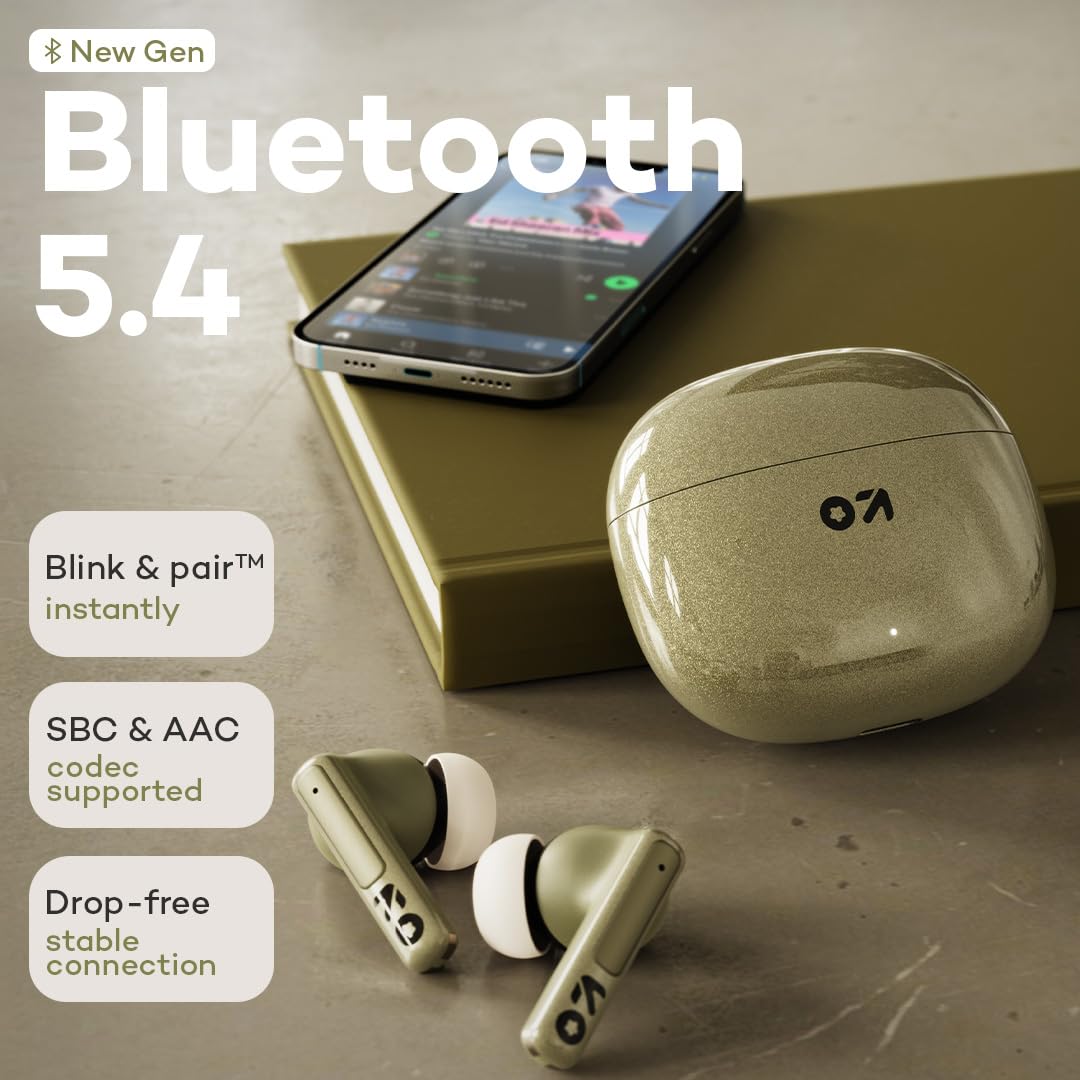
Image: Highlights the new generation Bluetooth 5.4 technology, emphasizing instant "Blink & pair" functionality, support for SBC & AAC codecs, and a drop-free stable connection.
ఆపరేటింగ్ సూచనలు
టచ్ కంట్రోల్స్
The GOBOULT W60 earbuds feature intuitive touch controls for easy management of music, calls, and voice assistant:
| చర్య | ఎడమ ఇయర్బడ్ (L) | కుడి ఇయర్బడ్ (R) |
|---|---|---|
| సంగీతాన్ని ప్లే/పాజ్ చేయండి | సింగిల్ ట్యాప్ | సింగిల్ ట్యాప్ |
| తదుపరి ట్రాక్ | రెండుసార్లు నొక్కండి | రెండుసార్లు నొక్కండి |
| మునుపటి ట్రాక్ | ట్రిపుల్ ట్యాప్ | ట్రిపుల్ ట్యాప్ |
| సమాధానం/కాల్ ముగించు | సింగిల్ ట్యాప్ | సింగిల్ ట్యాప్ |
| కాల్ని తిరస్కరించండి | లాంగ్ ప్రెస్ (2 సెకన్లు) | లాంగ్ ప్రెస్ (2 సెకన్లు) |
| వాయిస్ అసిస్టెంట్ని యాక్టివేట్ చేయండి | లాంగ్ ప్రెస్ (3 సెకన్లు) | లాంగ్ ప్రెస్ (3 సెకన్లు) |
| గేమింగ్ మోడ్ను టోగుల్ చేయండి | క్వాడ్ ట్యాప్ | క్వాడ్ ట్యాప్ |

Image: Illustrates the "Tap to Command" feature, highlighting user-friendly touch controls and seamless multitasking capabilities of the earbuds.
పిలుస్తోంది
The Quad Mic ENC system ensures clear communication during calls:
- కాల్లకు సమాధానం ఇవ్వడం / ముగించడం: ఏ ఇయర్బడ్నైనా ఒకసారి నొక్కండి.
- కాల్లను తిరస్కరించడం: ఇయర్బడ్ని 2 సెకన్ల పాటు ఎక్కువసేపు నొక్కండి.
- The Environmental Noise Cancellation (ENC) actively reduces background noise for both you and the person on the other end.

Image: Focuses on the ZEN Quad Mic ENC technology, showing the four microphones designed to filter noise for crystal clear calling.
Gaming Mode (Ultra-Low Latency)
Activate gaming mode for a synchronized audio-visual experience during gaming or video playback:
- యాక్టివేషన్: Quad tap either earbud to toggle gaming mode on/off.
- This mode reduces audio latency to 50ms, minimizing delay between on-screen action and sound.

Image: Illustrates the 50ms Ultra Low Latency feature, showing its benefit for smooth, lag-free play and precision-tuned audio for intense combat zones in gaming.
నిర్వహణ
క్లీనింగ్
- ఇయర్బడ్లు మరియు ఛార్జింగ్ కేసును మృదువైన, పొడి, మెత్తటి బట్టతో క్రమం తప్పకుండా శుభ్రం చేయండి.
- చెవి చివరలను తీసివేసి, అవసరమైతే తేలికపాటి సబ్బు మరియు నీటితో శుభ్రం చేయండి, తిరిగి అతికించే ముందు అవి పూర్తిగా పొడిగా ఉన్నాయని నిర్ధారించుకోండి.
- ఇయర్బడ్లు మరియు కేస్ రెండింటిపై ఛార్జింగ్ కాంటాక్ట్లను సున్నితంగా శుభ్రం చేయడానికి కాటన్ స్వాబ్ లేదా చిన్న, మృదువైన బ్రష్ను ఉపయోగించండి.
- రాపిడి పదార్థాలు, ఆల్కహాల్ లేదా రసాయన క్లీనర్లను ఉపయోగించడం మానుకోండి.
నిల్వ
- ఉపయోగంలో లేనప్పుడు, ఇయర్బడ్లను రక్షించడానికి మరియు వాటిని ఛార్జ్లో ఉంచడానికి ఎల్లప్పుడూ వాటి ఛార్జింగ్ కేసులో నిల్వ చేయండి.
- పరికరాన్ని చల్లని, పొడి ప్రదేశంలో, తీవ్రమైన ఉష్ణోగ్రతలు మరియు ప్రత్యక్ష సూర్యకాంతి నుండి దూరంగా నిల్వ చేయండి.
ట్రబుల్షూటింగ్
If you encounter any issues with your GOBOULT W60 earbuds, refer to the following common solutions:
| సమస్య | సాధ్యమైన పరిష్కారం |
|---|---|
| ఇయర్బడ్లు జత చేయడం లేదు |
|
| ఒక ఇయర్బడ్ మాత్రమే పని చేస్తోంది |
|
| తక్కువ వాల్యూమ్ లేదా పేలవమైన ధ్వని నాణ్యత |
|
| ఛార్జింగ్ సమస్యలు |
|
| Voice Assistant not responding |
|
వారంటీ మరియు మద్దతు
Your GOBOULT W60 True Wireless Earbuds come with a warranty. Please refer to the included Warranty Card for detailed terms and conditions, including warranty period and coverage.
For technical support, service, or further inquiries, please contact Boult customer service through the contact information provided on your Warranty Card or the official Boult webసైట్.
తయారీదారు: బౌల్ట్ ఆడియో, ఎక్సోటిక్ మైల్ ప్రైవేట్ లిమిటెడ్
మూలం దేశం: భారతదేశం
అదనపు సమాచారం
The GOBOULT W60 earbuds are available in multiple colors: Green, Black, and White. Choose the color that best matches your personal style.

Image: Displays the GOBOULT W60 earbuds and their charging cases in three available colors: Green, Black, and White.


