1. పరిచయం
This manual provides detailed instructions for the installation, operation, and maintenance of your Hiseeu 8MP 4K PoE Security Camera System. This system is designed for comprehensive home and business surveillance, offering high-resolution video, advanced detection capabilities, and flexible recording options. Please read this manual thoroughly before setup and use to ensure proper functionality and safety.
2. పెట్టెలో ఏముంది
క్రింద జాబితా చేయబడిన అన్ని భాగాలు మీ ప్యాకేజీలో చేర్చబడ్డాయని ధృవీకరించండి:
- 1x 4K NVR (Network Video Recorder) with 2TB HDD pre-installed
- 8x 4K PoE Cameras (8MP Bullet Cameras)
- 4x 64 అడుగుల ఈథర్నెట్ కేబుల్స్
- 4x 100 అడుగుల ఈథర్నెట్ కేబుల్స్
- NVR కోసం 1x పవర్ అడాప్టర్
- 1x USB మౌస్
- 1x HDMI కేబుల్
- 1x 3 అడుగుల ఈథర్నెట్ కేబుల్
- 1x వినియోగదారు మాన్యువల్
- 1x హెచ్చరిక స్టిక్కర్
- 1x Screws Bag (for camera mounting)

Image: All components included in the Hiseeu 8MP 4K PoE Security Camera System package.
3 కీ ఫీచర్లు
- 4K 8MP HD Image: Delivers vivid and detailed video resolution (3840x2160p), four times clearer than 2MP systems.
- 121° వెడల్పు View కోణం: Equipped with a 2.8mm lens, providing a wider field of view compared to standard 3.6mm lenses.
- AI మానవ/వాహన గుర్తింపు: Advanced artificial intelligence technology for accurate detection of humans and vehicles, reducing false alarms.
- కలర్ నైట్ విజన్: Offers three night vision modes: Black-and-White, Color Night Mode, and Alarm Light mode (activates light upon detection).
- రెండు-మార్గం ఆడియో: Enables real-time communication through the camera via the mobile app.
- 24/7 Recording & Smart Playback: Supports continuous recording and various playback modes including sync, motion detection, and common playback.
- PoE (పవర్ ఓవర్ ఈథర్నెట్): ఒకే ఈథర్నెట్ కేబుల్ ద్వారా విద్యుత్ మరియు డేటాను అందించడం ద్వారా సంస్థాపనను సులభతరం చేస్తుంది.
- Expandable NVR: The 8-port NVR can be expanded to 16 channels by adding an external PoE switch.
- Internet Flexibility: Functions for local surveillance without internet; remote access via app/PC client requires internet connection.
4. సెటప్
4.1 సిస్టమ్ ముగిసిందిview
The Hiseeu PoE Security Camera System consists of a Network Video Recorder (NVR) and multiple Power over Ethernet (PoE) cameras. The NVR manages video recording, storage, and network connectivity, while the cameras capture high-definition video footage.
4.2 హార్డ్వేర్ కనెక్షన్
Follow these steps to connect your system:
- కెమెరాలను NVR కి కనెక్ట్ చేయండి: Use the provided Ethernet cables to connect each PoE camera to the PoE ports on the back of the NVR. A single Ethernet cable provides both power and video signal.
- NVR ని మానిటర్ కి కనెక్ట్ చేయండి: Connect the NVR to a TV or monitor using the HDMI cable for local viewing.
- USB మౌస్ను కనెక్ట్ చేయండి: Plug the USB mouse into one of the USB ports on the NVR for navigation.
- NVR ని పవర్ కి కనెక్ట్ చేయండి: Connect the NVR's power adapter to the NVR and then to a power outlet. The NVR will power on automatically.
- (Optional) Connect NVR to Router: For remote access via the mobile app or PC client software, connect the NVR to your internet router using the 3ft Ethernet cable.
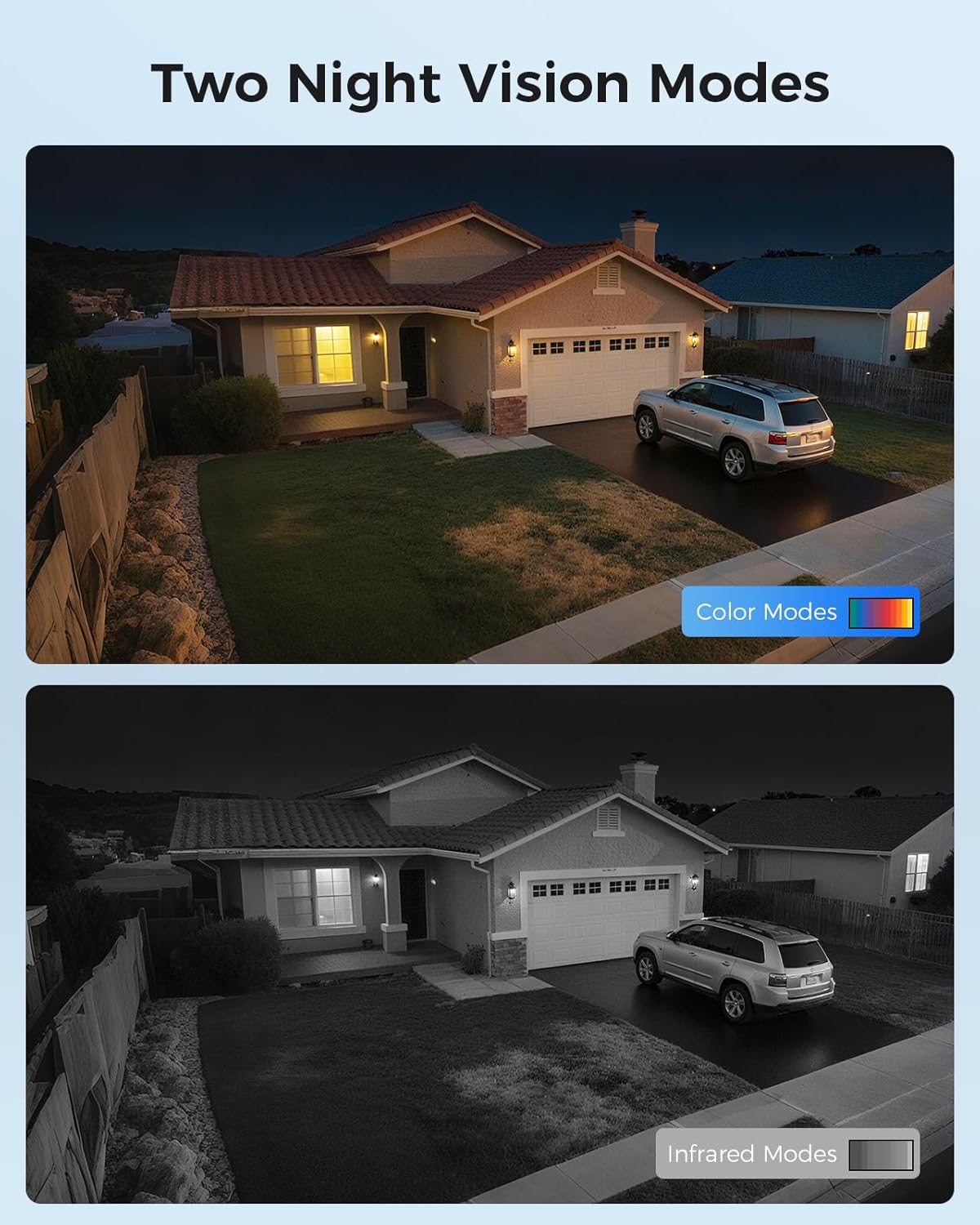
Image: Power over Ethernet setup, showing camera connected to NVR, NVR to router, and NVR to monitor.
4.3 ప్రారంభ కాన్ఫిగరేషన్
Upon first startup, the NVR will guide you through an initial setup wizard. This typically includes:
- Setting up a secure password for the NVR.
- Configuring network settings (DHCP is usually recommended for ease of use).
- Formatting the pre-installed 2TB HDD if prompted.
- Scanning and adding connected cameras.
It is crucial to set a strong, unique password for your NVR to protect your system from unauthorized access.
5. ఆపరేటింగ్
5.1 ప్రత్యక్ష ప్రసారం View
మీరు చెయ్యగలరు view live camera feeds through multiple interfaces:
- TV Monitor: Directly connected to the NVR via HDMI/VGA.
- మొబైల్ యాప్: Download the 'Guard Live' app (available on App Store and Google Play) for remote viewస్మార్ట్ఫోన్లలో.
- PC Client Software: Install the client software on your computer for viewing మరియు నిర్వహణ.
Video: Demonstration of the Hiseeu 4K 8MP PoE Security Camera system's live view capabilities and features.
వీడియో: ముగిసిందిview of the Hiseeu Ultra HD 4K 8 Wired Camera System, highlighting its features and performance.
5.2 రికార్డింగ్
The system supports continuous recording to the pre-installed 2TB HDD. You can also configure motion detection recording to save storage space and focus on important events.
5.3 ప్లేబ్యాక్
రికార్డ్ చేసిన fooని యాక్సెస్ చేయండిtage using the following playback modes:
- ప్లేబ్యాక్ని సమకాలీకరించండి: View footage from up to 4 cameras simultaneously.
- Motion Detection Playback: Review only segments where motion was detected.
- Common Playback: Standard timeline-based playback.

Image: Smart Playback Modes interface on the NVR, showing options for reviewing రికార్డ్ ఫూtage.
5.4 నైట్ విజన్ మోడ్లు
The cameras offer enhanced night surveillance with three modes:
- Black-and-White: Standard infrared night vision.
- కలర్ నైట్ మోడ్: Provides full-color video in low-light conditions.
- అలారం లైట్: The camera's built-in light activates upon detecting suspicious objects, enhancing visibility and acting as a deterrent.

Image: Two Night Vision Modes, illustrating color and infrared views at night.
5.5 Smart Detection (AI)
Leverage AI technology for precise human and vehicle detection:
- Customizable Alarm Areas: Define specific zones for detection to minimize irrelevant alerts.
- తక్షణ నోటిఫికేషన్లు: Receive immediate app push notifications when a human or vehicle is detected.
- Audible/Visual Alarms: Configure warning lights and sounds to deter intruders.
- NVR Buzzer: The NVR can emit a beeping sound as an additional alert.

Image: Smart Human/Vehicle Detect, showing how to set up alarm areas and notification types.
5.6 టూ-వే ఆడియో
The integrated two-way audio feature allows you to communicate directly through the camera:
- Speak into your mobile app, and your voice will be broadcast through the camera's speaker.
- Listen to audio from the camera's microphone through the app or connected TV monitor.

Image: Two Way Audio feature, demonstrating communication between a smartphone user and someone near the camera.
5.7 రిమోట్ యాక్సెస్
To access your security system remotely:
- Ensure your NVR is connected to a router with internet access.
- Download and install the 'Guard Live' mobile app or the PC client software.
- Follow the in-app instructions to add your NVR using its unique ID or QR code.
6. నిర్వహణ
- రెగ్యులర్ క్లీనింగ్: కెమెరా లెన్స్లను క్రమానుగతంగా మృదువైన, d తో శుభ్రం చేయండి.amp స్పష్టమైన చిత్ర నాణ్యతను నిర్ధారించడానికి వస్త్రాన్ని ఉపయోగించండి. రాపిడి క్లీనర్లను నివారించండి.
- ఫర్మ్వేర్ నవీకరణలు: Check the Hiseeu official webసరైన పనితీరు మరియు భద్రతను నిర్ధారించడానికి అందుబాటులో ఉన్న ఫర్మ్వేర్ నవీకరణల కోసం సైట్ లేదా యాప్.
- HDD నిర్వహణ: The 2TB HDD will automatically overwrite older footage when full. You can configure recording schedules and motion detection settings to manage storage efficiently.
- కేబుల్ తనిఖీ: Regularly inspect all Ethernet cables for damage, especially those exposed to outdoor elements.
- విద్యుత్ సరఫరా: Ensure the NVR's power adapter is securely connected and free from damage.
7. ట్రబుల్షూటింగ్
- వీడియో డిస్ప్లే లేదు: Check all cable connections (HDMI, Ethernet to cameras). Ensure the NVR and cameras are powered on. Verify monitor input selection.
- రిమోట్ యాక్సెస్ లేదు: Confirm the NVR is connected to the internet router. Check router settings and NVR network configuration. Ensure the mobile app or PC client is correctly configured with the NVR's ID.
- పేలవమైన చిత్ర నాణ్యత: Clean camera lenses. Ensure cameras are securely mounted and not obstructed. Check for strong light sources directly facing the camera at night.
- తప్పుడు మోషన్ అలారాలు: Adjust motion detection sensitivity and define specific detection zones to exclude irrelevant areas (e.g., moving trees).
- NVR రికార్డింగ్ లేదు: Check HDD status in NVR settings. Ensure the HDD is formatted and not full. Verify recording schedules and motion detection settings.
- పాస్వర్డ్ సమస్యలు: If you forget your NVR password, refer to the NVR's on-screen recovery options or contact Hiseeu technical support for assistance.
8. స్పెసిఫికేషన్లు
| ఫీచర్ | స్పెసిఫికేషన్ |
|---|---|
| బ్రాండ్ | హిసీయు |
| మోడల్ సంఖ్య | PK-8YHB88-BT |
| కనెక్టివిటీ టెక్నాలజీ | ఈథర్నెట్, వైర్డు |
| వీడియో క్యాప్చర్ రిజల్యూషన్ | 4K (3840x2160p) |
| ప్రత్యేక లక్షణాలు | App Control, Audio Recording, AI Human/Vehicle Detection |
| ఛానెల్ల సంఖ్య | 8 (expandable to 16 with external PoE switch) |
| మెమరీ స్టోరేజ్ కెపాసిటీ | 2 TB HDD (ముందే ఇన్స్టాల్ చేయబడింది) |
| శక్తి మూలం | కార్డెడ్ ఎలక్ట్రిక్ |
| అంశం కొలతలు (L x W x H) | 10 x 14 x 12 అంగుళాలు |
| అనుకూల పరికరాలు | Cameras, Laptops, Personal Computers, Smartphones, TV |
| తక్కువ కాంతి సాంకేతికత | Night Vision (Color Night Mode available) |
| నైట్ విజన్ రేంజ్ | 100 అడుగులు |
| ఫ్రేమ్ రేట్ | 25 FPS |
| రికార్డింగ్ మోడ్ | నిరంతర, మోషన్ డిటెక్షన్ |
| మొత్తం USB పోర్ట్లు | 2 |
| లెన్స్ రకం | వైడ్ యాంగిల్ (2.8మి.మీ) |
| వీడియో ఇన్పుట్ | RJ45 |
| Viewing యాంగిల్ | 121 డిగ్రీలు |
9. వారంటీ మరియు మద్దతు
- ఉత్పత్తి వారంటీ: Your Hiseeu security system is covered by a product warranty. Please refer to the warranty card included in your package or contact Hiseeu customer service for specific details regarding coverage and duration.
- జీవితకాల సాంకేతిక మద్దతు: Hiseeu provides lifetime technical support for its products. For any technical issues, setup assistance, or troubleshooting, please contact our support team.
- 30-రోజుల ఉచిత వాపసు: If you are not satisfied with your purchase, Hiseeu offers a 30-day free return policy. Please ensure the product is returned in its original condition and packaging.
For support, visit the Hiseeu official website or contact the customer service provided with your product documentation.


