1. పరిచయం
Thank you for choosing the UGREEN Revodok Pro 14-in-1 USB-C Docking Station. This manual provides detailed instructions for setting up, operating, and maintaining your docking station to ensure optimal performance and compatibility with your devices. Please read this manual thoroughly before use.
2. ఉత్పత్తి ముగిసిందిview
The UGREEN Revodok Pro is a versatile 14-in-1 USB-C docking station designed to expand your laptop's connectivity. It features a comprehensive array of ports to support multiple displays, high-speed data transfer, network connectivity, and power delivery.
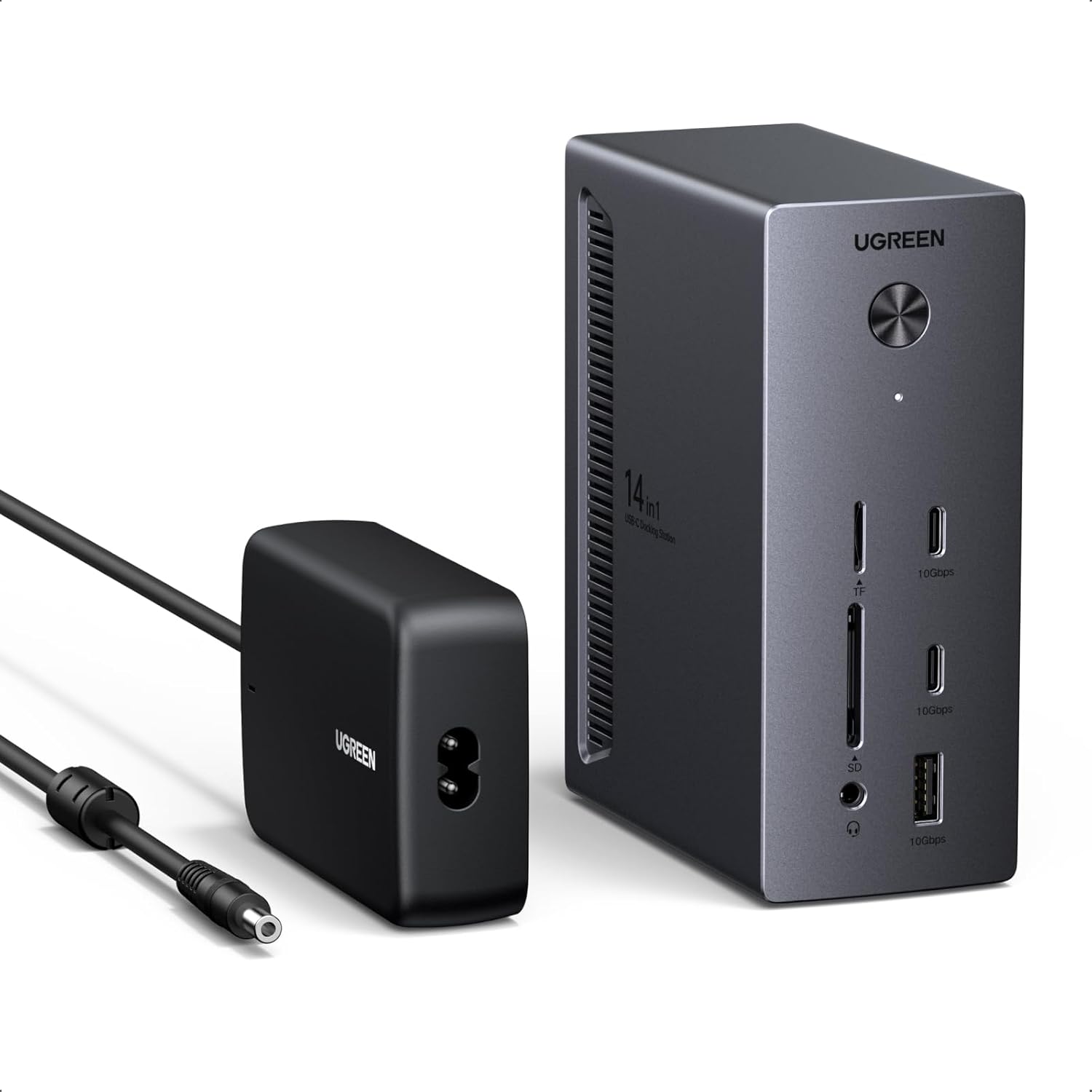
Image: UGREEN Revodok Pro Docking Station with its included power adapter.
పోర్ట్ కాన్ఫిగరేషన్:
- 2 x DisplayPort 4K@120Hz
- 1 x HDMI 4K@60Hz
- 2 x USB-C 10Gbps (Data Transfer Only)
- 1 x USB-A 10Gbps
- 2 x USB-A 5Gbps
- 1 x గిగాబిట్ ఈథర్నెట్ (RJ45)
- 1 x USB-C PD Out 27W (for peripheral charging)
- 1 x SD Card Reader (up to 170MB/s)
- 1 x TF Card Reader (up to 170MB/s)
- 1 x 3.5mm Audio Jack (output/input)
- 1 x DC IN 24V/5.83A 140W (for docking station power)
- 1 x USB-C Upstream Port (100W Max, for host connection)

Image: Detailed diagram illustrating the location and function of each of the 14 ports on the docking station.
3. సెటప్ సూచనలు
- పవర్ కనెక్షన్: Connect the provided 140W power adapter to the DC IN port on the docking station and then to a power outlet. This is essential for the docking station to function correctly and provide power to connected devices.
- హోస్ట్ కనెక్షన్: Connect your laptop or host device to the docking station using the supplied USB-C to USB-C cable. Ensure your laptop's USB-C port supports full functionality (DP Alt Mode, Power Delivery, and Data Transfer).
- డిస్ప్లే కనెక్షన్: Connect your external monitors to the DisplayPort (DP) and/or HDMI ports on the docking station.
- పరిధీయ కనెక్షన్: Connect your USB devices (keyboard, mouse, external drives), Ethernet cable, SD/TF cards, and audio devices to the corresponding ports on the docking station.
- డ్రైవర్ ఇన్స్టాలేషన్: The UGREEN Revodok Pro is generally plug-and-play. No additional drivers are typically required for Windows 10/11. For macOS, ensure your system is up to date.
4. ఆపరేటింగ్ సూచనలు
4.1 Triple Display Configuration
The docking station supports connecting up to three external displays.
- One display can support up to 4K@120Hz (via DisplayPort).
- Simultaneously, three external displays can be connected with resolutions such as 4K@60Hz (x2) + 4K@30Hz (x1).

Image: A user demonstrating a triple 4K display setup connected to a laptop via the UGREEN Revodok Pro docking station.
ప్రదర్శన మోడ్లు:
- Windows PC: Supports multiple external displays showing different content (MST mode).
- macOS PC: Only supports all external displays showing the same content (SST mode). Extended multi-monitor functionality with different content on each screen is not supported on macOS with this docking station.

Image: Visual representation of multi-screen display modes, highlighting the differences between Windows (supporting extended displays) and macOS (supporting mirrored displays).
4.2 హై-స్పీడ్ డేటా బదిలీ
The docking station is equipped with three USB 3.2 data ports (two USB-C and one USB-A) supporting data transfer speeds of up to 10Gbps. Two additional USB-A 5Gbps ports are suitable for connecting peripherals like a mouse or keyboard.
- USB 3.2 Ports (2x USB-C, 1x USB-A): Ideal for connecting external hard drives and USB flash drives for rapid data transfer.
- USB 3.0 Ports (2x USB-A): Suitable for standard peripherals.
- SD/TF కార్డ్ రీడర్లు: Support speeds up to 170MB/s for efficient photo and file transfers from memory cards.
Note: The data-only USB ports do not support video signal output or charging.

Image: Illustration of fast file transfer capabilities, showing a laptop connected to the docking station with external storage and memory cards.
4.3 Power Delivery and Charging
The docking station provides power delivery capabilities for your host laptop and other devices.
- USB-C Upstream Port: Delivers up to 100W Power Delivery to charge your host laptop.
- USB-C PD Out Port: Provides up to 27W Power Delivery for charging peripherals like smartphones or tablets.
Note: The USB-C charging ports do not support data transfers or video signal output.

Image: Diagram illustrating the power delivery features, with 100W charging for a laptop via the upstream port and 27W charging for a smartphone via the downstream port.
4.4 Network and Audio Connectivity
- గిగాబిట్ ఈథర్నెట్ పోర్ట్: Provides a stable and fast wired network connection up to 1000Mbps.
- 3.5mm ఆడియో జాక్: Supports both audio output (headphones/speakers) and microphone input.
5. అనుకూలత
For full functionality, ensure your computer's USB-C port supports the following:
- DP Alt Mode (DisplayPort Alternate Mode): Required for video output via DisplayPort and HDMI.
- పవర్ డెలివరీ (PD): Required for charging your laptop via the docking station.
- డేటా బదిలీ: Required for USB data ports to function.
The docking station is compatible with Windows 10/11 and macOS. Popular compatible models include Dell, HP, ThinkPad, and ASUS laptops with full-function USB-C ports.

Image: Compatibility chart detailing supported operating systems (Windows 10/11) and the requirement for a full-function USB-C port (Thunderbolt 5/4/USB4/USB-C with DP Alt Mode/PD Charge/Data Transfer).
Important Note for macOS Users:
macOS computers only support SST (Single Stream Transport) mode for external displays. This means all external monitors will display the same content, mirroring your primary display. If you require multiple external displays with different content, this docking station is not recommended for macOS.
6. నిర్వహణ
- డాకింగ్ స్టేషన్ను శుభ్రంగా మరియు దుమ్ము లేకుండా ఉంచండి. శుభ్రం చేయడానికి మృదువైన, పొడి వస్త్రాన్ని ఉపయోగించండి.
- పరికరాన్ని విపరీతమైన ఉష్ణోగ్రతలు లేదా తేమకు గురిచేయకుండా ఉండండి.
- Ensure adequate ventilation around the docking station to prevent overheating.
- పరికరాన్ని మీరే విడదీయడానికి లేదా మరమ్మతు చేయడానికి ప్రయత్నించవద్దు. సమస్యలు తలెత్తితే కస్టమర్ సపోర్ట్ను సంప్రదించండి.
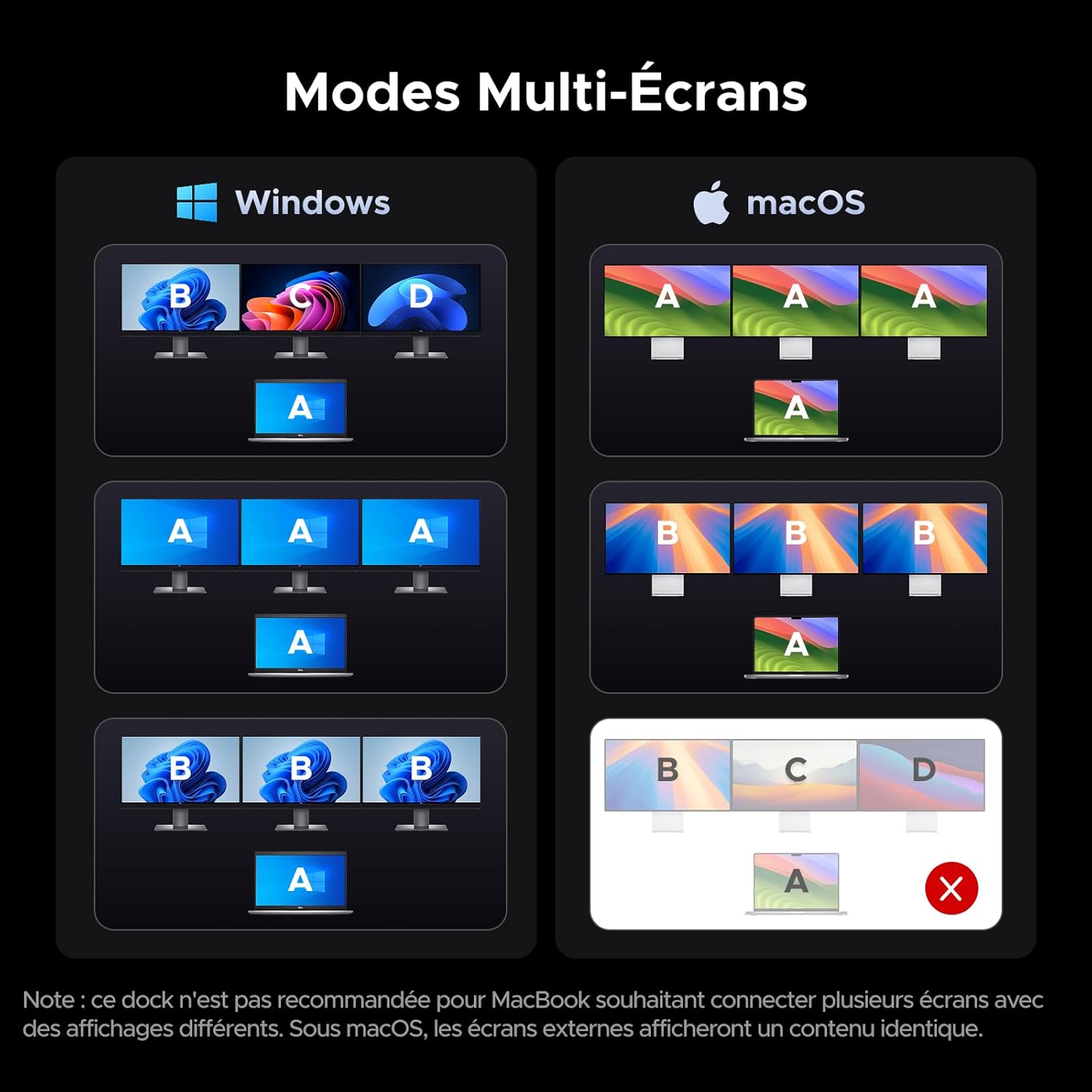
Image: Comparison of a cluttered desk before using the docking station versus an organized desk after integrating the docking station for cable management.
7. ట్రబుల్షూటింగ్
| సమస్య | సాధ్యమైన కారణం / పరిష్కారం |
|---|---|
| No display output or flickering screens. |
|
| ల్యాప్టాప్ ఛార్జింగ్ కావడం లేదు. |
|
| USB devices not recognized or slow data transfer. |
|
| ఈథర్నెట్ కనెక్షన్ సమస్యలు. |
|
| ఆడియో పనిచేయడం లేదు. |
|
8. స్పెసిఫికేషన్లు
| ఫీచర్ | వివరాలు |
|---|---|
| మోడల్ సంఖ్య | CM843 |
| ఓడరేవులు | 2x DisplayPort 4K@120Hz, 1x HDMI 4K@60Hz, 2x USB-C 10Gbps, 1x USB-A 10Gbps, 2x USB-A 5Gbps, 1x Gigabit Ethernet, 1x USB-C PD Out 27W, 1x SD Card Reader, 1x TF Card Reader, 1x 3.5mm Audio, 1x DC IN 140W, 1x USB-C Upstream 100W |
| మొత్తం USB పోర్ట్లు | 8 (5 data, 3 charging/upstream) |
| పవర్ ఇన్పుట్ | DC IN 24V/5.83A (140W Power Adapter) |
| Laptop Charging (Upstream) | 100W వరకు పవర్ డెలివరీ |
| Peripheral Charging (Downstream) | 27W వరకు పవర్ డెలివరీ |
| డేటా బదిలీ వేగం | USB 3.2 Gen 2 (10Gbps), SD/TF (170MB/s) |
| ఈథర్నెట్ వేగం | 10/100/1000Mbps గిగాబిట్ ఈథర్నెట్ |
| అనుకూల పరికరాలు | Laptops with full-function USB-C ports (DP Alt Mode, PD, Data Transfer) |
| ఆపరేటింగ్ సిస్టమ్ | Windows 10/11, macOS (with display limitations) |
| తయారీదారు | ఉగ్రీన్ గ్రూప్ లిమిటెడ్ |
| మూలం దేశం | చైనా |
9. వారంటీ మరియు మద్దతు
The UGREEN Revodok Pro Docking Station comes with a 24 నెలల తయారీదారు వారంటీ from UGREEN.
సాంకేతిక మద్దతు, వారంటీ క్లెయిమ్లు లేదా తదుపరి సహాయం కోసం, దయచేసి వారి అధికారిక ద్వారా UGREEN కస్టమర్ సేవను సంప్రదించండి webమీరు ఉత్పత్తిని కొనుగోలు చేసిన సైట్ లేదా రిటైలర్.
తయారీదారు: ఉగ్రీన్ గ్రూప్ లిమిటెడ్


