ఉత్పత్తి ముగిసిందిview
The Vantrue S1 Pro Max is a flagship 4K+4K dual dash camera system designed for comprehensive vehicle surveillance. It features dual Sony STARVIS 2 IMX678 sensors, delivering exceptional clarity day and night. Key functionalities include advanced driver-assistance systems (ADAS/BSD), PlatePix technology for clear license plate capture, HDR Night Vision 4.0, 5GHz Wi-Fi, built-in GPS, and smart voice control. This bundle includes the necessary Hardwire Kit and LTE Module for enhanced parking monitoring and remote access capabilities.

చిత్రం: పైగాview of the Vantrue S1 Pro Max dash camera system, showing the main unit, rear camera, hardwire kit, LTE module, and the mobile application interface.
సెటప్ మరియు ఇన్స్టాలేషన్
1. Mounting the Dash Camera
Mount the front dash camera securely on your vehicle's windshield, ensuring it does not obstruct your view. Position it centrally for optimal recording. The rear camera should be mounted on the rear windshield, providing a clear view వెనుక రహదారి.

Image: Illustration of the dual 4K dash cam setup, showing the 155-degree wide-angle coverage for both front and rear cameras, capturing license plates clearly.
2. Hardwire Kit Connection
The included hardwire kit enables continuous power supply for parking monitoring features. Follow the wiring diagram carefully:
- రెడ్ వైర్: Connect to a 12V-30V rated power fuse (constant power).
- పసుపు వైర్: Connect to the ACC fuse slot (switched power, active when ignition is on).
- బ్లాక్ వైర్: Connect to any metal part of the car chassis for ground.
The hardwire kit automatically converts 12V/24V vehicle power to 5V/2A for the dash cam.

Image: Detailed wiring diagram illustrating the connection points for the red, yellow, and black wires of the hardwire kit to the vehicle's fuse box and ground.
3. LTE Module Installation
The LTE module (included) provides remote monitoring capabilities. Connect the LTE module to the dash cam as per the instructions provided with the module. Ensure a valid SIM card (not included) is inserted into the LTE module for cellular connectivity.

Image: Visual representation of the Vantrue LTE module and its associated features, including real-time remote preview, instant notifications, car location tracking, and cloud storage.
4. SD కార్డ్ చొప్పించడం
Insert a compatible microSD card (up to 1TB, sold separately) into the designated slot on the dash camera. Ensure the card is inserted correctly until it clicks into place. It is recommended to format the SD card within the dash cam's settings before first use and periodically thereafter.
ఆపరేషన్
1. Powering On/Off and Basic Recording
The dash cam will automatically power on and begin recording when your vehicle's ignition is turned on (if connected via ACC fuse). It will power off automatically when the ignition is turned off. Manual power control is also available via the power button.
2. స్మార్ట్ వాయిస్ కంట్రోల్
The S1 Pro Max supports hands-free operation using voice commands. This allows you to control essential functions without diverting your attention from the road. Common commands include:
- "Start recording"
- "ఫోటో తీయండి"
- "Lock video"
- "స్క్రీన్ ఆన్ చేయి" / "స్క్రీన్ ఆఫ్ చేయి"
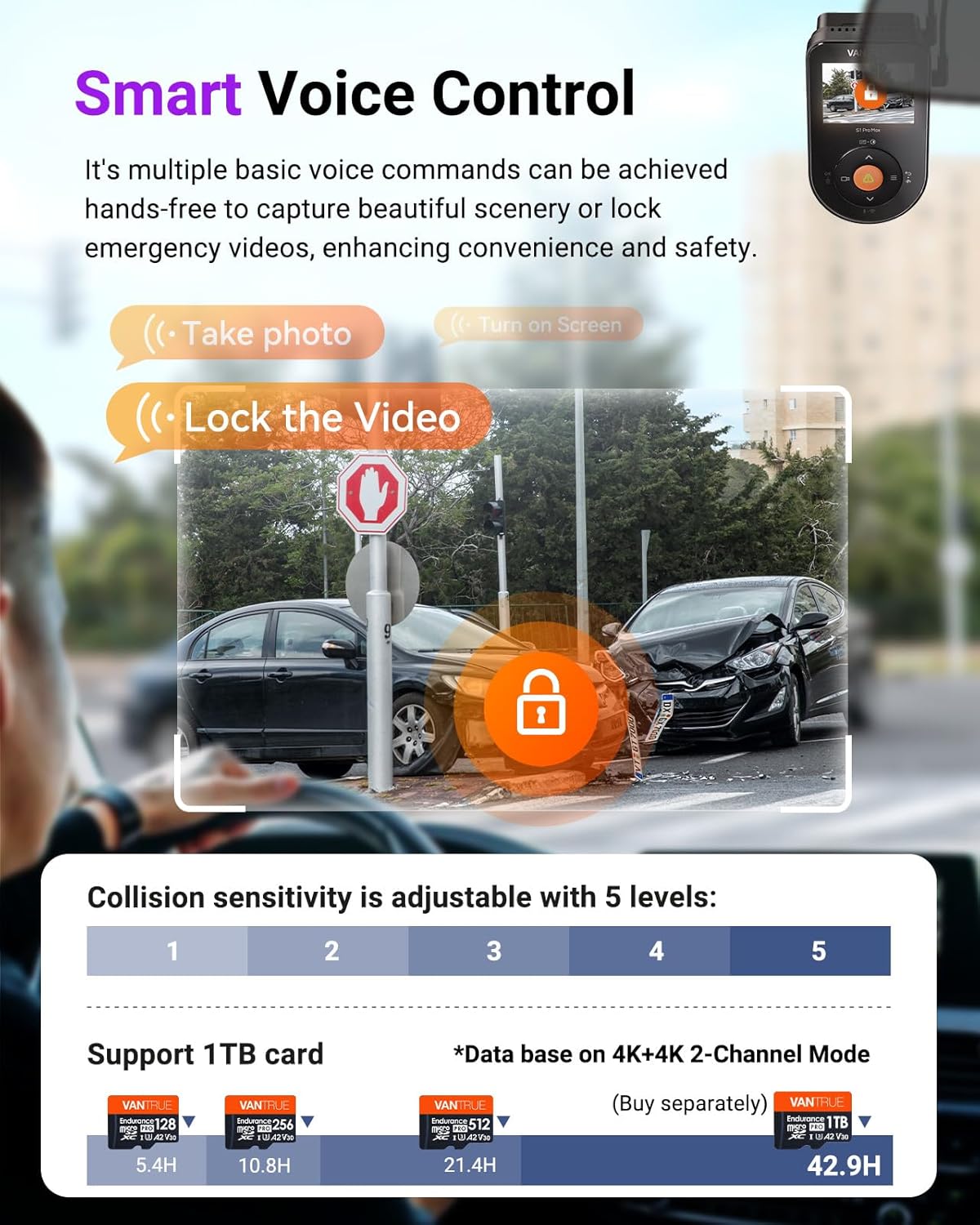
Image: Depiction of voice control commands like "Take photo" and "Lock the Video," alongside an explanation of adjustable collision sensitivity levels and supported SD card capacities.
3. Wi-Fi and Mobile App Connection
The dash cam features 5GHz Wi-Fi for fast connection to the Vantrue Free app on your smartphone. This allows for:
- ప్రత్యక్షం view రికార్డింగ్లు.
- Reviewing మరియు foo డౌన్లోడ్ చేస్తోందిtagఇ నేరుగా మీ ఫోన్కి.
- కెమెరా సెట్టింగ్లను సర్దుబాటు చేస్తోంది.
- Over-the-air (OTA) firmware updates.
Download the "Vantrue Free" app from the App Store or Google Play.

Image: Diagram illustrating the faster 5GHz Wi-Fi connectivity, GPS tracking, OTA upgrades, and mileage statistics, with screenshots of the Vantrue app interface.
4. GPS పనితనం
The built-in GPS module tracks your driving route and speed. This data can be viewed during video playback on the Vantrue Free app or a dedicated GPS player on your computer. GPS stamps can be embedded into your footage for accurate incident documentation.
5. ADAS and BSD Systems
The S1 Pro Max incorporates AI-powered Advanced Driver-Assistance Systems (ADAS) and Blind Spot Detection (BSD) to enhance driving safety:
- ADAS: Provides real-time voice alerts for potential dangers such as collision warnings, forward collision alerts, lane departure warnings, and pedestrian detection.
- BSD: Includes Lane Change Assist Alarm and Rear Collision Warning to alert you of vehicles in your blind spots or approaching from the rear.
6. Remote Monitoring and Cloud Features
With the LTE module and Vantrue Free app, you can remotely monitor your vehicle's surroundings from anywhere. This includes:
- Real-time Remote Preview: View లైవ్ ఫూtage from your dash cam.
- తక్షణ నోటిఫికేషన్లు: Receive alerts for detected events.
- Car Location Tracking: Monitor your vehicle's location.
- Smart Cloud Storage: 2GB free storage for data backup, reducing risk of data loss.
- రిమోట్ Fileనిర్వహణ: ప్లేబ్యాక్ మరియు డౌన్లోడ్ వీడియో files stored on your SD card remotely.

Image: Screenshot of the Vantrue app showing remote live preview of the dash cam footage, with options for voice commands like "What are you doing?" and "I'm calling the police."

Image: Illustration of the 2GB free cloud storage feature and remote file management capabilities, allowing users to access and download videos from their SD card via the app.
నిర్వహణ
1. SD కార్డ్ నిర్వహణ
To ensure optimal performance and prevent data corruption, it is recommended to format the microSD card regularly (e.g., once a month) using the dash cam's settings menu. This helps maintain the card's health and ensures smooth recording. Replace the SD card if you experience frequent recording errors or data loss.
2. పరికరాన్ని శుభ్రపరచడం
Gently wipe the dash cam lenses with a soft, lint-free cloth to remove dust or smudges. Avoid using abrasive cleaners or solvents that could damage the lens coating or device casing. Keep the device free from excessive dust and moisture.
ట్రబుల్షూటింగ్
- డాష్ కామ్ ఆన్ చేయడం లేదు: Ensure the power connection (hardwire kit or USB) is secure and providing adequate power. Check vehicle's fuse if using hardwire kit.
- రికార్డింగ్ సమస్యలు (ఉదా., ఫ్రీజింగ్, పాడైంది) fileలు): Format the SD card within the camera settings. Try a different, high-quality microSD card (U3 or higher recommended).
- Wi-Fi కనెక్షన్ సమస్యలు: Ensure the Vantrue Free app is updated. Restart both the dash cam and your smartphone. Check Wi-Fi settings on the dash cam.
- GPS ట్రాకింగ్ లేదు: డాష్ కామ్ క్లియర్ గా ఉందని నిర్ధారించుకోండి view of the sky. Allow a few minutes for GPS signal acquisition after powering on.
- వాయిస్ కంట్రోల్ స్పందించడం లేదు: Speak clearly and ensure the environment is not excessively noisy. Check voice control settings in the dash cam menu.
- Remote monitoring not working: Verify the LTE module has a working SIM card with an active data plan. Ensure the LTE module is properly connected to the dash cam and has signal.
For further assistance or advanced troubleshooting, refer to the Vantrue official webసైట్ లేదా కస్టమర్ సపోర్ట్ని సంప్రదించండి.
స్పెసిఫికేషన్లు
| ఫీచర్ | వివరాలు |
|---|---|
| మోడల్ పేరు | S1 PRO Max |
| బ్రాండ్ | వాంట్రూ |
| వీడియో క్యాప్చర్ రిజల్యూషన్ | 4K (3840 x 2160 pixels) Dual |
| చిత్రం సెన్సార్ | డ్యూయల్ సోనీ స్టార్విస్ 2 IMX678 |
| కనెక్టివిటీ టెక్నాలజీ | Wi-Fi (5GHz), GPS, LTE (via module) |
| ప్రత్యేక లక్షణాలు | Night Vision, AI Dash Camera (ADAS/BSD), Fast 5GHz WiFi, Built-in GPS, Smart Voice Control, Remote Monitoring, PlatePix, HDR Night Vision 4.0 |
| ఓరియంటేషన్ | ముందు & వెనుక |
| మౌంటు రకం | Dashboard Mount, Rear Mount |
| చేర్చబడిన భాగాలు | Hardwire Kit, LTE Module |
| Max SD Card Capacity | 1TB (sold separately) |
మద్దతు మరియు వారంటీ
For product support, technical assistance, or warranty information, please visit the official VANTRUE webసైట్లో లేదా వారి కస్టమర్ సర్వీస్ను సంప్రదించండి. వారంటీ క్లెయిమ్ల కోసం కొనుగోలు రుజువుగా మీ కొనుగోలు రసీదును ఉంచండి.
Official VANTRUE Store: VANTRUE Amazon Store


