పరిచయం
This manual provides detailed instructions for the setup, operation, and maintenance of your Pyle PA Speaker System, Model PPHP1569UT.5. This high-powered, versatile audio system is designed for various entertainment needs, including karaoke, parties, and stage performances. It features a 15-inch Bluetooth active PA speaker and a 15-inch passive PA speaker, offering 500W max output with deep bass and clear highs. Please read this manual thoroughly before using the system to ensure proper function and longevity.
పెట్టెలో ఏముంది

చిత్రం: పైగాview of the Pyle PA Speaker System components included in the package.
అన్ప్యాక్ చేసిన తర్వాత, క్రింద జాబితా చేయబడిన అన్ని వస్తువులు ఉన్నాయని మరియు మంచి స్థితిలో ఉన్నాయని దయచేసి ధృవీకరించండి:
- 15'' Bluetooth Active PA Speaker
- 15'' Passive PA Speaker
- (2) స్పీకర్ స్టాండ్స్
- పవర్ కేబుల్
- Audio Cable 5M (Both sides are speakON)
- మైక్రోఫోన్
- రిమోట్ కంట్రోల్
ఉత్పత్తి లక్షణాలు
- 500 Watts Max Power: The PA combo speaker system features a 2x15” woofer and 2x1” tweeter, providing a 500W max power output for full-range surround stereo sound with deep bass and clear highs.
- Combo PA Speaker System: Includes a 15” Bluetooth active PA speaker with a built-in amplifier and a 15” passive PA speaker for a complete audio setup.
- వైర్లెస్ బ్లూటూత్ స్ట్రీమింగ్: Stream audio wirelessly from any Bluetooth-enabled device such as smartphones, tablets, or PCs.
- Multiple Auxiliary Input Options: MP3ని సపోర్ట్ చేస్తుంది files via USB/SD ports, FM radio, and a ¼” microphone jack for versatile connectivity.
- పోర్టబుల్ డిజైన్: Lightweight design with integrated carry handles and roller caster wheels for easy transport.
- LED లైట్లు: Integrated LED lights for visual enhancement.

Image: Illustration of the speaker's internal components, highlighting the 15-inch subwoofer and 1-inch tweeter for powerful audio output.
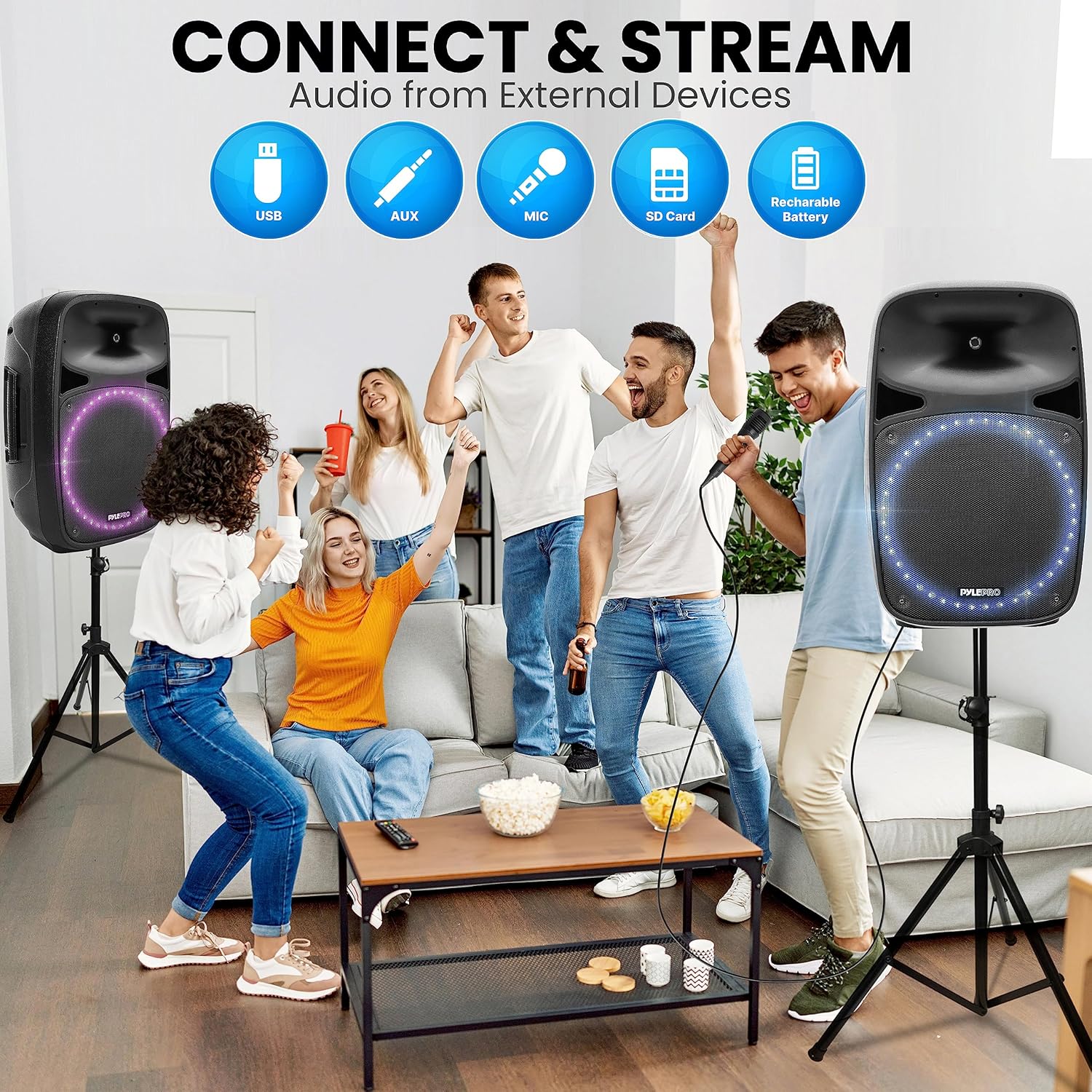
Image: The speaker's design featuring a retractable handle and caster wheels for enhanced portability.
భాగాలు మరియు విధులు
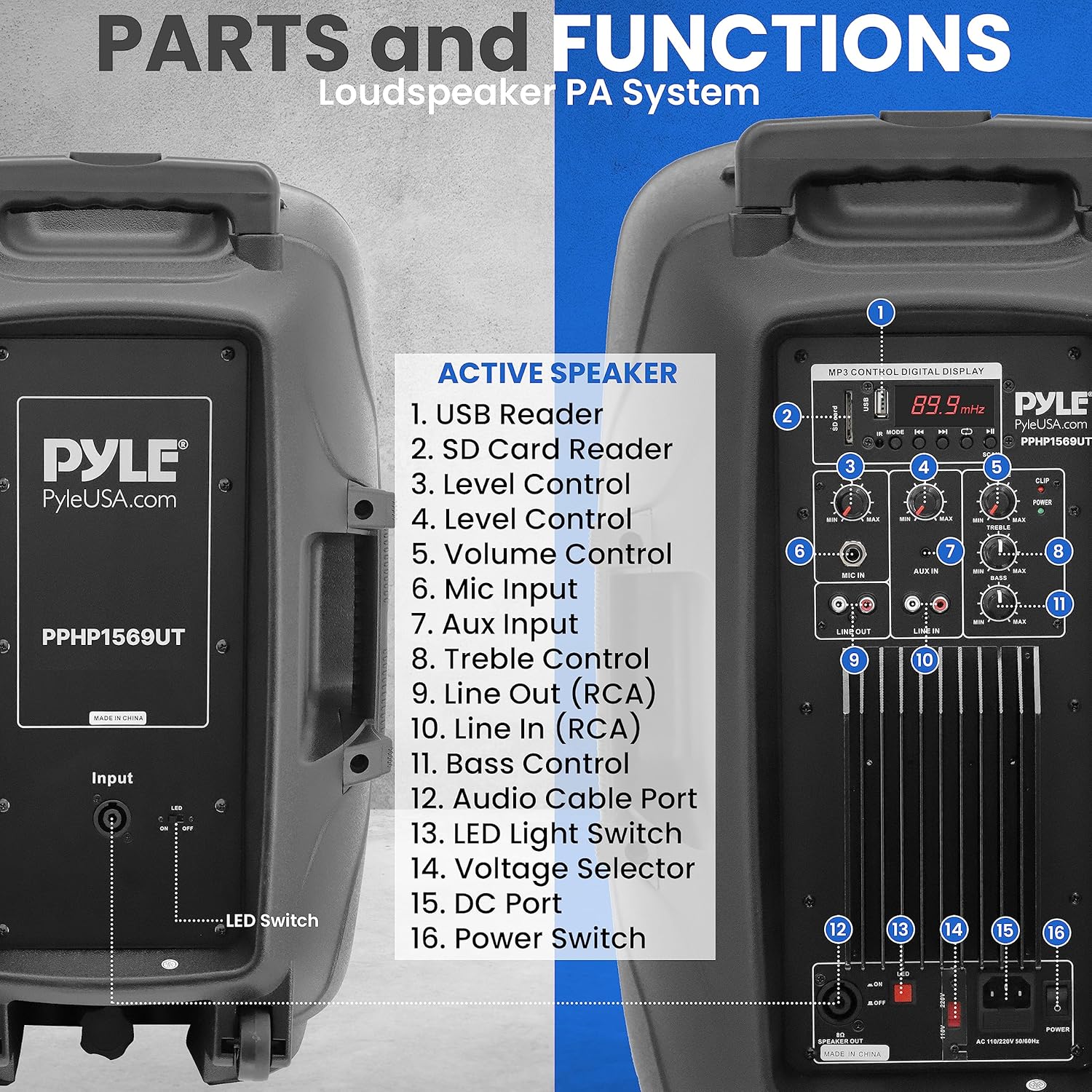
Image: Rear panel of the active speaker, detailing the various ports and controls.
Active Speaker Control Panel:
- USB రీడర్: ఆడియో ప్లే చేయడానికి fileఒక USB ఫ్లాష్ డ్రైవ్ నుండి.
- SD కార్డ్ రీడర్: ఆడియో ప్లే చేయడానికి files from an SD memory card.
- Level Control (Input 1): Adjusts the input level for a specific channel.
- Level Control (Input 2): Adjusts the input level for a specific channel.
- వాల్యూమ్ నియంత్రణ: Master volume adjustment for the overall output.
- మైక్ ఇన్పుట్: ¼” jack for connecting a microphone.
- ఆక్స్ ఇన్పుట్: RCA input for connecting external audio devices.
- ట్రిబుల్ నియంత్రణ: అధిక-ఫ్రీక్వెన్సీ ప్రతిస్పందనను సర్దుబాటు చేస్తుంది.
- లైన్ అవుట్ (RCA): RCA output for connecting to another ampలైఫైయర్ లేదా పవర్డ్ స్పీకర్.
- లైన్ ఇన్ (RCA): RCA input for connecting external audio devices.
- బాస్ నియంత్రణ: తక్కువ-ఫ్రీక్వెన్సీ ప్రతిస్పందనను సర్దుబాటు చేస్తుంది.
- ఆడియో కేబుల్ పోర్ట్: SpeakON port for connecting the passive speaker.
- LED లైట్ స్విచ్: Toggles the integrated LED lights on/off.
- వాల్యూమ్tagఇ సెలెక్టర్: Switch to select between 110V and 220V power input.
- DC పోర్ట్: Not applicable for this model (typically for DC power input).
- పవర్ స్విచ్: యూనిట్ని ఆన్ లేదా ఆఫ్ చేస్తుంది.
నిష్క్రియ స్పీకర్:
The passive speaker connects to the active speaker via the provided SpeakON audio cable. It does not have its own controls or power input.
సెటప్
1. స్పీకర్ ప్లేస్మెంట్:
- Place the active and passive speakers in desired locations. For optimal sound dispersion, consider using the included speaker stands.
- To mount on stands, align the speaker's bottom pole mount with the stand's top pole and gently lower the speaker onto the stand. Ensure it is stable.
2. Connecting the Speakers:
- Locate the "Audio Cable Port" (12) on the active speaker's control panel.
- Connect one end of the provided 5M SpeakON audio cable to this port.
- Connect the other end of the SpeakON audio cable to the input port on the passive speaker.
- రెండు కనెక్షన్లు సురక్షితంగా ఉన్నాయని నిర్ధారించుకోండి.
3. పవర్ కనెక్షన్:
- Before connecting power, ensure the "Voltage Selector" (14) on the active speaker is set to the correct voltagమీ ప్రాంతం కోసం (110V లేదా 220V).
- Connect the power cable to the active speaker's power input.
- పవర్ కేబుల్ యొక్క మరొక చివరను తగిన ఎలక్ట్రికల్ అవుట్లెట్లోకి ప్లగ్ చేయండి.
ఆపరేటింగ్ సూచనలు
1. పవర్ చేయడం ఆన్/ఆఫ్:
- To turn on the system, press the "Power Switch" (16) located on the active speaker's control panel. The digital display will illuminate.
- To turn off the system, press the "Power Switch" (16) again.
2. బ్లూటూత్ వైర్లెస్ స్ట్రీమింగ్:

Image: Visual representation of the speaker's built-in Bluetooth capability for wireless audio streaming.
- స్పీకర్ పవర్ ఆన్ చేయబడిందని నిర్ధారించుకోండి.
- Press the "Mode" button on the digital display panel until "Bluetooth" or "BT" is displayed. The unit will enter pairing mode.
- మీ బ్లూటూత్-ప్రారంభించబడిన పరికరంలో (స్మార్ట్ఫోన్, టాబ్లెట్, PC), అందుబాటులో ఉన్న బ్లూటూత్ పరికరాల కోసం శోధించండి.
- జాబితా నుండి "పైల్ ఆడియో" లేదా అలాంటి పేరును ఎంచుకోండి.
- Once paired, you will hear a confirmation tone, and you can begin streaming audio wirelessly.
3. USB/SD Card Playback:

Image: The speaker system's versatility in connecting and streaming audio from external devices, including USB, AUX, Microphone, and SD Card inputs.
- Insert a USB flash drive into the "USB Reader" (1) or an SD card into the "SD Card Reader" (2).
- సిస్టమ్ స్వయంచాలకంగా USB/SD మోడ్కి మారుతుంది మరియు అనుకూల ఆడియోను ప్లే చేయడం ప్రారంభిస్తుంది. files. If not, press the "Mode" button to select the correct input.
- Use the playback controls (Play/Pause, Next, Previous) on the digital display or remote control to manage your music.
4. AUX ఇన్పుట్:
- Connect your external audio device (e.g., MP3 player, CD player) to the "Aux Input" (7) or "Line In (RCA)" (10) using appropriate cables.
- Press the "Mode" button until "AUX" or "Line In" is displayed.
- Adjust the volume on both your external device and the speaker system.
5. Microphone Use:
- Connect the provided microphone to the "Mic Input" (6).
- Adjust the "Level Control" (3 or 4, depending on which input is used for mic) for the microphone to achieve desired volume.
- Ensure the master "Volume Control" (5) is set appropriately.
6. FM రేడియో:
- "FM" ప్రదర్శించబడే వరకు "మోడ్" బటన్ను నొక్కండి.
- Use the scan buttons on the digital display or remote control to search for available radio stations.
7. ధ్వనిని సర్దుబాటు చేయడం:
- Use the "Bass Control" (11) to adjust the low-frequency output.
- Use the "Treble Control" (8) to adjust the high-frequency output.
- The "Volume Control" (5) adjusts the overall output volume of the system.
8. LED లైట్లు:
- Toggle the "LED Light Switch" (13) to turn the integrated LED lights on or off.
నిర్వహణ
- శుభ్రపరచడం: Use a soft, dry cloth to clean the exterior of the speakers. Do not use liquid cleaners or abrasive materials.
- నిల్వ: When not in use for extended periods, store the system in a cool, dry place, away from direct sunlight and extreme temperatures.
- నిర్వహణ: Always use the integrated carry handles and roller caster wheels for transport. Avoid dropping or subjecting the speakers to strong impacts.
- వెంటిలేషన్: Ensure proper ventilation around the active speaker to prevent overheating. Do not block any ventilation openings.
ట్రబుల్షూటింగ్
| సమస్య | సాధ్యమైన కారణం | పరిష్కారం |
|---|---|---|
| శక్తి లేదు | పవర్ కేబుల్ కనెక్ట్ కాలేదు; పవర్ స్విచ్ ఆఫ్; సరికాని వాల్యూమ్tagఇ ఎంపిక చేయబడింది. | Ensure power cable is securely plugged in. Turn on the power switch. Verify voltage సెలెక్టర్ సరిగ్గా సెట్ చేయబడింది. |
| స్పీకర్ల నుండి శబ్దం లేదు | Volume too low; Incorrect input selected; Cables not connected properly; Passive speaker cable loose. | Increase master volume. Select the correct input mode (Bluetooth, USB, AUX). Check all audio cable connections, especially the SpeakON cable to the passive speaker. |
| బ్లూటూత్ జత చేయడం లేదు | Speaker not in pairing mode; Device too far; Bluetooth disabled on device. | Ensure speaker is in Bluetooth mode and "BT" is flashing. Move device closer to speaker. Enable Bluetooth on your device. |
| వక్రీకరించిన ధ్వని | Volume too high (clipping); Input source distortion; Incorrect EQ settings. | Reduce volume on both speaker and source device. Check source audio quality. Adjust Bass and Treble controls. |
| మైక్రోఫోన్ పని చేయడం లేదు | Microphone not plugged in; Microphone volume too low; Faulty microphone. | Ensure microphone is securely plugged into the Mic Input. Increase the microphone's level control. Test with another microphone if available. |
స్పెసిఫికేషన్లు
| ఫీచర్ | వివరాలు |
|---|---|
| మోడల్ సంఖ్య | PPHP1569UT.5 |
| పవర్ అవుట్పుట్ | గరిష్టంగా 500 వాట్స్ |
| వూఫర్ సైజు | 15 inches (x2) |
| ట్వీటర్ పరిమాణం | 1 అంగుళాలు (x2) |
| ఇంపెడెన్స్ | 8 ఓం |
| ఫ్రీక్వెన్సీ రెస్పాన్స్ | 3.3 KHz (Crossover) |
| కనెక్టివిటీ టెక్నాలజీ | Bluetooth, AUX, USB, SD Card |
| ఆడియో ఇన్పుట్లు | Microphone (¼"), Aux (RCA), Line In (RCA), USB, SD |
| ఆడియో అవుట్పుట్లు | Line Out (RCA), SpeakON (to passive speaker) |
| శక్తి మూలం | Corded Electric (110V/220V selectable) |
| వస్తువు బరువు | 81.7 పౌండ్లు |
| ప్యాకేజీ కొలతలు | 36 x 31 x 20 అంగుళాలు |
| అనుకూల పరికరాలు | PC, Smartphone, Android, Tablet, iPad, iPhone |
| మౌంటు రకం | స్టాండ్ మౌంట్ |
వారంటీ మరియు మద్దతు
Pyle products are designed for reliability and performance. For information regarding warranty coverage, product support, or to purchase replacement parts, please visit the official Pyle webసైట్ లేదా వారి కస్టమర్ సేవా విభాగాన్ని సంప్రదించండి.
మీరు సందర్శించడం ద్వారా మరిన్ని వివరాలు మరియు సంప్రదింపు వివరాలను పొందవచ్చు అమెజాన్లో పైల్ స్టోర్ or the official Pyle USA webసైట్.
For returns, please refer to Amazon's 30-day easy returns policy.


