ఉత్పత్తి ముగిసిందిview
The EDUP USB WiFi 6 Adapter AX600M is a compact, dual-band wireless network adapter designed to provide high-speed Wi-Fi 6 connectivity for your PC, laptop, or desktop. It supports the latest 802.11ax standard, offering enhanced performance for streaming, gaming, and video conferencing.

Image: The EDUP USB WiFi 6 Adapter AX600M, a compact black dongle with a gold USB connector and a blue Wi-Fi signal icon.
ముఖ్య లక్షణాలు:
- Next-Gen WiFi 6 Speed: Up to 286Mbps on 5.8GHz and 286Mbps on 2.4GHz for smooth performance.
- కాంపాక్ట్ డిజైన్: Built-in antenna, ideal for portable use and tight spaces.
- ప్లగ్ & ప్లే: Easy driver installation, compatible with Windows 11/10/7.
- మెరుగైన భద్రత: Supports WEP, WPA-PSK, WPA2-PSK, and WPA3-PSK encryption.
- బహుముఖ మోడ్లు: Supports Ad-Hoc and Infrastructure modes.
ప్యాకేజీ విషయాలు
మీ ప్యాకేజీలో అన్ని అంశాలు ఉన్నాయని ధృవీకరించండి:
- 1x EDUP WiFi Adapter (AX600M)
ఏవైనా వస్తువులు తప్పిపోయినా లేదా దెబ్బతిన్నా, దయచేసి కస్టమర్ సపోర్ట్ను సంప్రదించండి.
సెటప్ గైడ్
Follow these steps to install and set up your EDUP USB WiFi 6 Adapter AX600M:
- Step 1: Insert the WiFi Adapter
Insert the EDUP USB WiFi adapter into an available USB port on your desktop or laptop computer. Ensure it is fully seated in the port.
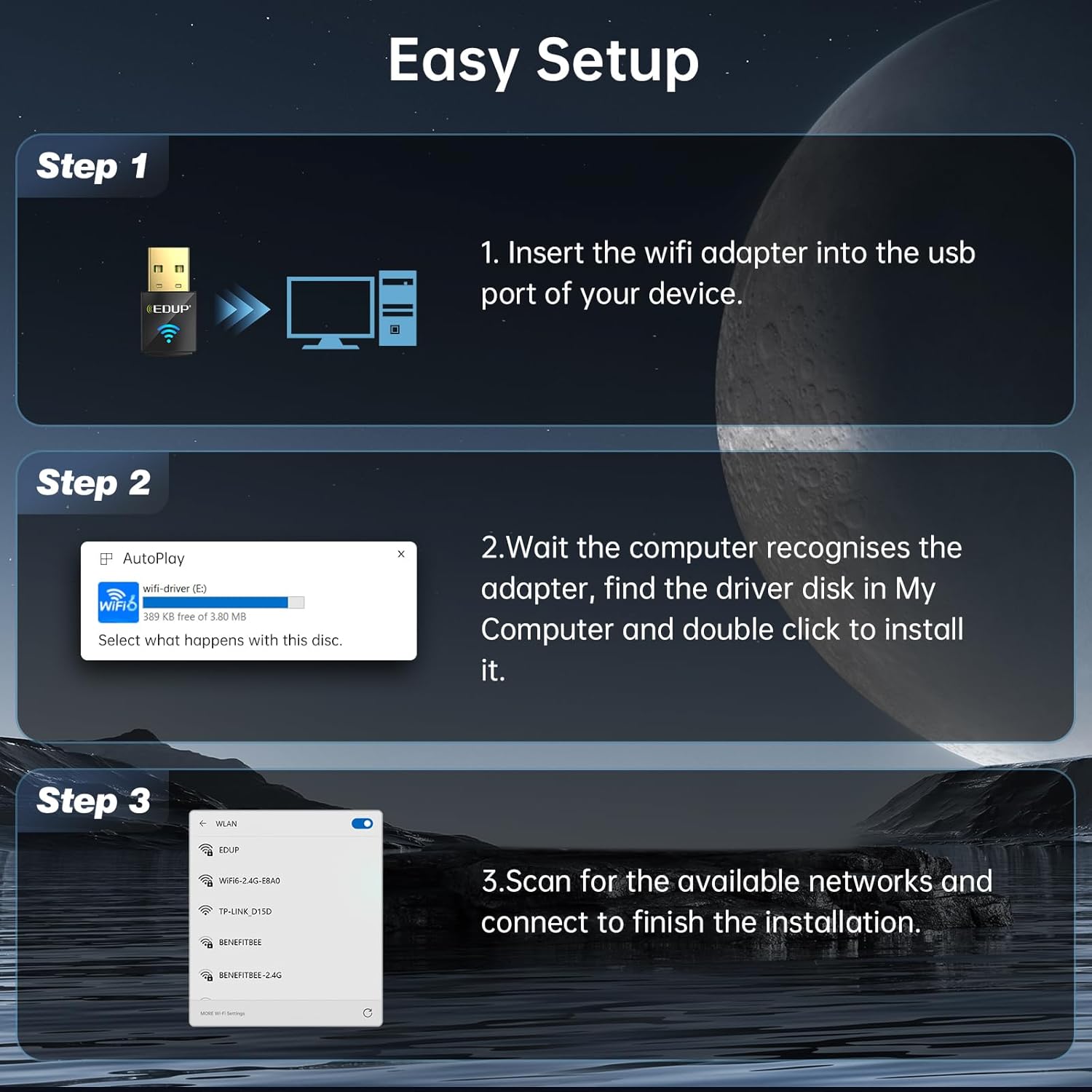
Image: Diagram showing the EDUP USB WiFi adapter being inserted into a computer's USB port.
- దశ 2: డ్రైవర్ ఇన్స్టాలేషన్
Most Windows 11/10/7 systems will automatically detect the adapter and install the necessary drivers. If an auto-play prompt appears, follow the on-screen instructions to install the driver from the adapter's virtual disk. If no prompt appears, navigate to "My Computer" or "This PC", locate the new drive (often labeled "wifi-driver" or similar), and double-click to run the installer.

Image: Screenshot of a Windows auto-play prompt for driver installation, indicating compatibility with Windows 7, 10, and 11.
- దశ 3: నెట్వర్క్కి కనెక్ట్ చేయండి
Once the driver is installed, your computer will recognize the adapter. Scan for available wireless networks, select your desired network, and enter the password to connect. The adapter supports both 2.4GHz and 5GHz bands.

Image: Graphic illustrating the dual-band capabilities of the adapter, showing 5GHz (286Mbps) and 2.4GHz (286Mbps) coverage.
ఆపరేటింగ్ సూచనలు
Wi-Fi Receive Mode
In Wi-Fi Receive Mode, the adapter allows your computer to connect to existing wireless networks, providing internet access and network connectivity. This is the primary mode of operation for most users.
Wi-Fi Hotspot Mode (Soft AP)
The adapter can also function as a Wi-Fi Hotspot (Soft AP), allowing your computer to share its internet connection with other devices. This is useful for creating a personal Wi-Fi network when only a wired connection is available on your computer.
- To enable Hotspot Mode, refer to your operating system's network settings (e.g., Mobile hotspot settings in Windows).
- Ensure your computer has an active internet connection (e.g., Ethernet) to share.

Image: Graphic illustrating the adapter's capability to function in both Wi-Fi Receive Mode (connecting to a network) and Wi-Fi Hotspot Mode (sharing internet).
MU-MIMO టెక్నాలజీ
The EDUP AX600M adapter supports MU-MIMO (Multi-User, Multiple-Input, Multiple-Output) technology. When paired with a MU-MIMO compatible router, this technology allows the router to communicate with multiple devices simultaneously, improving network efficiency and reducing latency, especially in environments with many connected devices.

Image: Diagram comparing MU-MIMO router communication with the EP-AX600 adapter versus a regular adapter, showing improved simultaneous data flow.
నిర్వహణ
To ensure optimal performance and longevity of your EDUP USB WiFi 6 Adapter AX600M, follow these simple maintenance guidelines:
- శుభ్రముగా ఉంచు: Periodically clean the adapter's exterior with a soft, dry cloth. Avoid using liquid cleaners or solvents.
- సరైన నిల్వ: ఉపయోగంలో లేనప్పుడు, అడాప్టర్ను చల్లని, పొడి ప్రదేశంలో, ప్రత్యక్ష సూర్యకాంతి మరియు తీవ్రమైన ఉష్ణోగ్రతలకు దూరంగా నిల్వ చేయండి.
- భౌతిక నష్టాన్ని నివారించండి: Do not drop, bend, or expose the adapter to excessive force.
- డ్రైవర్ నవీకరణలు: Regularly check for updated drivers on the EDUP official webఅనుకూలత మరియు పనితీరు మెరుగుదలలను నిర్ధారించడానికి సైట్.
ట్రబుల్షూటింగ్
If you encounter issues with your EDUP USB WiFi 6 Adapter AX600M, refer to the following common troubleshooting steps:
| సమస్య | సాధ్యమైన పరిష్కారం |
|---|---|
| కంప్యూటర్ ద్వారా అడాప్టర్ గుర్తించబడలేదు. |
|
| Wi-Fi నెట్వర్క్కి కనెక్ట్ చేయడం సాధ్యం కాలేదు. |
|
| నెమ్మదిగా Wi-Fi వేగం. |
|
| Driver installation failed. |
|
If the problem persists, please contact EDUP customer support for further assistance.
స్పెసిఫికేషన్లు
| ఫీచర్ | వివరాలు |
|---|---|
| మోడల్ | AX600M |
| వైర్లెస్ స్టాండర్డ్ | IEEE 802.11ax (Wi-Fi 6) |
| ఫ్రీక్వెన్సీ బ్యాండ్ | డ్యూయల్ బ్యాండ్ (2.4GHz & 5.8GHz) |
| డేటా బదిలీ రేటు | 286Mbps (2.4GHz) వరకు, 286Mbps (5.8GHz) వరకు |
| హార్డ్వేర్ ఇంటర్ఫేస్ | USB 2.0 |
| అనుకూల పరికరాలు | డెస్క్టాప్, ల్యాప్టాప్ |
| ఆపరేటింగ్ సిస్టమ్ అనుకూలత | విండోస్ 11/10/7 |
| భద్రతా గుప్తీకరణ | WEP, WPA-PSK, WPA2-PSK, WPA3-PSK |
| ఉత్పత్తి కొలతలు | 0.64 x 0.3 x 1.22 అంగుళాలు (16.26 x 7.62 x 30.99 మిమీ) |
| వస్తువు బరువు | 0.705 ఔన్సులు (20 గ్రాములు) |
| ఆపరేటింగ్ ఉష్ణోగ్రత | 0°C నుండి 70°C (32°F నుండి 158°F) |
| నిల్వ ఉష్ణోగ్రత | -40°C నుండి 70°C (-40°F నుండి 158°F) |
వారంటీ మరియు కస్టమర్ మద్దతు
EDUP provides a 3 సంవత్సరాల తయారీదారు భర్తీ వారంటీ for the USB WiFi 6 Adapter AX600M. Additionally, a 90-day no-questions-asked return policy అందించబడుతుంది.
For any issues, questions, or support needs, please contact EDUP customer support via Amazon message. Our team is committed to providing prompt assistance and solutions.
You can also visit the official EDUP store on Amazon for more information and products: EDUP Amazon Store


