1. పరిచయం
Thank you for choosing the LOBKIN S18 Open Ear Clip Earbuds. These earbuds are designed to provide a comfortable and safe listening experience, allowing you to stay aware of your surroundings while enjoying high-quality audio. This manual provides detailed instructions for setup, operation, and maintenance to ensure optimal performance.
2. పెట్టెలో ఏముంది
- LOBKIN S18 Open Ear Clip Earbuds (2)
- Charging Case with Smart LED Screen (1)
- USB-C ఛార్జింగ్ కేబుల్ (1)
- వినియోగదారు మాన్యువల్ (1)
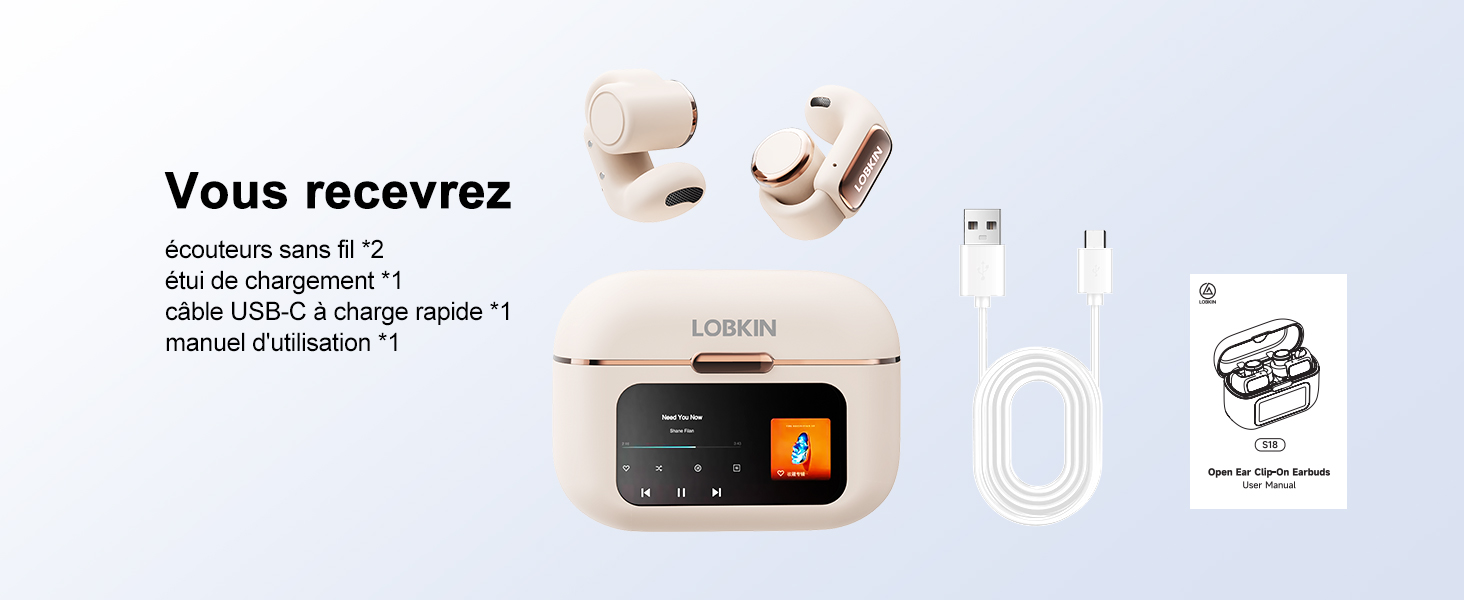
Image: Contents of the LOBKIN S18 package, showing two earbuds, the charging case, a USB-C charging cable, and the user manual.
3. ఉత్పత్తి ముగిసిందిview
3.1 ముఖ్య లక్షణాలు
- Open Ear Clip Design: Ensures awareness of surroundings and comfortable wear.
- స్మార్ట్ LED టచ్ స్క్రీన్: High-sensitivity display on the charging case for intuitive control.
- బ్లూటూత్ 5.4 టెక్నాలజీ: Provides stable, low-latency, and energy-efficient wireless connectivity.
- 4GB Integrated Memory: Allows storage of over 1000 songs for standalone MP3 playback.
- సుదీర్ఘ బ్యాటరీ జీవితం: Up to 8 hours of playtime per charge, with a total of 36 hours using the charging case.
- ENC శబ్ద తగ్గింపు: నేపథ్య శబ్దాన్ని తగ్గించడం ద్వారా కాల్ స్పష్టతను పెంచుతుంది.
- IPX4 నీటి నిరోధకత: Protects against splashes and sweat, suitable for fitness activities.
3.2 భాగాలు
The LOBKIN S18 earbuds feature a lightweight, ergonomic design made from skin-friendly silicone. The charging case includes a smart LED touch screen for easy access to various functions.

చిత్రం: ఒక ఓవర్view of the LOBKIN S18 Open Ear Clip Earbuds and their charging case, highlighting key features such as touch controls, water resistance, noise reduction, Bluetooth 5.4, open design, and extended battery life.
4. సెటప్
4.1 ఇయర్బడ్లు మరియు కేస్ను ఛార్జ్ చేయడం
మొదటిసారి ఉపయోగించే ముందు, ఇయర్బడ్లు మరియు ఛార్జింగ్ కేసును పూర్తిగా ఛార్జ్ చేయండి.
- ఛార్జింగ్ కేస్లో ఇయర్బడ్లను ఉంచండి.
- USB-C ఛార్జింగ్ కేబుల్ను కేస్లోని ఛార్జింగ్ పోర్ట్కు మరియు పవర్ సోర్స్కి కనెక్ట్ చేయండి.
- The LED screen on the case will indicate the charging status.
పూర్తిగా ఛార్జ్ చేయడానికి సుమారు 1.5 గంటలు పడుతుంది.

Image: The LOBKIN S18 earbuds in their charging case, illustrating the battery life and charging times.
4.2 బ్లూటూత్ జత చేయడం
- ఇయర్బడ్లు ఛార్జింగ్ కేసులో ఉన్నాయని మరియు కేస్ మూత తెరిచి ఉందని నిర్ధారించుకోండి.
- On your mobile device, enable Bluetooth.
- కోసం వెతకండి available devices and select "LO-S18" to pair.
- జత చేసిన తర్వాత, ఇయర్బడ్లు ఉపయోగించడానికి సిద్ధంగా ఉంటాయి.
Video: A demonstration of unboxing the LOBKIN S18 earbuds, wearing them, and pairing them via Bluetooth to a smartphone. The video also shows interaction with the smart LED touch screen on the charging case.
5. ధరించే సూచనలు
The LOBKIN S18 earbuds feature an open clip design for a secure and comfortable fit without entering the ear canal.
- ఎడమ (L) మరియు కుడి (R) ఇయర్బడ్లను గుర్తించండి.
- Place the front part of the earbud into your ear.
- Adjust the clip so the rear part sits comfortably behind your ear, ensuring a snug fit.

Image: A visual comparison of the LOBKIN S18's open clip ear design with traditional in-ear earbuds, highlighting the ergonomic and comfortable fit.
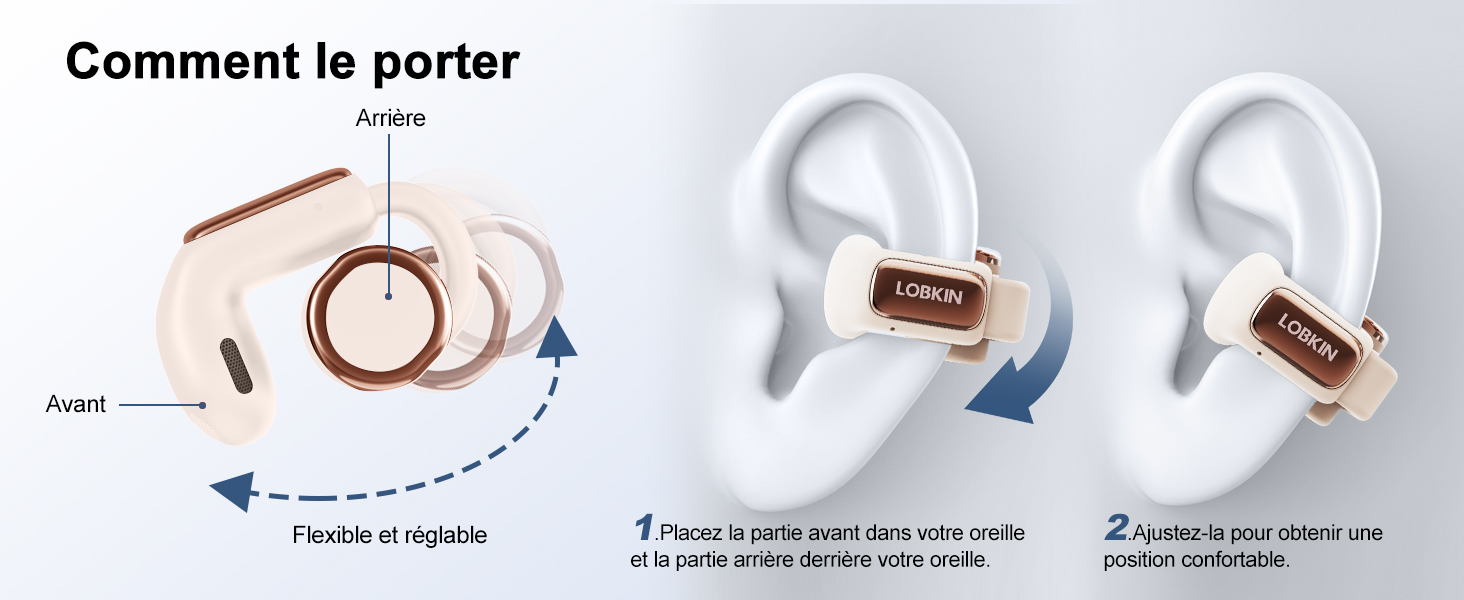
Image: Step-by-step guide on how to correctly position the LOBKIN S18 earbuds on the ear, demonstrating the flexible and adjustable clip.
6. ఆపరేటింగ్ సూచనలు
6.1 Smart LED Touch Screen Functions
The charging case features a smart LED touch screen that provides access to various settings and controls.

Image: The LOBKIN S18 charging case's smart LED touch screen, showing various available functions and settings.
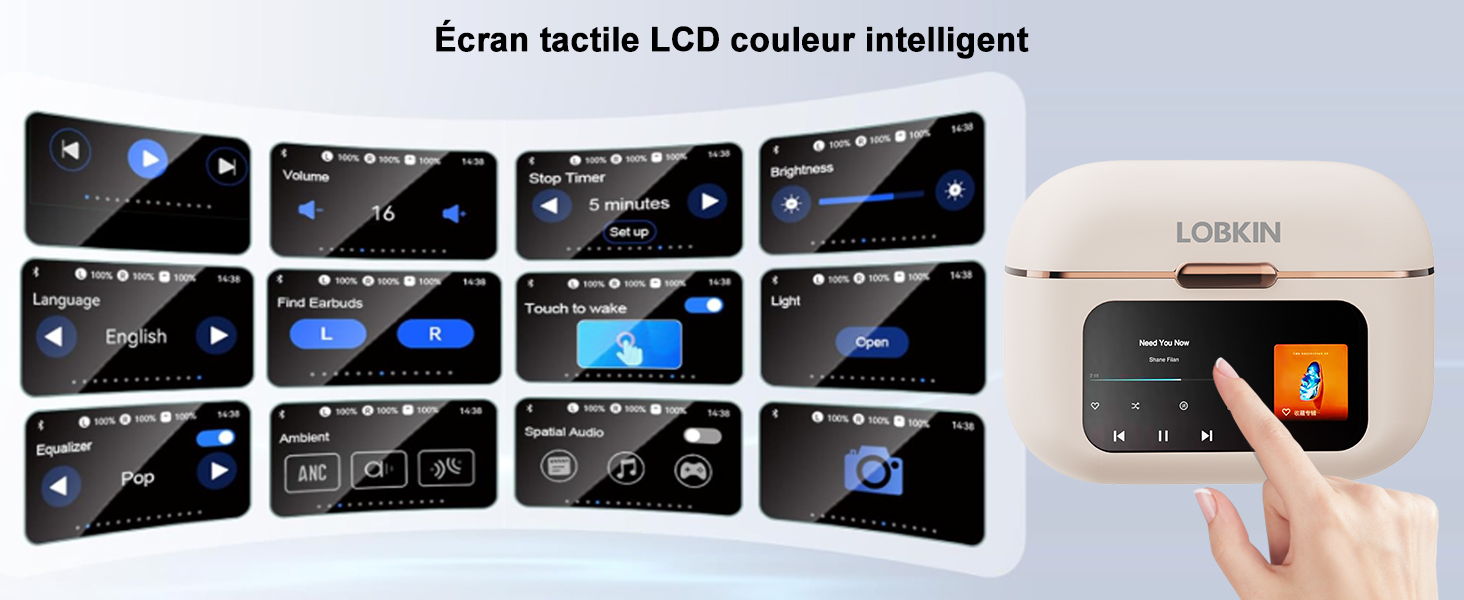
Image: A user interacting with the smart color LCD touch screen on the LOBKIN S18 charging case, showcasing its multi-functional interface.
6.2 ఇయర్బడ్ టచ్ కంట్రోల్స్
The earbuds themselves have touch-sensitive areas for controlling playback and calls.
| చర్య | నియంత్రణ |
|---|---|
| కాల్కు సమాధానం ఇవ్వండి/హ్యాంగ్ అప్ చేయండి | సింగిల్ ట్యాప్ L/R |
| ప్లే/పాజ్ చేయండి | సింగిల్ ట్యాప్ L/R |
| కాల్ని తిరస్కరించండి | Tap and hold L/R for 2 seconds |
| వాల్యూమ్ డౌన్ | ఎల్ని రెండుసార్లు నొక్కండి |
| వాల్యూమ్ అప్ | R రెండుసార్లు నొక్కండి |
| మునుపటి పాట | Triple tap L |
| తదుపరి పాట | Triple tap R |
| వాయిస్ అసిస్టెంట్ని యాక్టివేట్ చేయండి | Tap and hold L for 2 seconds |
| గేమ్ మోడ్ని యాక్టివేట్/డియాక్టివేట్ చేయండి | R రెండుసార్లు నొక్కండి |
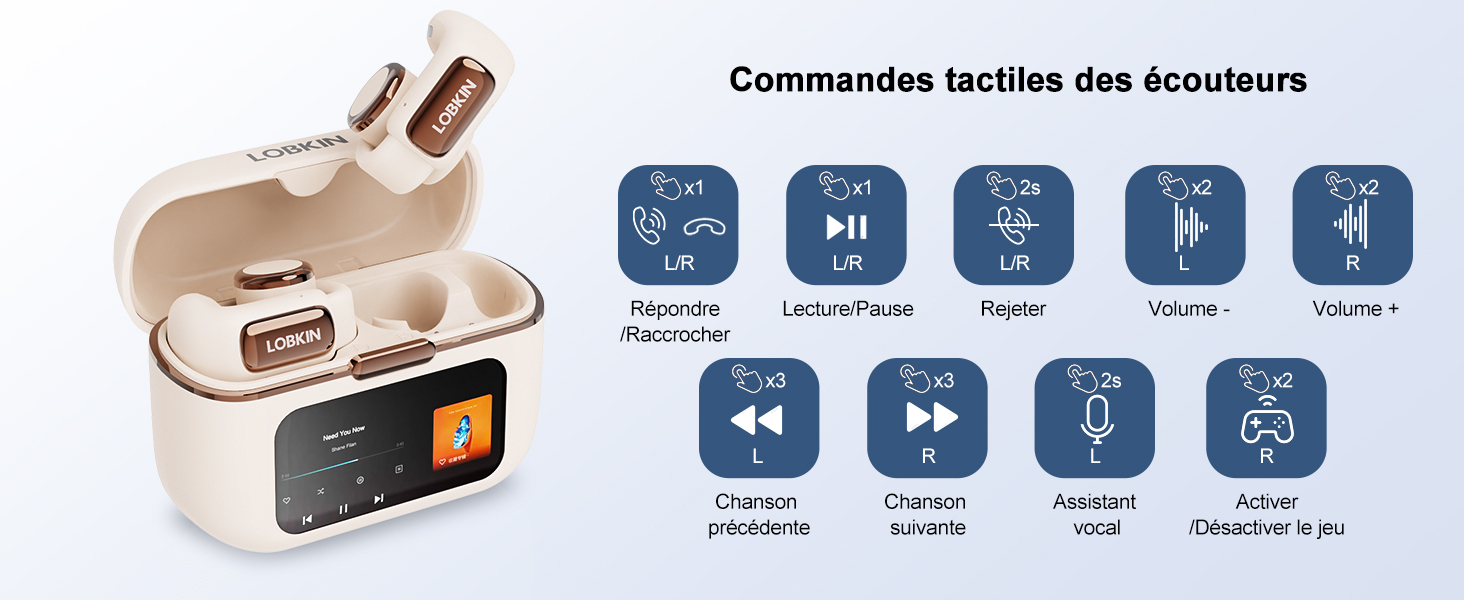
Image: A visual guide to the touch controls on the LOBKIN S18 earbuds, detailing various gestures and their corresponding functions.
6.3 4GB Integrated Memory (MP3 Mode)
The charging case has 4GB of built-in memory, allowing you to store and play music directly from the earbuds without needing a connected phone.
- To transfer music, connect the charging case to a computer using the USB-C cable. The case will appear as a removable drive.
- Drag and drop your desired MP3 fileపరికరంలోని నియమించబడిన ఫోల్డర్లోకి లు.
- On the LED screen, navigate to the music playback interface. There will be an icon to switch to local playback mode.
- In local playback mode, only songs stored in the earbud's memory can be played, and Bluetooth will automatically disconnect.
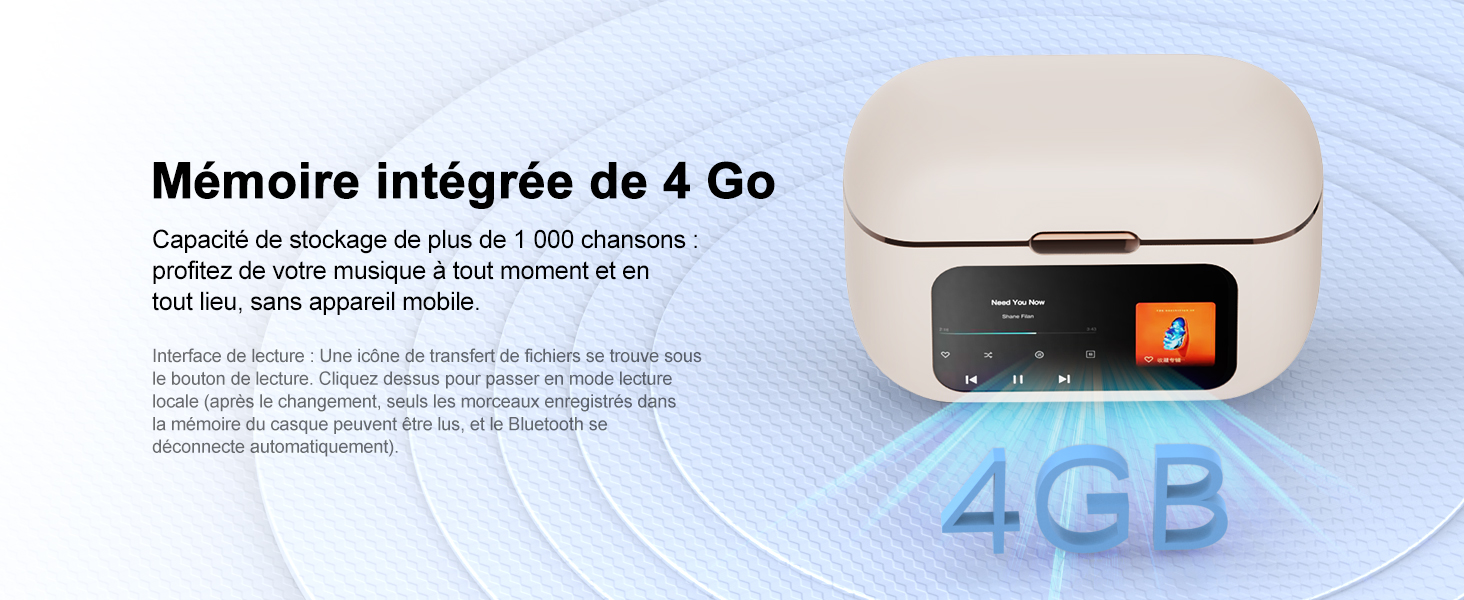
Image: The LOBKIN S18 charging case, illustrating its 4GB integrated memory for storing music.
6.4 Find Missing Earbuds Function
If you misplace an earbud, use the 'Find Earbuds' function on the charging case's LED screen.
- On the LED screen, find the 'Find Earbuds' interface.
- Tap the icon for the missing earbud (L or R).
- Tap 'Start', and the corresponding earbud will emit a 'beep' sound.
- Tap 'Stop' to end the search.
Note: The earbuds must be connected to the charging case and within connection range for this function to work.
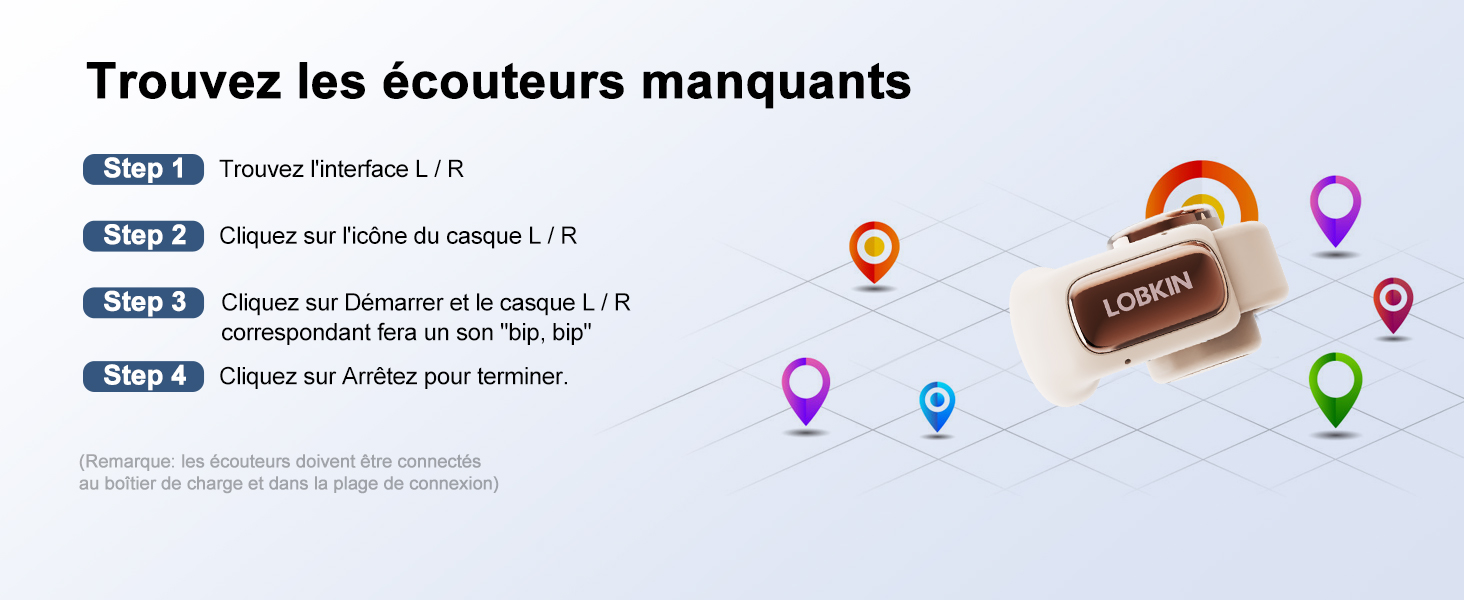
Image: Instructions for using the 'Find Missing Earbuds' feature, showing the interface on the charging case and how to activate the sound.
6.5 Bluetooth Camera Function
The earbuds can be used to remotely trigger your phone's camera.
- Ensure the earbuds are correctly connected to your phone via Bluetooth.
- మీ ఫోన్ కెమెరా అప్లికేషన్ను తెరవండి.
- Tap the camera icon on the earbud's touch control to synchronize with your phone's camera interface and take a photo.
Note: The phone must be within Bluetooth connection range.
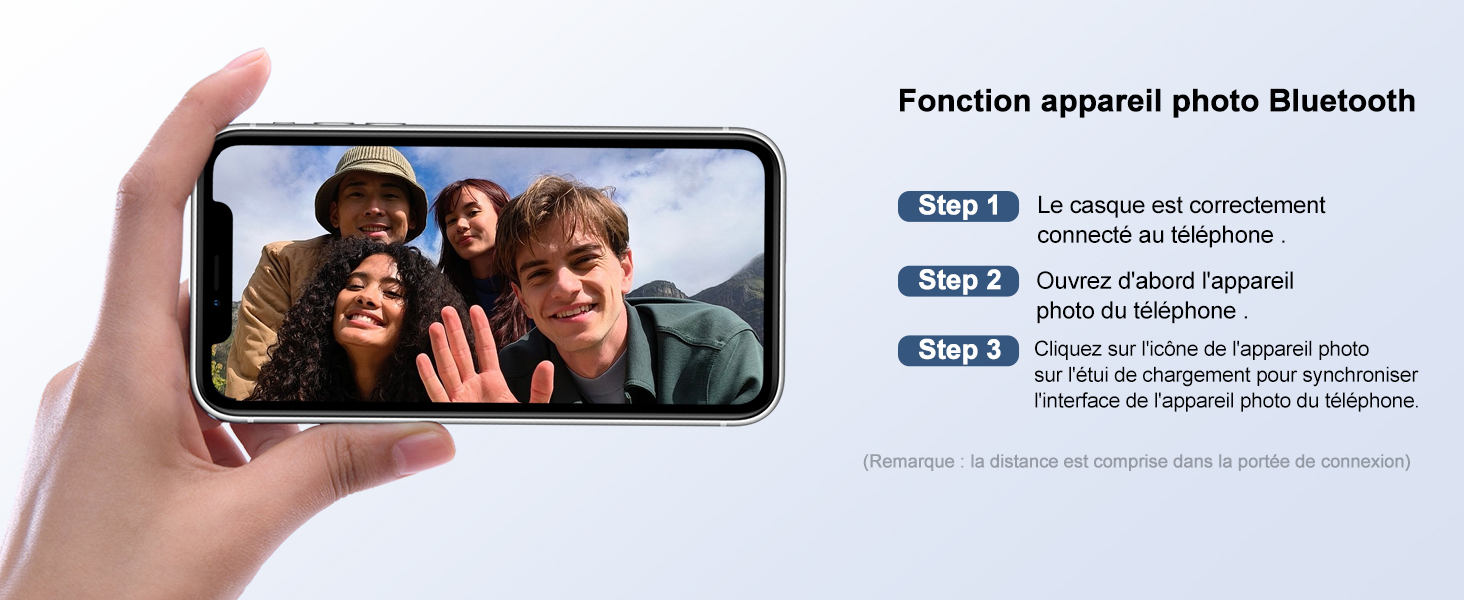
Image: A user demonstrating the Bluetooth camera function, showing a smartphone with the camera app open, ready to be triggered by the earbuds.
7. నిర్వహణ
To ensure the longevity and optimal performance of your LOBKIN S18 earbuds, follow these maintenance guidelines:
- శుభ్రపరచడం: ఇయర్బడ్లు మరియు ఛార్జింగ్ కేసును మృదువైన, పొడి, మెత్తటి బట్టతో క్రమం తప్పకుండా తుడవండి. కఠినమైన రసాయనాలు లేదా రాపిడి పదార్థాలను ఉపయోగించకుండా ఉండండి.
- నిల్వ: ఉపయోగంలో లేనప్పుడు, ఇయర్బడ్లను దుమ్ము మరియు దెబ్బతినకుండా రక్షించడానికి వాటి ఛార్జింగ్ కేసులో నిల్వ చేయండి. చల్లని, పొడి ప్రదేశంలో నిల్వ చేయండి.
- నీటి బహిర్గతం: ఇయర్బడ్లు IPX4 నీటి-నిరోధకతను కలిగి ఉన్నప్పటికీ, నీటిలో ఎక్కువసేపు ఉండటం లేదా నీటిలో మునిగిపోకుండా ఉండండి. అవి తడిస్తే వాటిని పూర్తిగా ఆరబెట్టండి.
- ఛార్జింగ్: Use only the provided USB-C cable for charging. Avoid overcharging or using damaged cables.
8. ట్రబుల్షూటింగ్
| సమస్య | సాధ్యమైన పరిష్కారం |
|---|---|
| ఇయర్బడ్లు జత చేయడం లేదు | Ensure Bluetooth is enabled on your device. Place earbuds in case, open lid, and re-search for "LO-S18". Ensure earbuds are charged. |
| శబ్దం లేదు | Check volume levels on both earbuds and connected device. Ensure earbuds are paired and connected. Try restarting the connected device. |
| పేలవమైన ధ్వని నాణ్యత | Ensure earbuds are clean and properly seated on your ears. Move closer to the connected device to avoid interference. |
| ఛార్జింగ్ కేసు ఛార్జింగ్ కాదు | Check the USB-C cable and power adapter. Ensure connections are secure. Try a different cable or power source. |
| టచ్ నియంత్రణలు స్పందించడం లేదు | Ensure your fingers are clean and dry. Try restarting the earbuds by placing them in the case and closing the lid for a few seconds. |
9. స్పెసిఫికేషన్లు
| ఫీచర్ | వివరాలు |
|---|---|
| మోడల్ సంఖ్య | S18 |
| కనెక్టివిటీ టెక్నాలజీ | వైర్లెస్ (బ్లూటూత్ 5.4) |
| Integrated Memory | 4GB |
| ఇయర్బడ్ ప్లేటైమ్ | 8 గంటల వరకు |
| మొత్తం ప్లేటైమ్ (కేస్తో సహా) | 36 గంటల వరకు |
| ఛార్జింగ్ సమయం | సుమారు 1.5 గంటలు |
| నీటి నిరోధకత | IPX4 |
| మైక్రోఫోన్ | Built-in with ENC Noise Reduction |
| నియంత్రణ రకం | టచ్ |
| మెటీరియల్ | యాక్రిలోనిట్రైల్ బుటాడిన్ స్టైరీన్ (ABS) |
| అనుకూల పరికరాలు | Phones, tablets, desktops, car audio systems |
| బ్యాటరీ కూర్పు | లిథియం-పాలిమర్ |
10. భద్రతా సమాచారం
- ఉత్పత్తిని విడదీయవద్దు లేదా సవరించవద్దు.
- తీవ్రమైన ఉష్ణోగ్రతలు, ప్రత్యక్ష సూర్యకాంతి మరియు బహిరంగ మంటల నుండి దూరంగా ఉంచండి.
- ఉత్పత్తిని వదలడం లేదా బలమైన ప్రభావాలకు గురిచేయడం మానుకోండి.
- పిల్లలు మరియు పెంపుడు జంతువులకు దూరంగా ఉంచండి.
- వినికిడి దెబ్బతినకుండా ఉండటానికి ఇయర్బడ్లను ఎక్కువసేపు అధిక వాల్యూమ్లలో ఉపయోగించవద్దు.
- Be aware of your surroundings when using open-ear earbuds, especially in traffic or hazardous environments.
11. వారంటీ మరియు మద్దతు
LOBKIN products come with a standard manufacturer's warranty. For detailed warranty information, product support, or to report any issues, please refer to the contact information provided on the product packaging or visit the official LOBKIN webసైట్.


