1. పరిచయం
Thank you for choosing the Ameta S50 Lite GPS Drone. This manual provides essential information for the safe operation, maintenance, and troubleshooting of your drone. Please read this manual thoroughly before operating the drone to ensure proper use and to prevent damage or injury.
భద్రతా మార్గదర్శకాలు
- డ్రోన్ను ఎల్లప్పుడూ బహిరంగ ప్రదేశాలలో, వ్యక్తులు, భవనాలు మరియు అడ్డంకులకు దూరంగా ఆపరేట్ చేయండి.
- ఆపరేషన్ సమయంలో డ్రోన్ నుండి సురక్షితమైన దూరం పాటించండి.
- బలమైన గాలులు, వర్షం లేదా ఇతర ప్రతికూల వాతావరణ పరిస్థితుల్లో ఎగరవద్దు.
- Ensure batteries are fully charged and propellers are securely attached before each flight.
- డ్రోన్ ఆపరేషన్కు సంబంధించి అన్ని స్థానిక చట్టాలు మరియు నిబంధనలకు కట్టుబడి ఉండండి.
2. ప్యాకేజీ విషయాలు
మీ ప్యాకేజీలో అన్ని అంశాలు ఉన్నాయని ధృవీకరించండి:
- Ameta S50 Lite GPS Drone
- రిమోట్ కంట్రోలర్
- Intelligent Flight Batteries (3 included for extended flight time)
- విడి ప్రొపెల్లర్లు
- USB ఛార్జింగ్ కేబుల్
- క్యారీయింగ్ బ్యాగ్
- వినియోగదారు మాన్యువల్ (ఈ పత్రం)

Image: Complete package contents of the Ameta S50 Lite GPS Drone, including the drone, remote controller, batteries, spare propellers, USB cable, and carrying bag.
3. సెటప్
3.1 బ్యాటరీ ఛార్జింగ్ మరియు ఇన్స్టాలేషన్
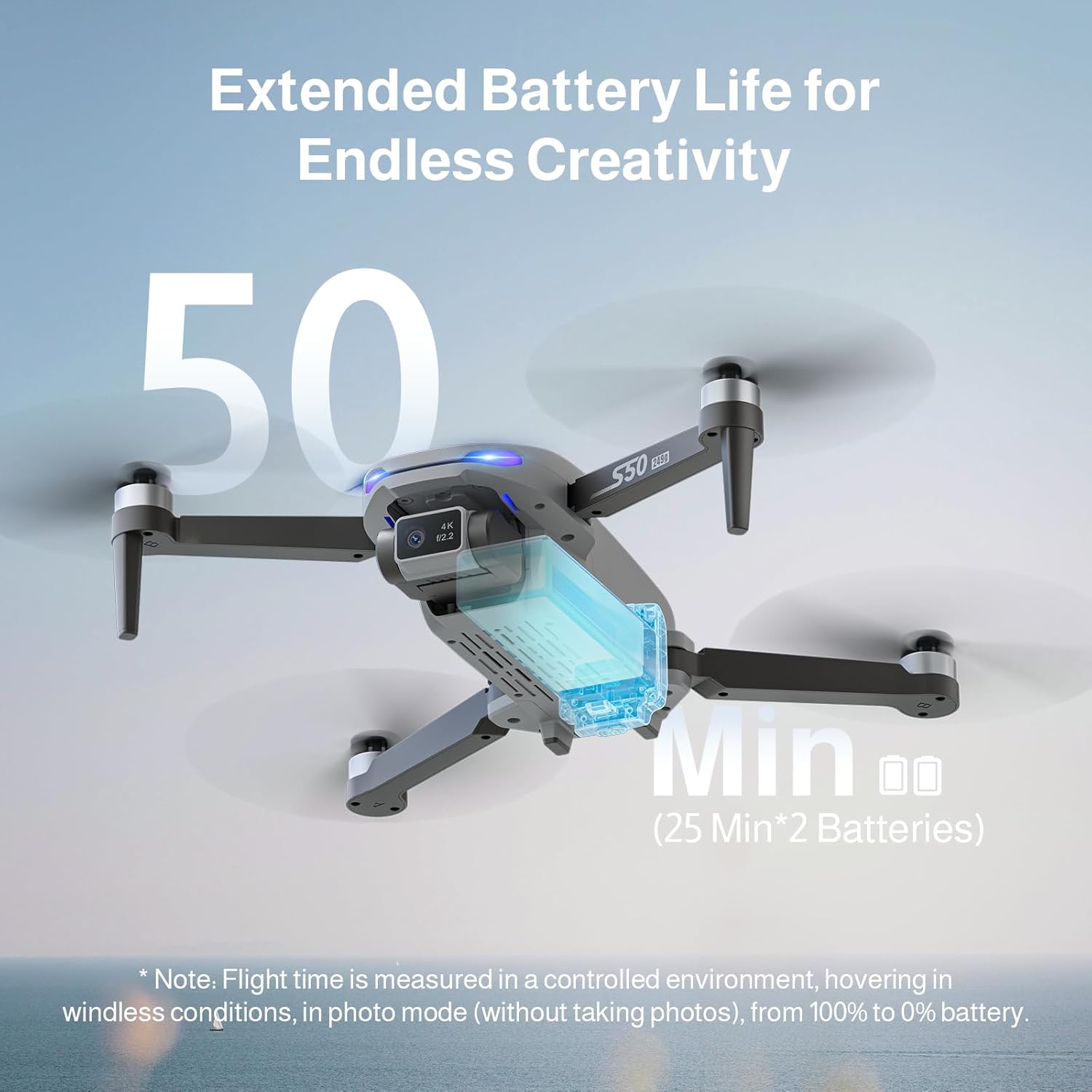
The Ameta S50 Lite drone is equipped with high-capacity 2000mAh batteries, providing up to 25 minutes of flight time per battery. Ensure all batteries are fully charged before flight.
- Connect the intelligent flight battery to the USB charging cable.
- USB ఛార్జింగ్ కేబుల్ను తగిన USB పవర్ అడాప్టర్లోకి ప్లగ్ చేయండి (చేర్చబడలేదు).
- The battery indicator lights will show charging status. Once fully charged, disconnect the battery.
- To install, slide the charged battery into the battery compartment on the rear of the drone until it clicks securely into place.

Image: Specifications of the Ameta S50 Lite drone battery, detailing its nominal voltage of 7.4V and rated capacity of 2000mAh.

Image: Illustration showing the proper method for inserting the high-performance battery into the Ameta S50 Lite drone's battery compartment.

Image: The Ameta S50 Lite drone with a battery partially inserted, demonstrating how the battery provides an additional 25 minutes of flight time.
3.2 Propeller Attachment
Ensure propellers are correctly attached to their respective motor shafts. Match the propeller type (A or B) with the corresponding motor arm.
3.3 రిమోట్ కంట్రోలర్ తయారీ
Install batteries into the remote controller (if applicable) and ensure it is fully charged. Familiarize yourself with the control sticks and buttons.
3.4 యాప్ డౌన్లోడ్ మరియు కనెక్షన్
Download the official Ameta drone application from your device's app store. Power on the drone and remote controller, then connect your smartphone to the drone's 5G WiFi network as displayed in your phone's Wi-Fi settings. Open the app to establish connection and view the FPV feed.
4. ఆపరేటింగ్ సూచనలు
4.1 ప్రీ-ఫ్లైట్ చెక్లిస్ట్
- Check battery levels of both drone and remote controller.
- Ensure propellers are securely attached and undamaged.
- Select an open, clear flying area.
- Calibrate the drone's compass and gyroscope as per app instructions.
4.2 ప్రాథమిక విమాన నియంత్రణలు
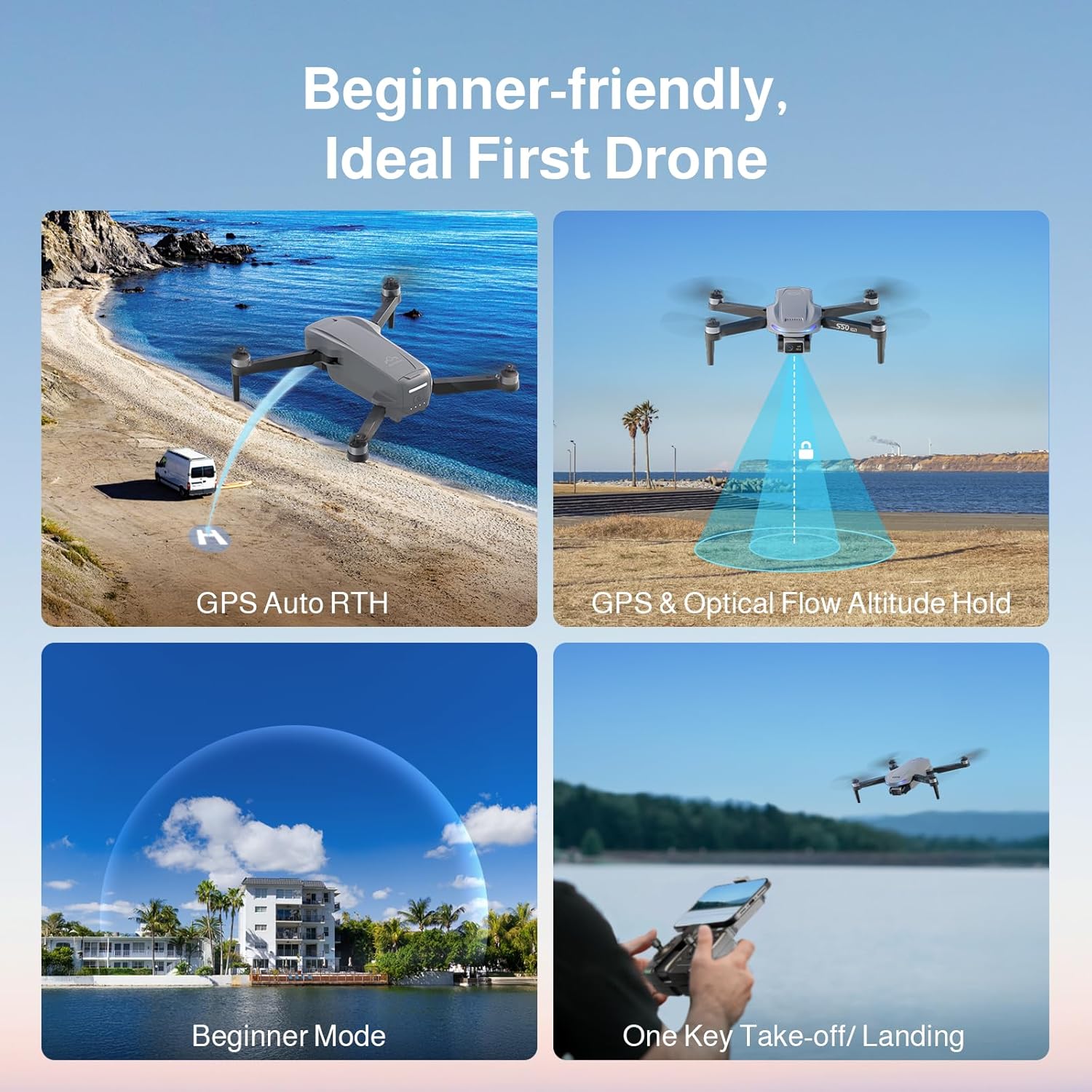
The Ameta S50 Lite features one-key take-off/landing and GPS/Optical Flow Altitude Hold for stable flight, making it suitable for all skill levels.
- వన్-కీ టేకాఫ్/ల్యాండింగ్: Press the designated button on the remote or in the app to automatically take off or land.
- ఎత్తు హోల్డ్: The drone will automatically maintain its altitude, allowing for easier control of horizontal movement.
- సర్దుబాటు స్పీడ్ స్థాయిలు: Switch between three speed modes (low, medium, high) to match your flying environment and skill level.
- బిగినర్స్ మోడ్: Activates restricted flight parameters for new pilots, enhancing safety and ease of control.

Image: Visual representation of the Ameta S50 Lite's beginner-friendly features, including GPS Auto Return to Home, GPS & Optical Flow Altitude Hold, Beginner Mode, and One-Key Take-off/Landing.
4.3 ఇంటెలిజెంట్ ఫ్లైట్ మోడ్లు
Leverage the drone's GPS positioning system and smart modes for advanced flight capabilities and cinematic shots.
- ఇంటికి తిరిగి వెళ్ళు (RTH): The drone can automatically return to its take-off point. This includes One-Key RTH, Low Battery RTH, and Lost Signal RTH.
- GPS Follow (Follow Me): The drone will automatically follow the remote controller or connected smartphone, capturing dynamic footage.
- Waypoints Flight: Plan a custom flight path by setting multiple waypoints on the map in the app, and the drone will fly along the designated route.
- సర్కిల్ ఫ్లై: The drone will orbit a designated point or object, maintaining a set radius and altitude.
- రాకెట్: The drone ascends vertically while recording, creating a dramatic reveal shot.
- దూరంగా: The drone flies away from the pilot while ascending, capturing a wide landscape shot.
- పనోరమా: Captures multiple images to stitch together a wide panoramic photo.
- సమయం ముగిసిపోయింది: టైమ్-లాప్స్ వీడియోను సృష్టించడానికి కాలక్రమేణా ఫోటోల శ్రేణిని రికార్డ్ చేస్తుంది.
- సంజ్ఞ సెల్ఫీ: Perform specific hand gestures to trigger photo or video recording.
చిత్రం: పైగాview of the Ameta S50 Lite drone's reliable GPS features, including Return to Home, Waypoints Flight, Circle Fly, and GPS Follow.
4.4 కెమెరా ఆపరేషన్
The Ameta S50 Lite is equipped with a 4K camera featuring a 13MP Sony IMX258 Sensor and a 90° adjustable lens, capable of capturing high-quality photos and videos.
- ఫోటో/వీడియో క్యాప్చర్: Use the dedicated buttons on the remote controller or within the app to take photos or start/stop video recording.
- సర్దుబాటు చేయగల లెన్స్: Adjust the camera angle remotely via the app or remote controller to capture different perspectives.
- FPV ట్రాన్స్మిషన్: Enjoy smooth, real-time first-person view (FPV) via 5G WiFi transmission with a range of up to 500m.

Image: The Ameta S50 Lite drone in flight, highlighting its hands-free 4K camera with a built-in 13MP IMX258 Sensor for high-resolution recording.
చిత్రం: వివరణాత్మకం view of the Ameta S50 Lite drone's camera, emphasizing its 4K resolution (3840x2160), 5G WiFi transmission up to 500m, and 90° adjustable camera lens.
5. నిర్వహణ
Regular maintenance ensures the longevity and optimal performance of your Ameta S50 Lite drone.
- బ్యాటరీ సంరక్షణ: Store batteries in a cool, dry place. Do not overcharge or over-discharge. If storing for extended periods, charge to approximately 50-60%.
- ప్రొపెల్లర్ తనిఖీ: Regularly check propellers for cracks, bends, or damage. Replace any damaged propellers immediately.
- శుభ్రపరచడం: డ్రోన్ బాడీ మరియు కెమెరా లెన్స్ శుభ్రం చేయడానికి మృదువైన, పొడి వస్త్రాన్ని ఉపయోగించండి. కఠినమైన రసాయనాలు లేదా ద్రవాలను ఉపయోగించకుండా ఉండండి.
- నిల్వ: When not in use, store the drone and its accessories in the provided carrying bag in a dry, cool environment.
6. ట్రబుల్షూటింగ్
| సమస్య | సాధ్యమైన కారణం | పరిష్కారం |
|---|---|---|
| డ్రోన్ పవర్ ఆన్ అవ్వదు | బ్యాటరీ తక్కువగా ఉంది; బ్యాటరీ సరిగ్గా ఇన్స్టాల్ చేయబడలేదు. | Charge battery fully; Reinstall battery securely |
| No FPV feed in app | WiFi not connected; App not launched correctly | Ensure phone is connected to drone's 5G WiFi; Restart app and drone |
| అస్థిర విమాన ప్రయాణం/డ్రిఫ్టింగ్ | Improper calibration; Strong winds; Damaged propellers | Perform compass and gyroscope calibration; Fly in calm conditions; Replace damaged propellers |
| GPS signal weak/lost | Flying indoors or near tall structures; Interference | Fly in open outdoor areas; Avoid areas with high electromagnetic interference |
7. స్పెసిఫికేషన్లు
| ఫీచర్ | వివరాలు |
|---|---|
| బ్రాండ్ | అమేటా |
| మోడల్ | S50 లైట్ |
| కెమెరా | 4K Video, 13MP Photos, Sony IMX258 Sensor, 90° Adjustable Lens |
| విమాన సమయం | Up to 25 minutes per battery (75 minutes with 3 batteries) |
| బ్యాటరీ కెపాసిటీ | 2000mAh, 7.4V |
| ఒకరి నుండి ఒకరికి వ్యాధి ప్రబలడం | 5G WiFi FPV, up to 500m range |
| స్థాన వ్యవస్థ | GPS, Optical Flow |
| ASIN | B0FJXNLS69 |
8. వారంటీ మరియు మద్దతు
వారంటీ సమాచారం: Please refer to the product packaging or the official Ameta webవివరణాత్మక వారంటీ నిబంధనలు మరియు షరతుల కోసం సైట్ను చూడండి. వారంటీ క్లెయిమ్ల కోసం మీ కొనుగోలు రుజువును ఉంచండి.
కస్టమర్ మద్దతు: For technical assistance, troubleshooting, or any inquiries regarding your Ameta S50 Lite drone, please contact Ameta customer service through the contact information provided on the official webసైట్ లేదా ఉత్పత్తి ప్యాకేజింగ్.


