పరిచయం
This manual provides comprehensive instructions for the assembly, operation, maintenance, and troubleshooting of your Gazzyt Foldable Racing Simulator Cockpit. Please read this manual thoroughly before use to ensure proper setup and safe operation.
భద్రతా సమాచారం
- ప్రతి ఉపయోగం ముందు అన్ని బోల్ట్లు మరియు ఫాస్టెనర్లు సురక్షితంగా బిగించబడ్డాయని నిర్ధారించుకోండి.
- గరిష్ట బరువు సామర్థ్యం 300 పౌండ్లు (136 కిలోలు) మించకూడదు.
- Keep hands and fingers clear of moving parts during adjustment and folding.
- Place the cockpit on a stable, level surface to prevent tipping.
- పిల్లలను ఉపయోగించే సమయంలో పర్యవేక్షించండి.
- Regularly inspect the frame and components for any signs of wear or damage. Discontinue use if damage is found.
ప్యాకేజీ విషయాలు
Verify that all components are present before beginning assembly. If any parts are missing or damaged, contact Gazzyt customer support.
- Main Cockpit Frame (Foldable)
- Racing Seat with Headrest
- స్టీరింగ్ వీల్ మౌంట్
- Pedal Plate Assembly
- Shifter Mount Platform
- Hardware Kit (various bolts, nuts, washers, and adjustment handles)
- Assembly Tools (typically Allen wrenches)
అసెంబ్లీ సూచనలు
Follow these steps carefully to assemble your racing simulator cockpit. It is recommended to have a clear, open space for assembly.
Step 1: Prepare the Base Frame
Unfold the main frame components. Ensure the base is stable on the floor.

Image: The main frame of the racing simulator cockpit in its unfolded state, ready for component attachment.
Video: Detailed assembly process for the Gazzyt Racing Cockpit, demonstrating how to connect the main frame components.
Step 2: Attach the Pedal Plate
Secure the pedal plate assembly to the front section of the cockpit frame using the provided bolts and nuts. Ensure it is firmly attached.

Image: The racing cockpit with the pedal plate assembly securely mounted to the front section.
Step 3: Install the Steering Wheel Mount
Attach the steering wheel mount to the central frame. This mount allows for angle and height adjustments.
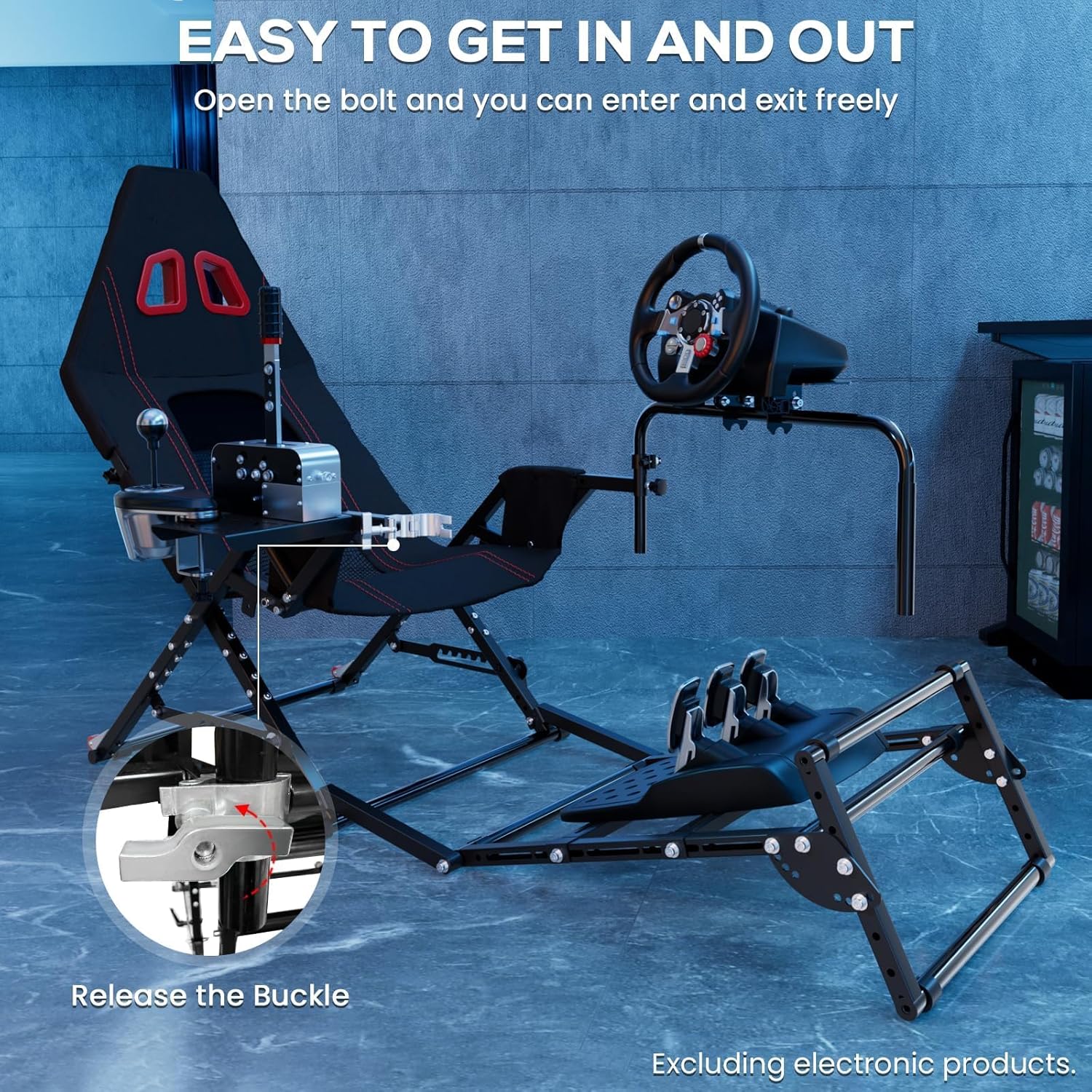
Image: The racing cockpit showing the steering wheel mount installed, highlighting its adjustable features.
Step 4: Mount the Shifter Platform
The shifter platform can be installed on either the left or right side of the cockpit, according to user preference. Secure it with the appropriate hardware.

Image: The racing cockpit with the shifter platform mounted, demonstrating its ambidextrous installation.
Step 5: Secure the Seat
Attach the racing seat to the main frame. The seat features a hybrid design with mesh ventilation and a memory foam headrest for comfort.

Image: The fully assembled racing cockpit, showcasing the seat with its breathable mesh and headrest.
సర్దుబాట్లు మరియు అనుకూలీకరణ
The Gazzyt Racing Simulator Cockpit offers multiple adjustment points to optimize your racing experience for comfort and ergonomics.
- Steering Wheel Height and Angle: The steering wheel mount can be adjusted for height (0-10cm) and angle (±15 degrees) to suit your preferred driving position.
- Pedal Distance and Angle: The pedal plate can be adjusted for distance and tilt angle, accommodating users of various heights (1.4m-1.9m).
- సీట్ రిక్లైన్: The seat's bottom bracket allows for angle adjustment from 45-90 degrees.
- Shifter Platform Position: The shifter platform can be installed on either the left or right side.
Image: An illustration highlighting the various adjustable components of the cockpit, including steering wheel, pedal, and seat angles.
Video: Demonstration of the product's adjustable features, including steering wheel height, pedal position, and seat recline, to fit various user heights.
మడత మరియు నిల్వ
The Gazzyt Racing Simulator Cockpit features a foldable design for convenient storage and portability. It includes rear wheels for easy movement when folded.
Folding Method 1: Compact Fold
To achieve a compact fold, first release the quick-release bolts on the side of the cockpit to allow the steering wheel frame to swing open. Then, close the main support frame and raise the pedal section upwards. This method allows the cockpit to stand upright for storage.
Video: Demonstration of Folding Method 1, showing how to fold the cockpit into a compact, upright position for storage.
Folding Method 2: Disassembly for Minimal Space
For minimal storage space, the pedal section can be detached from the main cockpit. Rotate the handle and pull out the pin to separate the pedal frame. The main cockpit can then be folded as described in Method 1, and the pedal frame stored separately.
Video: Demonstration of Folding Method 2, illustrating how to detach the pedal section and fold the main cockpit for maximum space-saving.

Image: The racing cockpit in its folded state, demonstrating its compact footprint for storage.
అనుకూలత
The Gazzyt Racing Simulator Cockpit is designed for wide compatibility with various popular sim racing equipment. It supports direct-drive motors up to 10Nm.
గమనిక: This cockpit does not support steering wheels that are only held in place with clamps.
అనుకూల పరికరాలు:
- Logitech: G29, G920, G923
- Thrustmaster: T248, T300
- Fanatec: Direct Drive Wheels (≤10Nm)
- Other mainstream sim racing gear that can be bolted onto the mounting plates.

Image: A visual guide detailing the compatibility of the cockpit with various racing wheels, pedals, and shifters from brands like Logitech, Thrustmaster, Fanatec, Moza, and Simagic.
ఆపరేటింగ్ సూచనలు
Once assembled and adjusted, connect your racing wheel, pedals, and shifter to the respective mounts. Ensure all connections are secure. Power on your racing equipment and gaming system, then launch your preferred racing simulation software. Adjust in-game settings as needed for optimal performance and feedback.
To easily enter and exit the cockpit, utilize the quick-release bolts on the steering wheel frame. Turn them counter-clockwise to open, allowing the frame to swing away, then relock them after seating yourself.

Image: A user seated in the Gazzyt Racing Simulator Cockpit, demonstrating the ergonomic setup for an immersive racing experience.
నిర్వహణ
- శుభ్రపరచడం: ప్రకటనతో ఫ్రేమ్ను తుడిచివేయండిamp cloth. For the fabric seat, use a mild soap solution and allow it to air dry. Avoid harsh chemicals.
- ఫాస్టెనర్ తనిఖీ: Periodically check all bolts, nuts, and adjustment mechanisms to ensure they are tight and secure. Tighten as necessary.
- ఫ్రేమ్ తనిఖీ: Inspect the metal frame for any signs of bending, cracks, or corrosion.
- ఫాబ్రిక్ తనిఖీ: Check the seat fabric for tears or excessive wear.
ట్రబుల్షూటింగ్
- Cockpit feels unstable: Ensure all assembly bolts are fully tightened. Verify the cockpit is on a flat, stable surface.
- Difficulty adjusting components: Loosen the adjustment knobs or bolts sufficiently before attempting to reposition. Do not force adjustments.
- మడతపెట్టడంలో ఇబ్బంది: Refer to the "Folding and Storage" section and the provided video demonstrations. Ensure all adjustment points are loosened or released as instructed.
- Equipment not fitting: Double-check the compatibility section. Ensure your racing gear uses a bolt-on mounting system rather than clamps.
స్పెసిఫికేషన్లు
| ఫీచర్ | వివరాలు |
|---|---|
| ఉత్పత్తి కొలతలు (విప్పబడినవి) | 58.39 x 42.52 x 23.82 అంగుళాలు (148cm x 108cm x 60.5cm) |
| వస్తువు బరువు | 46.1 పౌండ్లు (20.9 కిలోలు) |
| Maximum Load-Bearing Capacity | 300 పౌండ్లు (136 కిలోలు) |
| Adjustable Height Range (User) | 1.4m - 1.9m (4'7" - 6'3") |
| స్టీరింగ్ వీల్ సర్దుబాటు | Height 0-10cm, Angle ±15° |
| పెడల్ సర్దుబాటు | Distance and Tilt Angle (up to 60°) |
| Seat Recline Adjustment | 45-90° |
| Direct Drive Wheel Support | Up to 10Nm |
| మెటీరియల్ | Metal frame, fabric seat with mesh ventilation and memory foam headrest |
వారంటీ మరియు మద్దతు
For warranty information, technical support, or to order replacement parts, please contact Gazzyt customer service. Refer to the product packaging or the official Gazzyt webసంప్రదింపు వివరాల కోసం సైట్.


