1. పరిచయం
This manual provides essential instructions for the setup, operation, and maintenance of your Blackview MP60 Mini PC. Please read this guide thoroughly before using the device to ensure optimal performance and longevity. The Blackview MP60 is a compact desktop computer designed for various applications, including home office, business, education, and multimedia entertainment.

చిత్రం: ముందు భాగం view నల్లజాతికి చెందినview MP60 Mini PC, highlighting its compact design and Intel N150 processor branding.
2. పెట్టెలో ఏముంది
ప్యాకేజీలో అన్ని అంశాలు ఉన్నాయని నిర్ధారించుకోండి:
- 1 x Blackview MP60 మినీ PC
- 1 x పవర్ అడాప్టర్
- 1 x HDMI కేబుల్
- 1 x యూజర్ మాన్యువల్ (ఈ పత్రం)
- 1 x VESA mount with screws
3. ఉత్పత్తి ముగిసిందిview
3.1 ముఖ్య లక్షణాలు
- ప్రాసెసర్: Intel N150 (4 Cores, 4 Threads, up to 3.6GHz)
- మెమరీ: 16GB DDR4 RAM (Dual Channel SODIMM DDR4, Max 32GB Expansion Support)
- నిల్వ: 512GB PCIe SSD (Max 2TB expansion via M.2 SSD or 2.5" SATA HDD/SSD)
- ఆపరేటింగ్ సిస్టమ్: Pre-installed Windows 11 Pro
- గ్రాఫిక్స్: Intel UHD Graphics, supporting Dual 4K@60Hz display output
- కనెక్టివిటీ: Wi-Fi 5 (802.11ac), Gigabit Ethernet, Bluetooth 4.2
- పోర్టులు: 2x USB 3.0, 2x USB 2.0, 2x HDMI, 1x RJ45 LAN, 1x DC Jack, 1x 3.5mm Audio Jack
- డిజైన్: Ultra-compact (5" × 5" × 2", 0.86 lbs), VESA mount compatible
- శీతలీకరణ: Efficient cooling system with a whisper-quiet fan (<38dB under demanding tasks)

Image: An infographic detailing the Blackview MP60's core specifications: Intel N150 processor, 16GB DDR4 RAM, 512GB SSD, Windows 11, multi-port design, ultra-compact size, silent operation, and efficient heat dissipation.
3.2 పోర్ట్లు మరియు సూచికలు
Familiarize yourself with the available ports and indicators on your Mini PC:
- ముందు ప్యానెల్: Power button, 2x USB 3.0 ports, 2x USB 2.0 ports, 3.5mm Audio Jack (Headphone/Microphone combo)
- వెనుక ప్యానెల్: DC Power Input, 2x HDMI ports, 1x RJ45 Gigabit Ethernet port
- LED సూచిక: Blue for power-on, Red for sleep mode.

Image: A visual representation of the Blackview MP60's front and rear ports, including USB, HDMI, LAN, DC power, and audio jack.
4. సెటప్ గైడ్
4.1 ప్రారంభ కనెక్షన్
- డిస్ప్లేను కనెక్ట్ చేయండి: Use the provided HDMI cable to connect the Mini PC to your monitor or TV. The MP60 supports dual displays; connect a second monitor if desired.
- పెరిఫెరల్స్ కనెక్ట్ చేయండి: Plug in your USB keyboard and mouse to the available USB ports.
- పవర్ కనెక్ట్ చేయండి: Connect the power adapter to the DC input port on the Mini PC, then plug the adapter into a power outlet.
- నెట్వర్క్ కనెక్షన్ (ఐచ్ఛికం): For a wired internet connection, connect an Ethernet cable to the RJ45 LAN port. For wireless, Wi-Fi will be configured during the initial Windows setup.
4.2 మొదటి బూట్ మరియు విండోస్ సెటప్
- Press the power button on the front of the Mini PC. The LED indicator will turn blue.
- Follow the on-screen instructions to complete the Windows 11 Pro initial setup. This includes selecting your region, keyboard layout, connecting to a Wi-Fi network (if not using Ethernet), and creating a user account.
- Once setup is complete, your Blackview MP60 Mini PC is ready for use.
4.3 VESA మౌంట్ ఇన్స్టాలేషన్ (ఐచ్ఛికం)
The included VESA mount allows you to attach the Mini PC to the back of a compatible monitor or to a wall mount.
- Attach the VESA bracket to the back of your monitor using the provided screws. Ensure the monitor has standard VESA mounting holes.
- Slide the Blackview MP60 Mini PC onto the mounted bracket until it clicks securely into place.

Image: The Blackview MP60 Mini PC demonstrating its small form factor and how it can be discreetly mounted behind a monitor using the VESA bracket.
5. ఆపరేటింగ్ సూచనలు
5.1 పవర్ ఆన్/ఆఫ్ మరియు స్లీప్ మోడ్
- పవర్ ఆన్: Press the power button. The LED will turn blue.
- స్లీప్ మోడ్: Briefly press the power button or select 'Sleep' from the Windows Start menu. The LED will turn red.
- షట్ డౌన్: విండోస్ స్టార్ట్ మెనూ నుండి 'షట్ డౌన్' ఎంచుకోండి.
- Force Shut Down: సిస్టమ్ స్పందించకపోతే, పరికరం పవర్ ఆఫ్ అయ్యే వరకు పవర్ బటన్ను దాదాపు 5-10 సెకన్ల పాటు నొక్కి పట్టుకోండి. దీన్ని చివరి ప్రయత్నంగా మాత్రమే ఉపయోగించండి.
5.2 కనెక్ట్ పెరిఫెరల్స్
Utilize the various ports to connect your devices:
- USB పరికరాలు: Connect external hard drives, USB flash drives, printers, or other USB accessories to the USB 3.0 or USB 2.0 ports.
- ఆడియో పరికరాలు: హెడ్ఫోన్లు లేదా బాహ్య స్పీకర్లను 3.5mm ఆడియో జాక్కి కనెక్ట్ చేయండి.
- బ్లూటూత్ పరికరాలు: Pair Bluetooth-enabled keyboards, mice, headphones, or other devices via Windows Bluetooth settings.
5.3 డ్యూయల్ డిస్ప్లే సెటప్
ది బ్లాక్view MP60 supports two 4K displays simultaneously via its two HDMI ports, enhancing productivity for tasks like financial analysis, creative design, or coding.
- Connect both monitors to the HDMI ports on the Mini PC.
- In Windows, right-click on the desktop and select 'Display settings'.
- Configure your display preferences (e.g., extend desktop, duplicate displays) as needed.

Image: A workstation featuring two 4K monitors connected to the Blackview MP60, illustrating its dual display capability for enhanced multitasking.
5.4 నిల్వ విస్తరణ
ది బ్లాక్view MP60 allows for easy storage expansion:
- The device supports an additional 2.5-inch SATA HDD/SSD (256GB/512GB/up to 2TB).
- To install, carefully remove the bottom cover of the Mini PC.
- Connect the 2.5-inch drive to the SATA connector and secure it in the designated bay.
- దిగువ కవర్ను తిరిగి అటాచ్ చేయండి.

చిత్రం: పేలినది view illustrating the removable storage base and the process of installing an additional 2.5-inch SATA HDD/SSD into the Blackview MP60 Mini PC.
6. నిర్వహణ
6.1 శుభ్రపరచడం
- Regularly clean the exterior of the Mini PC with a soft, dry cloth.
- Use compressed air to gently clear dust from ventilation openings to maintain optimal airflow and cooling efficiency.
- Do not use liquid cleaners or solvents directly on the device.
6.2 సాఫ్ట్వేర్ నవీకరణలు
- Keep your Windows 11 Pro operating system updated to ensure security and performance. Access Windows Update through 'Settings > Windows Update'.
- Regularly update device drivers (e.g., graphics, chipset) from the Blackview మద్దతు website or through Windows Update.
6.3 వేడి వెదజల్లడం
ది బ్లాక్view MP60 features an efficient cooling system. To ensure proper heat dissipation:
- Ensure the Mini PC is placed in a well-ventilated area.
- వెంటిలేషన్ ఓపెనింగ్లను నిరోధించవద్దు.
- Avoid placing the device on soft surfaces that can obstruct airflow.
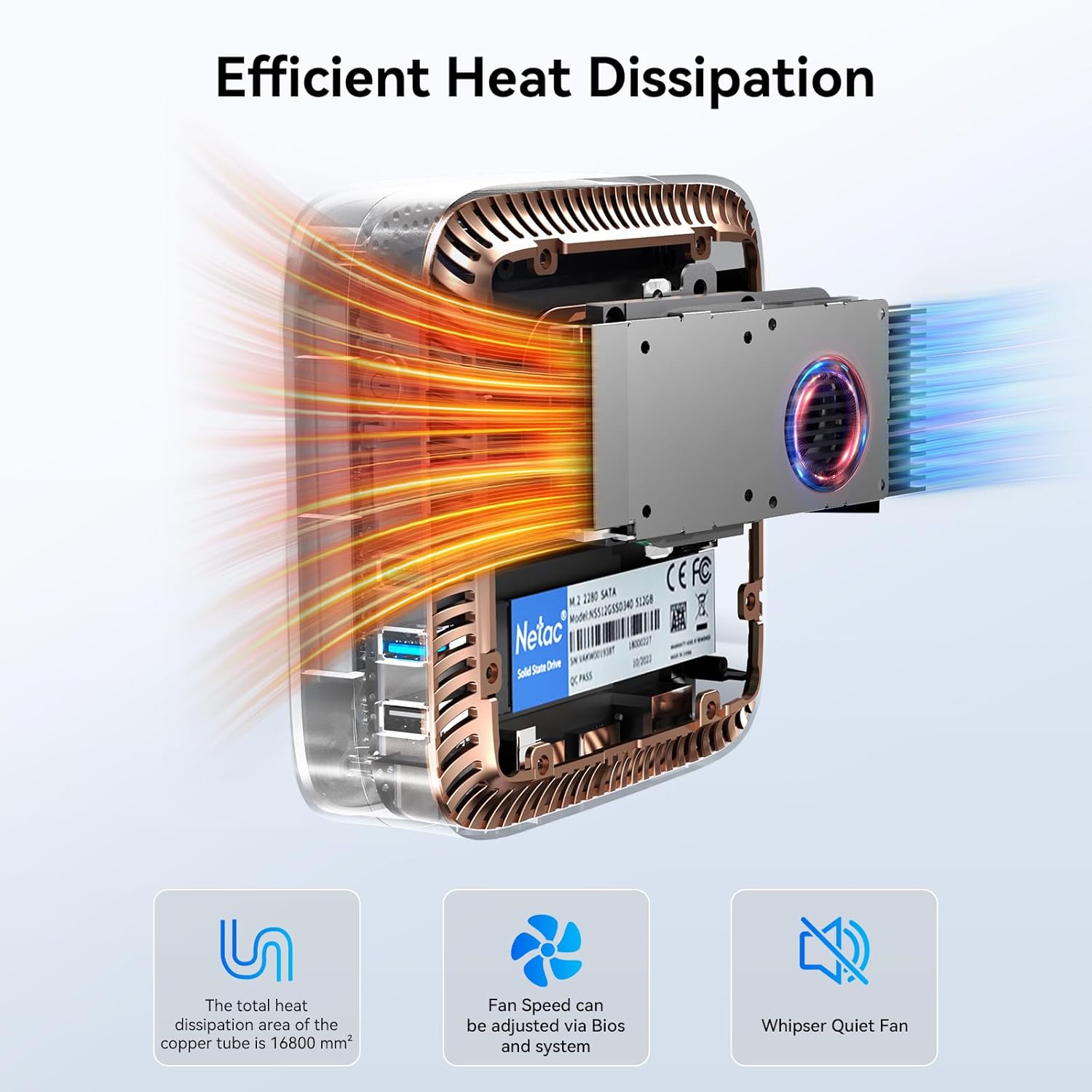
చిత్రం: ఒక అంతర్గత view నల్లజాతికి చెందినview MP60, highlighting its efficient cooling system with a copper tube and fan designed for optimal heat dissipation.
7. ట్రబుల్షూటింగ్
This section addresses common issues you might encounter with your Blackview MP60 Mini PC.
| సమస్య | సాధ్యమైన కారణం | పరిష్కారం |
|---|---|---|
| మానిటర్ పై డిస్ప్లే లేదు | Loose HDMI cable, incorrect input source on monitor, power issue. | Check HDMI cable connections. Ensure monitor is on and set to the correct input. Verify power adapter is securely connected to both the PC and outlet. |
| మినీ PC పవర్ ఆన్ అవ్వదు | పవర్ లేదు, పవర్ అడాప్టర్ తప్పు. | Ensure power adapter is correctly connected and the power outlet is functional. Try a different power outlet. |
| ఆడియో అవుట్పుట్ లేదు | Incorrect audio settings, loose cable, driver issue. | Check audio cable connections. Verify audio output device in Windows Sound settings. Update audio drivers if necessary. |
| Slow Wi-Fi connection | Weak signal, router issues, interference. | Ensure the Mini PC is within range of your Wi-Fi router. Restart your router. Check for other devices causing interference. Consider a wired Ethernet connection for maximum speed. |
| సిస్టమ్ స్తంభించిపోతుంది లేదా క్రాష్ అవుతుంది | Overheating, software conflict, insufficient resources. | Ensure proper ventilation. Close unnecessary applications. Check for Windows updates and driver updates. If persistent, consider a system restore or reinstall. |
8. స్పెసిఫికేషన్లు
Detailed technical specifications for the Blackview MP60 Mini PC:
| ఫీచర్ | వివరాలు |
|---|---|
| ప్రాసెసర్ | Intel N150 (3.6 GHz Celeron) |
| RAM | 16 GB DDR4 SDRAM |
| నిల్వ | 512 GB SSD (Expandable up to 2TB) |
| గ్రాఫిక్స్ కోప్రాసెసర్ | Intel Processor N150 (Integrated) |
| ఆపరేటింగ్ సిస్టమ్ | Windows 11 ప్రో |
| గరిష్ట స్క్రీన్ రిజల్యూషన్ | 4096 x 2160 పిక్సెల్స్ (4K) |
| వైర్లెస్ రకం | వై-ఫై 5 (802.11ac), బ్లూటూత్ 4.2 |
| USB పోర్ట్లు | 2x USB 3.0, 2x USB 2.0 |
| వీడియో అవుట్పుట్ | 2x HDMI |
| LAN | గిగాబిట్ ఈథర్నెట్ |
| వస్తువు బరువు | 2.38 పౌండ్లు (సుమారు 1.08 కిలోలు) |
| ప్యాకేజీ కొలతలు | 9.76 x 7.63 x 2.59 అంగుళాలు |
| రంగు | నలుపు |
9. వారంటీ మరియు మద్దతు
నలుపుview provides comprehensive support for your MP60 Mini PC:
- 3-Year Worry-Free Warranty: Your Blackview MP60 Mini PC is covered by an industry-leading 3-year warranty.
- జీవితకాల సాంకేతిక మద్దతు: Access to dedicated technical support for the lifetime of your product.
- USA Support: Dedicated support services available in the USA.
- అమ్మకాల తర్వాత మద్దతు: For any questions or issues, contact Blackview customer service through your purchase platform's "Account Service" or "Order History." Responses are typically provided within 24 hours.

Image: An infographic detailing Blackview's after-sales support, including 3 years of quality support, 24-hour customer service, and lifetime technical support.


