1. పరిచయం
Thank you for choosing the Mesqool CR1029 Digital Calendar Clock. This device is designed to provide clear and comprehensive time, date, and day information, along with advanced features like multiple alarms, medication reminders, adjustable brightness, and a digital photo frame function. Its large 7-inch display is ideal for users of all ages, especially the elderly or those with visual impairments. This manual will guide you through the setup, operation, and maintenance of your new clock.
2. సెటప్
2.1 పవర్ కనెక్షన్
The Mesqool CR1029 Digital Calendar Clock operates via an AC power adapter and is not battery-powered for its primary function. Please connect the provided AC adapter to the clock and plug it into a standard wall outlet. Ensure the connection is secure.
2.2 బ్యాటరీ బ్యాకప్
The clock features a memory backup function using two AAA batteries (not included). These batteries preserve your time and alarm settings in the event of a power outage. The display will turn off during a power cut, but settings will be retained. Once power is restored, the clock will resume normal operation without requiring re-setup.

Image: The back of the Mesqool CR1029 clock showing the power input and the battery compartment for backup.
3. ఆపరేటింగ్ సూచనలు
3.1 సమయం మరియు తేదీ ప్రదర్శన
The clock displays the time, date, and day of the week clearly on its 7-inch screen. The display is designed for easy readability from a distance. The time format can be switched between 12-hour and 24-hour modes. The clock also supports automatic Daylight Saving Time (DST) adjustment with a single button press on the unit.

Image: The clock displaying time, date, and day, with icons representing different times of the day (dawn, noon, afternoon, evening, night, pre-dawn).
3.2 Alarm Settings and Reminders
The Mesqool CR1029 supports up to 20 basic alarms, configurable for daily, weekdays, weekends, or specific dates. Additionally, it offers 20 personalized reminders for tasks such as medication intake or hydration. When an alarm activates, it displays a colorful icon and text message to clearly convey the reminder. This feature is particularly useful for the elderly to manage medication schedules.

Image: The clock displaying a medication reminder, showing pill icons and text.
3.3 Volume Adjustment and Snooze Function
You can adjust the alarm volume across 9 levels and choose from 18 different ringtones. This allows for a personalized alarm experience, suitable for both light and deep sleepers. The snooze function can be set for intervals of 3, 5, or 9 minutes, providing flexibility for waking up.

Image: The clock illustrating the 9 volume levels and a selection of 18 alarm tones.
3.4 ప్రకాశం సర్దుబాటు
The display brightness can be adjusted in 10 steps, from 5% to 100%. This allows you to customize the display for optimal visibility during the day and a softer glow at night, making it comfortable for bedrooms and sensitive eyes. You can set different brightness levels for day and night periods.
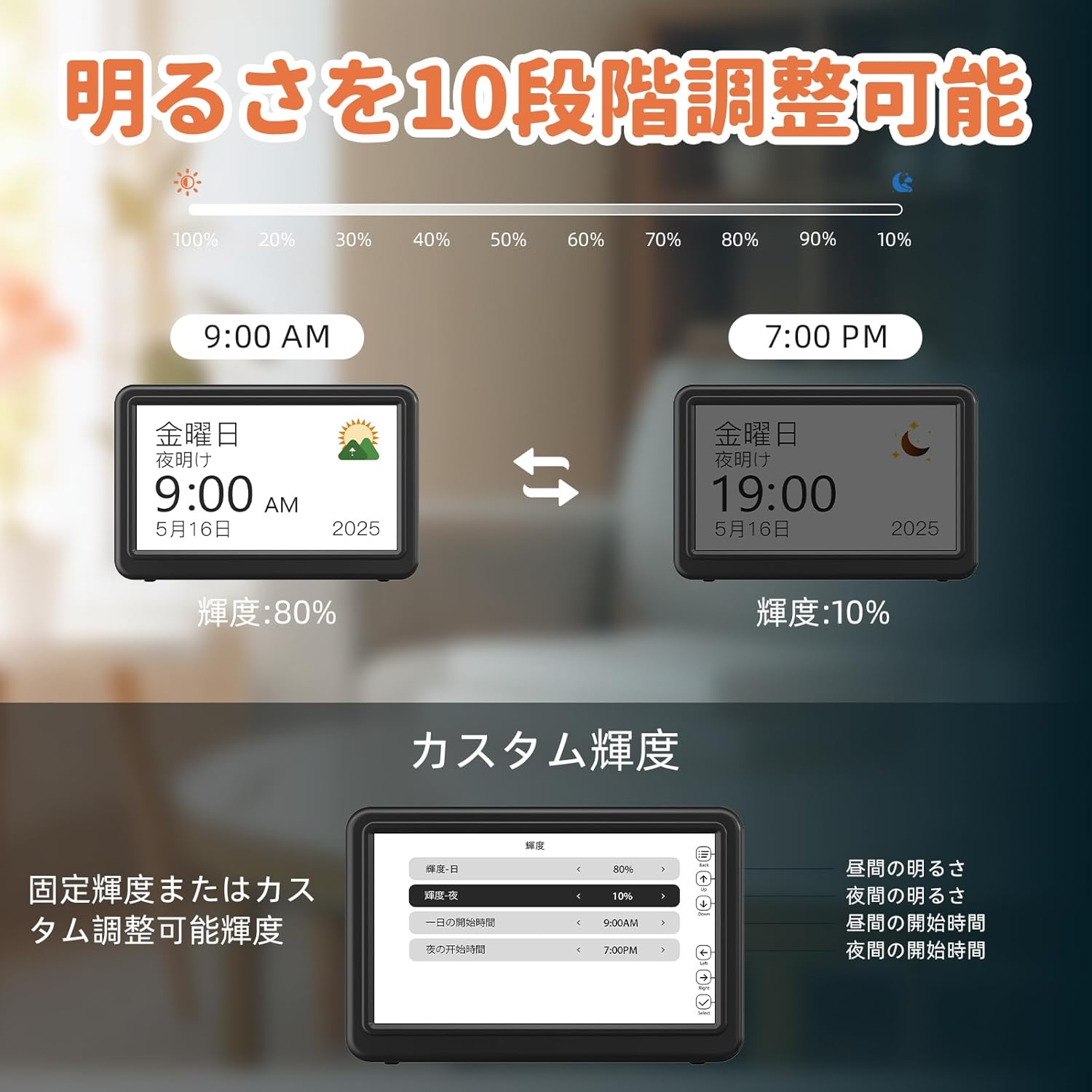
Image: The clock demonstrating the 10-level brightness adjustment feature, with examples for day (80%) and night (10%) settings.
3.5 Display Themes and Colors
Unlike traditional monochrome clocks, the Mesqool CR1029 offers 12 distinct display themes and multiple color options. This allows you to personalize the clock's appearance to match your room's decor or your personal preference, catering to various users including students, visually impaired individuals, and those with color perception differences.
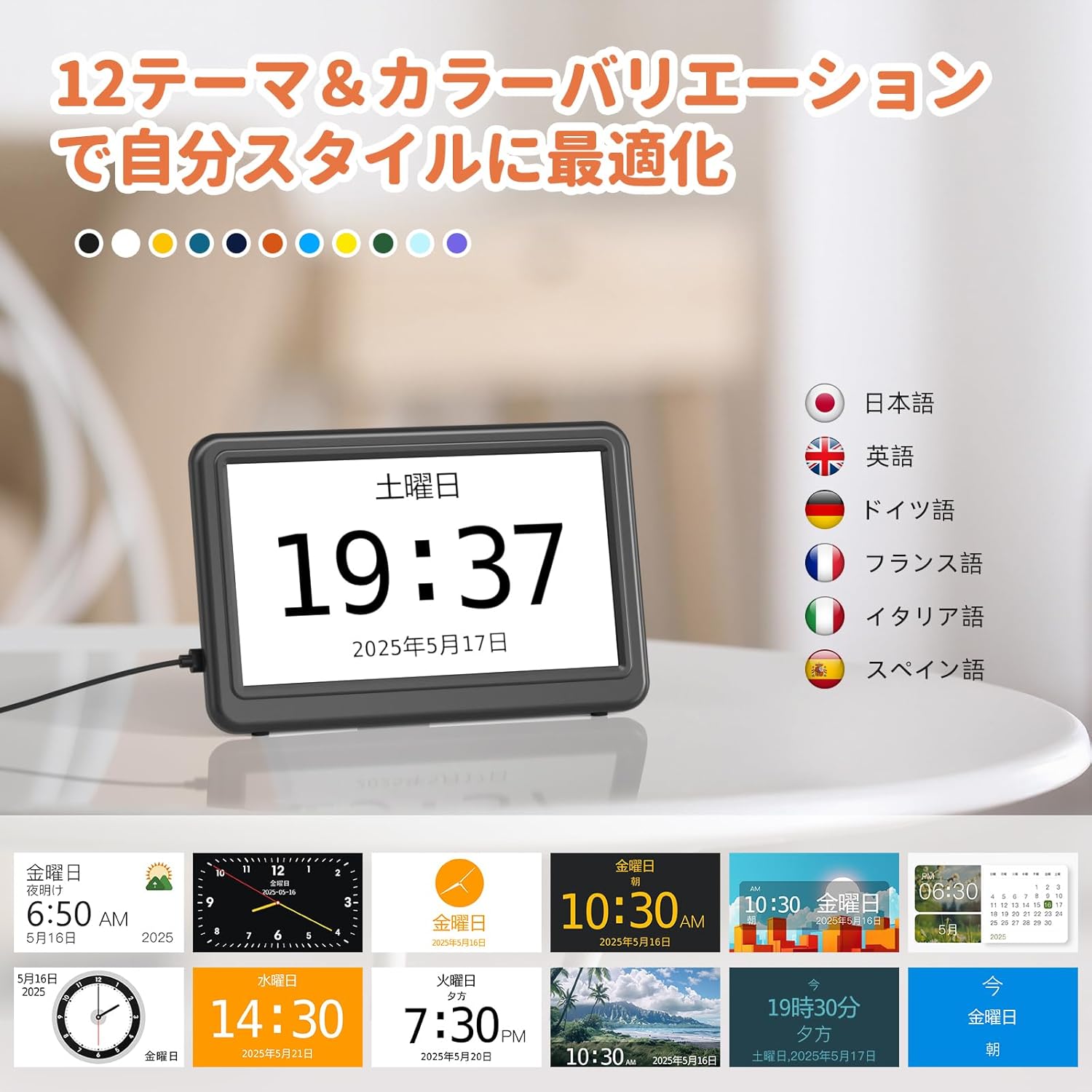
Image: A collage of different display themes and color variations available on the clock.
3.6 భాషా సెట్టింగ్లు
The clock supports 6 languages: Japanese, English, French, German, Italian, and Spanish. You can easily switch between languages in the settings menu to suit your preference.
Video: Demonstrates how to navigate the settings menu to change the display language on the clock.
3.7 Digital Photo Frame Function
The Mesqool CR1029 can also function as a digital photo frame. Simply insert an SD card or USB memory stick (up to 64GB) containing your photos. You can display cherished memories of family and friends, adding a warm touch to any room. This makes it an excellent gift option.

Image: The clock displaying a family photo, illustrating its use as a digital photo frame.
4. ఫీచర్లు ఓవర్view
- 7-Inch Large Display: Provides clear and easy-to-read time, date, and day information.
- 20 Types of Alarms: Supports daily, weekday, weekend, and specific date alarms.
- Personalized Reminders: Set up to 20 custom reminders for medication, hydration, and daily routines.
- 12 Display Themes & Multi-Color Options: Customize the clock's appearance to suit your preference or environment.
- 10-స్థాయి ప్రకాశం సర్దుబాటు: Adjust display brightness from 5% to 100%, with separate day/night settings.
- Volume Control & Snooze: 9 volume levels and 18 ringtones, with 3/5/9 minute snooze options.
- 12/24 Hour Format & DST: Easily switch between time formats and adjust for Daylight Saving Time.
- 6 Language Support: Includes Japanese, English, French, German, Italian, and Spanish.
- Digital Photo Frame Function: Display photos from an SD card or USB memory stick (up to 64GB).
- మెమరీ బ్యాకప్: Internal battery retains settings during power outages.
5. నిర్వహణ
To ensure the longevity and optimal performance of your Mesqool CR1029 Digital Calendar Clock, please follow these maintenance guidelines:
- శుభ్రపరచడం: Use a soft, dry cloth to clean the display and exterior. Avoid using abrasive cleaners, solvents, or chemical sprays, as these can damage the surface.
- ప్లేస్మెంట్: Place the clock on a stable, flat surface. Avoid direct sunlight, extreme temperatures, and high humidity, which can affect performance and display quality.
- శక్తి: Always use the provided AC adapter. Disconnect power during electrical storms or when not in use for extended periods.
6. ట్రబుల్షూటింగ్
If you encounter any issues with your Mesqool CR1029, please refer to the following common solutions:
| సమస్య | సాధ్యమైన కారణం | పరిష్కారం |
|---|---|---|
| ప్రదర్శన ఖాళీగా ఉంది | శక్తి లేదా శక్తి లేదుtage. | Ensure the AC adapter is securely connected to the clock and a working power outlet. Check if there's a power outagమీ ప్రాంతంలో ఇ. |
| అలారం మోగడం లేదు | Alarm is off, volume is too low, or incorrect settings. | Check alarm settings to ensure it's enabled. Increase the alarm volume. Verify the alarm time and frequency are set correctly. |
| సమయం/తేదీ తప్పు. | Manual adjustment needed or DST setting is wrong. | Manually adjust the time and date in the settings. Check the Daylight Saving Time (DST) setting and adjust if necessary. |
| ఫోటోలు ప్రదర్శించబడవు | SD card/USB memory issue or unsupported format. | Ensure the SD card or USB memory is correctly inserted and contains compatible image files (e.g., JPEG). Check if the storage device is formatted correctly. Max capacity is 64GB. |
If the problem persists, please contact Mesqool customer support for further assistance.
7. స్పెసిఫికేషన్లు
| ఫీచర్ | వివరాలు |
|---|---|
| తయారీదారు | Mesqool E-commerce Co.,Ltd |
| మోడల్ సంఖ్య | CR1029 |
| ప్యాకేజీ కొలతలు | 19.1 x 16.7 x 2.9 సెం.మీ |
| రంగు | నలుపు |
| పరిమాణం | మధ్యస్థం |
| ఇతర విధులు | క్యాలెండర్ ప్రదర్శన |
| శక్తి మూలం | కార్డెడ్ ఎలక్ట్రిక్ |
| ప్యాకేజీ బరువు | 0.33 కిలోలు |
| బ్యాటరీలు అవసరం | అవును (బ్యాకప్ కోసం) |
| బ్యాటరీలు ఉన్నాయి | నం |
| ప్రదర్శన రకం | డిజిటల్ |
| శైలి | ఆధునిక |
| ఉత్పత్తి కొలతలు | 11.9 సెం.మీ (వెడల్పు) x 2.5 సెం.మీ (ఎత్తు) |
| గది రకం | Kitchen, Bedroom, Home Office, Living Room |
| ఆకారం | దీర్ఘచతురస్రాకార |
| ఇండోర్/అవుట్డోర్ ఉపయోగం | ఇండోర్ |
8. వారంటీ మరియు మద్దతు
Mesqool products are manufactured to high-quality standards. This product comes with a manufacturer's warranty. For specific warranty details, please refer to the documentation included with your purchase or contact Mesqool customer support directly. If you require technical assistance or have questions regarding your CR1029 Digital Calendar Clock, please reach out to the seller or Mesqool customer service.


