1. పరిచయం
This manual provides essential information for the NIMO 15.6" Gaming Laptop (Model N159). It covers product features, setup procedures, operating instructions, maintenance guidelines, troubleshooting tips, and detailed specifications. Please read this manual thoroughly before using your new laptop to ensure optimal performance and longevity.

Image: The NIMO 15.6" Gaming Laptop, showcasing its display and key features like fingerprint unlock, Type-C PD charger, and backlit keyboard.
2. పెట్టెలో ఏముంది
ప్యాకేజింగ్లో అన్ని వస్తువులు ఉన్నాయని నిర్ధారించుకోండి:
- 1 x NIMO N159 ల్యాప్టాప్
- 1 x టైప్-C 100W PD ఫాస్ట్ ఛార్జర్
- 1 x యూజర్ మాన్యువల్ (ఈ పత్రం)
- విండోస్ 11 హోమ్ ఆపరేటింగ్ సిస్టమ్ (ముందే ఇన్స్టాల్ చేయబడింది)
- Warranty Information (2 Years Warranty, 90 Days Return)
3. ఉత్పత్తి ముగిసిందిview
3.1 ముఖ్య లక్షణాలు
- ప్రాసెసర్: AMD రైజెన్ 7 7735HS (8 కోర్లు, 16 థ్రెడ్లు, 4.75GHz వరకు)
- గ్రాఫిక్స్: Integrated AMD Radeon 680M GPU
- ప్రదర్శన: 15.6" Full HD (1920x1080) IPS Anti-Glare Display
- మెమరీ: 16GB DDR5 RAM (upgradeable)
- నిల్వ: 1TB PCIe 4.0 SSD (upgradeable)
- ఛార్జింగ్: 100W టైప్-సి పిడి ఫాస్ట్ ఛార్జర్
- భద్రత: Fingerprint Reader for secure unlock
- కీబోర్డ్: Backlit Keyboard with Numeric Keypad
- ఆడియో: Dual 2W stereo speakers, dual beamforming microphones
- Webక్యామ్: 2MP with physical camera shutter
- ఆపరేటింగ్ సిస్టమ్: Windows 11 హోమ్

Image: An illustration detailing the AMD Ryzen 7 7735HS processor, highlighting its 8 cores, 16 threads, and integrated Radeon 680M graphics for balanced performance.
3.2 పోర్ట్లు మరియు కనెక్టర్లు
Familiarize yourself with the available ports on your NIMO laptop:

Image: A detailed diagram illustrating the location and type of ports on the NIMO laptop, including USB 2.0, USB 3.2 Gen1, Type-C Gen2 (multifunction), HDMI 2.0, Audio Jack, Micro SD Reader, and Kensington Lock.
- USB 2.0 పోర్ట్: పాత USB పరికరాలను కనెక్ట్ చేయడానికి.
- USB 3.2 Gen1 Ports (x4): For high-speed data transfer with compatible USB devices.
- Type-C Gen2 Ports (x2, Multifunction): Supports data transfer, video output, and power delivery (100W PD fast charging).
- HDMI 2.0 పోర్ట్: బాహ్య డిస్ప్లేలు లేదా టీవీలకు కనెక్ట్ చేయడానికి.
- ఆడియో జాక్: హెడ్ఫోన్లు లేదా బాహ్య స్పీకర్లను కనెక్ట్ చేయడానికి.
- మైక్రో SD రీడర్: మైక్రో SD మెమరీ కార్డులను చదవడానికి.
- కెన్సింగ్టన్ లాక్ స్లాట్: For securing your laptop with a compatible lock.
4. సెటప్
4.1 ప్రారంభ పవర్ ఆన్
- ల్యాప్టాప్ మరియు అన్ని ఉపకరణాలను పెట్టె నుండి అన్ప్యాక్ చేయండి.
- Connect the 100W Type-C PD Fast Charger to one of the Type-C ports on the laptop and then to a power outlet.
- ల్యాప్టాప్ మూత తెరవండి. ల్యాప్టాప్ స్వయంచాలకంగా పవర్ ఆన్ కావచ్చు లేదా మీరు పవర్ బటన్ను నొక్కాల్సి రావచ్చు.
- భాష ఎంపిక, నెట్వర్క్ కనెక్షన్ మరియు వినియోగదారు ఖాతా సృష్టితో సహా Windows 11 హోమ్ సెటప్ను పూర్తి చేయడానికి స్క్రీన్పై ఉన్న సూచనలను అనుసరించండి.
4.2 బ్యాటరీని ఛార్జ్ చేయడం
Before first use, it is recommended to fully charge the laptop battery. The 100W Type-C PD Fast Charger can provide approximately 5 hours of usage time with just 1 hour of charging.

Image: A visual representation of the 100W Type-C lightning-fast charger connected to the NIMO laptop, demonstrating its ability to charge quickly and efficiently.
5. ఆపరేటింగ్ సూచనలు
5.1 పవర్ ఆన్/ఆఫ్ మరియు స్లీప్ మోడ్
- పవర్ ఆన్: కీబోర్డ్పై ఉన్న పవర్ బటన్ను నొక్కండి.
- పవర్ ఆఫ్: విండోస్లో స్టార్ట్ బటన్ను క్లిక్ చేసి, ఆపై పవర్ > షట్ డౌన్ ఎంచుకోండి.
- స్లీప్ మోడ్: స్టార్ట్ బటన్ను క్లిక్ చేసి, ఆపై పవర్ > స్లీప్ ఎంచుకోండి లేదా ల్యాప్టాప్ మూతను మూసివేయండి.
5.2 Using the Fingerprint Unlock
The fingerprint reader is integrated into the touchpad for quick and secure access.
- During Windows setup or later in Windows Settings, configure your fingerprint for login.
- To unlock, simply place your registered finger on the fingerprint reader on the touchpad.
5.3 Adjusting the Backlit Keyboard
The keyboard backlight can be adjusted for comfortable typing in various lighting conditions.

Image: A visual guide demonstrating the fingerprint unlock feature on the touchpad and the functionality of the backlit keyboard, including how to cycle through brightness settings using the F9 key.
- నొక్కండి F9 key to cycle through backlight settings:
- 1 Tap: Light (Temporary)
- 2 Taps: Light (Temporary)
- 3 Taps: Light (Constant)
- 4 Taps: Off
5.4 ఉపయోగించి Webcam Shutter
For privacy, the laptop includes a physical camera shutter.
- Slide the shutter to the left to open the camera.
- Slide the shutter to the right to close and cover the camera lens.

Image: A visual guide demonstrating the physical camera shutter, showing both the 'Camera Open' and 'Camera Close' statuses for enhanced privacy.
6. నిర్వహణ
6.1 ల్యాప్టాప్ను శుభ్రపరచడం
- ల్యాప్టాప్ను శుభ్రం చేసే ముందు ఎల్లప్పుడూ పవర్ ఆఫ్ చేసి, ఛార్జర్ను డిస్కనెక్ట్ చేయండి.
- కొద్దిగా మెత్తని, మెత్తని బట్టను ఉపయోగించండి dampడిస్ప్లే కోసం నీరు లేదా స్క్రీన్ క్లీనర్తో నింపబడి ఉంటుంది.
- కీబోర్డ్ మరియు ఛాసిస్ కోసం, మృదువైన, పొడి వస్త్రాన్ని ఉపయోగించండి. కఠినమైన రసాయనాలు లేదా రాపిడి పదార్థాలను నివారించండి.
- వెంటిలేషన్ రంధ్రాల నుండి దుమ్మును తొలగించడానికి క్రమానుగతంగా సంపీడన గాలిని ఉపయోగించండి.
6.2 బ్యాటరీ సంరక్షణ
- బ్యాటరీని తరచుగా పూర్తిగా డిశ్చార్జ్ చేయడాన్ని నివారించండి.
- ల్యాప్టాప్ను ఎక్కువ సేపు ఉపయోగించకపోతే చల్లని, పొడి ప్రదేశంలో నిల్వ చేయండి.
- ల్యాప్టాప్ను తీవ్రమైన ఉష్ణోగ్రతలకు బహిర్గతం చేయవద్దు.
6.3 సాఫ్ట్వేర్ నవీకరణలు
సరైన పనితీరు మరియు భద్రతను నిర్ధారించడానికి ఆపరేటింగ్ సిస్టమ్ మరియు డ్రైవర్ నవీకరణలను క్రమం తప్పకుండా తనిఖీ చేయండి మరియు ఇన్స్టాల్ చేయండి.
7. ట్రబుల్షూటింగ్
| సమస్య | సాధ్యమైన కారణం | పరిష్కారం |
|---|---|---|
| ల్యాప్టాప్ పవర్ ఆన్ చేయడం లేదు. | తక్కువ బ్యాటరీ లేదా పవర్ అడాప్టర్ సమస్య. | Connect the charger and wait a few minutes before attempting to power on. Ensure the charger is properly connected to both the laptop and the power outlet. |
| స్క్రీన్ ఖాళీగా లేదా నల్లగా ఉంది. | ల్యాప్టాప్ స్లీప్ మోడ్లో ఉంది, డిస్ప్లే సెట్టింగ్ల సమస్య లేదా హార్డ్వేర్ సమస్య. | Press any key or the power button to wake from sleep. Try connecting an external monitor to check if the display output works. Restart the laptop. |
| కీబోర్డ్ బ్యాక్లైట్ పనిచేయడం లేదు. | Backlight turned off or at lowest setting. | నొక్కండి F9 key repeatedly to cycle through brightness levels and turn on the backlight. |
| Fingerprint unlock not working. | Finger not properly placed, or sensor issue. | Ensure your finger is clean and dry and covers the sensor completely. Re-register your fingerprint in Windows Settings if the issue persists. |
| నెమ్మదిగా పనితీరు. | చాలా అప్లికేషన్లు నడుస్తున్నాయి, తగినంత నిల్వ లేదు లేదా పాత డ్రైవర్లు. | Close unnecessary applications. Check available storage space. Update Windows and device drivers. |
If you encounter issues not listed here or require further assistance, please contact NIMO customer support.
8. స్పెసిఫికేషన్లు
| బ్రాండ్ | నిమో |
| మోడల్ పేరు | NIMO N159B |
| స్క్రీన్ పరిమాణం | 15.6 అంగుళాలు |
| స్క్రీన్ రిజల్యూషన్ | 1920 x 1080 పిక్సెల్స్ (FHD IPS) |
| ప్రాసెసర్ | AMD Ryzen 7 7735HS (8 Cores, 4.75 GHz Max Turbo) |
| RAM | 16 GB DDR5 (4800 MHz) |
| హార్డ్ డ్రైవ్ | 1024 జీబీ ఎస్ఎస్డీ (పిసిఐఇ 4.0) |
| గ్రాఫిక్స్ కోప్రాసెసర్ | AMD రేడియన్ 680M (ఇంటిగ్రేటెడ్) |
| ఆపరేటింగ్ సిస్టమ్ | Windows 11 హోమ్ |
| వైర్లెస్ రకం | 802.11a/b/g/n/ac |
| USB 2.0 పోర్ట్లు | 1 |
| USB 3.0 పోర్ట్లు | 4 |
| సగటు బ్యాటరీ జీవితం | 5 Hours (54Wh, 11.4V/4700mAh) |
| వస్తువు బరువు | 3.8 పౌండ్లు |
| ఉత్పత్తి కొలతలు | 14.07 x 8.98 x 0.76 అంగుళాలు |
| రంగు | నీలం |
| వెనుక Webకెమెరా రిజల్యూషన్ | 2 ఎంపీ |
| ప్రత్యేక లక్షణాలు | బ్యాక్లిట్ కీబోర్డ్, ఫింగర్ప్రింట్ రీడర్, HD ఆడియో, న్యూమరిక్ కీప్యాడ్ |
9. వారంటీ మరియు మద్దతు
9.1 తయారీదారు వారంటీ
Your NIMO N159 laptop is covered by a comprehensive 2-సంవత్సరాల తయారీదారు వారంటీ from Nimo Direct Inc. This warranty covers defects in materials and workmanship under normal use. For warranty claims, please contact customer support.

Image: A technician working on a laptop's internal components, representing the 2-year support provided for Nimo products.
9.2 రిటర్న్ పాలసీ
Nimo Direct Inc. offers a 90-రోజుల ఇబ్బంది లేని రిటర్న్ పాలసీ. You may return any Nimo product for any reason within 90 days of purchase. Please refer to your purchase documentation for specific return procedures.
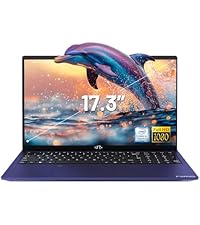
Image: A delivery person handing a package to a customer, illustrating the 90-day return policy for Nimo products.
9.3 కస్టమర్ మద్దతు
For any product-related questions, technical assistance, or warranty claims, please contact our professional after-sales service team. Our dedicated support team is available to resolve issues or facilitate replacements.
- ఇమెయిల్: service@nimopc.com
- ఆన్లైన్: అధికారిక NIMO ని సందర్శించండి website or product page for contact options.

Image: Customer service representatives wearing headsets, indicating professional customer assistance available via phone and live chat.


