1. పరిచయం
Thank you for choosing the Twotrees TS5 7W Laser Engraver. This advanced machine is designed for precise and versatile engraving on a wide range of materials, featuring an innovative 4-in-1 rotary system. This manual provides essential information for safe operation, setup, usage, and maintenance of your device. Please read it thoroughly before operating the engraver.
2. భద్రతా సూచనలు
WARNING: Laser radiation can cause eye damage and skin burns. Always follow safety precautions.
- కంటి రక్షణ: The Twotrees TS5 features an integrated closed structure with special filtering materials to block harmful blue light. However, never look directly at the laser beam. Always ensure the protective enclosure is properly closed during operation.
- చర్మ రక్షణ: లేజర్ పుంజానికి చర్మం నేరుగా గురికాకుండా ఉండండి.
- వెంటిలేషన్: The integrated smoke and dust ejection system helps maintain a clean working environment. Ensure proper ventilation in your workspace.
- మండే పదార్థాలు: Do not engrave highly flammable materials without proper precautions. Keep a fire extinguisher nearby.
- పిల్లలు మరియు పెంపుడు జంతువులు: Keep the engraver out of reach of children and pets.
- విద్యుత్ సరఫరా: Use only the provided power adapter. Ensure the power supply matches the specified voltage (100-240 V ~ 50/60 Hz).
- అత్యసవర నిలుపుదల: Familiarize yourself with the location of the emergency stop button.
3. ఉత్పత్తి ముగిసిందిview
The Twotrees TS5 7W Laser Engraver is a versatile and efficient tool for custom engraving. Its key features include:
- 4-in-1 Rotary System: The first enclosed 4-in-1 rotary laser engraver, including roller, chuck, sphere, and ring kits for engraving various shapes and objects.
- High Pre-assembly: 95% pre-assembled for quick and easy setup.
- భద్రతా ఆవరణ: Integrated closed structure with light filtering materials and a smoke/dust ejection system for a safe and clean workspace.
- Magnetic Closure Design: Allows for easy access and efficient batch processing.
- Precise Focusing: Ensures accurate engraving positioning.
- విస్తృత అనుకూలత: Supports popular engraving software like LaserGRBL (Windows) and LightBurn (macOS/Windows/Linux), and GRBL control systems.
- Versatile Materials: Capable of engraving on aluminum jewelry, leather, glass, wood, stainless steel, cups, wine glasses, and rings.

Figure 3.1: The Twotrees TS5 Laser Engraver shown with its various 4-in-1 rotary attachments for diverse engraving tasks.

Figure 3.2: Breakdown of the innovative 4-in-1 rotary system, illustrating the Roller, Chuck, Sphere, and Ring rotary attachments.

Figure 3.3: The individual components of the Twotrees TS5 rotary system, ready for assembly and interchangeability.
4. సెటప్
The Twotrees TS5 is 95% pre-assembled, making setup quick and straightforward.
- అన్ప్యాకింగ్: ప్యాకేజింగ్ నుండి అన్ని భాగాలను జాగ్రత్తగా తొలగించండి. ప్యాకింగ్ జాబితాలో జాబితా చేయబడిన అన్ని భాగాలు ఉన్నాయని నిర్ధారించుకోండి.
- ప్లేస్మెంట్: Place the engraver on a stable, level surface in a well-ventilated area, away from flammable materials.
- పవర్ కనెక్షన్: Connect the power adapter to the engraver and then to a suitable power outlet.
- సాఫ్ట్వేర్ ఇన్స్టాలేషన్: Install your preferred engraving software (LaserGRBL for Windows or LightBurn for macOS/Windows/Linux) on your computer. Links to download these can typically be found on the Twotrees official website or the software developers' sites.
- USB కనెక్షన్: Connect the engraver to your computer using a USB cable.
- Rotary Attachment (if needed): If using a rotary attachment, select the appropriate kit (roller, chuck, sphere, or ring) and install it according to the specific instructions for that module.
5. ఆపరేటింగ్ సూచనలు
Operating the Twotrees TS5 involves preparing your design, setting up the material, and initiating the engraving process.
5.1 మెటీరియల్ తయారీ
- Flat Materials: Place flat materials directly on the engraving bed.
- Cylindrical/Irregular Objects: For items like cups, wine glasses, spheres, or rings, install the appropriate rotary attachment.
- సెక్యూరింగ్ మెటీరియల్: Ensure the material is securely fastened to prevent movement during engraving. The chuck and roller systems offer multiple clamping styles.

Figure 5.1: The engraver demonstrating multiple clamping styles for different objects, such as a wine glass on the roller and a mug on the chuck.
5.2 లేజర్ను కేంద్రీకరించడం
Precise focusing is crucial for optimal engraving results.
- మాన్యువల్ ఫోకస్: Adjust the laser module height until the laser spot is at its smallest and sharpest point on the material surface.
- Assisted Focus: The TS5 features an effortless focus mechanism. Refer to the specific instructions for your model's focusing method.
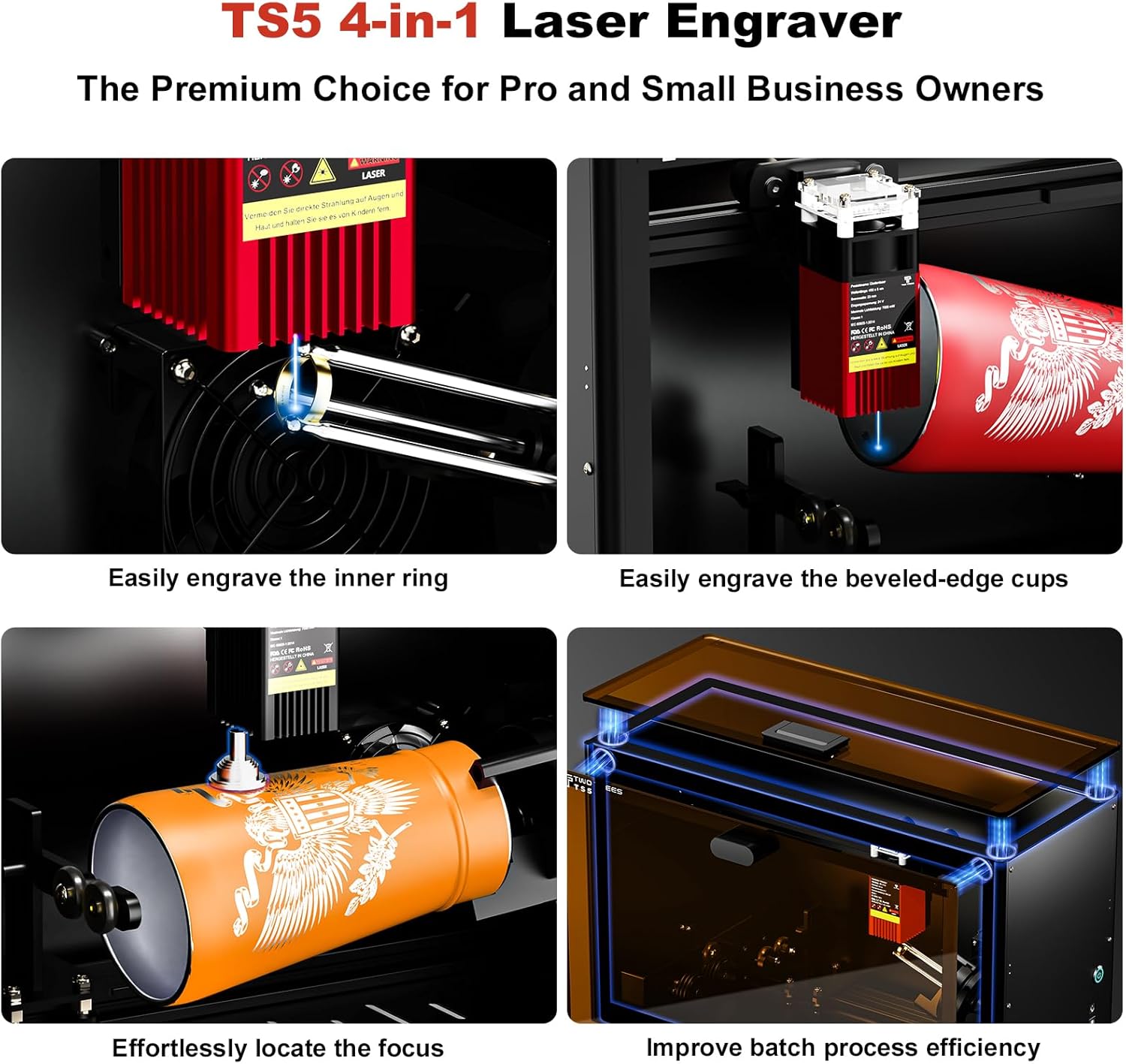
Figure 5.2: Visual guide demonstrating key operational aspects: engraving inner rings, handling beveled cups, effortless focus adjustment, and improving batch processing efficiency.
5.3 Software Operation (LightBurn/LaserGRBL)
- దిగుమతి డిజైన్: మీ డిజైన్ను లోడ్ చేయండి file (LBRN, BMP, JPG, PNG, GCODE) into the software.
- సెట్టింగ్లను సర్దుబాటు చేయండి: Set engraving parameters such as laser power (adjustable), speed, and number of passes based on the material.
- ముందుగాview: సాఫ్ట్వేర్ యొక్క ప్రీ-ఇన్స్టాలేషన్ను ఉపయోగించండిview function to ensure the design is correctly positioned.
- చెక్కడం ప్రారంభించండి: Close the protective enclosure, ensure all safety measures are in place, and initiate the engraving process from the software.

చిత్రం 5.3: ఉదాamples of diverse engraving applications on materials such as aluminum jewelry, leather, glass, and wood.

Figure 5.4: The Twotrees TS5 actively engraving intricate patterns onto a wine glass using the roller rotary attachment.
6. నిర్వహణ
Regular maintenance ensures the longevity and optimal performance of your Twotrees TS5 Laser Engraver.
- లెన్స్ శుభ్రపరచడం: Periodically clean the laser lens with a soft, lint-free cloth and lens cleaning solution to maintain laser power and precision.
- Cleaning the Enclosure: Wipe down the interior and exterior of the enclosure to remove dust and debris.
- సరళత: Lightly lubricate moving parts (rails, screws) as recommended by the manufacturer to ensure smooth operation.
- ఫర్మ్వేర్ నవీకరణలు: Check the Twotrees official webమీ పరికరం కోసం అందుబాటులో ఉన్న ఏవైనా ఫర్మ్వేర్ నవీకరణల కోసం సైట్.
7. ట్రబుల్షూటింగ్
ఇక్కడ కొన్ని సాధారణ సమస్యలు మరియు వాటి సంభావ్య పరిష్కారాలు ఉన్నాయి:
| సమస్య | సాధ్యమైన కారణం | పరిష్కారం |
|---|---|---|
| లేజర్ కాల్చడం లేదు లేదా బలహీనంగా ఉంది | సరికాని ఫోకస్, మురికి లెన్స్, తక్కువ పవర్ సెట్టింగ్, వదులుగా ఉన్న కనెక్షన్. | Adjust focus, clean lens, increase laser power in software, check all cable connections. |
| Engraving is distorted or misaligned | Material not secured, loose belts/components, incorrect software settings. | Secure material, check and tighten belts/components, verify software settings (e.g., origin, work area). |
| Software not connecting to engraver | USB కేబుల్ సమస్య, డ్రైవర్ ఇన్స్టాల్ చేయబడలేదు, తప్పు COM పోర్ట్ ఎంచుకోబడింది. | Try a different USB cable/port, install necessary drivers, select the correct COM port in software. |
| అధిక పొగ/పొగలు | Insufficient ventilation, material type. | Ensure the integrated fume extraction system is clear and operating, improve room ventilation. |
8. స్పెసిఫికేషన్లు
| ఫీచర్ | వివరాలు |
|---|---|
| మోడల్ | TS5 7W |
| లేజర్ పవర్ | 7 W |
| మొత్తం శక్తి | 60 W |
| తరంగదైర్ఘ్యం | 450 ± 5 ఎన్ఎమ్ |
| స్పాట్ సైజు | 0.035 × 0.1 మి.మీ |
| పని చేసే ప్రాంతం | 249 × 123 × 123 మిమీ |
| Chuck Outer Clamping రేంజ్ | Ø26 - Ø140 mm |
| Chuck Inner Clamping రేంజ్ | Ø15 - Ø110 mm |
| Chuck Tilt Adjustment Angle | -8° నుండి +8° |
| ఉత్పత్తి కొలతలు | 480 × 200 × 298 మిమీ |
| నికర బరువు | 9.13 కిలోలు |
| ఇన్పుట్ వాల్యూమ్tage | 100-240 V ~ 50/60 Hz |
| అవుట్పుట్ వాల్యూమ్tage | 24 వి |
| X/Y Axis Positioning Accuracy | 0.1 మి.మీ |
| గరిష్ట వేగం | 10,000 మిమీ/నిమి |
| మద్దతు ఉన్న సాఫ్ట్వేర్ | LaserGRBL (Windows), LightBurn (Common) |
| మద్దతు ఉన్న OS | macOS / Windows / Linux |
| మద్దతు ఇచ్చారు File ఫార్మాట్లు | LBRN, BMP, JPG, PNG, GCODE |
9. వారంటీ మరియు మద్దతు
For warranty information and technical support, please refer to the documentation included with your purchase or visit the official Twotrees website. You may also contact your seller for assistance.
తయారీదారు: Twotrees
Model Number (Article Reference): CTNTS5
ASIN: B0FP14B4CR
10. అదనపు సమాచారం
The Twotrees TS5 is designed to meet over 95% of mug customization needs and is ideal for custom engraving of irregular mugs and various other objects.

Figure 10.1: The Twotrees TS5 demonstrating its capability to engrave a wide variety of customized mugs and other items.

Figure 10.2: A comparison table illustrating the superior features of the Twotrees TS5 Laser Engraver, such as its 4-in-1 system and high pre-assembly, compared to other models.


