1. పరిచయం
The NUX Amp Academy Stomp is a powerful and versatile compact amp modeler and multi-effects pedal designed for guitarists seeking a comprehensive tone solution. Featuring NUX's iconic TS/AC-4K Amp Modeling algorithm, this unit provides realistic amplifier simulations with independent preamp మరియు శక్తి amp sections. Its dual DSP architecture ensures high-quality effects processing alongside detailed amp modeling. With 9 EFX blocks and flexible routing options, the Amp Academy Stomp offers extensive creative possibilities for your sound.
2 కీ ఫీచర్లు
- Stereo IR Engine with dual 1024 samples resolution for realistic cabinet simulations.
- స్వతంత్ర ప్రీ & పవర్ amp simulation utilizing the advanced TSAC-4K white-box amp మోడలింగ్ అల్గోరిథం.
- పూర్తి ఫీచర్ amp modeling with options like 4 inputs for patch cable jumping.
- Comprehensive effect blocks including NG, EFX, AMP, I.R., EQ, S/R, DLY, and RVB, with free/parallel routing order.
- Bright 2.86-inch color LCD display (960*376 resolution) for intuitive operation.
- 27 preset slots with 3 scenes each, and independent L/R 60 IR slots.
- Pre/Post phrase loop functionality for detailed tone tweaking (requires NBT-1 with APP).
- Global settings for footswitch setup, Global EQ, PHONES LEVEL, AUX IN LEVEL, OUT LEVEL, Quick Block, and Tuner.
- Connectivity options include USB-C, stereo balanced 1/4-inch outputs, phones out for silent practice, 1/8-inch MIDI I/O, and EXP out with additional NMP-2 Lite support.
- Functions as a USB audio interface for recording and re-amping.
- Supports firmware updates and PC edit software for advanced control.
3. సెటప్ గైడ్
3.1 అన్ప్యాకింగ్ మరియు ప్రారంభ తనిఖీ
జాగ్రత్తగా తొలగించండి Amp Academy Stomp from its packaging. Inspect the unit for any signs of damage. Ensure all components are present.
3.2 పవర్ కనెక్షన్
Connect a compatible 9V DC, 500mA power adapter (center negative) to the DC 9V 500mA input jack on the rear panel. Use only the recommended power supply to prevent damage.
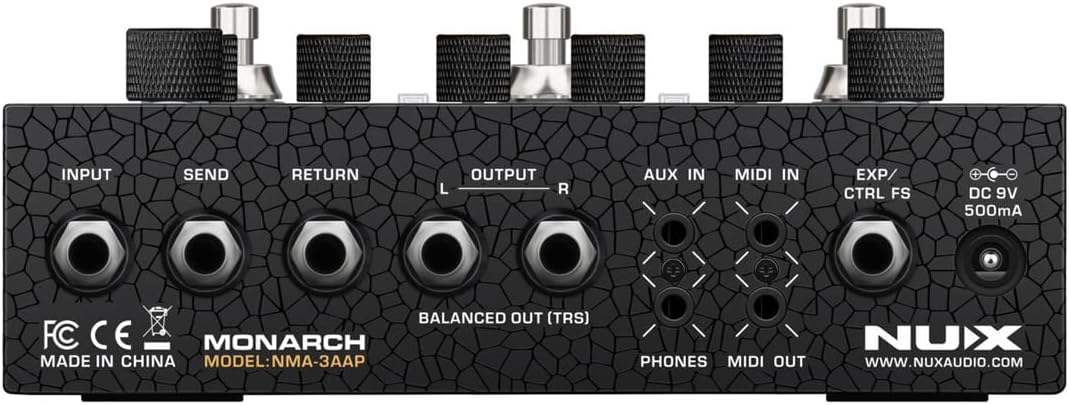
Figure 3.2.1: Rear panel of the NUX Amp Academy Stomp, illustrating the various input and output connections including power, audio, and MIDI.
3.3 ఆడియో కనెక్షన్లు
- ఇన్పుట్: మీ గిటార్ లేదా ఇతర పరికరాన్ని INPUT జాక్కి కనెక్ట్ చేయండి.
- అవుట్పుట్: Connect the L (mono) and R 1/4-inch output jacks to your amplifier, mixer, or audio interface. For balanced connections, use TRS cables with the BALANCED OUT (TRS) jacks.
- Send/Return: Use the SEND and RETURN jacks to integrate external effects pedals into the signal chain.
- ఫోన్లు: నిశ్శబ్ద సాధన కోసం, హెడ్ఫోన్లను PHONES జాక్కి కనెక్ట్ చేయండి.
- AUX IN: Connect an external audio source (e.g., MP3 player) to the AUX IN jack for practice.
3.4 MIDI మరియు USB కనెక్షన్లు
- MIDI I/O: Connect external MIDI devices using the 1/8-inch MIDI IN and MIDI OUT jacks for control or synchronization.
- USB-C: Connect the USB-C port to your computer for firmware updates, PC editing software control, and USB audio interface functionality.
- EXP/CTRL FS: Connect an expression pedal or external footswitch for additional control.
4. ఆపరేటింగ్ సూచనలు
4.1 ఫ్రంట్ ప్యానెల్ ఓవర్view

Figure 4.1.1: Front panel of the NUX Amp Academy Stomp, highlighting the display, control knobs, and footswitches for operation.
- ప్రదర్శన: The color LCD shows current preset, effect block status, and parameter values.
- గుబ్బలు: Control various parameters such as INPUT TRIM, OUTPUT LEVEL, and specific effect block parameters (labeled 1-4).
- ఫుట్ స్విచ్లు: Three footswitches (labeled 1, 2, 3) are used for preset selection, scene switching, and engaging/disengaging effect blocks. Their function can be customized in global settings.
- Home/Menu Button: Access the main menu and navigate settings.
- Edit/Save Button: Press to enter edit mode for the current preset; hold to save changes.
4.2 ప్రాథమిక ఆపరేషన్
- పవర్ ఆన్/ఆఫ్: Connect/disconnect the power adapter. There is no dedicated power switch.
- ప్రీసెట్ ఎంపిక: Use the footswitches to cycle through presets or scenes. The display will indicate the active preset.
- Effect Block Control: In a preset, individual effect blocks (NG, EFX, AMP, IR, EQ, S/R, DLY, RVB) can be toggled on/off. Use the display and associated knobs to adjust parameters within each block.
- ప్రీసెట్లను సేవ్ చేస్తోంది: After making adjustments, hold the 'Press to Edit / Hold to Save' button to save your changes to the current preset slot.
4.3 అధునాతన విధులు
- PC Edit Software: Download the NUX Amp Academy Stomp editor software from the official NUX website. Connect the pedal via USB-C to your computer for detailed parameter editing, IR loading, and firmware updates.
- USB ఆడియో ఇంటర్ఫేస్: The pedal can function as a USB audio interface, allowing you to record your guitar directly to your computer or re-amp ట్రాక్లు.
- గ్లోబల్ సెట్టింగ్లు: Access the global settings menu to customize footswitch assignments, adjust global EQ, set output levels for headphones and AUX IN, and configure the built-in tuner.
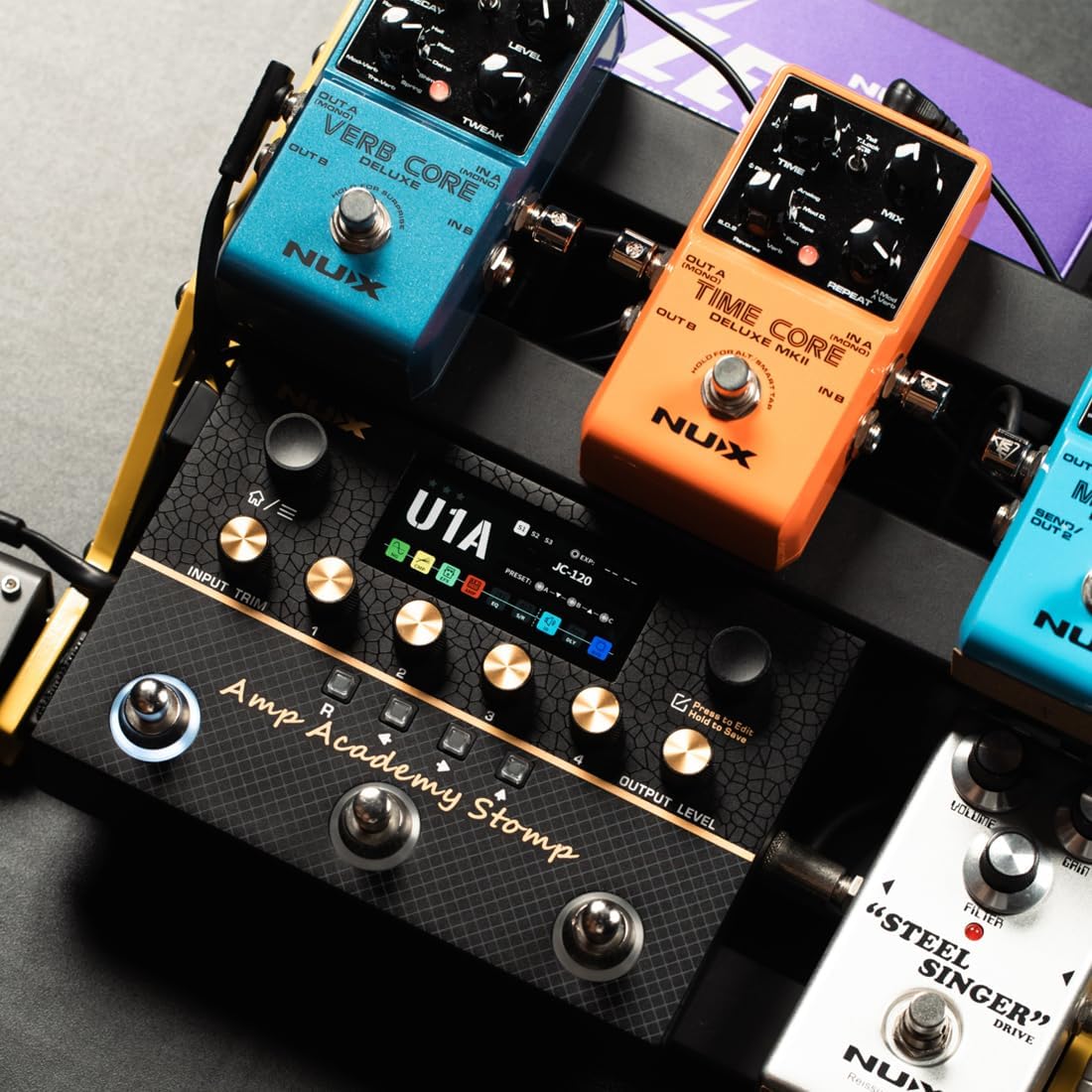
Figure 4.3.1: The NUX Amp Academy Stomp connected to a laptop, demonstrating its use with the dedicated PC editor software for comprehensive control and customization.
5. నిర్వహణ
- శుభ్రపరచడం: యూనిట్ శుభ్రం చేయడానికి మృదువైన, పొడి వస్త్రాన్ని ఉపయోగించండి. రాపిడి క్లీనర్లు లేదా ద్రావకాలను ఉపయోగించవద్దు.
- నిల్వ: ప్రత్యక్ష సూర్యకాంతి మరియు తీవ్రమైన ఉష్ణోగ్రతలకు దూరంగా చల్లని, పొడి ప్రదేశంలో పెడల్ను నిల్వ చేయండి.
- ఫర్మ్వేర్ నవీకరణలు: Periodically check the official NUX webసరైన పనితీరును మరియు కొత్త ఫీచర్లకు యాక్సెస్ను నిర్ధారించడానికి ఫర్మ్వేర్ అప్డేట్ల కోసం సైట్.
- విద్యుత్ సరఫరా: Always use the specified 9V DC, 500mA (center negative) power supply. Incorrect power can damage the unit.
6. ట్రబుల్షూటింగ్
- శక్తి లేదు: పవర్ అడాప్టర్ సరిగ్గా కనెక్ట్ చేయబడిందని మరియు పేర్కొన్న వాల్యూమ్ను అందిస్తుందని నిర్ధారించుకోండి.tage and current (9V DC, 500mA, center negative). Try a different power outlet.
- సౌండ్ అవుట్పుట్ లేదు:
- Check all audio cable connections (input, output, send/return).
- Verify that the INPUT TRIM and OUTPUT LEVEL knobs are not set to minimum.
- Ensure that the active preset has an amp model and IR loaded, and that effect blocks are engaged as desired.
- Check the volume on your connected amplifier లేదా ఆడియో ఇంటర్ఫేస్.
- వక్రీకరించిన ధ్వని:
- Adjust the INPUT TRIM to avoid clipping.
- Check the gain settings within the amp model and any distortion/overdrive effect blocks.
- PC Editor Not Connecting:
- Ensure the USB-C cable is securely connected to both the pedal and your computer.
- Install the necessary USB drivers if prompted by the software.
- వేరే USB పోర్ట్ లేదా కేబుల్ని ప్రయత్నించండి.
- Footswitches Not Responding: Check the footswitch assignments in the global settings menu.
7. స్పెసిఫికేషన్లు
| స్పెసిఫికేషన్ | విలువ |
|---|---|
| వస్తువు బరువు | 4.4 పౌండ్లు |
| ఉత్పత్తి కొలతలు | 7.2 x 2.6 x 1.2 అంగుళాలు (7.2"L x 2.6"W x 1.2"H) |
| మోడల్ సంఖ్య | Amp అకాడమీ స్టాంప్ |
| ASIN | B0FP52PCMJ |
| వాల్యూమ్tage | 9 వోల్ట్స్ DC |
| Ampఎరేజ్ | 500 మిల్లీamps |
| మొదటి తేదీ అందుబాటులో ఉంది | ఆగస్టు 29, 2025 |
8. వారంటీ మరియు మద్దతు
For warranty information, please refer to the documentation included with your purchase or visit the official NUX website. For technical support, firmware updates, and additional resources, please visit the NUX brand store on Amazon or the official NUX webసైట్.
NUX Brand Store: Visit the NUX Store on Amazon


