1. పరిచయం
This manual provides essential information for the safe and efficient operation, maintenance, and troubleshooting of your KENT RoboKlean R1 Robotic Vacuum Cleaner & Mop. Please read this manual thoroughly before using the product and retain it for future reference.

Figure 1: KENT RoboKlean R1 Robotic Vacuum Cleaner and its accompanying smart home application interface.
2. ఉత్పత్తి ముగిసిందిview
The KENT RoboKlean R1 is an advanced 2-in-1 robotic vacuum cleaner and mop designed for comprehensive floor cleaning. It features AI-powered navigation, strong suction, and smart control options.
ముఖ్య లక్షణాలు:
- Advanced LDS (Laser Distance Sensor) Navigation: For precise mapping and efficient cleaning paths.
- Reactive AI Obstacle Recognition: Detects and avoids obstacles to prevent damage and getting stuck.
- 8500Pa Ultra-Strong Suction: Effectively picks up dirt, dust, and debris from various surfaces.
- Wet & Dry Cleaning: Integrated vacuuming and mopping functions.
- 5200mAh బ్యాటరీ: Provides up to 3 hours (180 minutes) of runtime on a single charge.
- స్వీయ-ఛార్జింగ్: Automatically returns to the charging station when the battery is low.
- స్మార్ట్ యాప్ & వాయిస్ కంట్రోల్: Compatible with KENT Smart Home app, Amazon Alexa, and Google Home Assistant.
- Anti-Fall Feature: Sensors protect the robot from accidental falls down stairs or ledges.
- HEPA వడపోత వ్యవస్థ: Captures minute particles and allergens for a healthier environment.

Figure 2: The KENT RoboKlean R1 operating in a home environment, demonstrating hands-free cleaning.
3. సెటప్
3.1 అన్బాక్సింగ్ మరియు కాంపోనెంట్ చెక్
Carefully remove all components from the packaging. Ensure all items listed in the 'Included Components' section of the specifications are present.
3.2 ఛార్జింగ్ స్టేషన్ ప్లేస్మెంట్
Place the charging station against a wall in an open area, ensuring there are no obstacles within 1 meter to the sides and 1.5 meters in front of the station. Connect the power adapter to the charging station and plug it into a power outlet.
3.3 ప్రారంభ ఛార్జింగ్
Place the RoboKlean R1 onto the charging station. Ensure the charging contacts on the robot align with those on the station. Allow the robot to fully charge before its first use. The indicator light on the robot will change to indicate a full charge.
3.4 యాప్ ఇన్స్టాలేషన్ మరియు జత చేయడం
- Download the 'KENT Smart Home' app from your device's app store.
- ఖాతాను సృష్టించండి లేదా లాగిన్ చేయండి.
- Follow the in-app instructions to add your RoboKlean R1 device. This typically involves connecting the robot to your home Wi-Fi network.
3.5 ప్రారంభ మ్యాపింగ్
After initial setup, initiate a full cleaning cycle or a mapping run through the app. The robot will use its LDS navigation to create a detailed map of your home, which is crucial for efficient cleaning and setting up custom zones.

Figure 3: The RoboKlean R1 utilizes advanced LiDAR navigation for precise real-time mapping of your home layout.
4. ఆపరేటింగ్ సూచనలు
4.1 శుభ్రపరిచే చక్రాన్ని ప్రారంభించడం
You can start a cleaning cycle using the physical button on the robot, the KENT Smart Home app, or voice commands via Amazon Alexa or Google Home Assistant.
4.2 క్లీనింగ్ మోడ్లు
- ఆటోమేటిక్ క్లీనింగ్: మ్యాప్ చేసిన ప్రాంతం మొత్తాన్ని రోబోట్ శుభ్రం చేస్తుంది.
- స్పాట్ క్లీనింగ్: Directs the robot to intensively clean a specific small area.
- Local Cleaning: Cleans a user-defined area on the map.
- User-Defined Area Cleaning: Allows you to select specific rooms or zones for cleaning via the app.

Figure 4: The RoboKlean R1 offers diverse cleaning modes and features for customized cleaning.
4.3 తడి & పొడి శుభ్రపరచడం
The RoboKlean R1 performs both vacuuming and mopping. Ensure the water tank is filled for wet mopping. The robot is designed to handle various surfaces including tiles, marble, wooden floors, and carpets. It automatically boosts suction on carpets for deeper cleaning.

Figure 5: The RoboKlean R1's 2-in-1 functionality for wet mopping and dry vacuuming with auto-boost.
4.4 షెడ్యూలింగ్ మరియు నో-గో జోన్లు
Use the KENT Smart Home app to schedule cleaning times and define 'no-go zones' or virtual walls to restrict the robot from entering specific areas.
4.5 వాయిస్ నియంత్రణ
Integrate your RoboKlean R1 with Amazon Alexa or Google Home Assistant for hands-free operation. Refer to the app for detailed instructions on connecting to these services.
5. నిర్వహణ
Regular maintenance ensures optimal performance and extends the lifespan of your RoboKlean R1.
5.1 చెత్తబుట్ట మరియు నీటి ట్యాంక్
- Empty the 250 ML dustbin after each cleaning cycle.
- Clean the 250 ML water tank and mop pad regularly. The dustbin and mop components are designed for easy removal and washing.
5.2 HEPA ఫిల్టర్
Clean the HEPA filter periodically by tapping it gently to remove dust. Replace the filter every 3-6 months, or as indicated by the app or reduced suction performance.
5.3 Brushes and Sensors
- Regularly check and clean the main brush and side brushes for tangled hair or debris.
- Wipe the charging contacts, cliff sensors, and LDS sensor window with a dry cloth to ensure proper function.
5.4 బ్యాటరీ సంరక్షణ
The RoboKlean R1 features a long-lasting 5200mAh battery. To maintain battery health, ensure the robot is always docked and charging when not in use. Avoid fully discharging the battery frequently.

Figure 6: The RoboKlean R1's self-charging capability ensures it is always ready for the next cleaning session.
6. ట్రబుల్షూటింగ్
If you encounter issues with your RoboKlean R1, refer to the following common troubleshooting steps:
- రోబోట్ ఛార్జింగ్ లేదు: Ensure the charging station is powered on and the robot's charging contacts are clean and properly aligned with the station.
- రోబో తరచుగా ఇరుక్కుపోతోంది: Clear obstacles from the cleaning path. Clean the Reactive AI obstacle recognition sensors.
- పేలవమైన శుభ్రపరిచే పనితీరు: Empty the dustbin, clean or replace the HEPA filter, and clean the main and side brushes.
- యాప్ కనెక్టివిటీ సమస్యలు: Ensure your robot and smartphone are connected to the same Wi-Fi network. Restart the app and the robot.
- Robot falling down stairs: Clean the cliff sensors located on the underside of the robot.
For persistent issues, consult the 'Help' section within the KENT Smart Home app or contact customer support.
7. స్పెసిఫికేషన్లు
| బ్రాండ్ | CITY |
| మోడల్ పేరు | RoboKlean R1 |
| ప్రత్యేక లక్షణాలు | Advanced LDS Navigation, Reactive AI Obstacle Recognition, Self-Charging, 8500Pa Ultra-Strong Suction, Smart App & Voice Control, 3 Hours Runtime, Anti-Fall, Silent Operation |
| ఫిల్టర్ రకం | కార్ట్రిడ్జ్ (HEPA వడపోత) |
| చేర్చబడిన భాగాలు | ఇన్స్ట్రక్షన్ గైడ్ |
| కార్డ్లెస్ | అవును |
| సిఫార్సు చేసిన ఉపయోగాలు | Carpeted floors, hardwood floors, upholstery, pet hair removal |
| రంగు | నలుపు |
| ఉత్పత్తి కొలతలు | 39.8L x 45.5W x 13.3H సెంటీమీటర్లు |
| బ్యాటరీ లైఫ్ | 180 నిమిషాలు (3 గంటలు) |
| తయారీదారు | రిపబ్లిక్ ఆఫ్ చైనా |
| కంట్రోలర్ రకం | యాప్ కంట్రోల్, వాయిస్ కంట్రోల్ |
| వస్తువు బరువు | 5 కిలోలు |
| డస్ట్బిన్ కెపాసిటీ | 250 మి.లీ |
| నీటి ట్యాంక్ సామర్థ్యం | 250 మి.లీ |
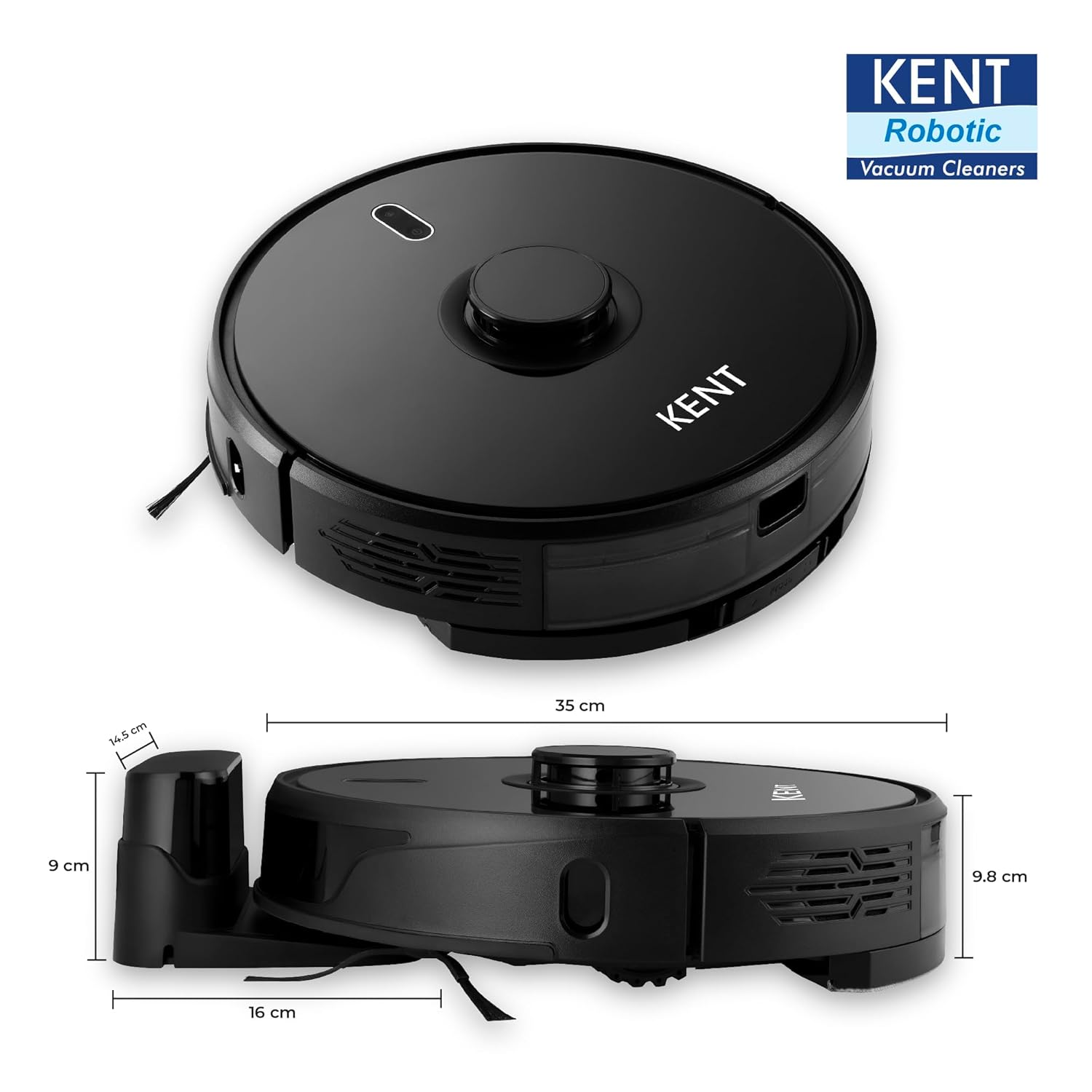
Figure 7: Physical dimensions of the RoboKlean R1.
8. వారంటీ మరియు మద్దతు
8.1 వారంటీ సమాచారం
This product may be eligible for an extended warranty plan, such as the '1 Year Extended Warranty Plan by Onsitego', which can be purchased separately. Please refer to your purchase documentation for specific warranty terms and conditions. Standard warranty details are typically provided with the product at the time of purchase.
8.2 కస్టమర్ మద్దతు
For technical assistance, service requests, or any inquiries regarding your KENT RoboKlean R1, please contact KENT RO SYSTEMS LTD customer support. Contact details can usually be found on the official KENT website or within the KENT Smart Home app.
You can also find helpful resources and FAQs within the KENT Smart Home app.


