1. పరిచయం
This manual provides detailed instructions for the installation, operation, and maintenance of the ANYFAR RM-BM2506F Decoder Adapter. This device integrates advanced features like Wireless CarPlay, Android Auto, Mirror Link, and camera support into compatible BMW vehicles equipped with the CIC infotainment system. Please read this manual thoroughly before installation and use to ensure proper functionality and safety.
2. ఉత్పత్తి ముగిసిందిview మరియు ముఖ్య లక్షణాలు
The ANYFAR RM-BM2506F Decoder Adapter enhances your vehicle's infotainment system with modern connectivity and multimedia capabilities.

Image: The ANYFAR RM-BM2506F Decoder Adapter unit, showing its various ports and connectors.
- వైర్లెస్ కార్ప్లే & ఆండ్రాయిడ్ ఆటో: Enjoy seamless integration of your smartphone with wireless connectivity for navigation, music, calls, messaging, and voice assistant functions.
- మిర్రర్ లింక్ & USB డ్రైవ్ ప్లేబ్యాక్: Mirror your phone's display to the car screen for video playback from various apps. A USB port is included for playing media from a USB drive or charging your phone.
- కారులో హై-ఫై ఆడియో: Experience high-quality audio through digital transmission, preserving the original sound quality of your car's audio system without interference or delay.
- అసలు కారు నియంత్రణలను నిలుపుకోండి: Maintain full functionality of your vehicle's existing controls, including touchscreen, voice control, physical buttons, and iDrive knob.
- బ్యాకప్ కెమెరా ఇన్పుట్ మద్దతు: Connect a backup camera or front camera. The camera feed will automatically display on the car screen when shifting into reverse.
3. అనుకూలత
This decoder adapter is specifically designed for 2008-2013 BMW models equipped with the CIC infotainment system. It is crucial to verify your vehicle's compatibility before installation.
3.1 అనుకూల వాహన నమూనాలు
The following BMW models are compatible:

Image: A table illustrating compatible BMW 1, 3, 5, 6, 7 Series, X1, X3, X5, X6, Z4, and MINI models with their respective production years (2008-2013).
- BMW 1 Series: (E87) 2008-2012
- BMW 3 Series: (E90/E91/E92/E93) 2009-2012
- BMW 5 Series: (E60/E61) 2008-2009
- BMW 6 Series: (F12/F13) 2010-2012
- BMW 7 Series: (F01/F02) 2011-2012
- బిఎండబ్ల్యూ ఎక్స్1: (E84) 2009-2014
- బిఎండబ్ల్యూ ఎక్స్3: (F25) 2011-2013
- బిఎండబ్ల్యూ ఎక్స్5: (F70) 2009-2013
- బిఎండబ్ల్యూ ఎక్స్6: (E71/E72) 2009-2013
- BMW Z4: (E89) 2009-2013
- మినీ: (R55/R56/R60) 2008-2012
3.2 CIC System Verification
అడాప్టర్ ఉంది only compatible with BMW vehicles featuring the CIC system. To confirm your system type, compare your car's radio home screen menu picture with the examples below. Additionally, verify the LVDS port on the back of your OEM car screen is a 4-PIN connector.
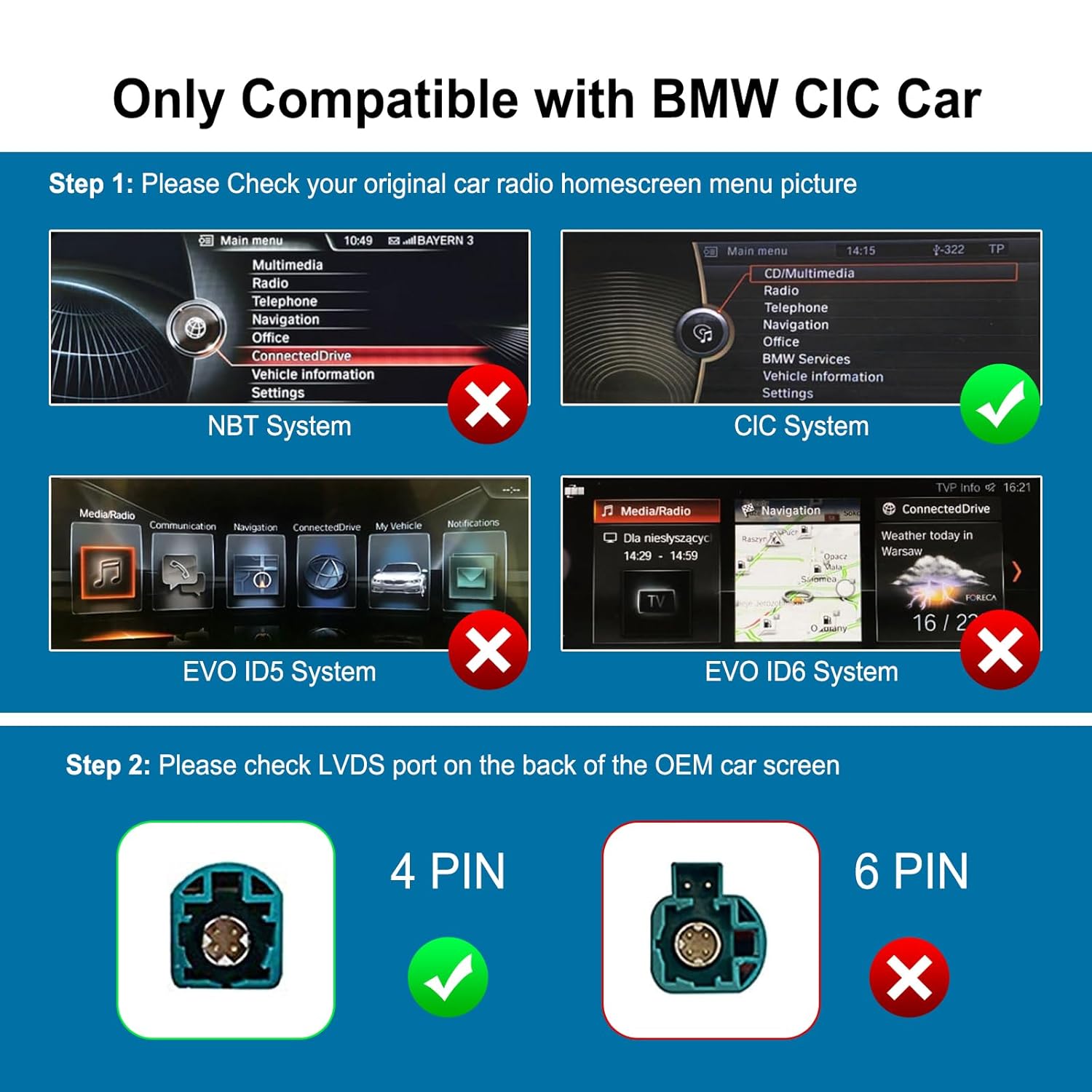
Image: Visual guide to identify the CIC system interface, distinguishing it from NBT, EVO ID5, and EVO ID6 systems. A green checkmark indicates CIC compatibility, while red crosses mark incompatible systems.
4. సెటప్ మరియు ఇన్స్టాలేషన్
Installation of the ANYFAR RM-BM2506F Decoder Adapter requires technical proficiency. If you are not comfortable with car electronics installation, it is recommended to seek professional assistance.
4.1 సాధారణ సంస్థాపనా దశలు
- తయారీ: Ensure the vehicle's ignition is off and the battery is disconnected before starting any electrical work.
- Access Head Unit: Carefully remove the trim panels and components necessary to access the OEM head unit and the back of the car screen.
- Connect LVDS Cables: Disconnect the original LVDS cable from the OEM screen. Connect the provided LVDS cable from the decoder adapter to the OEM screen. Then, connect the original LVDS cable to the 'OUT LVDS' port on the decoder adapter.
- Power and CAN Connections: Connect the power and CAN bus wires from the decoder adapter to the vehicle's wiring harness as indicated in the wiring diagram.
- సహాయక కనెక్షన్లు: Connect the AUX OUT cable to the vehicle's AUX input. This is crucial for audio output.
- USB and Microphone: Connect the USB extension cable for media playback and phone charging. Connect the external microphone for voice commands and calls.
- Camera Connections (Optional): If installing a backup or front camera, connect the CVBS cables to the designated 'Rear View CVBS' and 'Front View CVBS' ports on the adapter. Ensure the 12V camera power is correctly wired.
- Toggle Switch Configuration: Adjust the DIP switches on the decoder adapter according to your specific vehicle model and screen resolution. Refer to the product documentation for the correct switch settings.
- పరీక్ష కార్యాచరణ: Before reassembling, reconnect the battery and test all functions (CarPlay, Android Auto, Mirror Link, USB, Camera, original controls) to ensure correct operation.
- మళ్లీ కలపండి: Once all functions are verified, carefully reassemble the vehicle's dashboard components.
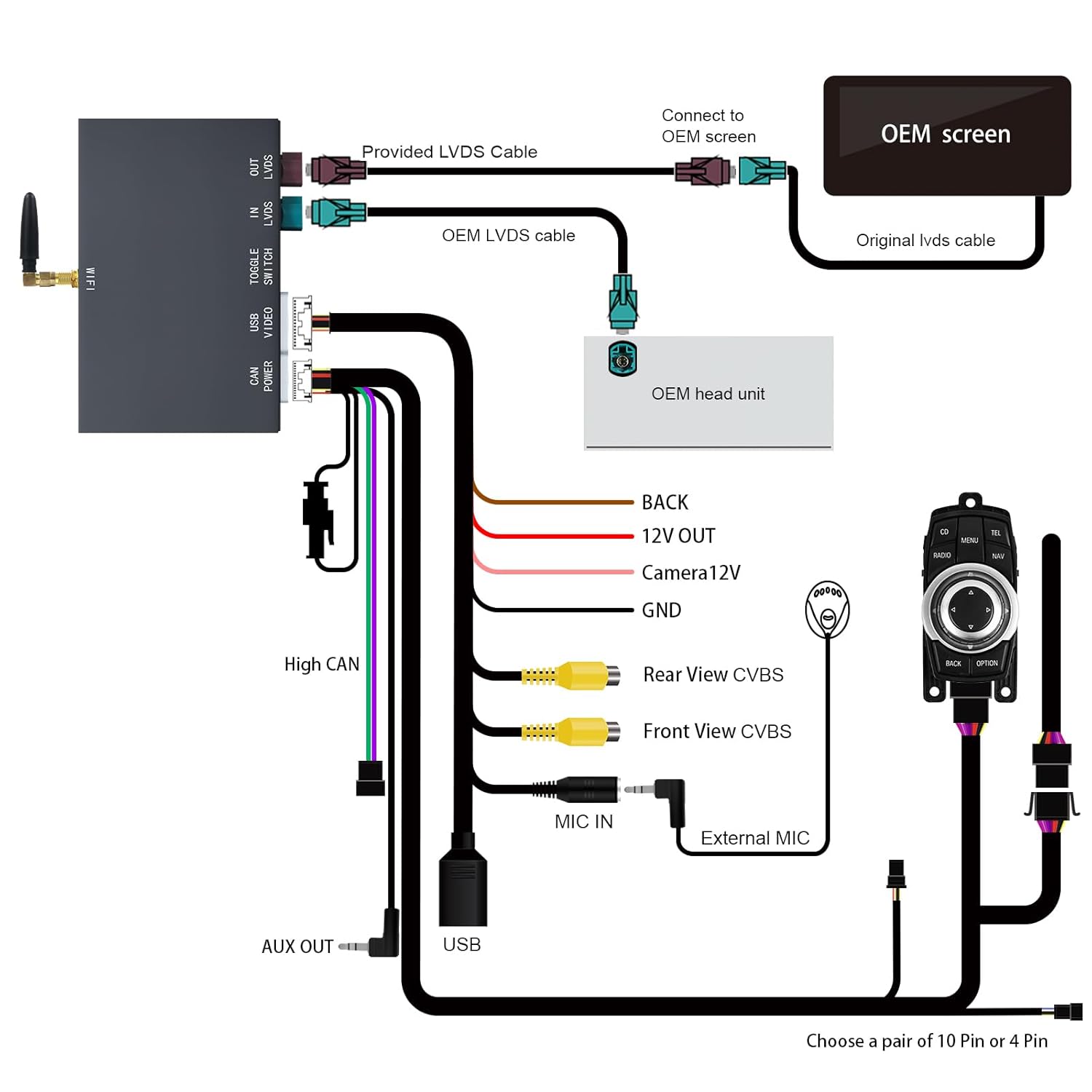
Image: A comprehensive wiring diagram illustrating the connections between the ANYFAR decoder adapter, OEM screen, OEM head unit, and various auxiliary inputs like USB, microphone, and cameras.
5. ఆపరేటింగ్ సూచనలు
After successful installation, the decoder adapter allows you to access new features while retaining your original car's controls.
5.1 వ్యవస్థల మధ్య మారడం
To switch between the original BMW CIC system and the adapter's interface (CarPlay/Android Auto), typically press and hold the MENU or BACK button on your iDrive controller for a few seconds. Refer to your specific vehicle's instructions for exact button mapping.
5.2 వైర్లెస్ కార్ప్లే & ఆండ్రాయిడ్ ఆటో

Image: A car's infotainment screen displaying the Apple CarPlay interface with various app icons for phone, music, maps, and messages.
- జత చేయడం: మీ స్మార్ట్ఫోన్లో, బ్లూటూత్ మరియు వై-ఫైని ప్రారంభించండి. కోసం వెతకండి the adapter's Bluetooth name (usually 'ANYFAR_XXXX') and pair. Confirm the pairing code on both devices.
- ఆటోమేటిక్ కనెక్షన్: Once paired, CarPlay or Android Auto should connect automatically when you start the vehicle.
- విధులు: Use the car's iDrive controller, steering wheel buttons, or voice commands (via Siri or Google Assistant) to navigate apps, make calls, send messages, and control music.
5.3 Mirror Link (AirPlay/AutoLink)

Image: A smartphone displaying a video, with the same video content mirrored onto the car's larger infotainment screen, demonstrating the Mirror Link feature.
This feature allows you to display your smartphone's screen directly onto the car's display. Connect your phone via Wi-Fi or USB, then activate the Mirror Link function from the adapter's menu. This is ideal for viewing videos or other content from your phone.
5.4 USB ప్లేబ్యాక్

Image: A car's infotainment screen displaying various media content, including movie posters and music notes, indicating playback from a USB drive.
ఆడియో లేదా వీడియో ఉన్న USB డ్రైవ్ను చొప్పించండి files into the provided USB port. Navigate to the USB Playback option in the adapter's menu to browse and play your media files.
5.5 కెమెరా ఫంక్షన్

Image: A car's infotainment screen showing the view from a backup camera, complete with dynamic parking guidelines, as the vehicle is in a parking garage.
If a backup camera is connected, the display will automatically switch to the camera view when the vehicle is put into reverse. Front camera views can typically be accessed manually through the adapter's menu or by a short press of a specific button (refer to installation guide for details).
5.6 Retaining Original Car Controls
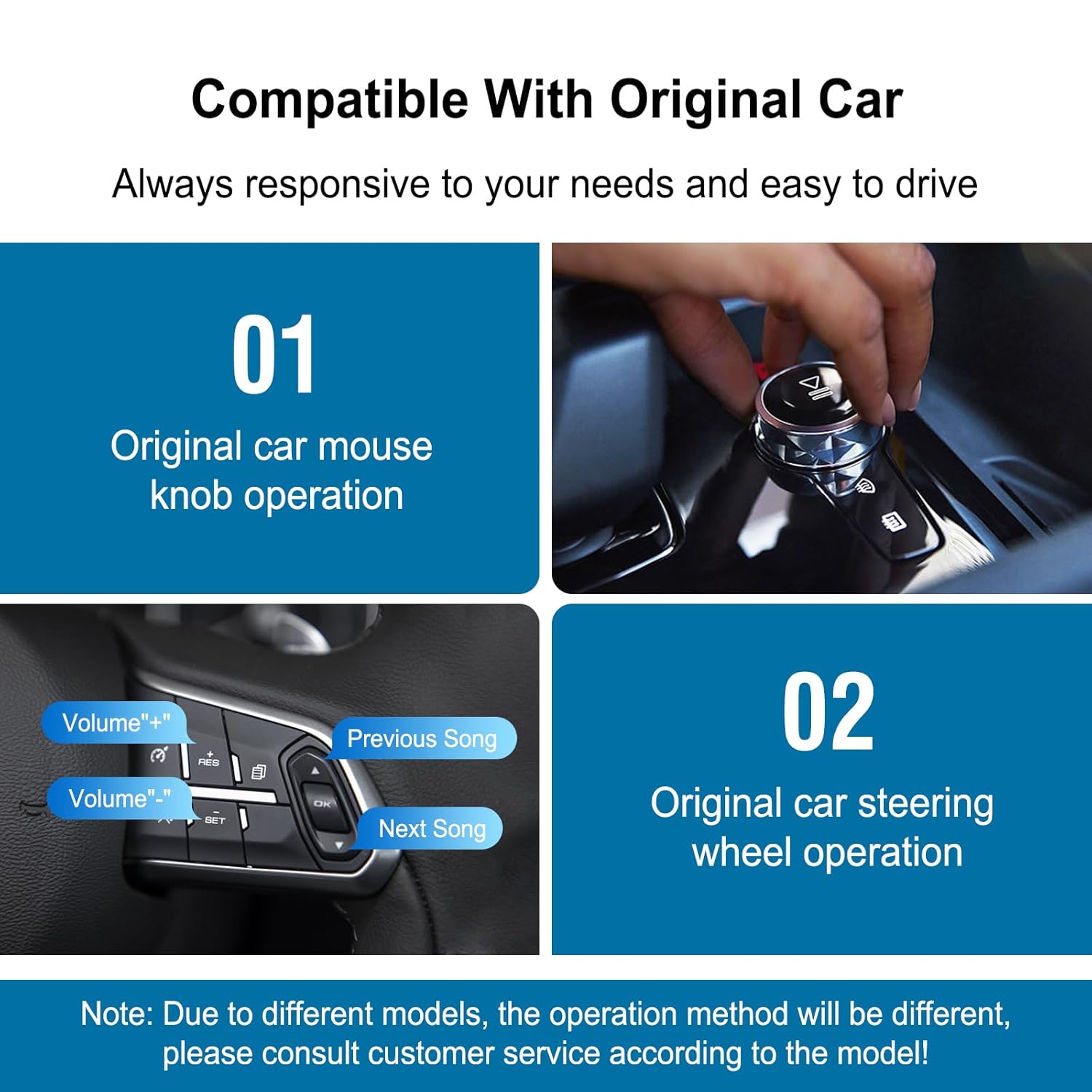
Image: Two panels demonstrating how the original BMW iDrive controller knob and steering wheel buttons are used to operate the system, highlighting the retention of factory controls.
The adapter is designed to work seamlessly with your car's existing controls. You can use the iDrive controller, steering wheel buttons, and original voice control functions to navigate the CarPlay/Android Auto interface and other adapter features.
6. నిర్వహణ
The ANYFAR RM-BM2506F Decoder Adapter is designed for durability and requires minimal maintenance.
- శుభ్రపరచడం: Keep the unit free from dust and moisture. If cleaning is necessary, use a soft, dry cloth. Do not use liquid cleaners or solvents.
- సాఫ్ట్వేర్ అప్డేట్లు: తయారీదారుని కాలానుగుణంగా తనిఖీ చేయండి website for any available firmware updates. Updates can improve performance and add new features. Follow the provided instructions carefully when performing updates.
- పర్యావరణ పరిస్థితులు: Avoid exposing the unit to extreme temperatures or direct sunlight for prolonged periods, as this can affect its lifespan.
7. ట్రబుల్షూటింగ్
If you encounter issues with your ANYFAR Decoder Adapter, refer to the following troubleshooting steps:
| సమస్య | సాధ్యమైన కారణం | పరిష్కారం |
|---|---|---|
| No display from adapter | Incorrect LVDS connection; Power issue; Incorrect DIP switch settings | Check all LVDS cables are securely connected. Verify power connections. Ensure DIP switches are set correctly for your vehicle. |
| No audio from adapter features | AUX cable not connected or selected; Volume too low | Ensure the AUX OUT cable is connected to your car's AUX input and the car's audio source is set to AUX. Increase volume. |
| వైర్లెస్ కార్ప్లే/ఆండ్రాయిడ్ ఆటో కనెక్ట్ కావడం లేదు | Bluetooth/Wi-Fi not enabled on phone; Incorrect pairing; Interference | Ensure phone's Bluetooth and Wi-Fi are on. Forget device and re-pair. Restart phone and car. |
| Original car controls not working in adapter mode | CAN bus connection issue; Adapter software glitch | Check CAN bus wiring. Restart the adapter by turning off and on the car. |
| బ్యాకప్ కెమెరా ప్రదర్శించబడటం లేదు | Camera not powered; CVBS cable loose; Incorrect camera settings | Verify camera power supply. Check CVBS cable connection. Ensure camera input is enabled in adapter settings. |
8. స్పెసిఫికేషన్లు
- మోడల్ సంఖ్య: RM-BM2506F
- బ్రాండ్: ఎప్పుడైనా
- తయారీదారు: Huizhou Rhythm Technology Co, Ltd
- అనుకూల వ్యవస్థలు: BMW CIC System (2008-2013 models)
- కనెక్టివిటీ: Wireless CarPlay, Wireless Android Auto, Mirror Link (AirPlay/AutoLink), USB
- ఇన్పుట్లు: USB, Microphone, Rear View CVBS, ముందు భాగం View CVBS
- అవుట్పుట్లు: LVDS, AUX Audio
- ప్యాకేజీ కొలతలు: 10.63 x 6.69 x 4.33 అంగుళాలు
- వస్తువు బరువు: 1.74 పౌండ్లు
- అంశాల సంఖ్య: 1
9. వారంటీ మరియు మద్దతు
For warranty information, technical support, or further assistance, please contact the seller or manufacturer directly. Refer to your purchase documentation for specific warranty terms and contact details.
Manufacturer: Huizhou Rhythm Technology Co, Ltd
బ్రాండ్: ANYFAR


