1. పరిచయం
Thank you for choosing the OSCAL Tiger 8 Smartphone 5G. This manual provides essential information for setting up, operating, and maintaining your device. Please read it carefully to ensure optimal performance and longevity of your smartphone.
పెట్టెలో ఏముంది
- OSCAL Tiger 8 Smartphone
- USB ఛార్జింగ్ కేబుల్
- SIM Card Pin Ejector Tool
- రక్షణ కేసు
- స్క్రీన్ ప్రొటెక్టర్ ఫిల్మ్

Image: Package contents of the OSCAL Tiger 8 Smartphone.
2. పరికరం ముగిసిందిview
Familiarize yourself with the physical components of your OSCAL Tiger 8 Smartphone.

Image: Physical layout and dimensions of the OSCAL Tiger 8 Smartphone.
- ముందు కెమెరా: డిస్ప్లే మధ్యలో ఎగువన ఉంది.
- వెనుక కెమెరా మాడ్యూల్: Houses the 16MP main camera and other sensors.
- వాల్యూమ్ బటన్లు: కుడి వైపున, ఆడియో స్థాయిలను సర్దుబాటు చేయడానికి.
- పవర్ బటన్/ఫింగర్ప్రింట్ సెన్సార్: కుడి వైపున, విద్యుత్ నియంత్రణ మరియు బయోమెట్రిక్ ప్రామాణీకరణ కోసం ఉపయోగించబడుతుంది.
- SIM కార్డ్ స్లాట్: On the left side, for inserting Nano-SIM and Micro SD cards.
- USB-C పోర్ట్: దిగువన, ఛార్జింగ్ మరియు డేటా బదిలీ కోసం.
- 3.5mm హెడ్ఫోన్ జాక్: At the bottom, for connecting wired headphones.
3. ప్రారంభ సెటప్
3.1 SIM కార్డ్ మరియు మైక్రో SD కార్డ్ ఇన్స్టాలేషన్
- ఫోన్ పవర్ ఆఫ్ చేయబడిందని నిర్ధారించుకోండి.
- Locate the SIM card slot on the left side of the device.
- అందించిన సిమ్ ఎజెక్టర్ సాధనాన్ని ట్రే పక్కన ఉన్న చిన్న రంధ్రంలోకి చొప్పించి, ట్రే బయటకు వచ్చే వరకు సున్నితంగా నెట్టండి.
- Place your Nano-SIM card(s) and/or Micro SD card into the tray according to the diagram on the tray.
- పరికరంతో ఫ్లష్ అయ్యే వరకు ట్రేని జాగ్రత్తగా స్లాట్లోకి నెట్టండి.
3.2 పవర్ చేయడం ఆన్/ఆఫ్
- పవర్ ఆన్ చేయడానికి: Press and hold the Power button (located on the right side) until the OSCAL logo appears.
- పవర్ ఆఫ్ చేయడానికి: పవర్ బటన్ను నొక్కి పట్టుకోండి, ఆపై స్క్రీన్పై ఉన్న ఎంపికల నుండి 'పవర్ ఆఫ్' ఎంచుకోండి.
- పునఃప్రారంభించడానికి: పవర్ బటన్ను నొక్కి పట్టుకోండి, ఆపై స్క్రీన్పై ఉన్న ఎంపికల నుండి 'పునఃప్రారంభించు' ఎంచుకోండి.
3.3 ప్రారంభ కాన్ఫిగరేషన్
Upon first power-on, follow the on-screen instructions to set up your device. This typically includes:
- భాష ఎంపిక
- Wi-Fi నెట్వర్క్కి కనెక్ట్ చేస్తోంది
- Setting up your Google account
- Setting up screen lock (PIN, pattern, password, fingerprint, face unlock)
4. Operating Your OSCAL Tiger 8
4.1 ప్రదర్శన మరియు పరస్పర చర్య
The OSCAL Tiger 8 features a 6.88-inch HD+ display with ultra-thin bezels, providing an immersive visual experience. The 120Hz refresh rate ensures smooth scrolling and immediate touch response, ideal for gaming and video playback. With 450 nits of brightness, colors remain vivid even in sunlight. Eye protection modes are included for comfortable viewరోజంతా తింటున్నాను.

Image: Immersive 6.88-inch HD+ 120Hz display.

Image: Adaptive display modes for visual comfort.
4.2 Performance and System
Powered by the Unisoc T8100 octa-core 5G processor, the OSCAL Tiger 8 is designed for exceptional performance in gaming, streaming, and multitasking. An advanced cooling system ensures the device remains cool and fluid even during intense use. The device features 12GB RAM (4GB physical + 8GB virtual) and 128GB internal storage, expandable up to 2TB via a Micro SD card, providing ample space and smooth operation for multiple applications.

Image: Unisoc T8100 5G Octa-Core Processor and advanced cooling system.

Image: Memory configuration with 12GB RAM and 128GB ROM, expandable to 2TB.
4.3 Software and AI Features
The OSCAL Tiger 8 runs on Android 15, integrated with DokeOS 4.2, offering advanced features for practical and secure daily use. The interface is optimized with intelligent AI, enhanced notification management, and improved privacy protection. You can personalize themes, wallpapers, and shortcuts. The device integrates three powerful AI models: DeepSeek-R1, ChatGPT-4o mini, and Gemini AI 2.0 Flash Edition, enabling intelligent chat, AI image generation, document analysis, study support, photo/video editing, and music creation.

Image: Android 15 and DokeOS 4.2 interface.

Image: Gemini AI features for enhanced digital efficiency.

Image: Doke AI applications for creative tasks.
4.4 కెమెరా విధులు
Capture clear and vivid moments with the OSCAL Tiger 8's 16MP main camera and 8MP front camera. The camera system includes AI scene recognition, smile shutter, and facial unlock. It supports 4K FHD+ video recording. Explore various camera modes such as Night, Beauty, Portrait, and HDR to enhance your photography.

Image: 16MP Main and 8MP Front AI Cameras.

Image: Diverse camera modes for various photographic scenarios.
4.5 బ్యాటరీ నిర్వహణ
The OSCAL Tiger 8 is equipped with a 5000mAh internal battery, supported by an intelligent power management system for stable and long-lasting performance. It supports 18W fast charging, significantly reducing charging times. Expected battery life includes 6 hours of continuous gaming, 8.5 hours of video playback, 26 hours of music, and up to 22 days in standby.
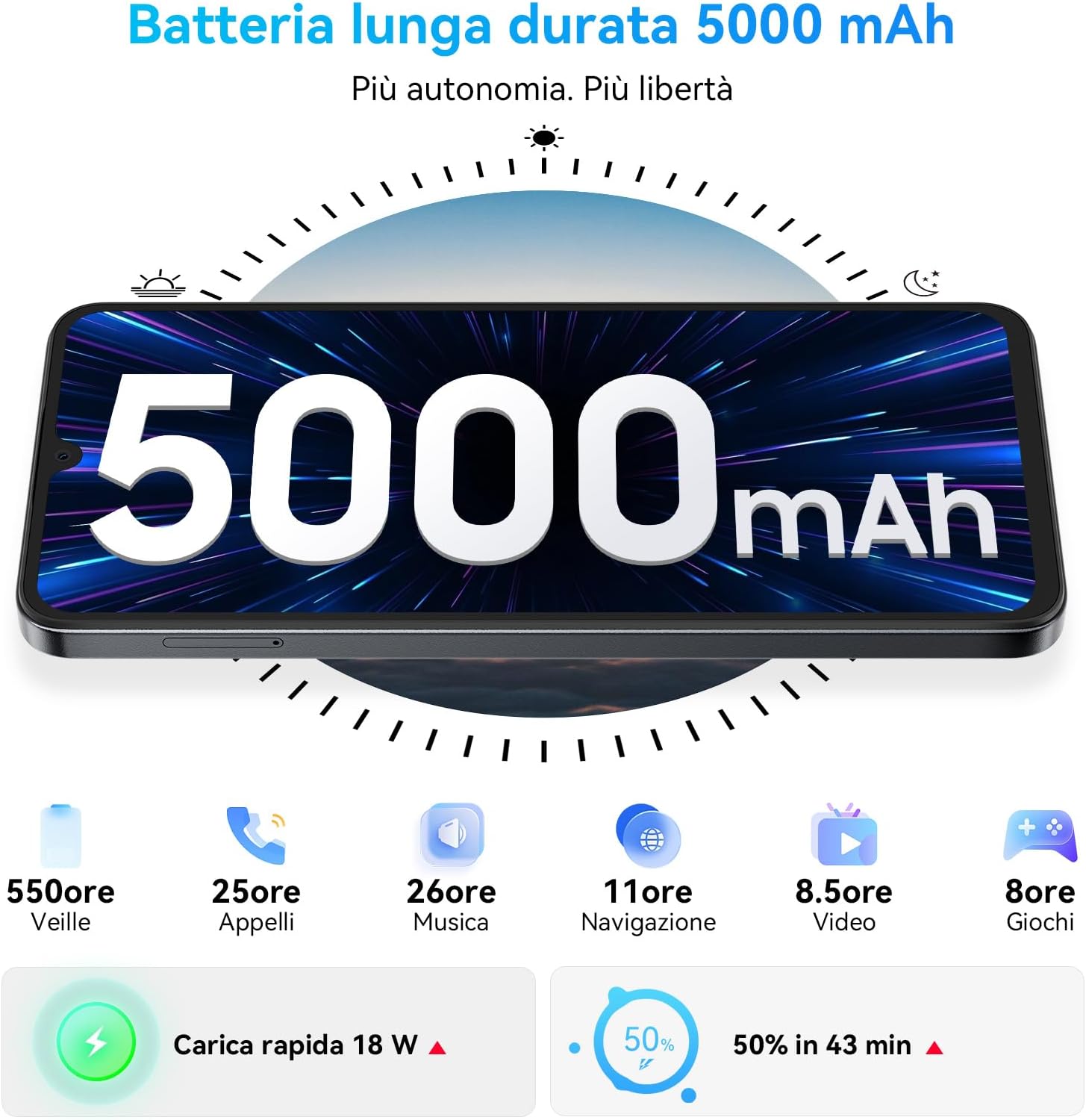
Image: 5000mAh long-lasting battery with 18W fast charging.
4.6 Connectivity and Security
The OSCAL Tiger 8 offers robust connectivity and security features. It supports 5G dual SIM functionality, NFC for convenient contactless payments and data sharing, and OTG for connecting external USB devices. For navigation, it utilizes GPS, GLONASS, Beidou, and Galileo. Security options include a side-mounted fingerprint sensor and facial recognition for quick and secure unlocking.

Image: Connectivity and security features including NFC, Dual SIM, GPS, Fingerprint, and Face Unlock.
5. నిర్వహణ మరియు సంరక్షణ
Proper maintenance ensures the longevity and optimal performance of your OSCAL Tiger 8 Smartphone.
- శుభ్రపరచడం: పరికరం యొక్క స్క్రీన్ మరియు బాడీని శుభ్రం చేయడానికి మృదువైన, మెత్తటి బట్టను ఉపయోగించండి. కఠినమైన రసాయనాలు లేదా రాపిడి పదార్థాలను ఉపయోగించకుండా ఉండండి.
- ఉష్ణోగ్రత: Avoid exposing your phone to extreme temperatures (very hot or very cold) as this can affect battery life and internal components.
- నీటి బహిర్గతం: The device is not waterproof. Avoid contact with water or other liquids.
- సాఫ్ట్వేర్ అప్డేట్లు: తాజా ఫీచర్లు, భద్రతా ప్యాచ్లు మరియు పనితీరు మెరుగుదలల నుండి ప్రయోజనం పొందడానికి సాఫ్ట్వేర్ నవీకరణలను క్రమం తప్పకుండా తనిఖీ చేసి, ఇన్స్టాల్ చేయండి.
- నిల్వ: Do not overfill your device's storage. Periodically clear unnecessary files and app caches to maintain smooth operation.
6. ట్రబుల్షూటింగ్
If you encounter issues with your OSCAL Tiger 8, try the following basic troubleshooting steps:
- పరికరం స్పందించడం లేదు: If the device freezes or becomes unresponsive, press and hold the Power button for approximately 10-15 seconds to force a restart.
- Apps Crashing or Slow: Try clearing the cache of the problematic application via Settings > Apps > [App Name] > Storage > Clear Cache. If the issue persists, consider reinstalling the app or ensuring your device software is up to date.
- బ్యాటరీ త్వరగా ఆరిపోతుంది: Check background app usage in Settings > Battery. Reduce screen brightness, disable unnecessary features like GPS, Bluetooth, or Wi-Fi when not in use. Consider using power-saving modes.
- Connectivity Issues (Wi-Fi/Mobile Data): Restart your device. Toggle Wi-Fi or mobile data off and on. If problems persist, try resetting network settings via Settings > System > Reset options > Reset Wi-Fi, mobile & Bluetooth.
- ఫింగర్ ప్రింట్ సెన్సార్ పనిచేయకపోవడం: మీ వేలు శుభ్రంగా మరియు పొడిగా ఉందని నిర్ధారించుకోండి. సెట్టింగ్లు > భద్రత > వేలిముద్రలో మీ వేలిముద్రలను తిరిగి నమోదు చేయండి.
- పేలవమైన కాల్ నాణ్యత: Check your network signal strength. Ensure nothing is obstructing the microphone or speaker. Try restarting the device.
7. స్పెసిఫికేషన్లు
Key technical specifications for the OSCAL Tiger 8 Smartphone 5G.
| ఫీచర్ | స్పెసిఫికేషన్ |
|---|---|
| బ్రాండ్ | OSCAL |
| మోడల్ పేరు | OSCAL Smartphone 5G (Tiger 8) |
| ఆపరేటింగ్ సిస్టమ్ | ఆండ్రాయిడ్ 15 |
| ప్రాసెసర్ | Unisoc T8100 Octa-Core (2.2 GHz) |
| RAM | 12 GB (4GB భౌతిక + 8GB వర్చువల్) |
| అంతర్గత నిల్వ | 128 GB |
| విస్తరించదగిన నిల్వ | 2 TB వరకు (మైక్రో SD) |
| ప్రదర్శన పరిమాణం | 6.88 అంగుళాలు |
| డిస్ప్లే రిజల్యూషన్ | 720 x 1640 పిక్సెల్లు (HD+) |
| రిఫ్రెష్ రేట్ | 120 Hz |
| ప్రధాన కెమెరా | 16 ఎంపీ |
| ఫ్రంట్ కెమెరా | 8 ఎంపీ |
| వీడియో రిజల్యూషన్ | 4K |
| బ్యాటరీ కెపాసిటీ | 5000 mAh |
| ఛార్జింగ్ | 18W ఫాస్ట్ ఛార్జింగ్ |
| కనెక్టివిటీ | 5G, WLAN, Bluetooth, USB, NFC |
| నావిగేషన్ | GPS, గ్లోనాస్, బీడౌ, గెలీలియో |
| భద్రత | Fingerprint Sensor, Facial Recognition |
| కొలతలు | 18 x 7 x 1.3 సెం.మీ |
| బరువు | 100 గ్రా |
8. వారంటీ మరియు మద్దతు
OSCAL is committed to providing high-quality products and excellent customer service. Your OSCAL Tiger 8 Smartphone 5G comes with comprehensive support.
- వారంటీ: Enjoy a 2-year warranty from the date of purchase.
- సాంకేతిక మద్దతు: Lifetime technical support is available for your device.
- కస్టమర్ సేవ: Our customer service team is available 24/7 to assist you with any questions or issues.
For assistance, please refer to the contact information provided with your purchase or visit the official OSCAL support webసైట్.


Image: OSCAL's commitment to customer service and warranty.


