1. పరిచయం
This manual provides essential instructions for the setup, operation, and maintenance of your CHIQ L43QST 43-inch Full HD QLED Google Smart TV. Please read this manual thoroughly before using your television and retain it for future reference. Following these instructions will ensure proper use and extend the lifespan of your device.
2. భద్రతా సమాచారం
విద్యుత్ షాక్, అగ్ని లేదా గాయం ప్రమాదాన్ని తగ్గించడానికి, ఎల్లప్పుడూ ఈ క్రింది భద్రతా జాగ్రత్తలను పాటించండి:
- వర్షం లేదా తేమకు టీవీని బహిర్గతం చేయవద్దు.
- టీవీ తెరవవద్దు casing; అన్ని సర్వీసింగ్లను అర్హత కలిగిన సిబ్బందికి సూచించండి.
- టీవీ చుట్టూ సరైన వెంటిలేషన్ ఉండేలా చూసుకోండి. వెంటిలేషన్ ఓపెనింగ్లను బ్లాక్ చేయవద్దు.
- టీవీ పడిపోకుండా ఉండటానికి స్థిరమైన, స్థాయి ఉపరితలంపై ఉంచండి.
- మెరుపు తుఫానుల సమయంలో లేదా ఎక్కువసేపు ఉపయోగించనప్పుడు టీవీని పవర్ అవుట్లెట్ నుండి అన్ప్లగ్ చేయండి.
- చిన్న భాగాలు మరియు బ్యాటరీలను పిల్లలకు అందుబాటులో లేకుండా ఉంచండి.
3. ప్యాకేజీ విషయాలు
ప్యాకేజింగ్లో అన్ని వస్తువులు ఉన్నాయని నిర్ధారించుకోండి:
- CHIQ L43QST 43-inch Smart TV
- Remote Control (requires 2 AAA batteries, not always included)
- టీవీ స్టాండ్ (అసెంబ్లీ అవసరం)
- Wall Mount Components (for optional wall mounting)
- పవర్ కేబుల్
- వినియోగదారు మాన్యువల్ (ఈ పత్రం)

ఒక ఫ్రంట్ view of the CHIQ L43QST 43-inch Smart TV, showcasing దీని సన్నని బెజెల్ డిజైన్.
4. సెటప్
4.1. Stand Assembly or Wall Mounting
స్టాండ్ అసెంబ్లీ: Carefully place the TV screen-down on a soft, clean surface. Attach the provided stand components to the designated slots on the bottom of the TV using the screws included. Ensure the stand is securely fastened.
వాల్ మౌంటు: If you intend to wall mount the TV, refer to the instructions provided with your wall mount kit. Ensure the wall mount is compatible with the TV's VESA mounting pattern and that the wall can support the TV's weight. Professional installation is recommended for wall mounting.
4.2. పరికరాలను కనెక్ట్ చేస్తోంది
Your CHIQ L43QST TV offers various connectivity options:
- HDMI పోర్ట్లు: బ్లూ-రే ప్లేయర్లు, గేమ్ కన్సోల్లు లేదా సెట్-టాప్ బాక్స్లు వంటి బాహ్య పరికరాలను కనెక్ట్ చేయండి.
- USB పోర్ట్లు: Insert USB drives for media playback (photos, videos, music).
- ఈథర్నెట్ పోర్ట్: స్థిరమైన వైర్డు ఇంటర్నెట్ కనెక్షన్ కోసం.
- Wi-Fi: ఇంటర్నెట్ యాక్సెస్ కోసం మీ ఇంటి వైర్లెస్ నెట్వర్క్కి కనెక్ట్ అవ్వండి.
- బ్లూటూత్: Pair wireless headphones, soundbars, or other compatible accessories.
4.3. ప్రారంభ పవర్ ఆన్ మరియు Google TV సెటప్
After connecting the power cable and any desired devices, press the power button on the TV or remote control. Follow the on-screen instructions to complete the initial setup, including language selection, network connection, and Google account sign-in for Google TV features.
5. ఆపరేటింగ్ సూచనలు
5.1. గూగుల్ టీవీ ఇంటర్ఫేస్
Navigate the Google TV interface using your remote control. The home screen provides access to streaming apps, live TV, and personalized content recommendations. Use the directional pad and 'OK' button to select items.
5.2 కీ ఫీచర్లు
- QLED టెక్నాలజీ: Experience vibrant and accurate colors due to the Quantum Dot film, enhancing the purity of the backlight.
- పూర్తి HD రిజల్యూషన్ (1920 x 1080): Enjoy clear and sharp images with a resolution higher than standard HD.
- HDR10 మద్దతు: Benefit from improved contrast and finer details in both bright and dark scenes, providing a more realistic viewing అనుభవం.
- డాల్బీ ఆడియో: The integrated professional audio decoding technology enhances stereo and surround sound, delivering clear, powerful, and rich audio.
- Chromecast అంతర్నిర్మిత: మీ ఫోన్ లేదా టాబ్లెట్ నుండి నేరుగా మీ టీవీకి సినిమాలు, షోలు, ఫోటోలు మరియు మరిన్నింటిని సులభంగా ప్రసారం చేయండి.
- Smart Voice Recognition: Use voice commands through the remote control for convenient navigation and content search.
- తల్లిదండ్రుల నియంత్రణ: Manage and restrict access to certain content or applications for younger viewERS.
- DLNA: Share media content from compatible devices on your home network directly to your TV.
6. నిర్వహణ
మీ టీవీ పనితీరు మరియు రూపాన్ని నిర్వహించడానికి:
- స్క్రీన్ క్లీనింగ్: మెత్తటి, మెత్తటి బట్టతో స్క్రీన్ను సున్నితంగా తుడవండి. మొండి మరకల కోసం, కొద్దిగా dampనీటితో లేదా ప్రత్యేక స్క్రీన్ క్లీనర్తో వస్త్రాన్ని తుడవండి. స్క్రీన్పై నేరుగా ద్రవాన్ని పిచికారీ చేయవద్దు.
- సి ని శుభ్రపరచడంasing: టీవీని తుడవడానికి మృదువైన, పొడి వస్త్రాన్ని ఉపయోగించండి casing. రాపిడి క్లీనర్లు లేదా ద్రావకాలను నివారించండి.
- వెంటిలేషన్: టీవీ వెనుక భాగంలో ఉన్న వెంటిలేషన్ ఓపెనింగ్లు దుమ్ము లేదా వస్తువులతో మూసుకుపోకుండా చూసుకోండి.
- పవర్ ఆఫ్: Always turn off and unplug the TV before cleaning or performing any maintenance.
7. ట్రబుల్షూటింగ్
మీ టీవీలో మీకు సమస్యలు ఎదురైతే, ఈ క్రింది సాధారణ పరిష్కారాలను చూడండి:
| సమస్య | సాధ్యమైన పరిష్కారం |
|---|---|
| పవర్ లేదు | పవర్ కేబుల్ టీవీకి మరియు వాల్ అవుట్లెట్కి సురక్షితంగా ప్లగ్ చేయబడిందో లేదో తనిఖీ చేయండి. వేరే అవుట్లెట్ని ప్రయత్నించండి. |
| చిత్రం/ధ్వని లేదు | సరైన ఇన్పుట్ సోర్స్ ఎంచుకోబడిందని నిర్ధారించుకోండి. బాహ్య పరికరాలకు కేబుల్ కనెక్షన్లను తనిఖీ చేయండి. |
| రిమోట్ కంట్రోల్ పనిచేయడం లేదు | బ్యాటరీలను (2 AAA) మార్చండి. రిమోట్ మరియు టీవీ యొక్క IR సెన్సార్ మధ్య ఎటువంటి అడ్డంకులు లేవని నిర్ధారించుకోండి. |
| నెట్వర్క్ కనెక్షన్ సమస్యలు | Restart your router and modem. Check Wi-Fi password. For wired connections, ensure the Ethernet cable is properly connected. |
| చిత్ర నాణ్యత సమస్యలు | చిత్ర సెట్టింగ్లను (ప్రకాశం, కాంట్రాస్ట్, రంగు) సర్దుబాటు చేయండి. కంటెంట్ మూలం అధిక నాణ్యతతో ఉందని నిర్ధారించుకోండి. |
8. స్పెసిఫికేషన్లు
| ఫీచర్ | వివరాలు |
|---|---|
| బ్రాండ్ | CHIQ |
| మోడల్ సంఖ్య | L43QST |
| స్క్రీన్ పరిమాణం | 43 అంగుళాలు (108 సెం.మీ.) |
| ప్రదర్శన సాంకేతికత | QLED, LED |
| రిజల్యూషన్ | పూర్తి HD (1920 x 1080p) |
| రిఫ్రెష్ రేట్ | 60 Hz |
| ఆపరేటింగ్ సిస్టమ్ | Android, Google TV |
| కనెక్టివిటీ | బ్లూటూత్, ఈథర్నెట్, HDMI, USB, Wi-Fi |
| ప్రత్యేక లక్షణాలు | Chromecast, Parental Control, DLNA, Smart Voice Recognition |
| ఆడియో టెక్నాలజీ | డాల్బీ ఆడియో |
| HDR మద్దతు | HDR10 |
| ఎనర్జీ ఎఫిషియెన్సీ క్లాస్ | E |
| విద్యుత్ వినియోగం (SDR) | 42 kWh/1000h |
| విద్యుత్ వినియోగం (HDR) | 42 kWh/1000h |
| ఉత్పత్తి కొలతలు (DxWxH) | 20P x 95lx 58.3H సెం.మీ. |
| కారక నిష్పత్తి | 16:9 |
| రిమోట్ కంట్రోల్ బ్యాటరీలు | 2 AAA (not always included) |
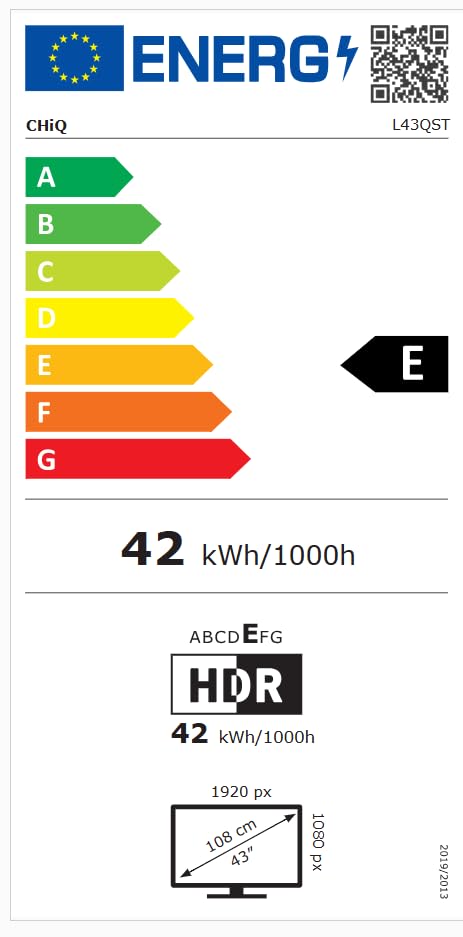
The EU energy efficiency label for the CHIQ L43QST television, indicating an energy class E and a consumption of 42 kWh per 1000 hours for both standard and HDR modes. It also shows the screen resolution as 1920x1080 pixels and a diagonal size of 43 inches (108 cm). For more details, visit the EPREL డేటాబేస్.
9. వారంటీ మరియు మద్దతు
For detailed warranty information, please refer to the warranty card included with your product or visit the official CHiQ website. For technical support or service inquiries, please contact CHiQ customer service through their official channels.


