పరిచయం
This manual provides essential instructions for the safe operation and maintenance of your Ameta S20 4K GPS Drone. Please read this manual thoroughly before operating the drone to ensure proper function and to prevent damage or injury. The Ameta S20 is a lightweight drone equipped with a 4K camera, GPS positioning, and intelligent flight modes, designed for both beginners and experienced users.
ఉత్పత్తి ముగిసిందిview
ప్యాకేజీ విషయాలు
The Ameta S20 package includes the following items:
- Ameta S20 Drone
- Remote Control with WiFi
- 2 x Standard Batteries
- విడి ప్రొపెల్లర్లు
- ఛార్జింగ్ కేబుల్
- స్క్రూడ్రైవర్
- వినియోగదారు మాన్యువల్ (ఈ పత్రం)
- త్వరిత ప్రారంభ గైడ్
- క్యారీయింగ్ కేసు
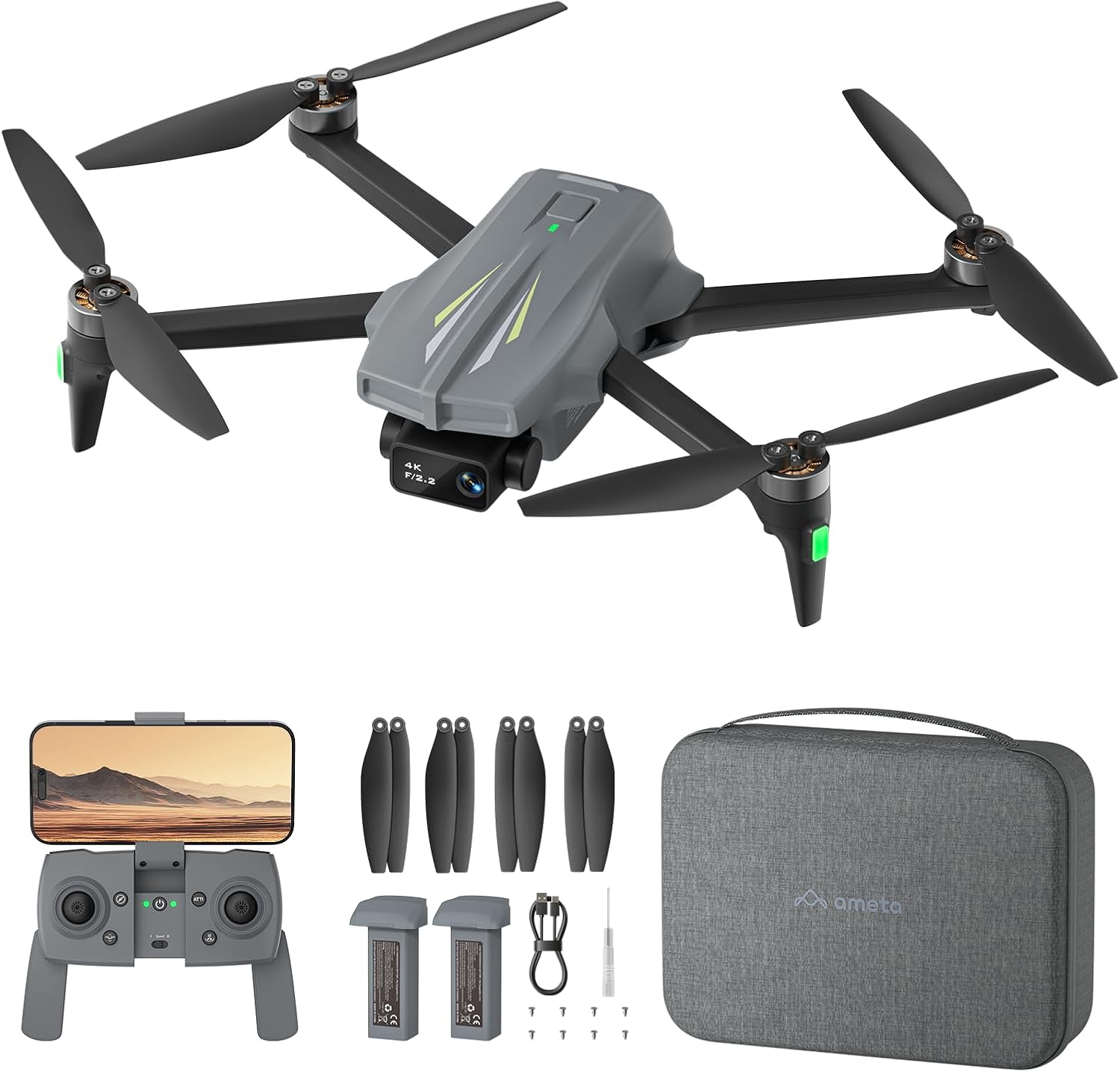
Image: Ameta S20 Drone, remote control, two batteries, spare propellers, charging cable, screwdriver, and carrying case.
కీ ఫీచర్లు
- 4K UHD Camera: Captures high-resolution photos (3840 x 2160 pixels) and videos (1920 x 1080 @30fps) with a 90° adjustable lens and IMX175 sensor.
- 5G వైఫై ట్రాన్స్మిషన్: Provides stable and real-time FPV (First Person View) up to 300m.
- GPS స్థాన నిర్ధారణ: Ensures stable flight and enables intelligent return-to-home functions.
- పొడిగించిన విమాన సమయం: Two 3000 mAh modular batteries offer up to 50 minutes of total flight time (25 minutes per battery).
- ప్రారంభకులకు అనుకూలమైనది: Features like one-click takeoff/landing, altitude hold, and beginner mode simplify operation.
- ఇంటెలిజెంట్ ఫ్లైట్ మోడ్లు: Includes Waypoint Flight, GPS Follow, Circle Fly, Rocket, Far, Panorama, Time-lapse, and Gesture Selfie for creative capture.
- తేలికపాటి డిజైన్: Weighs less than 249g, qualifying for Class C0 certification in many regions, reducing regulatory requirements.
- బ్రష్లెస్ మోటార్లు: Offers increased power, quieter operation, and enhanced stability.

Image: Close-up of the Ameta S20 drone's 4K UHD camera with 90-degree adjustable angle.
సెటప్
1. బ్యాటరీ ఛార్జింగ్ మరియు ఇన్స్టాలేషన్
- Ensure the drone and remote control are powered off.
- Connect the charging cable to the drone battery and a suitable USB power adapter (not included).
- Charge the batteries until the indicator lights show a full charge.
- Insert the charged battery into the drone's battery compartment, ensuring it clicks securely into place.
- Insert batteries into the remote control as per its specific instructions.

Image: The Ameta S20 drone with its battery compartment open, showing battery installation.
2. Propeller Installation (if required)
ప్రొపెల్లర్లు ముందే ఇన్స్టాల్ చేయకపోతే, ప్రొపెల్లర్లు మరియు మోటార్ ఆర్మ్లపై ఉన్న గుర్తులు (A మరియు B) ప్రకారం వాటిని అటాచ్ చేయండి. వాటిని గట్టిగా భద్రపరచడానికి అందించిన స్క్రూడ్రైవర్ను ఉపయోగించండి.
3. Remote Control and App Pairing
- Power on the drone, then power on the remote control.
- Wait for the drone and remote control to automatically pair. Indicator lights will confirm successful pairing.
- Download the official Ameta drone application from your device's app store.
- Connect your smartphone to the drone's Wi-Fi network (usually named "Ameta-S20-XXXX").
- Open the Ameta app to establish a connection and view ప్రత్యక్ష కెమెరా ఫీడ్.
ఆపరేటింగ్ సూచనలు
ప్రీ-ఫ్లైట్ చెక్లిస్ట్
- Ensure batteries are fully charged in both drone and remote control.
- Check that propellers are correctly installed and free from damage.
- Verify that the drone is placed on a flat, open surface.
- Confirm a strong GPS signal before flying (indicated by the app or drone lights).
- Check local regulations for drone operation.
ప్రాథమిక విమాన నియంత్రణలు
- ఒక-క్లిక్ టేకాఫ్/ల్యాండింగ్: Press the designated button on the remote control or in the app to automatically take off or land.
- ఎత్తు హోల్డ్: The drone maintains a stable altitude automatically, simplifying flight control.
- స్పీడ్ మోడ్లు: Select between two speed modes (Beginner/Normal) for varying flight responsiveness.

Image: The Ameta S20 drone performing an automatic one-click takeoff.
Intelligent Flight Modes (GPS Required)
These modes require an active GPS signal for optimal performance.
- ఇంటికి తిరిగి వెళ్ళు (RTH): The drone automatically returns to its takeoff point when activated, or in cases of low battery or signal loss.
- వే పాయింట్ ఫ్లైట్: Plan a flight path by setting multiple waypoints on the app's map. The drone will follow this pre-defined route.
- సర్కిల్ ఫ్లై: The drone orbits around a designated point, capturing smooth, dynamic footage.
- GPS Follow: The drone tracks your smartphone's GPS, following your movements automatically.
- రాకెట్: The drone ascends vertically while recording.
- దురముగా: The drone flies away from the user while recording.
- పనోరమా: Captures multiple images to stitch into a panoramic photo.
- సమయం ముగిసిపోయింది: Records a series of photos over time to create a time-lapse video.
- సంజ్ఞ సెల్ఫీ: ఫోటో లేదా వీడియో రికార్డింగ్ను ట్రిగ్గర్ చేయడానికి నిర్దిష్ట చేతి సంజ్ఞలను ఉపయోగించండి.

Image: The Ameta S20 drone initiating its automatic Return to Home function, flying back to its starting point.
కెమెరా ఆపరేషన్
- ఫోటో/వీడియో క్యాప్చర్: Use the dedicated buttons on the remote control or within the app to take photos or start/stop video recording.
- సర్దుబాటు చేయగల లెన్స్: The camera lens can be adjusted by 90° via the remote control or app to capture different angles.
- FPV View: The 5G WiFi transmission provides a live feed to your smartphone for real-time viewఇంగ్ మరియు ఫ్రేమింగ్.
నిర్వహణ
క్లీనింగ్
Regularly clean the drone body, camera lens, and motors with a soft, dry cloth. Avoid using liquids or solvents that could damage components.
ప్రొపెల్లర్ ప్రత్యామ్నాయం
Inspect propellers for cracks or damage before each flight. If a propeller is damaged, replace it immediately using the provided spare propellers and screwdriver. Ensure the correct 'A' and 'B' propellers are installed on the corresponding motor arms.
బ్యాటరీ సంరక్షణ
Store batteries in a cool, dry place. Do not overcharge or fully discharge batteries. If storing for extended periods, charge them to approximately 50-60% capacity.
ట్రబుల్షూటింగ్
| సమస్య | సాధ్యమైన కారణం | పరిష్కారం |
|---|---|---|
| డ్రోన్ పవర్ ఆన్ చేయదు. | తక్కువ లేదా ఛార్జ్ చేయని బ్యాటరీ; సరిగ్గా ఇన్స్టాల్ చేయని బ్యాటరీ. | Charge the battery fully. Ensure the battery is correctly inserted and secured. |
| రిమోట్ కంట్రోల్ డ్రోన్కి కనెక్ట్ అవ్వదు. | Drone or remote not powered on; pairing failed; interference. | Ensure both devices are on. Re-attempt pairing process. Move to an area with less interference. |
| Poor camera feed or no FPV. | Weak Wi-Fi signal; incorrect Wi-Fi connection; app not open. | Ensure phone is connected to the drone's Wi-Fi. Move closer to the drone. Restart the app and drone. |
| ఎగురుతున్నప్పుడు డ్రోన్ కదులుతుంది. | Improper calibration; strong winds; weak GPS signal. | Perform IMU and compass calibration. Fly in calm weather. Ensure strong GPS signal. |
| Return to Home (RTH) not working correctly. | Weak or no GPS signal; RTH point not set. | Ensure a strong GPS signal before takeoff. The RTH point is usually the takeoff location. |
స్పెసిఫికేషన్లు
| ఫీచర్ | వివరాలు |
|---|---|
| మోడల్ పేరు | DR-ATS22G (Ameta S20) |
| బరువు | 185 g (Less than 249g, Class C0 certified) |
| కొలతలు (మడత) | 13.5 x 8 x 5 సెం.మీ (సుమారుగా) |
| కొలతలు (విప్పబడినవి) | 33 x 28 x 5 సెం.మీ (సుమారుగా) |
| కెమెరా రిజల్యూషన్ (ఫోటో) | 4K (3840 x 2160 Pixels) |
| Camera Resolution (Video) | 1920 x 1080 @30fps |
| కెమెరా సెన్సార్ | IMX175 |
| లెన్స్ సర్దుబాటు | 90° సర్దుబాటు |
| కనెక్టివిటీ | 5G వైఫై |
| విమాన సమయం | Up to 50 minutes (with 2 batteries, 25 mins each) |
| బ్యాటరీ రకం | Non-standard battery (3000 mAh modular) |
| ప్రత్యేక లక్షణాలు | Automatic Landing, Integrated GPS, One-Button Return, Automatic Tracking, Extended Flight Time |
| వయస్సు పరిధి | Child, Adult |

Image: Diagram showing the folded and unfolded dimensions of the Ameta S20 drone.
భద్రతా మార్గదర్శకాలు
- స్థానిక నిబంధనలు: Always consult and comply with local drone flying laws and regulations before operation. The Ameta S20 is Class C0 certified, meaning it weighs less than 249g, which may exempt it from certain registration requirements in some regions.
- విమాన పర్యావరణం: Fly in open areas, away from people, animals, buildings, and obstacles. Avoid flying near airports or restricted airspace.
- వాతావరణ పరిస్థితులు: Do not fly in strong winds, rain, snow, or fog. Optimal flight conditions are calm and clear.
- దృష్టి రేఖను: ఎగురుతున్నప్పుడు మీ డ్రోన్తో ఎల్లప్పుడూ దృశ్యమాన రేఖను నిర్వహించండి.
- బ్యాటరీ భద్రత: Use only original or approved batteries and chargers. Do not puncture, drop, or short-circuit batteries.
- ప్రొపెల్లర్ భద్రత: Keep hands and face clear of rotating propellers. Ensure propellers are securely attached before flight.
- అత్యవసర విధానాలు: Familiarize yourself with the Return to Home function for emergency situations.

Image: A person holding the Ameta S20 drone, demonstrating its compact and lightweight design, which is under 249g.
వారంటీ మరియు మద్దతు
For warranty information, technical support, or service inquiries, please refer to the contact details provided in your product packaging or visit the official Ameta webవారంటీ క్లెయిమ్ల కోసం కొనుగోలు రుజువుగా మీ కొనుగోలు రసీదును ఉంచండి.
For further assistance, you may contact Ameta customer service through their official channels.


