1. పరిచయం
This manual provides detailed instructions for the installation, operation, and maintenance of your AINAVI 9-inch Touchscreen Car Stereo Radio. This unit is designed specifically for Honda Civic models manufactured between 2001 and 2005, offering advanced features such as Wireless CarPlay, Android Auto, Bluetooth, GPS Navigation, and support for an HD backup camera. Please read this manual thoroughly before installation and use to ensure proper function and safety.
2. భద్రతా సమాచారం
- ప్రొఫెషనల్ ఇన్స్టాలేషన్ సిఫార్సు చేయబడింది: Installation of car electronics can be complex. It is recommended to have this unit installed by a qualified professional to prevent damage to the product or your vehicle.
- పవర్ డిస్కనెక్ట్: ఏదైనా విద్యుత్ సంస్థాపన పనిని ప్రారంభించే ముందు ఎల్లప్పుడూ వాహనం యొక్క బ్యాటరీని డిస్కనెక్ట్ చేయండి.
- వైరింగ్: షార్ట్ సర్క్యూట్లను నివారించడానికి అన్ని వైరింగ్ కనెక్షన్లు సురక్షితంగా మరియు సరిగ్గా ఇన్సులేట్ చేయబడి ఉన్నాయని నిర్ధారించుకోండి.
- డ్రైవింగ్ భద్రత: Do not operate the unit's advanced features or watch videos that may distract you while driving. Always prioritize road safety.
- వెంటిలేషన్: Ensure the unit has adequate ventilation to prevent overheating.
3. ప్యాకేజీ విషయాలు
క్రింద జాబితా చేయబడిన అన్ని వస్తువులు మీ ప్యాకేజీలో చేర్చబడ్డాయని ధృవీకరించండి:
- Car Stereo Radio Head Unit (1280*720) with Frame for Honda Civic (2001-2005)
- పవర్ కేబుల్ (x1)
- RCA కేబుల్ (x1)
- బాహ్య మైక్రోఫోన్ (x1)
- GPS Module (x1)
- USB Cable (4Pin x1, 6Pin x1)
- Reversing Control Cable (x1)
- AHD 1080P Rear View కెమెరా (x1)
- Frame Removal Tool (x1)
- వినియోగదారు మాన్యువల్ (x1)

4. సెటప్ మరియు ఇన్స్టాలేషన్
The AINAVI Car Stereo is designed for a plug-and-play installation in compatible Honda Civic models (2001-2005). An installation guide is included in the package for detailed steps.
4.1. Unit Assembly
Carefully insert the 9-inch head unit into the provided custom frame. Ensure it clicks securely into place. The frame is designed to integrate seamlessly with your Honda Civic's dashboard.

4.2. వైరింగ్ కనెక్షన్లు
Connect the power cables, RCA cables, USB cables, external microphone, and GPS module to the corresponding ports on the back of the head unit. Refer to the included installation guide for specific wiring diagrams for your vehicle model.

4.3. Backup Camera Installation
Install the AHD 1080P rear view camera at the rear of your vehicle. Connect the camera's video output to the backup camera video input cable, and connect the power wires to the vehicle's reverse light circuit. This ensures the camera activates automatically when the vehicle is in reverse.

4.4. Visual Comparison
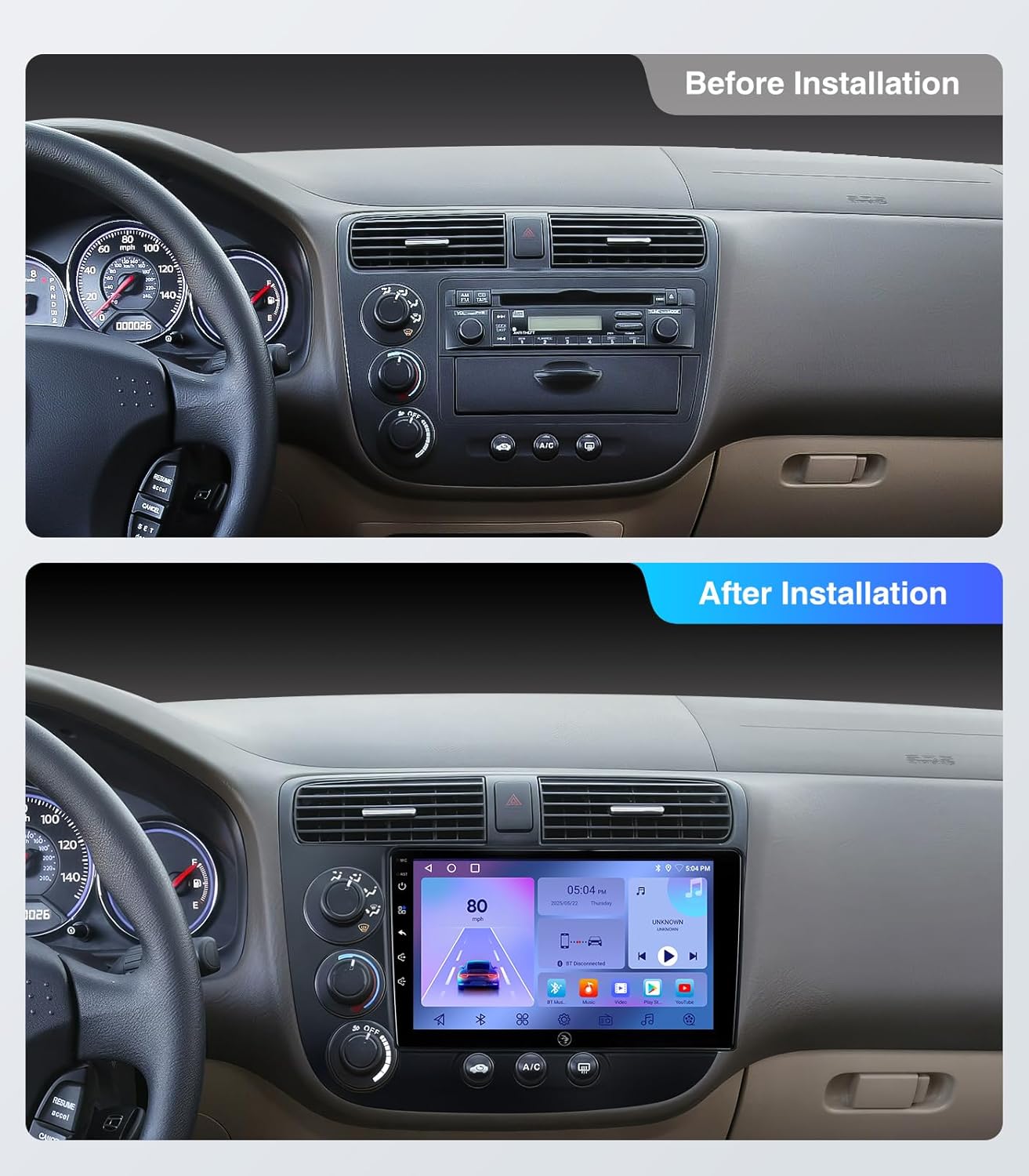
4.5. సంస్థాపన ముగిసిందిview వీడియో
For a visual guide on the installation process and product overview, please refer to the video below:
5. ఆపరేటింగ్ సూచనలు
5.1. పవర్ ఆన్/ఆఫ్ మరియు ప్రాథమిక నియంత్రణలు
Press the power button on the unit to turn it on or off. Adjust volume using the on-screen controls or compatible steering wheel controls. The touchscreen interface allows for intuitive navigation through menus and applications.
5.2. Wireless CarPlay and Android Auto
Connect your compatible smartphone wirelessly to access CarPlay or Android Auto. This allows for hands-free navigation, music playback, messaging, and voice commands directly through the car stereo interface.

5.3. GPS నావిగేషన్
Utilize the built-in GPS module for accurate navigation. The unit supports online and offline maps, offering 2D and 3D perspectives. Voice guidance and real-time traffic updates are available through compatible navigation applications.

5.4. బ్లూటూత్ కనెక్టివిటీ
Pair your mobile device via Bluetooth for hands-free calling and audio streaming. The external microphone ensures clear call quality. Access your phone's contacts and call history directly from the stereo.

5.5. 5G WiFi Hotspot
Connect to a 5G WiFi hotspot for faster internet access, enabling smooth streaming of online content and real-time updates for navigation and applications.

5.6. Audio Settings (DSP/EQ)
Customize your audio experience with the 48-band Equalizer (EQ) and Digital Sound Processor (DSP). Adjust sound profiles (Normal, Jazz, Pop, Classical, Heavy Metal, Vocal, Soft), surround sound patterns, bass boost, and individual speaker volumes to optimize sound quality for your vehicle's interior.

5.7. Split Screen and Screen Mirroring
The unit supports split-screen functionality, allowing you to run two applications simultaneously (e.g., navigation and music). Screen mirroring enables you to display your smartphone's screen directly on the car stereo.

6. నిర్వహణ
- స్క్రీన్ క్లీనింగ్: Use a soft, lint-free cloth to gently wipe the touchscreen. Avoid abrasive cleaners or solvents that may damage the display.
- సాఫ్ట్వేర్ అప్డేట్లు: Periodically check for software updates to ensure optimal performance and access to new features. Updates can typically be downloaded via WiFi.
- ఉష్ణోగ్రత: యూనిట్ను ఎక్కువసేపు వేడి మరియు చలి రెండింటిలోనూ తీవ్రమైన ఉష్ణోగ్రతలకు గురిచేయకుండా ఉండండి.
7. ట్రబుల్షూటింగ్
This section addresses common issues you might encounter. For more complex problems, please contact customer support.
| సమస్య | సాధ్యమైన కారణం | పరిష్కారం |
|---|---|---|
| యూనిట్ పవర్ ఆన్ చేయదు. | వదులుగా ఉన్న విద్యుత్ కనెక్షన్, ఫ్యూజ్ ఊడిపోవడం, వాహన బ్యాటరీ సమస్య. | Check all power cable connections. Inspect vehicle fuses. Ensure vehicle battery is charged. |
| సౌండ్ అవుట్పుట్ లేదు. | Volume too low, mute activated, incorrect audio settings, loose speaker wires. | Increase volume. Check if mute is active. Verify audio output settings. Inspect speaker wiring. |
| CarPlay/Android Auto కనెక్ట్ కావడం లేదు. | Bluetooth/WiFi off on phone, incompatible phone, software glitch. | Ensure Bluetooth and WiFi are enabled on your phone. Restart both phone and stereo. Check phone compatibility. |
| GPS సిగ్నల్ బలహీనంగా లేదా తప్పుగా ఉంది. | GPS antenna obstructed or improperly installed, environmental interference. | GPS యాంటెన్నా స్పష్టంగా ఉందని నిర్ధారించుకోండి view of the sky. Check antenna connection. Move vehicle to an open area. |
| బ్యాకప్ కెమెరా ప్రదర్శించబడటం లేదు. | Camera not powered, video cable loose, vehicle not in reverse. | Check camera power and video connections. Ensure vehicle is in reverse gear. |
8. స్పెసిఫికేషన్లు
Key technical specifications for the AINAVI 9-inch Touchscreen Car Stereo Radio:
| ఫీచర్ | వివరాలు |
|---|---|
| ప్రదర్శన పరిమాణం | 9 అంగుళాలు |
| ప్రదర్శన రకం | HD QLED Touchscreen (1280*720 resolution) |
| ఆపరేటింగ్ సిస్టమ్ | ఆండ్రాయిడ్ |
| ప్రాసెసర్ | 4-Core CPU, Dual-Core GPU |
| మెమరీ (RAM) | 2GB |
| నిల్వ (ROM) | 32GB |
| కనెక్టివిటీ | Bluetooth, USB, Wi-Fi (2.4GHz & 5GHz), Wired, Wireless |
| ప్రత్యేక లక్షణాలు | Android Auto, CarPlay, Touchscreen, RDS, Split Screen Function, 48-Band Equalizer, DSP, Siri Voice Control, Bluetooth Hands-Free Calling, Music Streaming, RCA, Screen Mirroring, Subwoofer Output, Spotify, Rear View కెమెరా ఇన్పుట్ |
| ఆడియో అవుట్పుట్ మోడ్ | సరౌండ్ స్టీరియో |
| మ్యాప్ రకం | ఉత్తర అమెరికా |
| మౌంటు రకం | డాష్బోర్డ్ మౌంట్ |
| వస్తువు బరువు | 4.09 పౌండ్లు |
| ప్యాకేజీ కొలతలు | 13.19 x 12.2 x 5.67 అంగుళాలు |

9. వారంటీ సమాచారం
This AINAVI Car Stereo Radio comes with a 12 నెలల తయారీదారు హామీ from the date of purchase. This warranty covers defects in materials and workmanship under normal use. Please retain your proof of purchase for warranty claims. The warranty does not cover damage caused by improper installation, accident, misuse, abuse, unauthorized modifications, or normal wear and tear.
10. మద్దతు మరియు సంప్రదింపు సమాచారం
For technical assistance, installation support, or any inquiries regarding your AINAVI product, please contact our customer support team:
- ఫోన్ మద్దతు: +1 (833) 858-5016 (పని వేళలు: మధ్యాహ్నం 01:00 నుండి ఉదయం 00:00 వరకు PST)
- ఇమెయిల్ మద్దతు: info@ainavi.com
- ఆన్లైన్ మద్దతు: You can also seek help via your order center on the platform where you purchased the product.
Our professional technical support team is available to assist you with installation and any operational questions.


