పరిచయం
Thank you for choosing the Jocoevol C-1665 Display Cabinet. This manual provides essential information for the safe assembly, operation, and maintenance of your new display cabinet. Please read these instructions thoroughly before beginning assembly or use to ensure proper function and longevity of the product.
భద్రతా సమాచారం
ముఖ్యమైన భద్రతా సూచనలు:
- గీతలు పడకుండా ఉండటానికి ఎల్లప్పుడూ మృదువైన, శుభ్రమైన ఉపరితలంపై క్యాబినెట్ను సమీకరించండి.
- అసెంబ్లీకి ముందు అన్ని భాగాలు ఉన్నాయని మరియు పాడైపోలేదని నిర్ధారించుకోండి. దెబ్బతిన్న భాగాలను ఉపయోగించవద్దు.
- Assembly requires two adults.
- స్క్రూలను ఎక్కువగా బిగించవద్దు, ఎందుకంటే ఇది పదార్థాన్ని దెబ్బతీస్తుంది.
- Place the cabinet on a level, stable surface to prevent tipping.
- క్యాబినెట్ పైకి ఎక్కవద్దు లేదా వేలాడదీయవద్దు.
- అసెంబ్లీ సమయంలో చిన్న భాగాలను పిల్లలకు దూరంగా ఉంచండి.
- Tempered glass is strong but can break if subjected to sharp impacts. Handle with care.
- Ensure electrical connections for RGB lighting are secure and follow local electrical codes.
ప్యాకేజీ విషయాలు
Before assembly, verify that all components are included in your package. Refer to the included parts list in your physical assembly guide for detailed identification.
- Cabinet panels (wood, glass)
- టెంపర్డ్ గాజు తలుపులు
- అల్మారాలు
- డ్రాయర్లు మరియు డ్రాయర్ స్లయిడ్లు
- RGB LED light strips
- Human body sensor module
- పవర్ అడాప్టర్
- Assembly hardware (screws, dowels, magnetic latches, etc.)
- యాంటీ టిప్ కిట్
- Instruction manual (physical copy)
సెటప్ మరియు అసెంబ్లీ
Assembly of the Jocoevol C-1665 Display Cabinet typically requires two people and takes approximately 40 minutes. Follow the numbered steps and diagrams provided in the separate physical assembly instructions included with your product. This section provides general guidance.
- అన్ప్యాక్ చేసి నిర్వహించండి: అన్ని భాగాలను జాగ్రత్తగా విప్పి, వాటిని మృదువైన, శుభ్రమైన ఉపరితలంపై వేయండి. సారూప్య భాగాలు మరియు హార్డ్వేర్లను సమూహపరచండి.
- ఫ్రేమ్ని సమీకరించండి: Begin by assembling the main frame of the cabinet using the provided panels and hardware. Ensure all connections are secure.
- షెల్ఫ్లను ఇన్స్టాల్ చేయండి: Insert the fixed and adjustable shelves into their designated positions. The upper shelf is removable and can be adjusted to accommodate items of varying heights.
- డ్రాయర్లను అసెంబుల్ చేయండి: Follow the instructions to assemble the two central drawers and install their slides into the cabinet frame.
- Attach Glass Doors: Carefully attach the tempered glass doors. Ensure the push-to-open magnetic latches are correctly aligned for smooth operation.
- RGB లైటింగ్ను ఇన్స్టాల్ చేయండి: Adhere the RGB LED light strips to each layer of the cabinet as indicated in the assembly guide. Connect them to the control module and power adapter.
- Mount Human Body Sensor: Install the human body sensor module in its designated location, typically on the right control panel.
- సురక్షిత క్యాబినెట్: For safety, attach the included anti-tip kit to the cabinet and a wall stud. This prevents accidental tipping.
- తుది తనిఖీ: Verify that all screws are tightened, and the cabinet is stable.
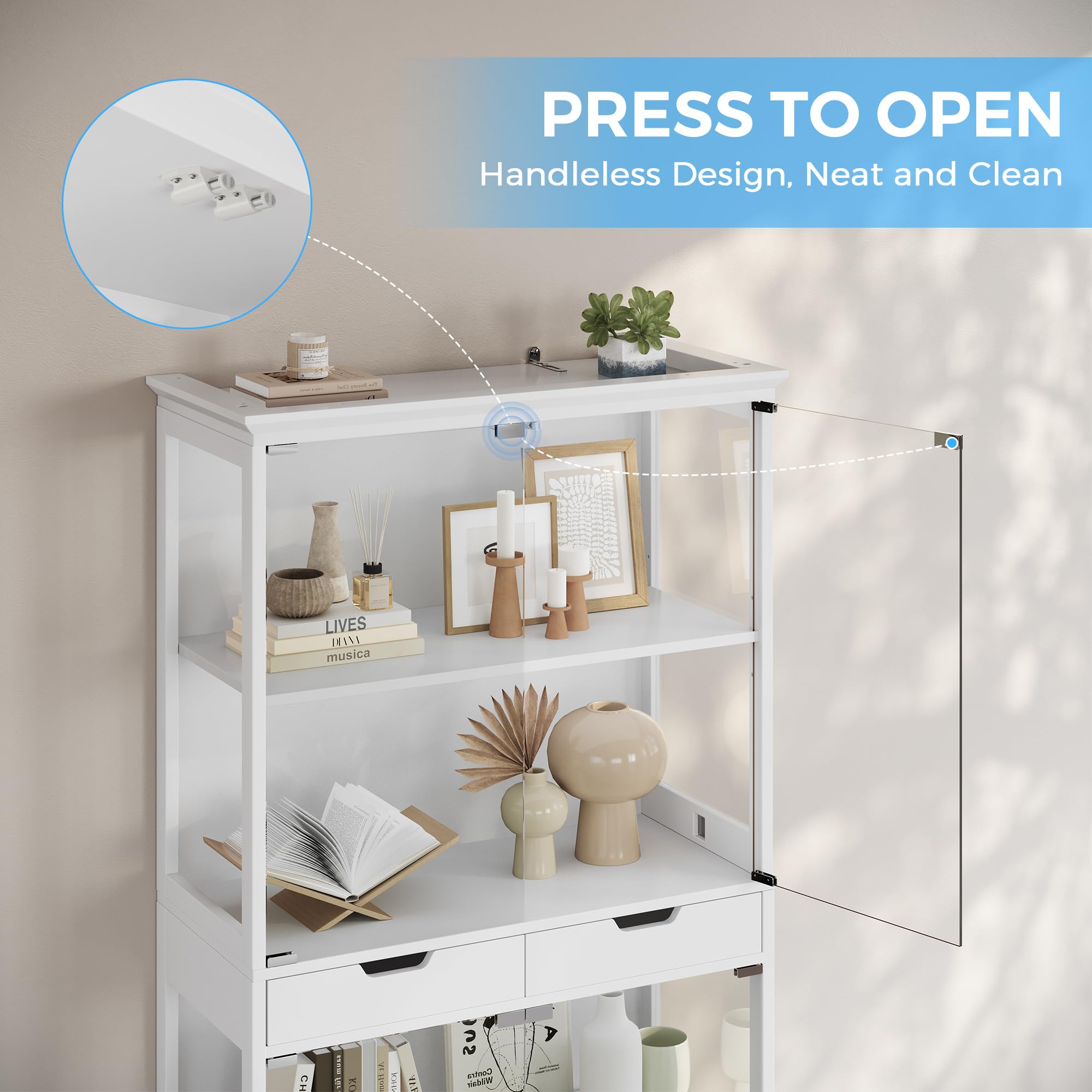
Image: The Jocoevol C-1665 Display Cabinet fully assembled, showcasing its glass doors and overall structure.
ఆపరేటింగ్ సూచనలు
Push-to-Open Glass Doors
The cabinet features a handle-free push-to-open mechanism for its tempered glass doors. To open a door, gently press on the center of the door panel. The magnetic latch will release, allowing the door to swing open. To close, simply push the door shut until the magnetic latch engages.
RGB Lighting and App Control
The integrated RGB LED lighting system can be controlled via a mobile application using Bluetooth. Follow these steps:
- పవర్ ఆన్: Ensure the cabinet's power adapter is plugged into a wall outlet.
- అనువర్తనాన్ని డౌన్లోడ్ చేయండి: Scan the QR code provided in your physical manual or search for the recommended app (e.g., "Lotus Lantern" or similar, check physical manual) in your device's app store.
- బ్లూటూత్ ద్వారా కనెక్ట్ చేయండి: Open the app and follow the on-screen instructions to connect to the cabinet's LED lighting system via Bluetooth.
- నియంత్రణ విధులు:
- రంగు ఎంపిక: 16 మిలియన్ రంగుల నుండి ఎంచుకోండి.
- ప్రకాశం సర్దుబాటు: లైట్ల తీవ్రతను సర్దుబాటు చేయండి.
- లైటింగ్ మోడ్లు: Select from various dynamic lighting effects.
- సంగీతం సమకాలీకరణ: Utilize the built-in microphone feature to synchronize the lights with ambient music.
Note: The specific app name and detailed instructions for app usage will be found in the dedicated lighting control manual or quick start guide included with your product.
Smart Human Body Sensor
The cabinet is equipped with an intelligent human body sensing system that automatically activates the lights. To use this feature:
- సెన్సార్ని యాక్టివేట్ చేయండి: Locate the function switch on the right control panel of the cabinet and turn it ON.
- ఆటోమేటిక్ యాక్టివేషన్: When a person approaches within 2 to 3 meters (approximately 6.5 to 10 feet) of the cabinet, the lights will automatically turn on.
- ఆటోమేటిక్ డియాక్టివేషన్: The lights will automatically turn off approximately one minute after the person walks away from the sensing range.
Note: Ensure the sensor is not obstructed for optimal performance.
Storage and Display Features
The Jocoevol C-1665 Display Cabinet is designed for versatile storage and display of your collectibles.
- కొలతలు: The cabinet measures 31.5"L x 15.7"D x 68.3"H, providing ample స్పేస్.
- అరలు: It features four spacious storage shelves behind tempered glass doors, keeping items dust-free.
- డ్రాయర్లు: Two practical drawers are located in the center for concealed storage of smaller items.
- Fenced Top: The top surface includes a fenced edge, offering additional secure space for display or storage.
- సర్దుబాటు చేయగల షెల్ఫ్: The upper removable shelf can be adjusted to accommodate items of different heights, providing flexibility for your display needs.
నిర్వహణ
Proper maintenance ensures the longevity and appearance of your display cabinet.
- గాజు శుభ్రపరచడం: Use a soft, lint-free cloth and a non-abrasive glass cleaner to clean the tempered glass surfaces. Avoid harsh chemicals that may damage the glass or frame.
- ఫ్రేమ్ శుభ్రపరచడం: Wipe wooden or metal frame surfaces with a soft, damp గుడ్డ. వెంటనే ఆరబెట్టండి.
- దుమ్ము దులపడం: పేరుకుపోకుండా నిరోధించడానికి అన్ని ఉపరితలాలను పొడి, మృదువైన గుడ్డతో క్రమం తప్పకుండా దుమ్ము దులపండి.
- హార్డ్వేర్ తనిఖీ: అన్ని స్క్రూలు మరియు కనెక్షన్లు బిగుతుగా ఉన్నాయని నిర్ధారించుకోవడానికి కాలానుగుణంగా వాటిని తనిఖీ చేయండి. అవసరమైతే తిరిగి బిగించండి.
- ప్రత్యక్ష సూర్యకాంతిని నివారించండి: Prolonged exposure to direct sunlight may cause fading or damage to the cabinet materials.
- అధిక తేమను నివారించండి: Keep the cabinet away from areas with high humidity or direct water exposure.
ట్రబుల్షూటింగ్
If you encounter issues with your Jocoevol C-1665 Display Cabinet, refer to the following common solutions:
| సమస్య | సాధ్యమైన కారణం | పరిష్కారం |
|---|---|---|
| లైట్లు వెలగడం లేదు. | Power adapter unplugged, loose connection, app issue. | Check power connection. Ensure all LED strip connections are secure. Restart the control app and re-establish Bluetooth connection. |
| Human sensor not activating lights. | Sensor switch OFF, obstructed sensor, out of range. | Ensure the sensor function switch on the right panel is ON. Clear any obstructions in front of the sensor. Approach within 2-3 meters. |
| Glass door not opening/closing smoothly. | Misaligned magnetic latch, obstruction. | Check for any objects obstructing the door path. Inspect the magnetic latch for proper alignment and adjust if necessary. |
| మంత్రివర్గం అస్థిరంగా ఉంది. | Uneven floor, loose hardware, anti-tip kit not installed. | Ensure the cabinet is on a level surface. Retighten all assembly hardware. Install the anti-tip kit securely to a wall stud. |
స్పెసిఫికేషన్లు
| బ్రాండ్ | Jocoevol |
| మోడల్ సంఖ్య | C-1665 |
| ఉత్పత్తి కొలతలు (D x W x H) | 15.7" x 31.5" x 68.3" |
| మెటీరియల్ | Tempered Glass, Wood (or similar frame material) |
| రంగు | తెలుపు |
| ప్రత్యేక లక్షణాలు | APP Control RGB LED Light, Smart Human Sensor, Push-to-Open Glass Doors |
| అరల సంఖ్య | 4 (plus fenced top) |
| డ్రాయర్లు | 2 |
| అసెంబ్లీ అవసరం | అవును |
| వస్తువు బరువు | 111 పౌండ్లు |
వారంటీ మరియు మద్దతు
Jocoevol is committed to providing top-quality service. While specific warranty details are provided with your purchase documentation, if you have any questions, require assistance with assembly, or encounter any issues with your Jocoevol C-1665 Display Cabinet, please do not hesitate to contact our customer support team.
Please refer to the contact information provided in your product packaging or on the official Jocoevol webఅత్యంత ప్రస్తుత మద్దతు ఛానెల్ల కోసం సైట్.


