పరిచయం
This instruction manual provides essential information for the EasyKeys DOM 2C580 replacement key. It covers key identification, proper usage, maintenance, troubleshooting, and product specifications to ensure correct application and longevity of your replacement key. Please read this manual thoroughly before using your new key.
ఉత్పత్తి ముగిసిందిview
The EasyKeys DOM 2C580 is a custom-cut replacement key designed for various file cabinets, desks, and cubicles. It is specifically compatible with DOM Key Series 2C1 - 2C2600 and works with manufacturers such as Hudson Sunar and Lista.
- Replacement key for DOM 2C580 lock codes.
- Custom cut for precise fit and function.
- Compatible with Hudson Sunar and Lista manufacturers.
- Durable brass material for long-lasting use.
Key Identification and Verification
Before using your replacement key, it is crucial to verify that the lock code and manufacturer on your existing lock or key match the specifications of the DOM 2C580 key. Incorrect key codes will not operate your lock.

మూర్తి 1: Common locations to find your lock code. Always verify the code directly from your lock or original key to ensure compatibility.
The DOM 2C580 key is designed to match the specific bitting pattern for locks with the '2C580' code. Ensure your lock explicitly states '2C580' or is part of the '2C1 - 2C2600' series from DOM, Hudson Sunar, or Lista.
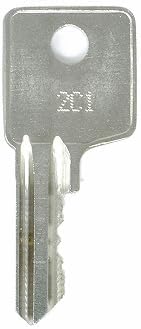
మూర్తి 2: Example of a DOM series replacement key. The specific code (e.g., 2C580) will be stamped on the key head.
కీ వినియోగం
To use your EasyKeys DOM 2C580 replacement key:
- Gently insert the key into the lock's keyway. Do not force the key.
- Once fully inserted, turn the key clockwise or counter-clockwise (depending on the lock mechanism) to engage or disengage the lock.
- Remove the key after locking or unlocking.
If the key does not turn smoothly, do not apply excessive force. Refer to the Troubleshooting section.
నిర్వహణ
Proper care will extend the life of your replacement key:
- Keep the key clean and free from dirt or debris.
- Avoid bending or damaging the key blade. Store it in a safe place.
- Do not use the key for purposes other than operating its intended lock.
ట్రబుల్షూటింగ్
If you encounter issues with your replacement key, consider the following:
- Key does not insert fully: Check for obstructions in the keyway. Ensure the key is oriented correctly.
- Key inserts but does not turn: Double-check that the lock code on your key matches the lock. The lock mechanism might be jammed or require lubrication.
- Key feels stiff or difficult to turn: Apply a small amount of graphite lubricant (not oil) into the keyway. Ensure the lock mechanism is not under stress (e.g., a drawer being pushed against the lock).
- Key is stuck: Gently wiggle the key while applying slight turning pressure. Do not force it, as this can break the key inside the lock.
If problems persist, contact EasyKeys customer support for further assistance.
ఉత్పత్తి లక్షణాలు
| ఫీచర్ | వివరాలు |
|---|---|
| బ్రాండ్ | EasyKeys |
| మోడల్ పేరు | 2C580 |
| తయారీదారు | DOM |
| పార్ట్ నంబర్ | 2C580-dom-key-666320 |
| మెటీరియల్ | ఇత్తడి |
| లాక్ రకం | కెమెరా |
| ప్రత్యేక లక్షణాలు | Adjustable Fit, Custom Cut Key, Durable |
| అంశం కొలతలు (L x W x H) | 0.5 x 0.5 x 1 అంగుళాలు |
| వస్తువు బరువు | 0.25 పౌండ్లు |
| చేర్చబడిన భాగాలు | కీ |
| మొదటి తేదీ అందుబాటులో ఉంది | జనవరి 30, 2024 |
వారంటీ మరియు మద్దతు సమాచారం
This product is subject to a standard 30-day return policy. For specific warranty details, please refer to the terms and conditions provided by EasyKeys at the time of purchase or on their official seller page.
For customer support, technical assistance, or inquiries regarding your EasyKeys DOM 2C580 replacement key, please contact EasyKeys directly through their Amazon seller page or official website. Provide your order details and the product model number (2C580) for efficient service.
